
The numbers for 2025 tell a startling story. According to the Verizon Data Breach Investigations Report, stolen or compromised credentials are now the #1 initial attack vector, used to start 22% of all breaches.
Research from CyberArk reveals an even broader crisis: a staggering 93% of organizations suffered at least one identity-related breach in the last 12 months. Meanwhile, IBM reports that it takes an average of 292 days to identify and contain a credential-based breach—the longest lifecycle of any attack. With leaked credentials surging 160% in 2025 compared to the year before.
The numbers tell a familiar story about access. What they don't tell you is what happens to the files once access is granted.
That's the part most security architectures leave unaddressed.
When an attacker uses a valid credential — whether stolen through phishing, harvested by infostealer malware, or lifted from a Shadow AI tool — your identity system does exactly what it's designed to do. It validates the credential and authorizes access. From that point, the attacker navigates your environment as an authenticated user. They browse, they download, they exfiltrate. And for an average of 292 days, nobody knows.
The question isn't whether your credential controls are working. It's what your files are doing during those 292 days.
🛡️Is Shadow AI a Blind Spot in Your Environment?
Infostealer malware frequently spreads through unvetted browser extensions and unauthorized AI tools — the exact environments where credentials and file contents get exposed without triggering a DLP alert. Use our assessment to find out where you're exposed.
The Gap Between Access and Protection
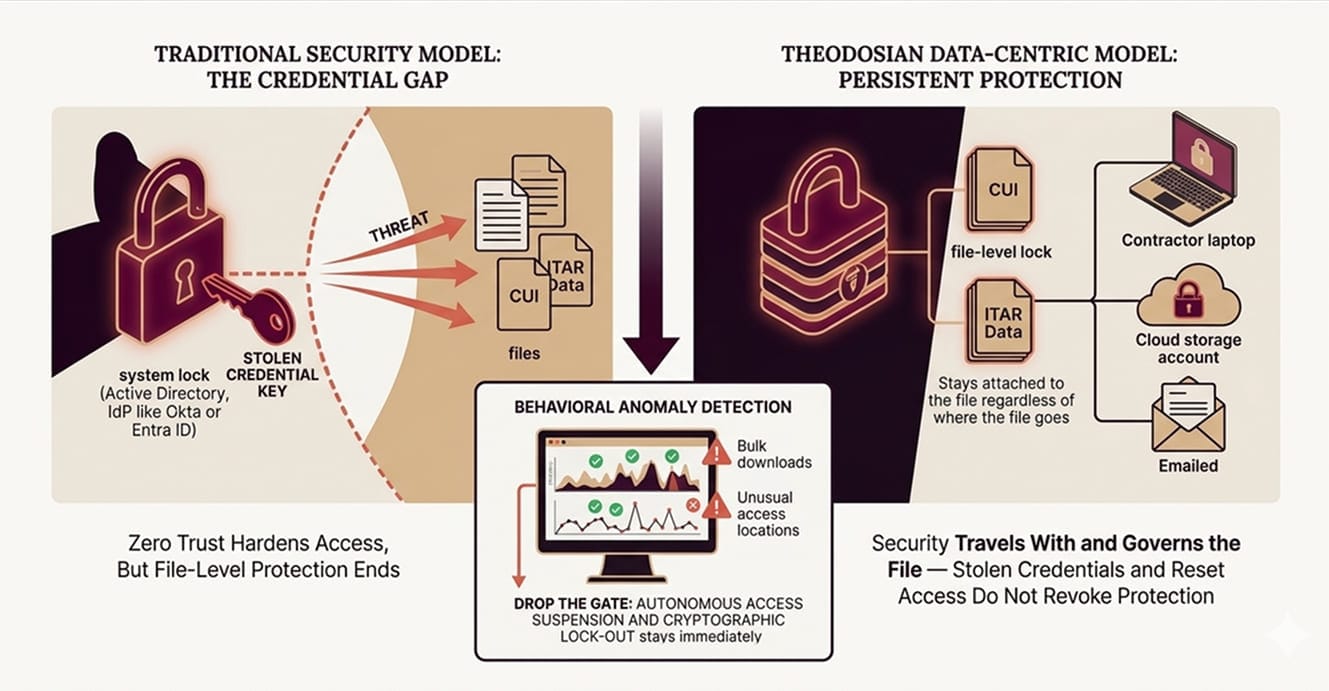
Authentication systems — whether it's Active Directory, an IdP like Okta or Entra ID, or a Zero Trust network access layer — answer one question: is this the right person?
They don't answer: Is this person behaving like themselves? Is this file still protected now that it's been downloaded? Is the data inside that document governed by anything once it leaves the perimeter?
Zero Trust has narrowed the access gap significantly. Continuous validation, device posture checking, and microsegmentation — these controls make it significantly harder for an attacker to move laterally after initial access. But Zero Trust's scope ends at the access event. Once a file has been downloaded to a local drive, emailed to an external address, or synced to a cloud storage account, the Zero Trust architecture is no longer in the picture. The file is on its own.
This isn't a criticism of Zero Trust; it's a statement about scope. The Federal Zero Trust Data Security Guide explicitly identifies the data pillar as the least mature in most federal implementations, and the same pattern holds across defense contracting environments. Organizations harden the identity and network layers, then leave the data layer largely unaddressed.
The result: credential theft doesn't just unlock a system. It unlocks the files that the system contains — and those files travel wherever the attacker takes them, completely free of any controls that existed on the server.
Three Ways Credential Theft Becomes a File Exposure Problem
1. The Phishing Window
A project manager at a Tier 2 defense subcontractor receives a convincing spear-phishing email. They enter their credentials on a spoofed portal. The attacker now has valid access to SharePoint, email, and the program's file repository.
Over the following days, the attacker moves methodically. They identify ITAR-controlled design files, proposals with pricing data, and a directory of subcontractor contact information. They download selectively, small batches, nothing that triggers a volume alert. Each download is an authenticated action. The DLP logs show authorized access. The SIEM shows normal activity.
Forty-three days later, the project manager notices an account anomaly and reports it. IT resets credentials. The attacker loses access to the SharePoint environment.
The files don't care. They're already on an external drive, in a cloud storage account the attacker controls, and possibly in transit to a foreign party. Resetting the credentials did nothing to the files. They were never tied to the credential in the first place.
2. The Infostealer Session
Infostealer malware stole 1.8 billion credentials in 2025, including session tokens that bypass multi-factor authentication entirely. When an employee installs an unvetted browser extension — a free productivity tool, an AI writing assistant, a PDF converter — that extension may be harvesting browser session cookies in the background.
Session token theft is particularly dangerous because it doesn't require the attacker to know the password or complete an MFA challenge. The token is valid for the duration of the session. The attacker impersonates the user's live, authenticated session without triggering any authentication events.
In a defense contractor environment, an employee working with export-controlled files may have legitimate session access to the entire project repository. A harvested session token gives the attacker the same access — invisibly, in parallel, for as long as the token is valid.
The file downloads that follow are logged as the employee's activity. Without behavioral anomaly detection that looks at what is being accessed — not just who is accessing it — these downloads are indistinguishable from legitimate use.
3. The Shadow AI Credential Leak
This one doesn't require an external attacker at all.
An engineer pastes a technical specification into an external AI tool to get a formatted summary. The specification contains CUI. The AI tool's session is running in a browser environment where an installed extension is logging input data. The credential — and the file contents — leave the organizational boundary in a single action, with no DLP alert and no audit log entry in any system the organization controls.
43% of employees regularly use AI tools that haven't been approved by their organization's IT or security team. In most cases, those tools are accessed through browsers that share the same session environment as the employee's authenticated work sessions. The same environment that contains their credentials also contains their files, and in many cases, the contents of those files.
Shadow AI is addressed in more depth in our Shadow AI Risk Assessment Checklist. The core problem — that browser-based AI tools create a credential and content exposure surface that DLP tools can't see — is directly relevant to the credential theft risk profile for defense contractors.
What Zero Trust Doesn't Protect
To be precise about the gap: Zero Trust, implemented well, makes credential theft harder to act on. Continuous verification, device compliance checks, and behavioral baselining can catch anomalies and limit lateral movement.
What Zero Trust doesn't do is govern the file after it leaves the access-controlled environment.
When a document is downloaded from a SharePoint library to a contractor's laptop, Zero Trust's job is complete. The document is now on a device that passed the compliance check at the time of download. What happens to that document tomorrow, when the laptop is in a coffee shop, when the session has expired, when the device is no longer managed, is outside Zero Trust's operating scope.
The same is true for files shared via email, synced to personal cloud storage, or transferred through any channel outside the managed environment. The Zero Trust architecture correctly validated the access event. It has no mechanism to govern the file afterward.
For CUI and ITAR-controlled technical data, that gap matters. CMMC's MP.2.121 control specifically requires that CUI on portable and contractor-managed devices maintain the same protections as CUI on organizational systems. Zero Trust satisfies the access control requirements. It doesn't satisfy the persistent protection requirements, because it was never designed to.
What Behavioral Anomalies Look Like, and What Happens When They're Detected
The 292-day detection window isn't because organizations aren't looking. It's because credential-based attacks are designed to look like authorized activity.
The distinguishing signals aren't in the authentication logs. They're in the behavior: file access patterns that don't match the user's historical baseline, bulk downloads at unusual hours, access to repositories the user has never touched before, or downloads from geographic locations inconsistent with the user's known work patterns.
Data-centric security applies context-aware access controls at the file layer, not the platform layer. On every open attempt, the system evaluates in real time: identity and role (via IdP, RBAC/ABAC), device compliance, geographic location, network and IP context, time-based parameters, and behavioral signals against the user's baseline.
An attacker using a valid credential from an unusual location, accessing files outside their authorization scope, or exhibiting bulk download behavior will trigger anomaly detection, even though the credential itself is valid. The response is autonomous: access is suspended, step-up MFA is issued, and the security team is alerted. No human intervention is required before the response fires. That capability is what we call Drop the Gate.
The critical distinction from a standard SIEM alert: the response isn't a notification waiting for a human to act. It's the automatic suspension of the access session and cryptographic lock-out of the file set, executed in the same millisecond window as the anomaly detection.
The Data-Centric Answer: What If the Credential Theft Didn't Matter?
The structural limitation of perimeter and identity-based security is that credential theft is a keys-to-the-kingdom problem. Whoever holds the credential holds the access. The files are a secondary consequence.
Data-centric security inverts that dependency. With FIPS 140-3 validated AES-256 encryption and unique keys directly embedded into every file, security is no longer tied to the network. Through a zero-knowledge, decentralized architecture where Theodosian never holds the keys, the file remains completely inaccessible to unauthorized users, regardless of where it is stored or how it is accessed.
This means:
- A file downloaded by an attacker using stolen credentials remains inaccessible; encryption persists because the attacker cannot satisfy context-aware access policies.
- A file on a contractor device after offboarding — or after a credential reset — is still encrypted. The key has been revoked. The file is inaccessible wherever it exists.
- A file exfiltrated by an insider using their own valid credentials is still governed. Behavioral anomaly detection can fire before exfiltration completes. Drop the Gate suspends access mid-session.
The credential no longer determines whether the data is protected. The file does.
For contractors handling ITAR-controlled technical data or CUI across a multi-tier subcontractor chain, this changes the risk profile of a credential compromise from "potential full-program exposure" to a bounded, revocable event. The blast radius is limited to files where cryptographic access was explicitly granted, and that access can be revoked from every copy simultaneously.
🔎 See How It Works Against a Real File Population
Theodosian's 14-day pilot scopes to your actual CUI or ITAR file set, and lets you test behavioral anomaly detection, per-file encryption, and Drop the Gate against your own environment before any production commitment.
FAQs: Credential Theft and File Security
What happens to files when someone's credentials are stolen?
When credentials are stolen, an attacker gains the same file access the legitimate user has, including the ability to download, forward, or copy documents to external environments. Standard authentication and access control systems don't distinguish between a legitimate user and an attacker using their credentials. Files that have been downloaded to local devices, synced to personal cloud storage, or sent via email are no longer subject to the server-side controls that protected them in the managed environment.
Does Multi-Factor Authentication prevent file exposure from credential theft?
MFA prevents unauthorized access when it's enforced, and the attacker doesn't have the second factor. However, modern credential theft increasingly targets session tokens rather than passwords, bypassing MFA entirely. Infostealer malware can harvest live browser session cookies, which represent an already-authenticated session and don't trigger an MFA challenge. For files that have already been downloaded or shared, MFA provides no protection regardless; it governs the access event, not the file's subsequent state.
What is the average time to detect a credential-based breach?
IBM's research puts the average at 292 days to identify and contain a credential-based breach. During that window, an attacker with valid credentials can access, download, and exfiltrate documents across the same repositories as the legitimate user — with all actions logged as authorized activity. The detection challenge is that credential-based access looks identical to legitimate use at the authentication layer; detection requires behavioral analysis at the data layer.
How does Zero Trust help with credential theft if it authenticates the user?
Zero Trust significantly raises the bar for credential-based attacks by requiring continuous verification, device compliance, and behavioral context, not just a one-time login. However, Zero Trust's scope ends at the access event. Once a file leaves the managed environment — through a download, email attachment, or external sync — Zero Trust has no visibility or enforcement capability over that file. The Zero Trust maturity model explicitly identifies the data pillar as requiring separate controls beyond identity and network-layer validation.
How does data-centric security change the impact of a credential compromise?
When files carry per-file FIPS 140-3 validated encryption with cryptographic access controls, a stolen credential alone is insufficient. An attacker may possess a valid login, but they cannot "unlock" the file because the decryption key is only released when all context-aware policies are met (e.g., approved device, known IP, and behavioral baseline). If a compromise is suspected, access can be revoked at the file level for every copy of every document globally, instantly rendering the stolen data inaccessible.