
Many platforms in this space will tell you it is ITAR-compliant. FedRAMP authorization, US-person-only access, FIPS 140-3 validated encryption, audit logging — these are now standard claims in the defense contractor market.
What the compliance pages rarely explain is what ITAR compliance actually requires of a file transfer solution, and where the protection ends.
ITAR violations do not happen inside certified platforms. They happen after a file moves: a CAD file downloaded to review offline, a technical spec forwarded to a subcontractor who passes it to a colleague, a draft specification left on a laptop taken through an international departure. In each case, the transfer platform logged a clean event. The controlled technical data was outside any platform's jurisdiction the moment it landed somewhere else.
This comparison covers the platforms worth evaluating, what each one genuinely covers, and what none of them address on their own.
What Does "ITAR-Compliant" Actually Mean for File Transfer?
Before evaluating platforms, it is worth being precise about what ITAR compliance requires of a file transfer tool, because the standard is more specific than most marketing materials suggest.
ITAR technical data under 22 CFR § 120.33 includes information required for the design, development, production, operation, or modification of defense articles on the US Munitions List. CAD files, engineering drawings, specifications, test data, manufacturing processes, and source code for defense applications — all technical data. Any electronic transfer of these materials is a potential export event.
The encryption safe harbor under 22 CFR § 120.54 allows defense contractors to transfer controlled technical data without an individual export license, provided specific conditions are met: the data must be encrypted using FIPS 140-3 validated cryptography (AES-256), the encryption must be end-to-end, and the keys must remain under US Person control. If a vendor can access your decryption keys, that access may itself constitute a regulated disclosure.
US Person access control is non-negotiable. Only US citizens and lawful permanent residents can access ITAR technical data without an export license. The platform must enforce this at the identity and administrative level, not just at the physical data residency level. A system hosted in the US but administered by a non-US employee does not satisfy this requirement.
Audit trail requirements are implied by ITAR's broad record-keeping obligations and become explicit under CMMC Level 2 if the contractor is also subject to DFARS. Every transfer event involving controlled technical data should be logged with sufficient detail to reconstruct what was transferred, to whom, when, and under what authorization.
With those requirements established, here is how the leading platforms perform.
How Does Kiteworks Handle ITAR-Compliant File Transfer?
Kiteworks is one of the most commonly deployed platforms in the defense supply chain for managed file transfer, secure email, and enterprise content collaboration. It holds FedRAMP Moderate Authorization and has a dedicated ITAR and CMMC compliance positioning.
Where coverage is strong: File transfers through the Kiteworks platform are encrypted in transit and at rest within the Kiteworks environment. Access controls enforce US Person restrictions. Detailed audit logs capture transfer events with user identity, file metadata, timestamps, and transfer channels. For defense contractors whose primary ITAR compliance challenge is the controlled transfer of technical data between authorized parties — prime to subcontractor, contractor to government — Kiteworks addresses that use case well.
Kiteworks also supports organization-managed encryption keys, which satisfies the 22 CFR § 120.54 key control requirement when properly configured.
Where it stops: Kiteworks protects files inside the Kiteworks environment. Once a file is downloaded from the platform to a local device — which engineers routinely do to actually work on the file — it exits Kiteworks's protection. The platform logged the download event. What happens to the file afterward is outside Kiteworks's control. If a downloaded CAD file is later accessed from an unmanaged device or forwarded through a personal email account, Kiteworks has no visibility and no protective control.
Deployment: Cloud and on-premises options available. FedRAMP Moderate authorization makes it suitable for federal contractor environments.
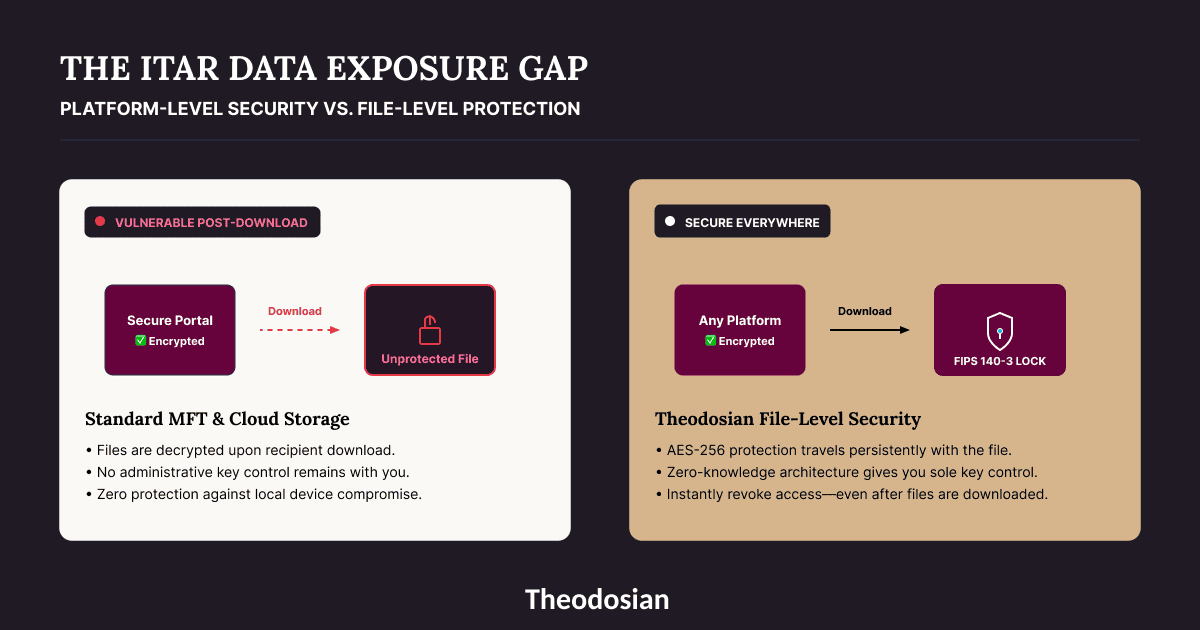
Are Your ITAR Files Protected Post-Download?
A secure platform transfer is only half the battle. Once your engineers or subcontractors download CAD files or technical specs to their local endpoints, standard transfer security ends.
How Do SFTP and Managed File Transfer Solutions Handle ITAR Transfers?
Secure FTP (SFTP) and traditional managed file transfer (MFT) platforms are widely used in the defense supply chain for transferring large files — CAD packages, firmware, technical documentation — between contractors and primes.
Where coverage applies: SFTP provides encrypted transmission (TLS/SSH) for files in transit. MFT platforms add workflow automation, delivery receipts, and transfer logging on top of the basic transport layer. For high-volume, structured data exchanges between known parties with established access controls, these tools provide a documented, auditable transfer channel.
Where they fall short: SFTP and MFT tools are transport-layer solutions. They encrypt the tunnel, not the file. Once a file arrives at the destination, the transport encryption ends, and the file sits in plaintext at the receiving end. There are no access controls embedded in the file, no key management requirement on the recipient side, and no ability to revoke access after the transfer has completed.
For ITAR's encryption safe harbor requirement — end-to-end encryption with US Person key control — standard SFTP does not satisfy the "organization-controlled keys" condition. The transfer may be encrypted in transit, but the receiving party can access the file without any ongoing key control on the originating organization's side.
How Does Virtru Handle ITAR-Compliant File Transfers?
Virtru provides email-centric encryption with FIPS 140-3 validated cryptography and a Private Keystore option for organization-controlled keys. For defense contractors whose ITAR technical data transfers happen primarily through email, Virtru provides a practical and deployable solution.
Where coverage is strong: Virtru encrypts email content and attachments with per-message encryption. Senders can set access controls, expiry dates, and revocation on individual messages. The Private Keystore option gives organizations key control, satisfying the 22 CFR § 120.54 condition. For email-attached technical data transfers between authorized US Persons, Virtru's architecture aligns with the safe harbor requirements.
Where it stops: Virtru's protection model is email-attached. Technical data that lives in shared drives, collaboration portals, or project management systems is outside Virtru's scope. For contractors whose ITAR data flows through multiple channels — email, cloud storage, secure portals, FTP — Virtru covers one channel.
How Does Microsoft 365 Handle ITAR Technical Data?
Microsoft 365 is widely used in the defense supply chain, and standard classification labels provide file-level controls within the M365 ecosystem. For contractors already standardized on Microsoft, it is a natural starting point.
- Where coverage is strong: Native classification labels with FIPS 140-3 validated encryption apply controls to Office documents within the M365 ecosystem. Audit logging through the Unified Audit Log captures access events for labeled content. For technical data that stays within M365 on managed Windows devices, Microsoft provides meaningful protection.
- Where it gets complicated: Microsoft's protection degrades when files exit M365. Non-Windows endpoints, non-Microsoft applications, and environments that do not respect classification labels lose the protection. Double Key Encryption provides organization-controlled keys but requires Windows desktop only, removes Copilot and AI capabilities, and limits search and indexing. Most contractors apply Double Key Encryption selectively rather than to their entire technical data environment.
- ITAR-Specific Concerns: Under standard Microsoft key management, Microsoft retains technical access capability for tenant administration. Double Key Encryption is the path to true organizational key control, but its technical trade-offs make it impractical as a blanket solution.
What Gaps Do Most ITAR File Transfer Solutions Share?
Every platform above shares the same structural limitation: they protect ITAR technical data within their own environment. The moment a file is downloaded to an endpoint, forwarded through an unsecured channel, or accessed from outside the managed environment, the platform's protection ends.
For the 22 CFR § 120.54 safe harbor to provide ongoing protection — not just for the initial transfer but for the life of the file — the encryption and key control need to be at the file layer, not the platform layer.
The specific gaps to evaluate against any platform:
Downloaded files: Engineers download technical data to work offline, review on travel, or use in design tools that do not integrate with the transfer platform. Every download is a file leaving the protection boundary.
Forwarded or re-shared files: A subcontractor receives a technical specification and forwards it to a colleague for review. If the file was decrypted on receipt, the forwarded copy has no ITAR controls.
Endpoint compromise: Files cached on endpoints after download are accessible to anyone who gains access to the endpoint — malware, physical theft, unauthorized access. The transfer platform logged a clean download. The ITAR exposure is downstream.
No revocation after transfer: If a contractor discovers that a file was transferred to an unauthorized party, most platforms have no mechanism to revoke access to a file that has already left the environment.
How Does File-Level Encryption Address the Post-Transfer Gap?
File-level encryption embeds protection in the file itself — meaning the encryption and access controls apply wherever the technical data travels, not just within the transfer platform.
Theodosian applies FIPS 140-3 validated AES-256 encryption at the file layer, with a unique key per file and zero-knowledge key management. Your organization controls the decryption keys — Theodosian cannot access them. The 22 CFR § 120.54 US Person key control requirement is satisfied architecturally, not through configuration.
When a Theodosian-protected technical file is transferred to a subcontractor, downloaded to an engineer's laptop, or accessed through a collaboration tool, the protection travels with it. Access requires authentication against the file's policy — evaluated in real time against identity, device compliance, location, network, and behavioral context. A non-US Person on the receiving end cannot decrypt the file regardless of which platform it arrived through. An engineer accessing the file from an unmanaged device in an unexpected location triggers step-up verification or access denial before the file opens.
Every access event is logged at the file layer — transfer, download, access attempt, policy outcome — regardless of which system the file is in at the time.
Theodosian deploys in days with no data migration, integrating with SharePoint, OneDrive, Google Drive, Dropbox, Box, and Windows file servers.
Which ITAR File Transfer Solution Is Right for Your Organization?
| Platform | FIPS 140-3 validated | US Person access enforcement | Org-controlled keys | Protection after download | Audit trail |
|---|---|---|---|---|---|
| Kiteworks | ✅ | ✅ | ✅ (configured) | ❌ | Within platform |
| SFTP / MFT | Transit only | Varies | ❌ | ❌ | Transfer events only |
| Virtru | ✅ | ✅ | Option (Private Keystore) | Email only | Email transfers |
| Microsoft 365 | ✅ | ✅ | Double Key Encryption only (highly limited) | ❌ | Within M365 |
| Theodosian | ✅ | ✅ | ✅ (zero-knowledge) | ✅ | File-layer, everywhere |
If your ITAR compliance challenge is primarily controlled transfer between known, authorized parties through a managed channel: Kiteworks is a mature, FedRAMP-authorized platform built for that use case.
If your challenge is email-attached technical data between authorized US Persons: Virtru covers that channel effectively with its Private Keystore option.
If your technical data regularly moves beyond a single controlled environment — downloaded to endpoints, accessed by subcontractors with varying security postures, synced across platforms — the protection needs to be at the file layer, not the transfer layer.
Protect the File Itself
True ITAR 22 CFR § 120.54 compliance requires persistent file-level encryption and zero-knowledge key control that follows your data everywhere, even when offline or on a subcontractor's endpoint.
FAQs: ITAR-Compliant File Transfer Solutions
What makes a file transfer solution ITAR compliant?
An ITAR-compliant file transfer solution must, at minimum: use FIPS 140-3 validated encryption (AES-256) for data in transit and at rest; enforce US Person-only access at the identity level; maintain organization-controlled encryption keys (the vendor must not be able to access your key material); and provide sufficient audit logging to reconstruct transfer events. These requirements derive from 22 CFR § 120.54 (the encryption safe harbor), ITAR's US Person access requirements, and the key control language throughout the regulations. FedRAMP authorization indicates a platform has passed federal security assessment — it does not by itself satisfy ITAR's specific encryption and key control requirements.
Does FedRAMP authorization mean a platform is ITAR compliant?
Not automatically. FedRAMP authorization means a cloud service provider has met federal security standards through an authorized third-party assessment organization. It is a strong indicator of security posture and is often a prerequisite for platforms serving the defense supply chain. However, ITAR compliance requires specific capabilities — FIPS 140-3 validated encryption, US Person access enforcement, and organization-controlled keys — that FedRAMP authorization does not guarantee on its own. Evaluate each platform's specific implementation of these requirements rather than relying on FedRAMP status as a proxy.
What is the ITAR encryption safe harbor and how does it apply to file transfers?
The ITAR encryption safe harbor (22 CFR § 120.54) provides that certain transfers of technical data encrypted using FIPS-validated cryptography do not constitute "exports" requiring an individual license, provided the encryption is end-to-end, and the decryption keys remain under US Person control. This is the legal mechanism that allows defense contractors to transfer ITAR technical data electronically without obtaining a separate export license for each transfer. The key conditions are: FIPS 140-3 validated encryption algorithm, end-to-end (not just in transit), and the sending organization — not the vendor — controls the keys. If your vendor holds the keys, the safe harbor condition is not fully met by your organization.
Can a non-US defense contractor access ITAR technical data through a secure platform?
No. ITAR's US Person requirement means only US citizens and lawful permanent residents can access ITAR-controlled technical data without an individual export license, regardless of the platform's security credentials. This applies to employees, contractors, and administrators. A FedRAMP-authorized platform with FIPS encryption still violates ITAR if a non-US Person administrator has access to the key material or the technical data itself. Enforce US Person identity verification at the platform and key management levels, not just at the data residency level.