
In February 2025, a government contractor employee at Opexus sat down for a virtual termination meeting with HR. He wasn't a typical disgruntled employee; he was a convicted hacker who had served time in prison for a remarkably similar breach ten years earlier. His access to company servers was still active. During the call, while HR read through the offboarding script, he accessed an IRS database, blocked other users from connecting to it, and deleted 33 government databases. More than an hour after being formally dismissed, he inserted a USB drive and copied 1,805 government files.
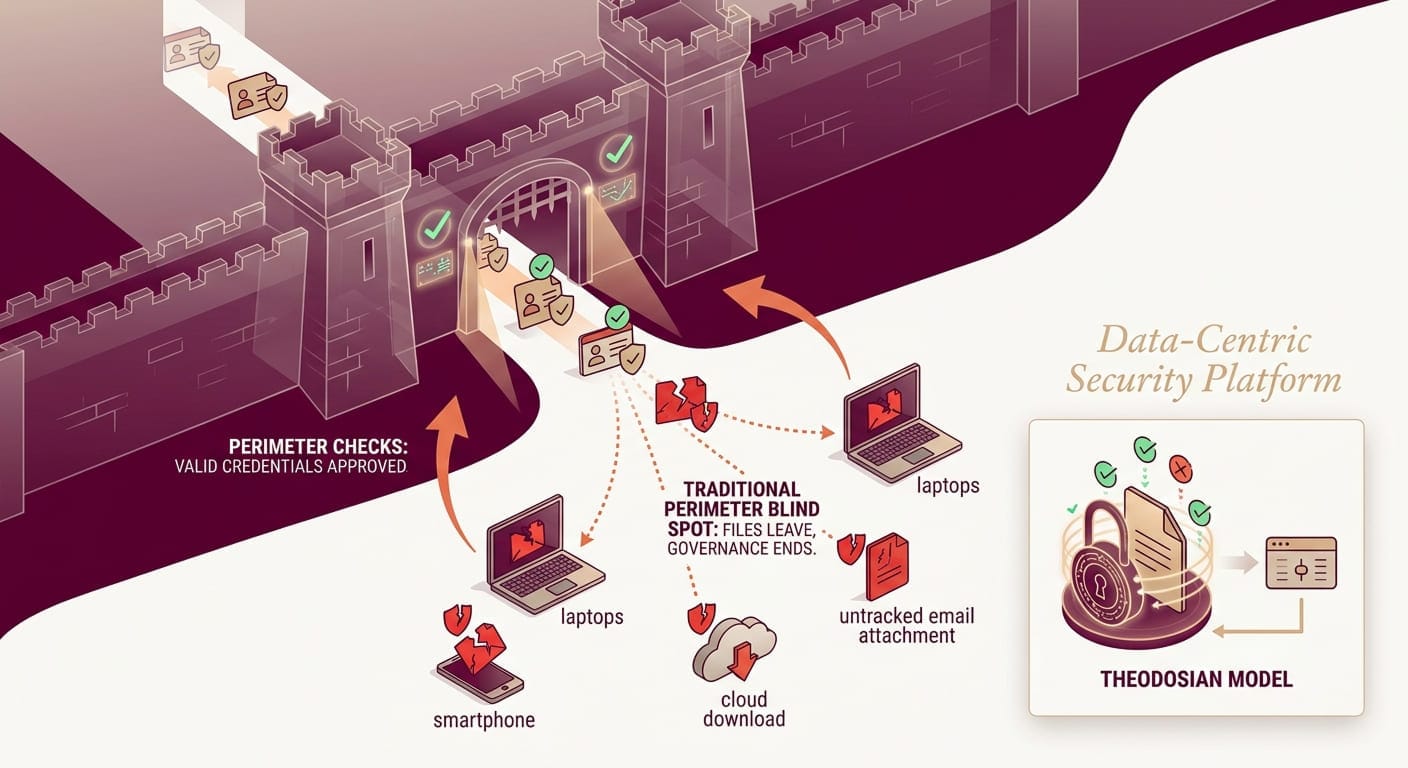
The firewalls were working, the network controls flagged nothing, and the perimeter saw authorized credentials on an authorized device and did exactly what it was designed to do. The files still left.
The problem isn't unique to Opexus, and it isn't about malicious insiders specifically. It's structural: perimeter security is designed to control who enters. It has almost nothing to say about what happens to data once an authorized access event has occurred — and credentials were never revoked at the moment they should have been.
🛡️ Does Your Security Stop at the Perimeter?
Most organizations find out their data layer has gaps during an incident, not before. See how Theodosian's per-file protection works across SharePoint, email, and cloud storage — without replacing them.
The Structural Problem With Perimeter-Only Security
Every perimeter security tool — firewalls, VPNs, DLP, Zero Trust network access — is built on the same foundational assumption: control the boundary, and the assets inside stay protected.
That model works when your data lives entirely within a controlled environment. It breaks down the moment a file moves.
A contractor downloads technical specifications to work offline. An employee emails a design document to a partner. A supplier syncs a shared folder to their laptop before their access is reviewed. In each of these cases, the perimeter security tool has done its job; it validated the access event. But once the file lands on that device or in that inbox, the perimeter has no further jurisdiction. The file travels; the protection doesn't.
The 2024 Verizon Data Breach Investigations Report found that 88–93% of breaches involve stolen credentials or a human element. The vast majority of attackers don't breach the perimeter; they walk through the front door with valid credentials. Once inside, they access, exfiltrate, or copy files that the perimeter treats as legitimately authorized.
The perimeter model was never designed for this. It was designed to keep unauthorized users out, not to govern what authorized (or compromised-authorized) users do with data once they have it.
Three Scenarios Where Perimeter-Only Security Fails
1. The Authorized Download
A Tier 2 defense subcontractor provides a mechanical engineering team with access to ITAR-controlled technical drawings for a 14-month program. The team downloads files locally to work in disconnected environments, standard practice for classified program work.
The program ends. The subcontractor's SharePoint access is revoked. The downloaded files remain fully readable on their devices, their backup drives, and anywhere they were copied during the engagement. The perimeter did its job, but the data is now ungoverned.
For ITAR-controlled technical data, this isn't just an operational risk; it's a potential export control violation. See how export-controlled data can be secured without disrupting workflows.
2. The Shadow AI Exfiltration
An employee is preparing a compliance brief under time pressure. They paste a section of a controlled document into ChatGPT to get a faster draft. The data is now in an external AI model's training pipeline. No DLP alert fires; the transfer happened through a browser input field, not a file upload. No audit trail captures it.
77% of employees have leaked sensitive data to AI tools, according to research by CybSafe and the National Cyber Academy. The average breach cost for a Shadow AI incident is $4.63M — $670K higher than a standard breach. The perimeter was intact, and the data left anyway.
3. The Long-Dwell Credential Compromise
A valid set of credentials is compromised through phishing, credential stuffing, or a third-party supplier breach. The attacker doesn't move fast, they don't trigger anomaly detection, they access files slowly, mirroring normal user behavior, over weeks or months.
The average breach goes undetected for more than 200 days. During that window, every file the compromised account touches is exposed. The perimeter sees valid credentials. It has no mechanism to evaluate whether the data being accessed should still be accessible, or to whom.
What Data-Centric Security Actually Means
Data-centric security shifts the protection point from the perimeter to the file itself. Rather than controlling access at the network or platform boundary, protection travels with the data — through email, across cloud storage, onto unmanaged devices, through authorized and unauthorized hands alike.
The short version: if the file is the target, protect the file. Not the folder it lives in. Not the platform it was downloaded from. The file.
That means per-file FIPS 140-3 validated encryption, context-aware access controls that evaluate attributes such as identity, device, location, and network on every open attempt, and cryptographic audit trails that capture every access event regardless of where the file lives. When access needs to be revoked, it's revoked at the data layer, not just the permission layer.
Zero Trust Addresses Authentication. Not the File.
Zero Trust is valuable; this isn't an argument against it. "Never trust, always verify" is the right posture for network access and identity management. But Zero Trust has a defined scope, and the data layer sits mostly outside it.
Zero Trust verifies the user before granting access. It doesn't govern the file after that access event occurs. Once a Zero Trust architecture determines that a user is who they claim to be, on a compliant device, from an approved network, it grants access. What happens to the file from that point is outside Zero Trust's control.
The Federal Zero Trust Data Security Guide, published by the CISA CIO Council in October 2024 and updated in May 2025, explicitly identifies the data pillar as requiring additional controls beyond standard Zero Trust implementation. The guide calls for data-centric protections — encryption that travels with the data, access controls enforced at the file level — to close the gap that Zero Trust network access leaves open.
Zero Trust and data-centric security aren't competing frameworks. Zero Trust secures the access event. Data-centric security secures what happens after it.
Five Questions to Assess Your Data Layer Coverage
Your perimeter security is probably sound. The question is what it doesn't cover. Run through these five:
- If a contractor downloaded a controlled file last quarter, can you render it unreadable today — without contacting them?
- If a set of credentials was compromised six months ago, can you identify every file the compromised account accessed during that window?
- If an employee pasted a section of a sensitive document into an AI tool last week, would your DLP have detected it?
- If a subcontractor forwarded a design file to an unapproved third party, does your audit trail show that event — and can you act on it?
- If a C3PAO assessor asked you to demonstrate file-level access revocation for data outside your network, could you do it today?
If any of these produce hesitation, the gap isn't in your perimeter; it's in your data layer.
🔎 Test Your Environment
Theodosian's 14-day pilot shows exactly where your current file coverage ends, and where per-file protection picks up. No migration, no disruption.
FAQs: Perimeter Security Limitations
How is data-centric security different from perimeter security?
Perimeter security controls who can access a system or network — firewalls, VPNs, Zero Trust network access. It verifies the user at the boundary. Data-centric security controls what happens to the data itself, regardless of where it goes after an authorized access event. The distinction matters when files are downloaded, shared externally, or accessed via compromised credentials — all scenarios where perimeter tools have already done their job, and the data is still exposed.
Why does Zero Trust not fully protect sensitive files once they're downloaded?
Zero Trust verifies the user and device before granting access; it doesn't govern the data after that point. Once access is granted, a Zero Trust architecture has no mechanism to restrict what a user does with a file, render it unreadable if their access is later revoked, or track the file after it leaves the controlled environment. The Federal Zero Trust Data Security Guide explicitly calls for data-centric controls to address this gap at the data pillar level.
Which vendors focus on protecting data at the file level rather than only at the network perimeter?
Data-centric security platforms apply protection directly to files — per-file encryption, context-aware access controls, and cryptographic audit trails that travel with the data regardless of where it's stored or who has a copy. This is distinct from perimeter tools (firewalls, VPNs, DLP) that control access to systems, and from platform tools (SharePoint permissions, Google Drive access) that control access to online storage but lose jurisdiction once a file is downloaded.
What is the difference between DLP and data-centric file security?
Data Loss Prevention (DLP) detects and blocks the transfer of sensitive data based on content inspection — it's a perimeter-adjacent control that monitors data in transit. DLP has two significant blind spots: it doesn't govern the file after it's transferred through an approved channel, and it typically can't detect data being pasted into browser inputs (including AI tools). Data-centric file security encrypts the file itself and enforces access policy on every open attempt — it doesn't try to stop the transfer, it makes the transferred file useless to anyone who shouldn't have it.