
"File-centric security" is a specific term for a specific architecture: protection that lives at the file layer, not the platform layer. A file-centric platform encrypts the file itself, controls who can open it, and logs every access event — regardless of which cloud storage, endpoint, or collaboration tool the file happens to be in at the time.
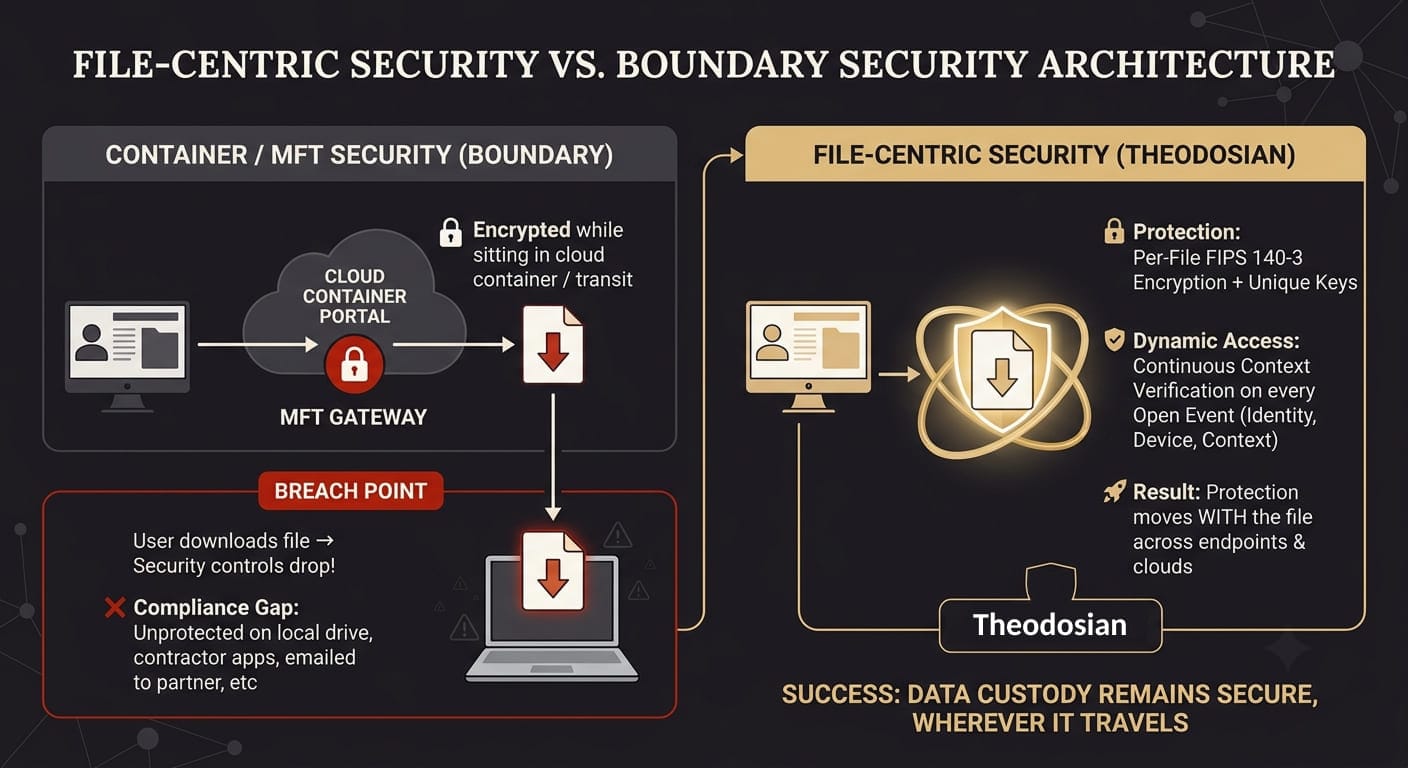
Not every platform that handles files is file-centric. A managed file transfer solution secures the transfer channel. A cloud storage platform secures the container. A DLP tool monitors what's moving. A file-centric platform secures the file itself, so the protection stays with it when it leaves the platform.
For compliance management — the documented, auditable, policy-driven control that regulators and C3PAOs actually check — the distinction is the whole game.
What Is a File-Centric Security Platform?
Three characteristics define the architecture:
Per-file encryption: Each file is encrypted individually with its own cryptographic key. The encryption travels with the file across platforms, devices, and environments. A file downloaded from SharePoint carries the same protection onto a local drive, into a partner's Google Drive, or through an email attachment.
File-layer access controls: Access policy is evaluated at the point of the file open event — not at the point of network access or platform login. Every access request is checked against current policy in real time: who is asking, from which device, from where, at what time, against what behavioral baseline.
File-layer audit trail: Every access event generates a record: user identity, file name and classification, device, timestamp, location, network type, and policy outcome. The audit trail follows the file, not the platform — a file accessed in SharePoint generates the same log structure as the same file accessed on a local endpoint at a subcontractor.
This architecture is what distinguishes a file-centric platform from a managed file transfer solution (which secures the transfer event), a cloud storage platform (which secures the container), or a classification tool (which labels data but doesn't control access outside its environment).
What Does "Compliance Management" Actually Mean at the File Layer?
Compliance management for regulated data requires three things that most security platforms don't fully deliver:
Control: Regulators ask whether you can demonstrate that only authorized individuals accessed specific files, under specific conditions, at specific times. A platform that logs activity within its own environment provides partial control; it doesn't cover what happens after a file is downloaded or shared externally.
Audit evidence: Compliance assessors want file-level access logs. Not "a user with the Finance role accessed the Finance folder" — they want the specific file, the specific user, the specific device, the timestamp, the location, and what the access policy decided. For CMMC, AU.L2-3.3.1 and AU.L2-3.3.2 describe this requirement in precise terms.
Continuity of controls: Compliance isn't satisfied if your controls work inside your platform and fail the moment a file exits it. ITAR-controlled technical data doesn't stop being ITAR-controlled when it's emailed to a sub-tier supplier. CMMC-covered CUI doesn't stop requiring FIPS-validated encryption when an engineer saves it to their desktop. Your blast radius isn't a choice you made. It's an architecture you inherited.
Most platforms satisfy compliance inside their own environment. File-centric platforms satisfy compliance wherever the file goes.
Which Compliance Frameworks Require File-Centric Security Controls?
Three frameworks make the strongest case for file-centric security as a direct compliance requirement:
CMMC Level 2 (NIST SP 800-171): 20+ practices across AC, SC, AU, and IR domains. SC.L2-3.13.11 requires FIPS-validated cryptography for CUI. SC.L2-3.13.10 requires organization-controlled cryptographic keys. AU.L2-3.3.1 and AU.L2-3.3.2 require per-access audit logging capturing who, what, where, and when. AU.L2-3.3.4 requires audit log protection. These controls apply to CUI wherever it lives, not just within a specific cloud tenant.
ITAR (22 CFR § 120.54): The encryption safe harbor requires FIPS 140-2/3 validated encryption with decryption keys under US Person organizational control. The requirement follows the data into every environment it enters — shared with sub-tier suppliers, on a cleared engineer's laptop, at a co-contractor's facility. Platform-level encryption doesn't satisfy this for files that exist outside the platform.
HIPAA Technical Safeguards (45 CFR § 164.312): Access controls, audit controls, integrity controls, and transmission security are required for ePHI. These apply to the data wherever it lives or moves. A billing processor downloading PHI from your secure portal into their own environment is accessing ePHI that your HIPAA controls no longer reach — unless those controls are embedded in the file itself.
👥 The Ultimate Test for File-Centric Security: Offboarding
When an employee leaves, or a vendor contract ends, revoking identity access doesn't delete the sensitive files sitting on their local drives. True compliance requires file-layer control that revokes decryption rights instantly, everywhere.
How Do the Leading File-Centric Security Platforms Compare for Compliance Management?
| Platform | Encryption Layer | After-Download Protection | Audit Trail Scope | CMMC/ITAR Ready | Deployment |
|---|---|---|---|---|---|
| Kiteworks | Platform-level (transit + at rest) | ❌ Logs download, doesn't follow file | Within Kiteworks | Transfer layer only | Days–weeks |
| Seclore | File-layer (IRM + copy/print prevention) | ✅ Including content extraction prevention | Per-file, per-access | ✅ | Months |
| Virtru | File-layer (email + attachments) | ✅ For email-transmitted files | Per message/attachment | Email channel only | Days |
| Theodosian | File-layer (AES-256 FIPS 140-3, unique key per file) | ✅ Across all platforms + endpoints | Per-file, per-access, cross-platform | ✅ Direct mapping | Days |
What these comparisons don't tell you:
Kiteworks is a strong choice for organizations whose primary compliance challenge is the controlled transfer event — it holds FedRAMP Moderate Authorization and is widely deployed in defense and healthcare. Its gap is post-download: once a file leaves the Kiteworks environment, the platform's controls stop. For CMMC and ITAR requirements that follow the data into downstream environments, that creates an uncovered gap.
Seclore has one capability the other platforms in this table don't currently have: copy/paste/print prevention once a file is open. If content extraction prevention is a hard requirement — certain classified environments, legal hold situations, specific DRM use cases — Seclore addresses it. The trade-offs are real: enterprise pricing ($27K–$50K+/year), multi-month deployment, and user friction from copy restrictions that consistently generate workarounds in practice.
Virtru is well-matched for organizations whose compliance-sensitive data primarily moves through email. Its Gmail and Outlook integrations are genuinely good, its HIPAA configuration is solid, and it has FIPS 140-3 validated cryptography. As the only channel it covers, email, it leaves file sharing across cloud platforms and endpoints unprotected.
What Should You Require When Evaluating a File-Centric Platform for Compliance?
Five questions to ask any vendor before signing:
Where does the encryption end? Ask specifically: if a user downloads a file to their local drive and emails it to a partner, does your encryption travel with it? The accurate answer for most platforms is no. The file-centric answer is yes.
Who controls the decryption keys? For ITAR and CMMC, the answer must be your organization — not the vendor. Zero-knowledge architecture means the vendor cannot access your keys under any circumstance, including legal compulsion or vendor breach. BYOK is not the same as zero-knowledge: in BYOK, the vendor still processes your key through their infrastructure.
What does your audit log capture per access event? CMMC AU.L2-3.3.1 requires user identity, event type, date and time, success or failure, and the event source. Ask for a sample log entry. Verify it contains every required field and that the log covers access events outside the vendor's own platform.
How long does actual deployment take? Compliance timelines are fixed. With CMMC Level 2 third-party assessment requirements in effect, a platform that takes six months to deploy isn't a compliance solution; it's a roadmap item.
What happens automatically when anomalous access is detected? Sending an alert is detection. Stopping the access is prevention. Drop the Gate — automatic access freeze triggered by anomaly signals without waiting for human review — is the difference between knowing something happened and limiting the damage.
Theodosian is built around all five: file-layer encryption that travels across every platform integration, patent-pending zero-knowledge key management, per-access audit logs satisfying CMMC AU domain requirements, days-to-deploy with no data migration, and Drop the Gate for autonomous response.
🚀 Test File-Layer Encryption in Your Own Environment
Compliance timelines don't wait for multi-month software rollouts. See how easily you can apply FIPS 140-3 validated encryption across your existing SharePoint, Google Drive, and local endpoints without migrating a single file.
FAQs: File-Centric Compliance Platforms
What is the difference between a file-centric security platform and a managed file transfer solution?
A managed file transfer (MFT) solution secures the transfer of files between parties — it protects the file during the exchange and logs the transfer event. Once the recipient downloads the file, the MFT's controls stop. A file-centric security platform protects the file itself, regardless of where it travels after a transfer. Encryption and access controls are embedded in the file, not in the transfer channel. For CMMC and ITAR requirements that follow the data into downstream environments — sub-tier suppliers, contractor laptops, external partners — file-centric security addresses the gap that MFT solutions leave once the transfer is complete.
Which compliance frameworks specifically require file-level encryption?
CMMC Level 2 practice SC.L2-3.13.11 explicitly requires FIPS-validated cryptography for CUI. ITAR's encryption safe harbor under 22 CFR § 120.54 requires FIPS 140-2/3 validated encryption with US Person key control. HIPAA Technical Safeguards under 45 CFR § 164.312 include encryption as an addressable specification for ePHI at rest and in transit. In each case, the encryption requirement follows the data — not the platform storing it. That's the core requirement that file-level encryption satisfies, and platform-level encryption doesn't, for data that exits the platform.
Can a file-centric security platform replace a DLP solution?
They address different problems. DLP monitors traffic flows and data movement to detect policy violations — primarily a detection and alerting function. A file-centric security platform controls access at the file layer — primarily a prevention and audit function. DLP can detect when a file is being sent to an unauthorized recipient. File-centric security can prevent that recipient from opening it, even after they've received it. For regulated data under CMMC, ITAR, or HIPAA, regulators check documented, auditable control over specific files — which is what file-centric security provides. The two tools are more complementary than competitive: detection tells you what's moving, prevention ensures that movement doesn't result in unauthorized access.