
Your security policy says no personal Dropbox. Your DLP tool monitors uploads. Your CASB sends alerts.
And somewhere right now, an employee is emailing a proposal to their personal Gmail so they can finish it on their laptop at home.
The uncomfortable truth about shadow IT is not that it happens. It's that your entire security model is built on the assumption that it won't.
Gartner estimates that 41% of employees acquire or create technology without IT's knowledge—a number projected to reach 75% as business data moves across unsanctioned applications. IBM's Cost of a Data Breach Report found that unmanaged assets, shadow IT, and unsanctioned SaaS applications are involved in 35% of enterprise breaches. These are not edge cases or rogue employees. These are regular people solving a real friction problem, and your perimeter-based controls are the friction they are solving around.
The standard response has been more detection: CASB tools that flag unsanctioned apps, DLP policies that block uploads, monitoring dashboards that surface anomalies after they occur. These tools have genuine value in building a shadow IT response program, but they share a foundational problem: they treat shadow IT as a transport problem. Stop the file from reaching the wrong destination. The file itself remains unprotected.
What happens when the transport already succeeded?
Why Does Detection-First Security Fail Against Shadow IT?
The logic of detection-first security is straightforward: identify where sensitive data is going, block it or alert on it, enforce policy at the edge. In a controlled environment with compliant users, this works reasonably well.
In the real world, it creates a different outcome. Employees who get blocked find workarounds. A DLP rule that flags WeTransfer uploads leads to files being zipped, renamed, or broken into smaller pieces. A CASB that blocks Dropbox leads to personal email. The harder you make it to use sanctioned tools, the more creative people become with unsanctioned ones.
This is not a behavior problem; it’s a usability signal. People reach for shadow IT because sanctioned tools create friction at exactly the moment when they need speed: before a client call, after hours, on a personal device. The files your DLP tool will never find are not always the result of malicious intent. They are the result of a security architecture that treats data protection as the user's problem.
The architectural question is not how to stop files from moving. Files move. The question is what happens to the data when they do.
🔒 Stop Shadow IT Exposures Before the File Leaves the Endpoint
DLP and CASB flags alert you after the transfer happens. Learn how per-file FIPS 140-3 AES-256 encryption keeps data unreadable across Dropbox, personal email, and unsanctioned cloud tools.
What Does AES-256 File-Level Encryption Actually Protect Against?
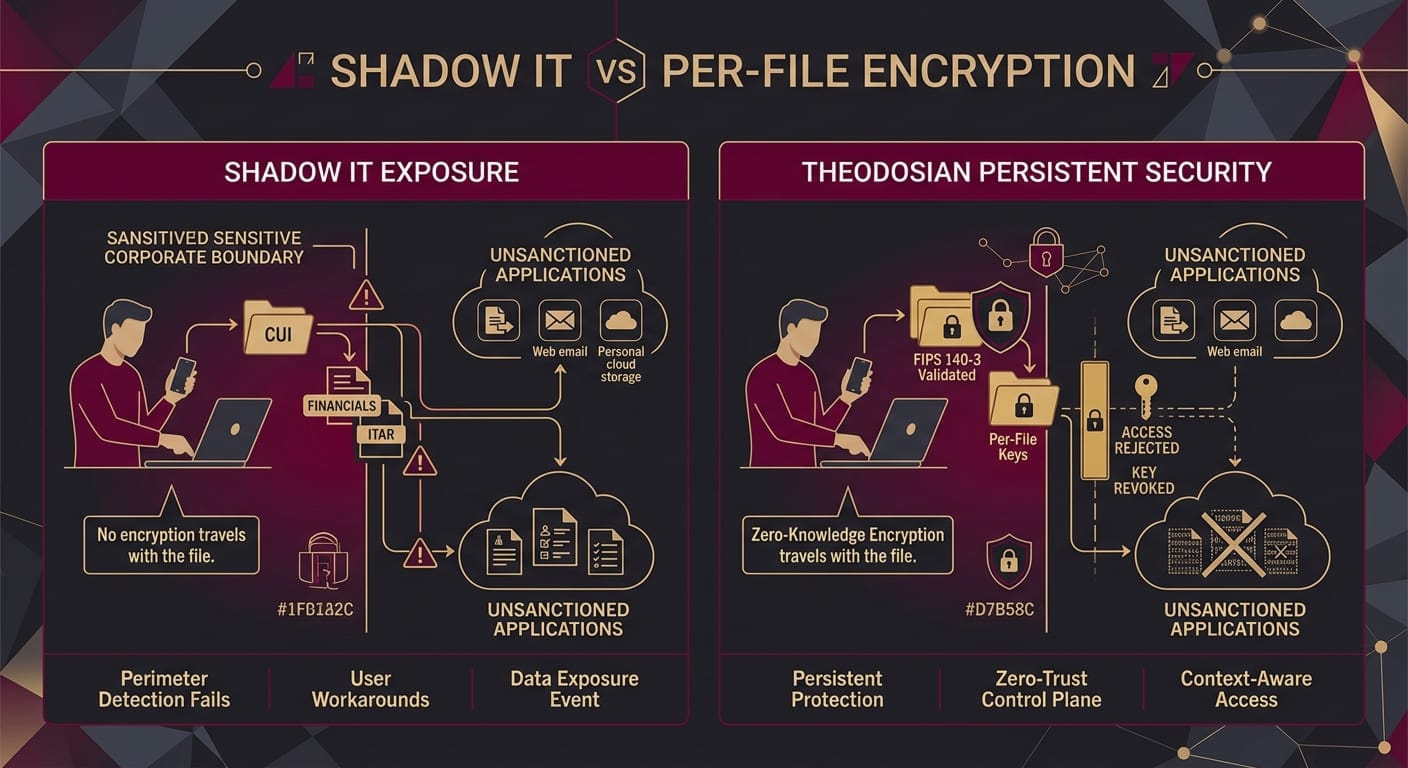
FIPS 140-3 AES-256 encryption applied at the file layer changes the threat model in a specific way: the file becomes its own security perimeter.
When encryption lives at the disk or transport layer, it protects data in transit and at rest on managed infrastructure. The moment a file lands on personal Dropbox, the managed infrastructure is gone. Disk encryption on the corporate laptop did nothing. TLS protected the upload. The file itself arrived in plaintext, readable by anyone with Dropbox access to that account.
File-level encryption inverts this. The file is encrypted before it leaves the endpoint. It stays encrypted regardless of where it travels: personal Dropbox, iCloud, a USB drive, a WeTransfer link. The ciphertext moves. The key does not.
The key never leaves the vault. With a patent-pending zero-knowledge architecture with Theodosian, the cloud storage provider — whether that is Dropbox, Google Drive, or your own managed environment — holds only encrypted data. The difference between zero-knowledge and standard enterprise encryption is not marketing language. It determines whether a provider can be compelled to hand over readable data, and it determines whether an employee who uploads a file to personal storage has actually exposed the underlying content.
The answer, with per-file zero-knowledge encryption, is no. The file landed in the wrong place. The data did not.
How Does Context-Aware Access Control Work When a File Is Already in Shadow IT?
Encryption without access control is a lock without a mechanism. The file is protected, but if the same employee can open it from their personal device on personal Dropbox using their corporate credentials, you have not contained much.
Dynamic access control adds the mechanism. Access decisions are made at open-time, not at upload-time. Every time someone attempts to open an encrypted file, the system evaluates the request against a current policy: Is this a registered device? Is this network trusted? Is this user's location within authorized geography? Is this within permitted hours?
A file that landed in a personal Dropbox account is still subject to these checks. The employee who uploaded it can be denied access from an unregistered personal device even though Dropbox shows the file as available. The file is there. It is not readable.
This matters particularly in defense contracting, where CMMC SC.L2-3.13.10 mandates encryption for controlled unclassified information regardless of where that information is stored. The compliance obligation does not pause because the file moved to an unauthorized location. File-level encryption with context-aware access controls means the encryption obligation follows the file rather than ending at the perimeter of your managed infrastructure.
Can Encryption Really Mitigate Shadow IT Without Requiring Behavioral Change?
This is the practical question that procurement conversations eventually reach, and it deserves a direct answer.
File-level encryption does not eliminate shadow IT. It does not change the behavior that drives it. Employees will still email files to personal accounts, upload to personal storage, and find workarounds when corporate tools are inconvenient.
What changes is the blast radius.
When an employee uploads a sensitive contract to personal Dropbox, the traditional outcome is a data exposure event: the file is readable, potentially to anyone with that Dropbox account, and your incident response team is working backward from a breach notification. With per-file AES-256 encryption and unique keys per file, the outcome is a policy violation with no data exposure. The file moved. The data stayed protected.
The response timeline changes too. Revocation of a compromised or unauthorized file is a central console action that takes effect globally within seconds — across every device and every storage location where that file exists. Dropbox, iCloud, or a forwarded email attachment. If the file has been opened from the right device with valid credentials and the policy has not yet been revoked, access was legitimate. If something changes — the employee is offboarded, a device is compromised, a policy violation is flagged — access is revoked globally without requiring the file to be located and deleted from each location.
Shadow IT becomes a transport audit item rather than a data security crisis.
If your current architecture relies on keeping files off the wrong storage — rather than keeping the wrong storage from reading your files — you are one employee workaround away from a breach.
Theodosian deploys per-file FIPS 140-3 AES-256 encryption with a unique key per file, patent-pending zero-knowledge key architecture, and context-aware access controls that evaluate device, network, geolocation, time, and identity at every open event. The Drop the Gate capability triggers autonomous access freezes and step-up MFA when anomalous access patterns are detected. It runs on FedRAMP Moderate infrastructure and deploys in days.
What Does This Mean for Detecting Shadow IT Going Forward?
Detection remains valuable. Knowing which unsanctioned apps your workforce is using, where sensitive data categories are appearing, and which employees are working around policy — this is useful intelligence for a security program. Shadow AI platforms that ingest files into AI training pipelines represent a specific and growing variant of this problem, where the unsanctioned destination is a model rather than a storage account.
The shift is in where detection sits in the priority stack. Detection-first security treats discovery as the control. File-layer encryption treats it as a signal. You still want to know that employees are using personal Dropbox for work files. That knowledge lets you address the usability friction, improve the sanctioned tooling, and build policy enforcement that reduces the behavior over time.
But the security posture does not depend on catching every instance before the file moves. The data is defended regardless.
For defense contractors and enterprise security teams managing CUI under CMMC, ITAR, or equivalent frameworks, this distinction is material. Regulators evaluating your encryption posture are asking whether controlled data was protected at rest and in transit. They are not asking whether your CASB successfully prevented every unauthorized upload. File-level encryption with audit logs that capture every access attempt, every open event, and every revocation provides demonstrable evidence that the encryption obligation was met regardless of where the file traveled.
🛡️ Protect CUI and ITAR Data Wherever It Lands
Don't rely on users following security policy. Test Theodosian's zero-knowledge architecture and context-aware access controls in a 14-day proof of concept.
FAQs: Shadow IT & File-Layer Security
Does AES-256 file encryption protect data uploaded to personal cloud storage?
Yes, when encryption is applied at the file layer before the file leaves the endpoint. The file arrives at the personal storage location as ciphertext. Without access to the decryption key — which remains in a separate zero-knowledge vault — the file content is unreadable regardless of who has access to the storage account. Standard cloud storage encryption protects data at rest within the provider's infrastructure; file-level encryption protects the content regardless of which infrastructure holds the file.
What is the difference between shadow IT detection and shadow IT encryption resilience?
Shadow IT detection tools — including CASB platforms and DLP solutions — identify when sensitive data is moving to unsanctioned applications and either block the transfer or alert security teams. Shadow IT encryption resilience assumes that some transfers will succeed before detection runs, and ensures that the file content remains protected even after it reaches the unauthorized destination. The two approaches address different points in the threat timeline and are complementary, but only one provides protection after the fact.
Does CMMC compliance still apply to files stored in personal Dropbox or shadow IT locations?
Yes. CMMC SC.L2-3.13.10 requires encryption of CUI at rest regardless of the storage location. If a controlled unclassified information file moves to an employee's personal Dropbox account, the compliance obligation moves with it. The organizational control that demonstrates compliance is encryption that persists at the file layer, not a policy that prevents the file from moving. Security teams auditing for CMMC readiness should verify that their encryption implementation covers files regardless of where they reside, not only files stored in managed infrastructure.
How quickly can file access be revoked across shadow IT locations?
With centralized key management and per-file unique keys, access revocation is a key management action that takes effect at the point of the next access attempt. Because the decryption key is not stored with the file, the file becomes unreadable the moment the key is revoked — regardless of whether the file has been copied, forwarded, or synchronized to multiple shadow IT locations. Revocation does not require locating and deleting every copy of the file.