
According to the 2026 Verizon Data Breach Investigations Report, stolen credentials are actively weaponized in nearly 40% of all corporate data breaches. Even when hackers use a software flaw to get their foot in the door, compromised identities remain their primary tool for moving laterally and accessing high-value systems. The modern attacker doesn’t just break in; eventually, they log in.
This reality raises the ultimate question for security teams: Once an attacker is using a valid, authenticated user account, what actually stops them from opening your most sensitive files?
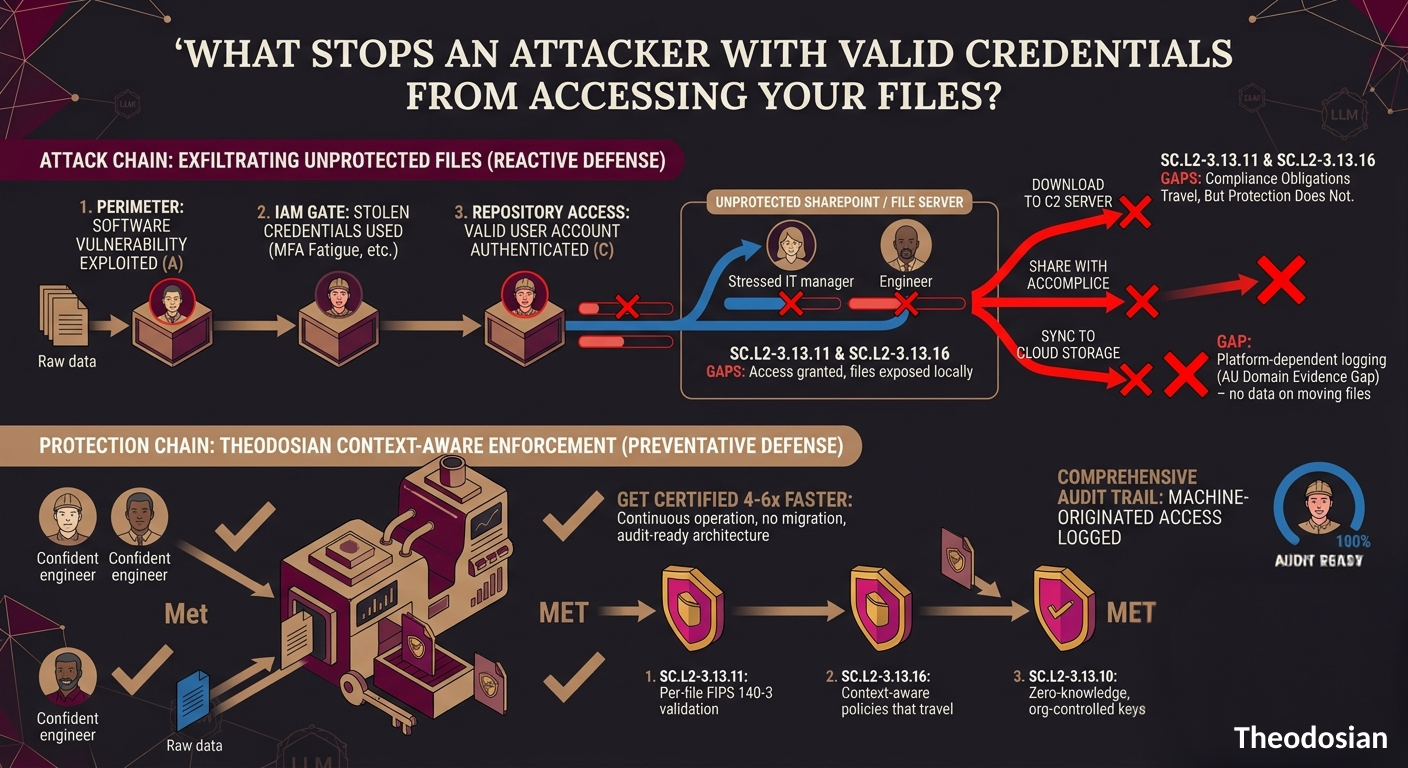
For most organizations, it’s: nothing. Traditional identity and access management (IAM) systems are designed to validate the user at the front door. They check the password, verify the MFA token, and grant access to the repository—whether that's SharePoint, a cloud bucket, or a local server. But once that login is marked as "valid," the security system's job is done. The system assumes the person behind the screen is who they claim to be.
If a threat actor is using a legitimate employee's credentials, they can systematically browse directories, download proprietary engineering specs, or sync entire folders of customer data. To the network, it looks like a productive day. To your business, it’s a catastrophic exfiltration event happening completely in plain sight.
Why Are Stolen Credentials the Primary Weapon for Data Exfiltration?
Credentials are valuable because they grant absolute authority. While perimeter vulnerabilities have become the leading way attackers bypass the initial firewall, their very next step is always to harvest or deploy valid credentials. A stolen set of credentials allows the attacker to move laterally across your network without triggering typical intrusion detection systems. It requires the attacker to simply look like an authorized user. Modern enterprise authentication systems are very good at verifying passwords and tokens; they are fundamentally blind to whether the person presenting those credentials is the legitimate employee or an intruder.
Credentials end up in attacker hands through several well-documented channels: phishing, credential stuffing attacks against weak or reused passwords, malware that extracts stored credentials from endpoints, third-party breaches where the same password was used elsewhere, and — more commonly than organizations want to acknowledge — insider access that someone decides to misuse.
MFA adds a meaningful layer. It makes the simple "just the password" attack much harder. But MFA is not the end of the problem. MFA fatigue attacks — where users are bombarded with authentication prompts until they approve one out of frustration — are a known and effective technique. SIM swapping bypasses SMS-based MFA entirely.
Adversary-in-the-middle phishing kits capture MFA tokens in real time. And for attacks originating from a compromised device, MFA is often irrelevant — the attacker has access to the same device the user just authenticated on.
The consequence: an attacker who has invested in acquiring valid credentials with current session tokens is, from the identity layer's perspective, the authorized user. The identity system has nothing left to say.
What Can an Attacker Do Once They Have Valid Credentials?
Quite a lot, and the access is often much broader than organizations realize.
In most enterprise environments, access permissions expand over time. The principle of least privilege is widely understood and documented in security policies, but in practice, permissions accumulate as employees change roles, join projects, and receive access that never gets revoked. Industry threat research shows that the average enterprise employee has unrestricted access to over 6 million files on their very first day on the job; a number that quickly doubles for larger organizations. When an attacker compromises a single user account, they don't just inherit an identity; they inherit this massive, pre-existing blast radius.
An attacker with a compromised account has access to everything that account can reach. In an M365 environment, that might include SharePoint sites, OneDrive contents, shared mailboxes, and Teams files that the user was added to years ago. On a Windows file server, it includes every network share the account has read access to.
The attack pattern that follows is straightforward: enumerate what's accessible, identify the highest-value targets, exfiltrate or encrypt them. In a credential-based breach, this can unfold at normal working hours, from a known IP address, using authorized tools, generating logs that look entirely routine until someone looks closely at the volume and destination of the data movement.
This is what makes credential-based attacks particularly difficult to detect. The anomaly is behavioral, not technical. The authorization checks are passing. The alert systems built around "unauthorized access" are not designed to flag access that looks authorized.
A Valid Password Shouldn't Mean Unconditional Trust
Your IAM tools are fantastic at checking the keys at the front door. But if a threat actor compromises an employee's session token, they inherit immediate, unchecked access to millions of corporate files. If your files can't tell the difference between a routine download and an automated malicious sweep, you aren't protecting your data; you are just logging its theft.
Why Is Identity Verification Alone Not Enough to Protect Sensitive Files?
Identity verification answers one question: is this the right credential? It does not answer: is this the right person? Is this behavior consistent with how this account normally operates? Does this context — device, location, time, access volume — match what we would expect from this user?
The gap between "valid credential" and "authorized human" is where credential-based attacks live. The controls that close that gap operate at a different layer than identity verification — they evaluate context, not just identity.
There are five contextual signals that identity verification does not capture:
Device identity and compliance: Which device is presenting the credential? Is it a managed, compliant device registered to the user — or an unknown device the user has never been seen on before? An attacker accessing an account from a command-and-control server presents a different device context than the user's normal laptop, regardless of whether the credentials are valid.
Geographic and network context: Where is the access originating? From the user's normal work location and network, or from an unfamiliar IP address in an unexpected geography? Users have normal patterns. Deviations from those patterns are meaningful signals.
Time of access: Is this request consistent with the user's normal working hours? An access event at 2am local time for an account that has never previously accessed files outside of business hours is anomalous even if the credential check passes.
Access volume and pattern: Is this account requesting access to one file, which is normal, or 3,000 files in 20 minutes, which is not? Bulk access patterns are a reliable indicator of exfiltration attempts.
Behavioral baseline: What does normal access look like for this account? What file types, which directories, what frequency? Deviation from the baseline — especially deviation that aligns with high-value file locations — is meaningful context.
None of these signals are visible at the identity layer. They are only visible at the access layer, specifically, at the point where the access request hits the file itself.
What Is Context-Aware Access Control and How Does It Stop Credential-Based Attacks?
Context-aware access control evaluates access requests against multiple signals simultaneously, not just credential validity. The goal is to make the access decision based on whether the entire context of the request is consistent with authorized access, not just whether the credential presented is valid.
In a file security context, this means the access control logic is embedded in the file. Every access request, regardless of which environment it originates from, is evaluated against a defined policy that considers identity plus the contextual signals described above. An attacker who has valid credentials but is accessing files from an unrecognized device, an unexpected location, at an unusual time, with unusual volume, fails the access control — even though their credential check passed.
This is the zero-trust principle applied at the file layer: continuous verification, never trust, every access evaluated on its current context.
What Signals Should Access Controls Evaluate Beyond Username and Password?
An effective context-aware access control system should evaluate, at minimum:
Authenticated identity: Who is the requesting principal, verified against your identity provider (Active Directory, Okta, Google Workspace, SAML/OIDC). Necessary but not sufficient.
Device identity and compliance status: Is the requesting device a managed device registered to the organization? Has it passed compliance checks — current patches, endpoint security running, disk encryption enabled? A valid credential from an unknown device is an anomaly.
IP address, GPS, and country: Where is the request originating? Is the location consistent with the user's normal access pattern? Is the country consistent with where this account normally operates? Geographic anomalies are high-confidence indicators.
Network type: Is the request coming from a corporate network, a known VPN, or a public/unknown network? The same file access request from a corporate network and an unknown public network carry different risk profiles.
Time of access: Is this consistent with normal working hours for this user? Off-hours access to sensitive files should trigger a higher bar.
Access volume and rate: Is the number of file access requests in this session consistent with normal activity? High-volume access patterns are a reliable early indicator of bulk exfiltration.
Behavioral anomaly against the user's baseline: Taken together, do the signals for this session match what this account normally does? Machine-learning-based behavioral baselines can detect anomalies that static rules miss.
Theodosian evaluates all six signal categories on every file access request, in real time. When the combination of signals exceeds an anomaly threshold, Drop the Gate freezes access to the protected files, triggers step-up MFA, and sends a real-time alert to the security team. The attacker's session does not get to continue while someone reviews a SIEM alert hours later.
Crucially, the entire sequence is logged: the access event, the anomaly detected, the trigger conditions, the access freeze, the MFA challenge outcome, and the security team notification. That log sequence satisfies AU.L2-3.3.1 and AU.L2-3.3.2 for CMMC compliance — and provides the incident evidence chain for IR.L2-3.6.1.
How Do You Build a File Security Program That Assumes Credentials Will Be Compromised?
The design principle is straightforward, even if the implementation takes effort: build your file security controls on the assumption that any credential can be compromised, and design the controls to remain effective when that happens.
This means:
Reduce the blast radius of any single credential: Per-file encryption with unique keys per file means that a compromised account cannot decrypt files it was not specifically authorized to access. Even within the scope of an authorized account, access is limited to files that meet the policy conditions, not every file the account technically has permission to see.
Evaluate every access in context: Don't rely on the initial authentication as the last line of defense. Every file access request should be evaluated against current context. A session authenticated six hours ago should not have indefinite permission to access new sensitive files without re-evaluation.
Close the in-use exposure window: Files that decrypt to disk when opened leave a plaintext copy on the endpoint. If the endpoint is compromised — which is often how credentials are stolen in the first place — those plaintext files are exposed even after the file security controls have done their job. Secure data-centric processing that handles decryption within an isolated cache—preventing unprotected, persistent plaintext from ever being written openly to the local disk—effectively closes this window.
Log access events at the file layer: Network logs tell you about connections. File-layer audit trails tell you about what was accessed, by whom, from where, and in what context. When a credential-based attack happens, the file-layer log is what tells the story — and what your C3PAO's AU domain review will expect to see. More on building that audit trail in How to Build a CMMC Audit Trail.
Automate the response: A security team that needs to review a SIEM alert and manually freeze access is working at human speed against an attack that may be running at machine speed. Automated response that freezes access, triggers step-up verification, and notifies the team at the moment of anomaly detection is faster and more consistent than any manual process.
Two Breach Scenarios
Scenario A: A phishing attack compromises a project engineer's M365 credentials. The attacker accesses SharePoint from an unrecognized device in an unexpected geography, runs a script that enumerates files with "CUI" in the name, and begins downloading them at 1,200 files per minute. The identity layer sees valid credentials. The network sees a user doing something they're authorized to do. Forty minutes and 8,000 files later, the SIEM fires an alert.
Scenario B: The same attack happens. The same credentials are compromised. The attacker begins accessing files — but the file access controls evaluate device context (unknown), geography (inconsistent), and access volume (anomalous). After the third file access request, Drop the Gate freezes access to the protected files, triggers step-up MFA, and sends an alert. The attacker's session is still live, but the files are locked. The security team gets a real-time notification with the triggering conditions.
The difference between Scenario A and Scenario B is not the authentication system. The credentials were compromised in both cases. The difference is what happens at the file.
Theodosian Deploys in Days with No Data Migration
See how context-aware access controls and Drop the Gate work in your environment.
FAQs: Identity and File Security
What percentage of breaches involve stolen credentials?
According to the 2026 Verizon Data Breach Investigations Report, stolen credentials are actively weaponized in nearly 40% of all corporate data breaches. While attackers frequently leverage software vulnerabilities to bypass the initial network perimeter, compromised identities remain their primary mechanism for moving laterally through corporate environments, escalating privileges, and successfully exfiltrating high-value files.
Does MFA prevent credential-based attacks?
MFA significantly raises the cost of credential-based attacks and prevents the majority of simple password spray and credential stuffing attacks. It does not prevent all credential-based access. MFA fatigue attacks exploit user behavior to approve unauthorized challenges. Adversary-in-the-middle phishing kits capture and replay MFA tokens in real time. Device compromise gives attackers access to authenticated sessions without needing to re-complete MFA. These techniques are documented, actively used, and partially responsible for the continued prevalence of credential-based breaches despite widespread MFA adoption.
What is context-aware access control?
Context-aware access control evaluates access requests against multiple signals beyond credential validity — device identity and compliance status, location, network type, time of access, and behavioral patterns relative to a baseline. The goal is to distinguish between access that is authorized in context (the right person, on the right device, from the right location, at the right time) and access that presents valid credentials but anomalous context (valid credentials on an unknown device, from an unexpected location, at an unusual hour, accessing files in bulk). Context-aware controls are particularly effective against credential-based attacks because the attacker's context often differs from the legitimate user's, even when the credential itself is identical.
What is "Drop the Gate" and how does it work?
Drop the Gate is Theodosian's autonomous threat response mechanism. When context-aware access controls detect anomalous signals across a file access session — unusual device, unexpected geography, off-hours access, bulk access patterns — Drop the Gate automatically freezes access to the protected files, triggers step-up MFA for the requesting session, and sends a real-time alert to the security team with the triggering conditions logged. The response is automated and immediate, rather than dependent on a human reviewing a SIEM alert after the fact. The entire sequence — anomaly detected, access frozen, MFA challenge, security team notification — is logged and exportable for your audit trail and incident response documentation.