
An analyst on your contracts team opens Microsoft 365 Copilot and types: "What do we know about the Lockheed contract?" They're not going rogue. They're doing their job. But within seconds, Copilot returns a summary pulling from proposal documents, pricing spreadsheets, and a legal memo they were never explicitly given access to — because those files lived in SharePoint folders that were open to the whole organization.
This is the Copilot risk that most security teams haven't fully priced in. It isn't a vulnerability in the software. It's a structural consequence of deploying an AI that operates at the boundary of your permission model, and finding out your permission model was never as precise as you assumed.
What Does Microsoft Copilot Actually Do With SharePoint Files?
Microsoft 365 Copilot works by indexing content across the M365 ecosystem — SharePoint, OneDrive, Teams, Exchange, and more. When a user submits a query, Copilot searches everything that user has permission to access. It summarizes documents, extracts key facts, generates drafts, and surfaces file references, all through the Microsoft Graph API.
Copilot is designed to give users a unified, natural-language interface to their organizational knowledge. The problem is that "organizational knowledge" has historically been stored in SharePoint environments where permissions were set for convenience, not for precision.
The indexing operates at the identity layer. If a user account has read access to a file — for any reason, including broad site-level sharing, inherited group membership, or default tenant settings — Copilot can access that file on their behalf. The AI does not apply a secondary access judgment. It defers entirely to whatever permissions Microsoft 365 has already assigned.
Copilot's search scope is, in practice, as wide as your SharePoint misconfiguration.
🛡️ Is Overpermissioned SharePoint Exposing Your CUI to Copilot?
URL filters and permission rollbacks won't stop AI graph indexing. See how zero-knowledge file-layer controls stop unauthorized Copilot data reads in real time.
Why Overpermissioned SharePoint Is the Copilot Risk Most Organizations Haven't Priced In
Research from Varonis consistently shows that enterprise SharePoint environments are permission-heavy by default, revealing that 58% of organizations have over 100,000 folders exposed to every employee. That number exists not because IT teams are careless but because SharePoint's default sharing model — particularly site-level inheritance — makes broad access the path of least resistance.
In pre-Copilot environments, that overpermissioning carried real but bounded risk. A determined insider could spend hours navigating SharePoint's folder structure to find sensitive files they shouldn't have. The information was technically accessible, but the friction was high enough that most people didn't exploit it intentionally or otherwise.
Copilot removes that friction entirely. A user doesn't need to know a document exists. They don't need to navigate to it. They ask a question in plain English, and Copilot finds it, reads it, and summarizes it in seconds. The blast radius of your permission misconfiguration is now equal to the sum of everything Copilot can reach on behalf of any given user account.
For defense contractors, this is not a theoretical concern. CUI spread across SharePoint sites under broad permissions now becomes Copilot-accessible at the speed of a natural language query. The CMMC AC.1.001 requirement for authorized access to CUI exists precisely to prevent this kind of uncontrolled exposure. If your SharePoint permissions aren't tightly scoped, Copilot is the most efficient auditor of that gap you've ever deployed — and it's running inside your own tenant.
This is the core structural shift. The container (SharePoint) was never the security boundary for the files it held. It was a storage and collaboration tool. The files themselves were always the thing that needed protection. Copilot just made that gap visible in a way that's impossible to ignore.
What Does Microsoft Purview Do — and What's the Trade-Off?
Microsoft's answer to this challenge is Microsoft Purview, specifically its Information Protection capabilities. Purview allows organizations to apply sensitivity labels to files — classifications like "Confidential" or "Highly Confidential" that can trigger encryption via Azure Rights Management (ARM). When a file is labeled and encrypted through Purview, access can be restricted to specific users or groups, even after the file leaves SharePoint.
This is a genuine improvement over relying on SharePoint permissions alone. For many organizations, Purview's labeling system, when properly deployed with automated classification and enforced labeling policies, meaningfully reduces the surface area of their exposure. Purview also integrates natively with Copilot: the AI respects sensitivity labels and, by design, will not surface content in Copilot responses that the user isn't supposed to access, provided the labels are correctly applied and enforced.
The catch is the phrase "when properly deployed." Label coverage in real enterprise environments is rarely complete. Files created before a labeling rollout, files uploaded by external collaborators, files living in legacy SharePoint sites — these are common gap zones. The Purview model depends on consistent, accurate labeling to function. Inconsistent labeling is a labeling problem, not a file protection problem, but the practical result is the same: files that don't carry a label fall through.
There's also a more fundamental constraint, and Microsoft documents it openly.
Why DKE Creates a Choice Between Protection and Productivity
Purview offers two encryption models. The standard model uses Azure Rights Management, where Microsoft holds and manages the encryption keys. Under this model, Microsoft can decrypt files on your behalf — which is exactly what Copilot does when it processes content. Files labeled with standard Purview encryption remain accessible to Copilot.
The stronger model is Double Key Encryption (DKE). DKE is Purview's zero-knowledge option. Under DKE, your organization holds a second encryption key that Microsoft never possesses. Microsoft cannot decrypt these files. That is the point: DKE exists precisely for scenarios — classified defense work, regulated financial data, privileged legal documents — where true vendor isolation is required.
But Microsoft's own documentation states that DKE-protected files cannot be accessed by Copilot or any other M365 service. This is not a limitation they're working to fix; it's a logical consequence of zero-knowledge architecture. If Microsoft can't decrypt the file, Copilot can't read it.
So Purview's DKE presents a direct choice: protect your most sensitive files with true zero-knowledge encryption, or make them available to Copilot. You cannot have both. For organizations in the defense supply chain or under heavy regulatory requirements — the ones who most need strong encryption and AI productivity tools simultaneously — this is a real operational constraint, not an edge case.
The BYOK (Bring Your Own Key) option doesn't resolve it either. Under BYOK, organizations supply their own tenant keys to Microsoft's Azure Key Vault, but Microsoft still manages the key infrastructure and can technically access those keys. BYOK is a compliance posture, not a zero-knowledge architecture. Copilot access to BYOK-protected content remains intact because Microsoft still retains the capability to decrypt.
What File-Layer Encryption Does That Purview Can't (Without Sacrificing Copilot)
The fundamental problem with container-based or label-dependent security is that protection only exists as long as the container or label system is functioning correctly. When permissions are misconfigured, when labels aren't applied, or when a file moves outside its original SharePoint site, the protection disappears.
File-layer encryption treats the file itself as the security boundary. The encryption travels with the file wherever it goes — into SharePoint, out of SharePoint, into email, or onto a contractor's endpoint.
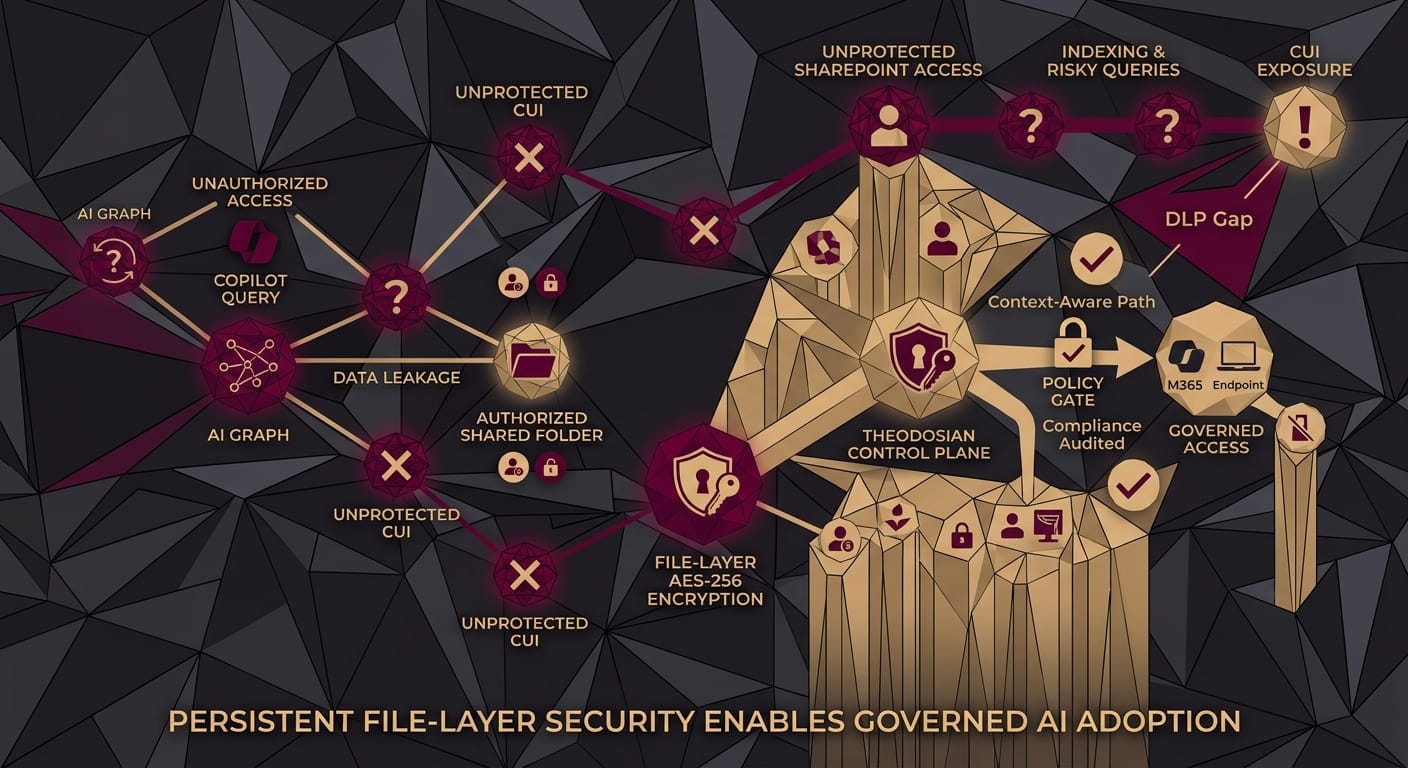
Where standard Microsoft Purview forces a strict tradeoff — either use standard Azure Rights Management (where Microsoft holds the keys and Copilot can read everything) or Double Key Encryption (DKE, which completely blocks Copilot) — Theodosian provides a third path through an identity-aware control plane.
Instead of relying on static tenant-level keys, access decisions are made dynamically. When an AI tool or user requests access to a file, the control plane evaluates user identity, device posture, network context, and application authorization simultaneously. Governed Copilot instances running on managed endpoints under policy approval receive decrypted content streams, while unauthorized requests receive an explicit access refusal or unreadable ciphertext. You achieve zero-knowledge key isolation without forcing a blanket shutdown of AI productivity.
How Does Theodosian Work With Microsoft 365 Environments?
Theodosian applies per-file AES-256 encryption validated to FIPS 140-3 standards, with a unique key generated for each individual file. The encryption is applied at the file layer and follows files across every environment they travel to — including SharePoint and OneDrive. There is no dependency on SharePoint's permission model for protection to hold.
The platform uses a patent-pending zero-knowledge architecture. Theodosian never processes decryption keys on behalf of a customer. Unlike standard Purview encryption (where Microsoft holds the keys), and unlike BYOK (where Microsoft manages the key infrastructure), Theodosian's architecture means that even Theodosian itself cannot access customer file content.
Access policy evaluation combines identity verification, device posture, geolocation, network context, behavioral signals, and time-based rules. This is not a binary allow/block decision. Access is granted based on whether the full context of the access request meets the policy — which means an employee accessing a file from their registered corporate device on a known network receives different treatment than the same credential attempting access from an unrecognized device in an unexpected geography.
For AI tools including Microsoft Copilot, Theodosian's AI identity brokering layer evaluates whether a Copilot request meets the access policy before decryption occurs. Organizations don't have to choose between protecting files with true zero-knowledge encryption and allowing governed Copilot access. The access decision is made by the policy engine, not by whether Microsoft holds a key.
When anomalous access behavior is detected — unusual volume, access pattern deviation, credential signals that don't match established baselines — Theodosian's Drop the Gate capability activates an autonomous access freeze and triggers step-up MFA, halting the session without waiting for human intervention. This matters in Copilot environments specifically because an AI-assisted access pattern can generate a high volume of file reads very quickly, compressing the window between first anomalous signal and actual data exposure.
Theodosian runs on FedRAMP Moderate infrastructure and deploys without requiring data migration. Organizations already using SharePoint and M365 can add file-layer protection to existing content without restructuring their environment. A proof of concept typically completes within two weeks.
The Copilot question is really a file security question in new clothing. The AI didn't create the exposure — overpermissioned SharePoint environments and unencrypted files created it. Copilot just made the exposure faster, more natural-language-friendly, and far harder to argue is merely theoretical. The organizations that treat this as a permissions cleanup problem will find it returning in the next tool that reads their file graph. The ones that move protection to the file itself close the gap regardless of which AI or application comes next.
🔒 Protect SharePoint Files Without Sacrificing M365 Copilot Productivity
Enforce FIPS 140-3 encryption and context-aware AI identity brokering across your existing M365 tenant in under two weeks.
FAQs: Microsoft Copilot, Purview, & File-Layer Security
Does Microsoft Copilot respect sensitivity labels from Microsoft Purview?
Yes, with an important qualifier. Copilot respects sensitivity labels when those labels are correctly applied and when the underlying encryption uses standard Azure Rights Management keys. Files carrying DKE (Double Key Encryption) labels cannot be accessed by Copilot at all, because DKE prevents Microsoft from decrypting the content. Files without any sensitivity label are treated as unprotected content — Copilot can access, summarize, and surface them freely, regardless of their subject matter. In most enterprise SharePoint environments, label coverage is incomplete, which means a meaningful portion of files fall into that unprotected category.
What is the difference between Microsoft Purview DKE and third-party file-level encryption?
Double Key Encryption in Purview provides genuine zero-knowledge protection: Microsoft cannot decrypt DKE-protected files, and neither can Copilot. The trade-off is that DKE is incompatible with the entire M365 productivity surface — Copilot, eDiscovery, and other M365 services cannot process DKE-protected content. Third-party per-file encryption platforms like Theodosian use their own zero-knowledge architecture but can include AI identity brokering layers that evaluate whether specific AI tool requests meet access policy. The result is per-file protection that travels with files everywhere, with Copilot access governed by context-aware policy rather than blocked entirely.
How does overpermissioned SharePoint create a Copilot security risk?
Copilot accesses files through the same permissions that govern direct human access. If a user account has read access to a file — because of broad site-level inheritance, default tenant settings, or group membership — Copilot can access that file on that user's behalf when they submit a relevant query. In organizations where SharePoint permissions are set broadly (research indicates 58% of organizations have more than 100,000 files accessible to every employee), Copilot effectively makes every one of those files queryable through natural language. The access was already there; Copilot removes the friction that previously made large-scale exploitation of that access difficult.
Can Theodosian protect files that are already stored in SharePoint?
Yes. Theodosian deploys without requiring data migration. Existing files in SharePoint can have per-file FIPS 140-3 validated encryption applied without restructuring the SharePoint environment or moving files to a new platform. Protection follows files at the file layer, meaning the encryption persists regardless of where the file travels after it leaves SharePoint. For a walkthrough of how this works in practice, see How to Add Zero-Knowledge Encryption to SharePoint, Google Drive, and Dropbox Without a Migration.
Is Theodosian suitable for defense contractors with CMMC requirements?
Theodosian is designed specifically for environments where CUI handling, access control, and encryption requirements carry compliance weight. The platform's per-file AES-256 encryption validated to FIPS 140-3, combined with context-aware access controls and detailed audit logging, directly addresses several CMMC Level 2 practices, including access limitation (AC.2.006), CUI encryption at rest (SC.3.177), and audit log generation (AU.2.041). Theodosian runs on FedRAMP Moderate infrastructure. A detailed comparison of compliance posture is available in the Best CMMC Compliance Tools for Defense Contractors in 2026.