
Role-based access control was designed for a world where people had fixed job titles, and files stayed in one place. Neither of those is true anymore.
An engineer might be a "Senior Systems Engineer" in your HR system, a cleared subcontractor on one program, and a third-party reviewer on another. Their access needs change by project, by day, by device, and by location. A static role assigned when they joined the company doesn't capture any of that. It captures who they were on day one.
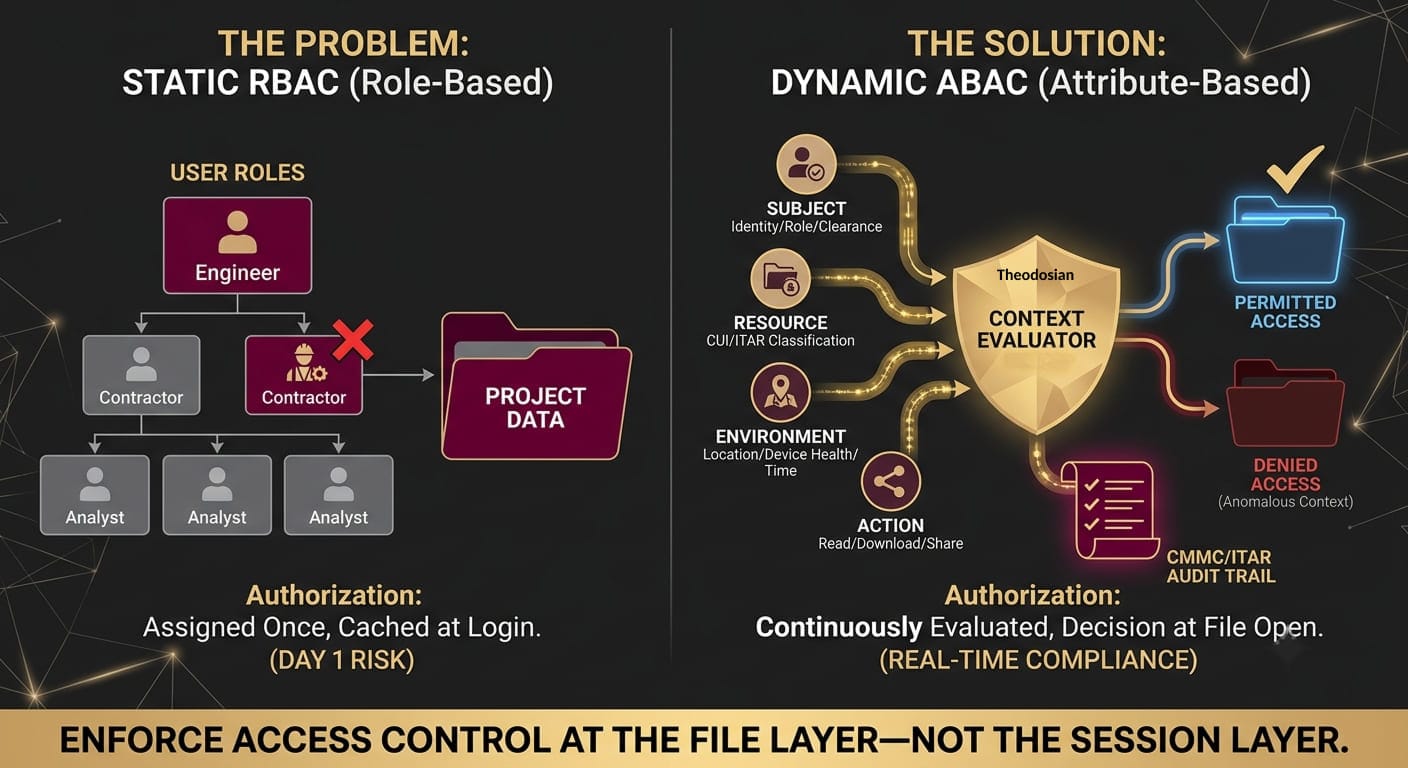
RBAC answers the question: "What role does this user have?" Attribute-based access control answers a different question: "given everything we know about this user, this device, this file, and this moment — should access be granted right now?"
Those are fundamentally different architectures. For organizations handling regulated data under CMMC, ITAR, or HIPAA, only one of them satisfies what the compliance frameworks actually require.
What Is the Difference Between ABAC and RBAC?
RBAC (Role-Based Access Control) assigns users to roles, and roles to permissions. "Finance Analyst" can read the Finance folder. "Project Manager" can read and write the Project folder. Access is determined at role-assignment time and evaluated at login. It works well for static environments with predictable access patterns.
ABAC (Attribute-Based Access Control) evaluates access based on attributes — characteristics of the user, the resource, the environment, and the action being requested. An ABAC policy might read: "allow access if the user is a cleared US Person, on a compliant managed device, in an approved geographic region, during standard business hours, and the file is classified at or below their clearance level." Every attribute is evaluated on every access request, in real time.
The difference: an RBAC system grants a contractor access when they're onboarded and doesn't re-evaluate until someone manually revokes it. An ABAC system grants access when the contractor opens the file, and re-evaluates the decision every time.
Why this matters for CMMC: NIST SP 800-171 Practice AC.L2-3.1.3 requires organizations to "control the flow of CUI in accordance with approved authorizations." AC.L2-3.1.1 requires limiting access to "authorized users, processes acting on behalf of authorized users, and devices (including other systems)." Static RBAC satisfies the letter of "authorized users." ABAC satisfies the intent — because authorization isn't a status you assign once, it's a condition you evaluate continuously.
🛑 Don’t Rely on Day 1 Authorization
If your authorization decision is more than 30 seconds old, it’s outdated. Experience real-time, context-aware file security in minutes.
What Are the Core Components of an ABAC System?
A functional ABAC implementation evaluates four attribute categories simultaneously:
Subject attributes: Who is making the request? Identity, role, clearance level, employment status, certifications, contract scope, behavioral history.
Resource attributes: What is being requested? File classification, sensitivity label, compliance scope (CUI, PHI, ITAR-controlled technical data), retention status, project association.
Environmental attributes: What is the context of the request? Time of day, geographic location, network type (corporate, VPN, public), device compliance status, whether the request is within normal behavioral patterns for this user.
Action attributes: What is the user trying to do? Read, write, share externally, download, print, export.
A complete ABAC policy evaluates all four categories before returning an access decision. Systems that evaluate only subject and resource attributes — the most common implementation — are ABAC by definition but miss the environmental context that makes the architecture valuable for regulated data protection.
What Does ABAC Look Like at the File Layer vs. the Network Layer?
Most ABAC implementations operate at the network or application layer: they control which applications a user can reach, based on attributes evaluated at session establishment. This is valuable — it's a significant improvement over network perimeter controls.
The limitation: file access after the session is established is outside the scope of most network-layer ABAC systems. A user who passes the ABAC evaluation at session establishment can access every file their role permits, regardless of what their device status, location, or behavioral pattern looks like when they actually open a specific file.
File-layer ABAC applies the same attribute evaluation logic at the point of each individual file open event. When a user tries to open a file — regardless of which platform it's on, which device they're using, or whether they're inside the corporate network — the ABAC policy evaluates all four attribute categories in real time and returns an access decision for that specific file, at that specific moment.
This is the architecture that satisfies CMMC's access control requirements for CUI that travels outside managed environments: to subcontractors, onto personal devices, into partner systems. The file's protection doesn't depend on the user being inside a specific network perimeter. It depends on them satisfying the access policy at the file layer.
How Do the Leading Attribute-Based Access Control Solutions Compare in 2026?
| Solution | ABAC Layer | File-Level Control | Cloud Storage Integration | Deployment Time | CMMC/ITAR Ready |
|---|---|---|---|---|---|
| Microsoft Entra ID Governance | Identity + app access (session layer) | ❌ Application-level | M365 ecosystem | Weeks–months | Partial (M365 scope only) |
| NextLabs | Application + data layer (enterprise DRM) | ✅ Policy-based, content-aware | On-premise focused | Months | ✅ (complex deployment) |
| PlainID | Identity + app access (session layer) | ❌ Session-level only | Cloud-native | Weeks | Partial |
| Axiomatics | Fine-grained authorization (API layer) | ❌ Application decisions only | API-driven integrations | Months | Partial |
| Theodosian | File layer — every access event | ✅ Per-file, real-time evaluation | SharePoint, Google Drive, Dropbox, Box, Windows file servers, NAS | Days | ✅ Direct mapping |
Microsoft Entra ID Governance is a strong choice for organizations whose primary access control challenge is identity governance — ensuring the right users have the right app access, with lifecycle management that cleans up over-provisioned accounts. Its ABAC capabilities (attribute-based conditional access policies) operate at the session layer. It doesn't govern what happens to files after the session is established.
NextLabs is one of the few vendors that applies ABAC policy to documents and files directly, using a policy engine that can evaluate content attributes alongside user and environment attributes. It's a mature enterprise product used in defense and government. The trade-offs: it's built primarily for on-premise environments, deployment timelines are measured in months, and the implementation complexity is significant for organizations without dedicated IAM engineering resources.
PlainID and Axiomatics are policy engines that enable developers to implement ABAC logic in applications. They're not file security products — they're authorization platforms that organizations use to build ABAC into their own applications. Relevant for engineering teams building custom systems; not a solution for organizations looking to deploy ABAC controls over existing file storage environments.
Theodosian applies context-aware access controls — identity, device compliance, geographic location, network type, time of day, and behavioral anomaly signals — at the point of each file open event, across SharePoint, Google Drive, Dropbox, Box, Windows file servers, and local endpoints. The policy evaluation is real-time and continuous, not cached from session establishment. When attributes are anomalous, Drop the Gate responds automatically: access freeze, step-up MFA, security team notification, without waiting for human review.
What ABAC Attributes Should Your Access Control System Evaluate for Regulated Data?
For CUI under CMMC, ITAR-controlled technical data, and HIPAA-regulated ePHI, the minimum attribute set for defensible access control includes:
User identity: Verified against an authoritative identity provider — not just a username/password, but a confirmed identity linked to employment status, clearance level, and current project scope.
Device compliance status: Is the requesting device enrolled in MDM? Does it meet minimum OS version, patch level, and configuration requirements? An authorized user on a compromised or non-compliant device is an unmanaged risk.
Geographic location: IP-based location, GPS location where available, country of origin. For ITAR, US Person key control requires that decryption be restricted to US persons — which geographic attributes can enforce at the file layer.
Network context: Corporate network, VPN, or unknown public network? Access from an airport lounge on an open WiFi network presents a different risk profile than access from a corporate office.
Temporal patterns: Is this access happening during the user's normal work hours? An access event at 3am by a user who normally works 9-to-5 in Eastern Time isn't automatically malicious — but it's an attribute that should raise the access decision threshold.
Behavioral baseline: Does the volume, velocity, and pattern of this access match what this user normally does? Bulk file access in a short window is the behavioral fingerprint of exfiltration. Attribute-based systems that include behavioral signals can detect and respond to this in real time — before the exfiltration completes.
🚀 Need to Lock Down CUI on Non-Compliant Devices?
Secure your regulated data across all platforms, ensuring it remains out of reach on unmanaged endpoints. Get a demo to see how simple ABAC at the file layer can be.
Related Reading:
- What Is Dynamic Access Control, and How Does It Go Beyond Role-Based Permissions?
- What Stops an Attacker Who Has Valid Credentials from Accessing Your Files?
- Does Zero Trust Actually Protect Your Files, or Just Your Network?
- File-Centric Zero Trust: Why Security Has to Live in the File, Not the Network
- How to Build a CMMC Audit Trail: What Your Evidence Package Needs to Show a C3PAO
FAQs: RBAC vs. ABAC for High Compliance
What is the difference between ABAC and RBAC?
RBAC (Role-Based Access Control) assigns users to roles at onboarding and maps those roles to permissions. Access decisions are made based on role membership and evaluated at login or session establishment. RBAC works well for stable environments with predictable access patterns. ABAC evaluates access on every request, considering contextual attributes beyond role membership: device compliance, location, network, time, behavioral signals, and file-specific attributes like classification level. The practical difference: RBAC grants a contractor access when they're added to a project and doesn't revisit that decision until someone manually revokes it. ABAC evaluates whether that contractor should have access right now, on this device, from this location, at this time — every time they open a file.
Does ABAC satisfy CMMC Level 2 access control requirements?
CMMC Level 2's AC domain (AC.L2-3.1.1 through AC.L2-3.1.22) requires organizations to limit CUI access to authorized users and devices, control the flow of CUI according to approved authorizations, and maintain audit trails of all access events. ABAC at the file layer satisfies these requirements because it evaluates authorization at the point of each file access — not just at session establishment — and generates per-access audit records that include user identity, device, location, and policy outcome. The AC.L2-3.1.3 requirement to "control CUI flow in accordance with approved authorizations" is specifically satisfied by file-layer ABAC: the encryption key is released only when all required attributes are satisfied, regardless of which network or platform the file is on.