
A program manager leaves a Tier 1 defense contractor on a Friday. Your IT team revokes their Active Directory access, removes them from the SharePoint site, disables their corporate email, and offboarding is complete by 5pm.
On Saturday morning, the former employee opens their personal laptop and reads every file they downloaded from SharePoint over the past three years. The access revocation didn't touch those files. They were already off the perimeter, on a device you never controlled, in a folder your IT team cannot reach, with no encryption key you can turn off.
The question isn't whether this happens; 53% of IT and security leaders cite data theft via unmanaged former-employee accounts as their absolute top offboarding fear. The question is whether your offboarding process was designed to address it or whether it was designed to address the version of the problem that's easier to solve.
🛡️ The Perimeter Doesn't Exist in the Modern Workplace
The moment a file leaves SharePoint, Teams, or an email server, traditional perimeter defenses stop working. If you want to eliminate the risk of departed contractors walking away with your CUI, you have to stop protecting the container and start protecting the content.
Why Does Standard Access Revocation Miss the Real Problem?
Standard offboarding operates on a reasonable assumption that turns out to be wrong: if you remove someone's access to the folder, they can no longer access the files.
That assumption breaks the moment a file leaves the controlled environment. SharePoint, OneDrive, Teams, and virtually every enterprise collaboration platform have the same documented behavior: files downloaded to a local device before access is revoked remain fully accessible on that device after revocation. Microsoft's own documentation confirms this. The platform controls access to the repository; it does not control copies of files that have already been made. Even advanced-tier compliance modules like Microsoft Purview can fall short if your external defense subcontractors are utilizing unmanaged BYOD endpoints where local syncing hasn't been strictly locked down via rigorous Mobile Device Management (MDM) profiles.
For defense contractors handling CUI, this isn't just an IT problem. It's a compliance failure waiting to be discovered, and the discovery timeline is not on your side. The average organization takes 81 days to detect an insider security incident. By that point, the former employee has had 81 days to use, share, or sell the files they walked out with.
What CMMC Requires at Offboarding
CMMC Level 2 has a specific control for personnel termination: PS.L2-3.9.2 — Protect organizational systems containing CUI during and after personnel actions such as terminations and transfers.
The practice requires "terminating system access and retrieving all related organizational information system-related property" at separation. DoD assessors and CMMC practitioners have increasingly interpreted this to include files that have left the controlled environment on personal or contractor-issued devices. The control doesn't carve out exceptions for files that were "technically accessible" before the employee left.
The adjacent controls that come into play:
- AC.L2-3.1.1 — Limit system access to authorized users. A former employee with working file copies is, functionally, still accessing CUI.
- MP.L2-3.8.1 — Protect system media containing CUI. A contractor's personal laptop becomes in-scope media the moment it holds CUI.
- AU.L2-3.3.1 — Create audit logs of activity. If you can't audit what files left before the departure, you can't demonstrate control.
None of these controls are satisfied by a SharePoint access revocation alone. They require demonstrating that CUI under your organizational control remains controlled, even when it's on a device that isn't yours.
The Exfiltration Window: What the Data Shows
The problem is worse than most offboarding checklists acknowledge, because most of the file movement happens before the revocation occurs.
Cyberhaven's 2024 Data Movement Report found a 720% spike in data exfiltration activity in the 24 hours before a layoff announcement. That's not a typo: departing employees — whether they know they're leaving or suspect it — move files before they lose access, not after. By the time IT executes the offboarding revocation, the files are already gone.
The pattern holds across industries but is particularly acute in defense contracting, where:
- Employees routinely have access to technical files, schematics, and contract documentation with real commercial or national security value.
- Contractor relationships are fluid — employees often work for multiple primes over a career and have strong professional incentives to retain "their" work product.
- Remote work and BYOD policies mean sensitive files routinely live on personal hardware that was never covered by your device management controls.
The 91% figure from Beyond Identity puts the access problem in a different frame: 91% of former employees retain active access to company applications and files after their departure. That's an access management failure with a file problem attached to it.
The Cases That Define the Stakes
The insider threat in defense contracting is not theoretical. Three cases illustrate what "files that left the perimeter" actually looks like in practice.
Ewa Ciszak, Missile Defense Agency (2025): A civilian program analyst arrested after manually slicing up classified documents to sneak them past security in her backpack. The smuggled materials contained sensitive acquisition data and contractor performance evaluations. The physical nature of the breach bypassed every traditional network and endpoint monitoring tool in the agency's arsenal.
Harold Martin, NSA Contractor: Martin retained approximately 50 terabytes of classified and sensitive data over 20 years, stored on personal devices and in his home. The volume was only discovered after an unrelated investigation. His access had been formally valid throughout.
Jack Teixeira, Air National Guard: Sentenced to 15 years in 2024 for leaking classified documents. The files were printed and photographed inside a secure facility — the leak mechanism was physical, not digital, but the core dynamic is the same: authorized access to sensitive material, no control on the content once it left the authorized environment.
None of these were defeated by access revocation. Access revocation assumes the threat vector is an authorized user continuing to log in after departure. The actual threat vector is an authorized user downloading or copying files before departure and retaining them afterward.
Where Your Offboarding Checklist Falls Short
Most contractor offboarding processes follow a reasonable sequence: notify IT, revoke Active Directory, remove from collaboration platforms, retrieve company devices, disable VPN, final payroll. This checklist was designed for an era when "access to a file" meant "ability to log in to the system that stores it."
That era ended when portable storage, cloud sync, and remote work made it trivially easy to create file copies that exist entirely outside enterprise systems.
The gap in most offboarding checklists:
| What Your Checklist Covers | What It Misses |
|---|---|
| Active Directory access | Files downloaded to personal devices before departure |
| SharePoint / OneDrive access | Synced local copies on company laptops not yet retrieved |
| Email access | Forwarded emails with CUI attachments |
| VPN / remote access | Files already cached in personal cloud storage |
| Physical device return | Contractor-owned laptops never under your MDM |
The last row is the one with the most exposure. If your contractor used a personal laptop to access CUI — even with your approval, even under a BYOD policy — that device has never been under your control. You cannot wipe it, and you cannot inspect it. Your offboarding checklist cannot include a step for it because you have no mechanism to execute against it.
What Does Proper CUI File Control at Offboarding Actually Look Like?
The architectural requirement for PS.L2-3.9.2 compliance isn't a better checklist. It's a different model of what "access control" means.
If access to a file is controlled at the file level — not at the folder, not at the platform, not at the device — then revoking access means the file itself becomes inaccessible, regardless of where it lives. A former contractor can have a copy of your ITAR-controlled schematic on their personal laptop, in their Dropbox, or on a USB drive in their desk drawer. If the file is encrypted with a key that your organization controls and you revoke that access credential, the file becomes inaccessible. It doesn't matter where it is.
That's the difference between access revocation and access termination. Revocation removes platform permissions. Termination removes the ability to read the content.
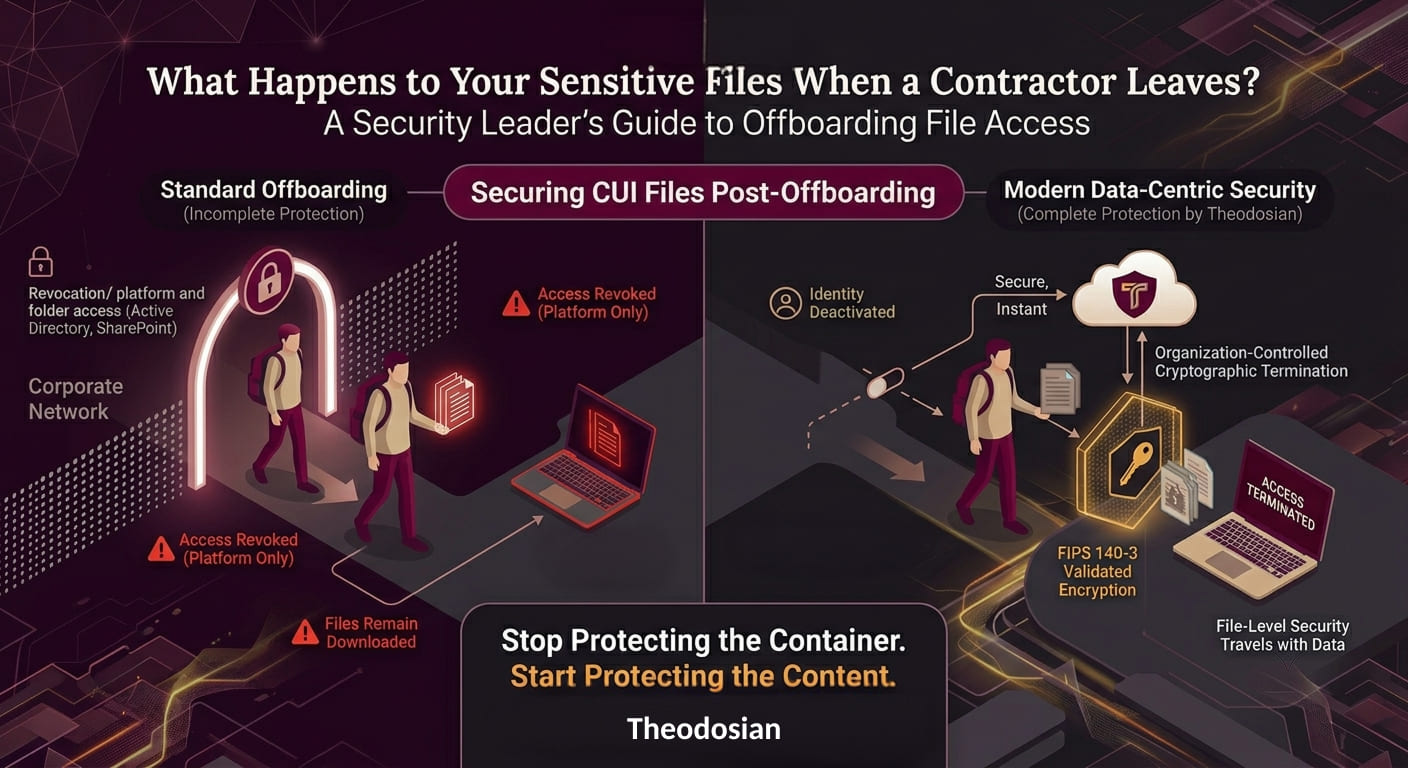
This is what "control that travels with the data" means in practice. The protection isn't in the container; it's in the file. When the contractor leaves, you don't need to find every copy they made; the file defends itself.
For CMMC compliance specifically, per-file encryption with organization-controlled key management satisfies PS.L2-3.9.2's requirement to "protect CUI during and after personnel actions" because the protection doesn't depend on retrieving the physical media or revoking platform access. It depends on a cryptographic revocation that you can execute in seconds.
Building an Offboarding Process That Addresses the Real Threat
A CMMC-aligned offboarding process for contractors with CUI access should move away from manual admin reviews and toward automated enforcement:
Before the Departure:
- Continuous Monitoring: Instead of manual log audits, ensure your file-level protection continuously tracks access velocity. If a contractor attempts an unusual spike in downloads or accesses sensitive files during off-hours, the system automatically flags the anomaly.
- Confirm Key Scope: Verify the exact cryptographic access keys assigned to the contractor’s identity and review their active file telemetry history.
At the Departure:
- Automatic "Drop the Gate" Enforcement: The exact second a contractor’s identity is deactivated in your directory, or the moment suspicious exfiltration behavior triggers an alert, the system must automatically revoke their cryptographic access. Every CUI file instantly freezes regardless of which device it's on.
- Audit Trail Generation: Ensure the automated revocation automatically logs the event in your CMMC audit trail (AU.L2-3.3.1) with an unalterable timestamp and precise data scope for assessor review.
After the Departure:
- Track the Locked Assets: Monitor your file telemetry for any post-departure attempts to open the encrypted files.
- Verify Zero-Trust Defenses: Confirm that audit logs show zero successful file decryptions after the gate was dropped.
The Ponemon Institute's 67-day average for insider threat containment is a reflection of organizations trapped in manual, reactive cycles. When your files protect themselves and automatically lock out unauthenticated identities, containment doesn't take two months—it takes fractions of a second.
The Architectural Choice
Access revocation is a door lock. It works when the threat is someone trying to come back through the door. It does nothing for the copies they made before they left.
- The Status Quo: Continue executing the standard offboarding checklist—revoke Active Directory, remove SharePoint access, and retrieve devices where possible. Discover 67 days later (the industry average for insider threat containment) that CUI from a departed contractor is in the hands of a competitor, on a job application portfolio, or the subject of a DOJ fraud investigation. You are left trying to explain to a CMMC assessor why your compliance posture relied entirely on a platform revocation that couldn’t actually reach the files.
- Automated File-Level Control: Deploy per-file encryption with organization-controlled key management. The moment an identity is deactivated or suspicious behavior triggers an alert, the system automatically drops the gate. Access is frozen and becomes unreadable. The data protects itself in real time without human delay.
The question isn't whether a departing contractor will take files with them. Across a distributed defense subcontractor base, they will. The question is whether your architecture drops the gate automatically before those files can be used.
🛡️ Ready to Put an Expiration Date on Your Outbound Files?
Don't wait for a CMMC audit or a post-departure data leak investigation to discover that your offboarding process stopped at the platform level. Bring zero-trust data protection directly into your file system without changing user workflows or migrating a single server.
FAQs: Offboarding File Access
Does PS.L2-3.9.2 require me to retrieve all files a contractor has ever downloaded?
The control requires protecting CUI "during and after personnel actions." The intent is that CUI remains protected, not necessarily that you physically retrieve every copy. If you can demonstrate that files are encrypted and access credentials have been revoked, you are demonstrating ongoing protection of the content even without physical retrieval. That's the compliance argument for file-level encryption as a PS.L2-3.9.2 control.
What if the contractor used a personal device I never controlled?
This is the gap that most offboarding checklists cannot address through process alone. If CUI was accessed on a personal device and that device was never under your MDM, you have no mechanism to wipe or inspect it. The only technical control that reaches personal devices is content-level encryption — if the files are encrypted with your keys, the device is irrelevant. The content cannot be read without your authorization.
How do I know if a departing contractor has already copied files?
Standard collaboration platforms like SharePoint and OneDrive log native file download events. However, most organizations only review these logs retroactively after an incident has occurred, leaving a massive detection gap.
By contrast, a data-centric platform like Theodosian turns the file itself into a sensor. It logs every single access, decryption, and sharing attempt in real time. If a contractor attempts unusual bulk downloads or copies files outside of working hours before their departure, the platform doesn't just record it—it automatically flags the anomaly, sends an alert, and can instantly "drop the gate" to freeze access.
Does an NDA protect me if a contractor walks out with CUI?
An NDA creates legal recourse. It does not protect the data. A signed NDA means you can sue someone who uses your files against you. It does not mean the files are encrypted, inaccessible, or returned. For CMMC compliance, legal agreements are not a substitute for technical controls.