
Zero trust has become the dominant security architecture of the decade. Almost every major security vendor now offers a zero trust solution. Most of them are applying zero trust to the right problem: controlling who can reach which systems.
The problem is that the sensitive files aren't in the systems. They're moving through them.
A zero trust network architecture verifies your identity and device posture before allowing a session. It evaluates context — compliant device, known location, valid credentials — and grants or denies access based on that evaluation. That's a meaningful improvement over flat-network architectures where a valid VPN credential opened everything.
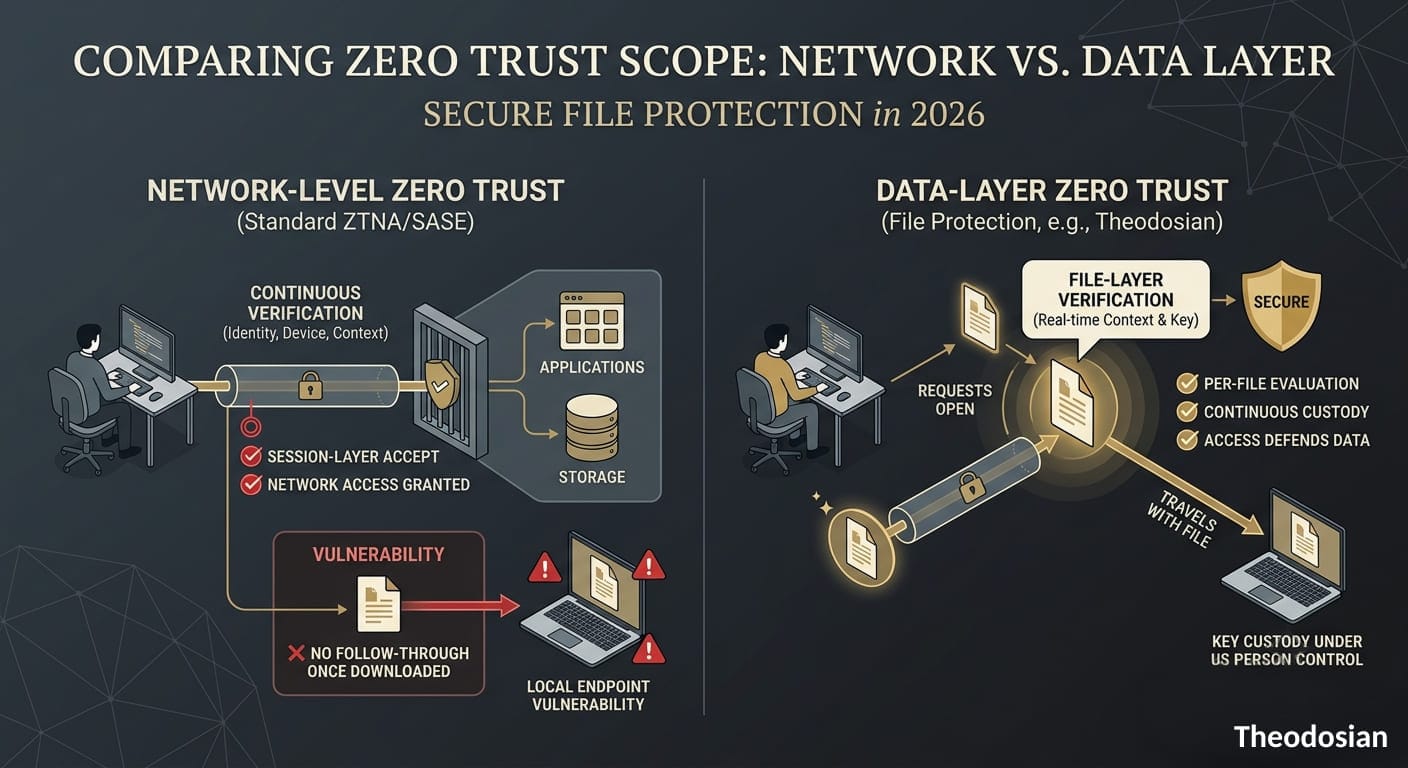
But what happens when an authorized user downloads a sensitive file? The session is legitimate, the user is authenticated, and the device is compliant. The file downloads to the endpoint — and from that point forward, the network's zero trust controls have nothing to say about what happens to it.
What Does "Zero Trust" Actually Mean, and Why Does It Matter for File Security?
Zero trust is a set of architectural principles, not a product category. NIST SP 800-207 defines it around one core idea: access decisions should be made based on continuous verification of identity, device posture, and context — never based on implicit trust from network location.
The access decision zero trust was originally designed to govern: "should this user, on this device, from this network, be allowed to reach this application?"
That's a network access decision. And zero trust at the network layer has been implemented well by a generation of vendors.
What most implementations still don't address is the data access decision: "should this user, on this device, in this context right now, be allowed to open this specific file?"
Those are different questions. The network zero trust decision happens once, at session establishment. The data zero trust decision should happen every time a file is opened, regardless of where the file is or how it got there.
Where Do Network-Level Zero Trust Solutions Fall Short for File Protection?
The gap isn't a design flaw; it's actually a scope limitation. Network zero trust controls access to systems. Data zero trust controls access to data. Files routinely move into environments that network zero trust cannot follow.
Downloaded to endpoints: An authorized user downloads a file to their laptop to work offline. The network session was legitimate. The download was authorized. Once the file is on the local drive, it's outside the network access control layer entirely.
Shared externally: A file moves from your SharePoint to a partner's Google Drive, to a contractor's Dropbox, to an email attachment. Each hop crosses a platform boundary. Each hop is potentially outside your organization's zero trust policy enforcement.
Accessed through personal or unmanaged devices: A user reaches a file through a personal device outside your MDM scope. The network zero trust control may block the session, or the user finds a path around it. Either way, the file's protection depends on the network control holding, which it often doesn't in practice for remote and hybrid teams.
Accessed by non-human identities: AI agents, automated workflows, and service accounts access files without going through the human authentication flow. Network zero trust was built for human sessions. Non-human access patterns are increasingly common and increasingly outside those tools' original scope.
In each scenario, the network said "yes" legitimately. What happened to the file afterward is a different problem.
What Should Zero Trust Security Solutions Do for Files Specifically?
Zero trust applied to files means the access verification follows the file, not just the session. Every time a file is opened, regardless of which platform it's on or which device it's accessed from, the request is evaluated against current policy.
That evaluation should cover:
- Identity: who is making the request, verified against an authoritative identity provider
- Device posture: managed, compliant, and recognized — or not
- Location: is this request originating from an expected geography?
- Network context: corporate network, VPN, or unknown public network?
- Temporal signals: is this access happening during normal hours for this user?
- Behavioral baseline: does the access pattern match what this user normally does?
When those signals are consistent with authorized access, the file opens. When they're anomalous, access is denied or stepped up to additional verification. When bulk access patterns signal exfiltration, the response should be immediate — not waiting for a human to review a SIEM alert 48 hours later.
This is zero trust applied to the data layer rather than the network layer. "Never trust, always verify" — applied to the file itself, every time it's opened, in any environment.
📋 The Ultimate Test for Your File Security: Offboarding
When an employee leaves, or a contractor is offboarded, network-level deprovisioning does not erase the sensitive files already sitting on their local drives. True zero trust means their access to those specific files vanishes instantly by design, not by manual checklist. Audit your offboarding data protection workflows before your next transition.
How Do the Leading Zero Trust Security Solutions Compare for File Protection?
| Solution | Zero Trust Scope | File-Level Protection | After Download? | Key Strength |
|---|---|---|---|---|
| Zscaler (ZIA/ZTNA) | Network sessions, application access | Platform-level | ❌ No | Best-in-class ZTNA for remote access |
| Palo Alto Prisma Access | SASE/ZTNA — network + app | Platform-level | ❌ No | Integrated SASE, strong threat prevention |
| Microsoft Entra / Conditional Access | Identity + device for M365 sessions | M365 ecosystem only | ❌ Outside M365 | Tight integration with M365 workloads |
| Cloudflare Zero Trust | Network sessions, application access | Platform-level | ❌ No | Developer-friendly, global edge |
| Kiteworks | Managed file transfer workflows | Within Kiteworks only | ❌ No | Compliance-grade controlled transfer |
| Theodosian | File-layer access control + encryption | Per-file, travels with the file | ✅ Yes | Zero trust applied at the data layer |
The tools above the last row aren't lesser zero trust solutions — they're category-defining products in their respective segments. Zscaler, Palo Alto, and Cloudflare govern who can reach systems; that's exactly what they were built to do, and they do it well.
The architectural difference is scope. Those solutions ask "should this user reach this application?" at the session layer. Theodosian asks "should this user open this file?" at the file layer — on every access, across every environment.
Both questions need answers. Most organizations have the session-layer question covered. The file-layer question is where the gap lives.
Which Zero Trust Approach Actually Protects Files After They Leave the Network?
File-layer zero trust means protection embedded in the file itself. Every access request is verified against a real-time policy evaluation — independent of which network, platform, or device the file happens to be on at the time of the request.
Theodosian implements this with context-aware access controls evaluating identity, device compliance status, location (IP, GPS, country), network type, time, and behavioral anomaly signals on every file open event. The evaluation happens in real time. There's no cached authorization from a previous session. A user who authenticated legitimately at 9am on a managed corporate device doesn't automatically have access at 11pm from an unknown device in a different country.
When signals are anomalous, response scales with risk. An unrecognized device triggers step-up MFA. Unexpected geographic origin combined with off-hours timing triggers access denial. Bulk access patterns — the behavioral fingerprint of exfiltration — trigger Drop the Gate: automatic freeze of access to protected files, step-up MFA required to restore, and immediate security team notification. The response doesn't wait for a human to review an alert. The file defends itself.
The architecture: FIPS 140-3 validated AES-256 encryption per file, with a unique key per file. Theodosian's patent-pending zero-knowledge architecture means your organization holds the decryption keys — not Theodosian, not your cloud provider. This satisfies ITAR's US Person key control requirement (22 CFR § 120.54) and CMMC's SC.L2-3.13.10 by design.
Every access event generates a full audit log: user identity, file name and sensitivity classification, device type and compliance status, timestamp, location, network type, and policy outcome. That log exists at the file layer — meaning it covers access events across SharePoint, Google Drive, Dropbox, Box, Windows file servers, NAS shares, and local endpoints in a single coherent record.
Deployment: Days, not months. No data migration. Two-week proof of concept. Integrations with SharePoint/OneDrive, Google Drive/Workspace, Dropbox, Box, Windows file servers, NAS shares. Identity providers: Active Directory, Okta, Google Workspace, SAML/OIDC.
Enforce True Zero Trust Wherever Your Files Move
A secure network gate is meaningless if the files inside it aren't cryptographically isolated. Real-time context validation should happen on every single click, preventing credential theft and lateral exfiltration natively.
FAQs: Zero Trust File Protection
What is zero trust security and how does it apply to files?
Zero trust security is an architectural model built on the principle of "never trust, always verify." Access decisions are made through continuous verification of identity, device posture, and contextual signals — not based on network location. Applied to files specifically, zero trust means every access request to a sensitive file is evaluated in real time, regardless of which platform the file is on, which device the request comes from, or whether the user has previously been authenticated. This is distinct from network-level zero trust, which verifies who can reach which systems but doesn't follow files after they're downloaded, shared externally, or synced to endpoints.
What is the difference between ZTNA and zero trust data protection?
ZTNA (Zero Trust Network Access) controls access to applications and systems — it replaces the traditional VPN model by verifying identity and device posture before granting network-level access to specific resources. Zero trust data protection applies the same "never trust, always verify" principle to the data layer: every access to a specific file or record is evaluated in real time, regardless of whether the user already has network access. ZTNA governs the network session; zero trust data protection governs what happens to the data after the session is established. The two are complementary. Organizations with strong ZTNA implementations often still have unprotected files once those files are downloaded to endpoints or shared outside managed environments.
How does zero trust file security support CMMC and ITAR compliance?
CMMC Level 2 and ITAR both require access controls that verify authorization at the data layer, not just the network layer. CMMC's AC.L2-3.1.1 requires organizations to limit system access to authorized users — which zero trust data controls implement by evaluating access on every file open event against current context. CMMC's AU domain requires audit logs capturing who accessed which CUI file, from where, and when — exactly what per-file audit logging provides. ITAR's encryption safe harbor (22 CFR § 120.54) requires FIPS-validated encryption with US Person key control — which zero-knowledge, file-layer encryption satisfies architecturally. These aren't interpretations of the regulations. They're the specific practices the frameworks were written to require.