
Every secure file sharing platform marketed to healthcare organizations will offer a HIPAA Business Associate Agreement. Most will mention encryption. Several will have compliance pages that reference the Security Rule's technical safeguards.
But none of that tells you what happens when a PHI file leaves the platform.
A billing specialist emails a claims file to a revenue cycle vendor. A physician downloads a patient record to review before a consultation. A specialist receives a referral attachment through a portal and saves it to their local drive. In each case, the platform logged a clean transfer. The PHI is now outside it.
This comparison covers the platforms most commonly deployed in healthcare file sharing environments, what each one genuinely protects, and the gap they all share, along with what fills it.
What Makes a File Sharing Solution Genuinely HIPAA Compliant?
The minimum bar for HIPAA compliance in a file sharing context is a Business Associate Agreement and a reasonable implementation of the Security Rule's technical safeguards. But "HIPAA compliant" as a marketing claim can cover a wide range of actual protection levels.
The meaningful questions to ask about any platform:
Does the BAA cover your actual use case? A BAA means the vendor agrees to handle your ePHI in accordance with HIPAA requirements. It does not guarantee the platform's security architecture will satisfy your specific technical safeguard obligations. Review the BAA for scope limitations.
Where does the encryption apply? Most healthcare file sharing platforms encrypt data in transit and at rest within their own storage. Neither of those protections travels with the file when it’s downloaded or shared externally.
Who controls the encryption keys? 45 CFR § 164.312(a)(1) includes encryption and decryption as an addressable implementation specification. Your organization is responsible for the safeguards, not your vendor. If your vendor controls the keys, a vendor breach or a compromised vendor administrator can expose your ePHI.
What happens to the audit trail when a file leaves the platform? HIPAA's audit controls requirement (§ 164.312(b)) applies to all systems containing or using ePHI. If downloading a file to an endpoint removes it from your platform's audit trail, you have a logging gap for the most common access pattern in healthcare workflows.
With those questions established, here is how the major platforms perform.
How Does Microsoft 365 Handle Healthcare File Sharing?
Microsoft 365 is the incumbent for most large healthcare organizations, and for good reason: it offers a HIPAA BAA and deep integration across clinical and administrative workflows, with standard and premium tiers providing significant security controls within the M365 ecosystem.
Where coverage is strong: Within SharePoint, OneDrive, and Teams on managed devices, Microsoft provides extensive controls that can manage and encrypt sensitive data using native classification labels. Audit logging through the Unified Audit Log covers access events for ePHI within M365. For organizations whose PHI stays almost entirely within M365, the coverage is meaningful.
Where it gets complicated: Files that leave M365 — downloaded to a personal device, saved to a non-Windows endpoint, opened in a non-Microsoft application, shared via a non-M365 portal — exit the Microsoft protection boundary. Standard classification labels that encrypt documents may not render correctly outside the M365 ecosystem, depending on client configuration.
Most organizations find that applying advanced file-level protection across their general PHI environment introduces significant friction, leading them to use it only for their most sensitive subset of files.
Is Your Microsoft HIPAA BAA Giving You a False Sense of Security?
Your M365 environment might be compliant, but the PHI files that leave it aren't. Your compliance obligation doesn't stop at the platform's edge. Your protection shouldn't either.
How Does Kiteworks Handle Secure Healthcare File Sharing?
Kiteworks positions itself as a Private Content Network — a secure platform for managing regulated content transfers, including healthcare file sharing, secure email, and managed file transfer workflows. It holds FedRAMP Moderate Authorization and offers a HIPAA BAA.
Where coverage is strong: File transfers through the Kiteworks platform are encrypted in transit and at rest within the Kiteworks environment. Audit logs capture who sent what to whom, when, and through which channel — providing the file transfer audit trail that HIPAA's audit controls requirement demands for transfer events. For organizations whose primary HIPAA compliance challenge is controlled file transfer between healthcare entities, Kiteworks addresses that use case directly.
Where it stops: Kiteworks's protection exists within the Kiteworks environment. A file downloaded from the platform exits that protection. The recipient's local environment becomes the security boundary, and Kiteworks has no visibility into or control over what happens there.
Key management: Kiteworks supports organization-managed encryption keys, addressing § 164.312(a)(1).
How Does Virtru Handle HIPAA-Compliant File Sharing?
Virtru is an email-centric encryption platform with a HIPAA BAA and strong integrations with Gmail and Outlook. For healthcare organizations whose primary PHI sharing challenge is email attachments — referrals, records requests, billing communications — Virtru provides a practical solution.
Where coverage is strong: Virtru encrypts email content and attachments and allows senders to set access controls, expiry dates, and revocation on individual messages. The recipient authenticates to access the decrypted message and attachment. For email-based PHI sharing between healthcare providers and their business associates, Virtru provides a documented encryption layer with audit logging for each message.
Where it stops: Virtru's protection model is email-attached. PHI that lives in shared drives, clinical portals, EHR exports, or any channel that is not email is outside Virtru's scope entirely. For organizations whose PHI sharing spans multiple channels, Virtru solves one part of a multi-channel problem.
Key management: Virtru's Private Keystore option provides organization-controlled keys.
How Does Google Workspace Handle HIPAA File Sharing?
Google Workspace offers a HIPAA BAA for covered services and is widely used in smaller practices, health tech companies, and clinical research environments. Google Drive with shared drives provides a common file-sharing environment for healthcare teams.
Where coverage is strong: Google Workspace encrypts data in transit and at rest within Google's infrastructure. Within the Workspace environment, sharing controls and audit logging through the Admin Console provide visibility into access events for ePHI stored in Drive, Docs, Sheets, and related services.
Where it stops: Google Workspace's encryption is infrastructure-level, not file-level. Downloaded files exit Google's protection. The HIPAA BAA covers Google's handling of ePHI within Workspace; it does not extend protection to ePHI that has been exported from the environment. Google Workspace Encryption (client-side encryption) provides additional control but with similar trade-offs to Microsoft Double Key Encryption: limited functionality, compatibility constraints.
How Does File-Level Encryption Address the Gap All These Platforms Share?
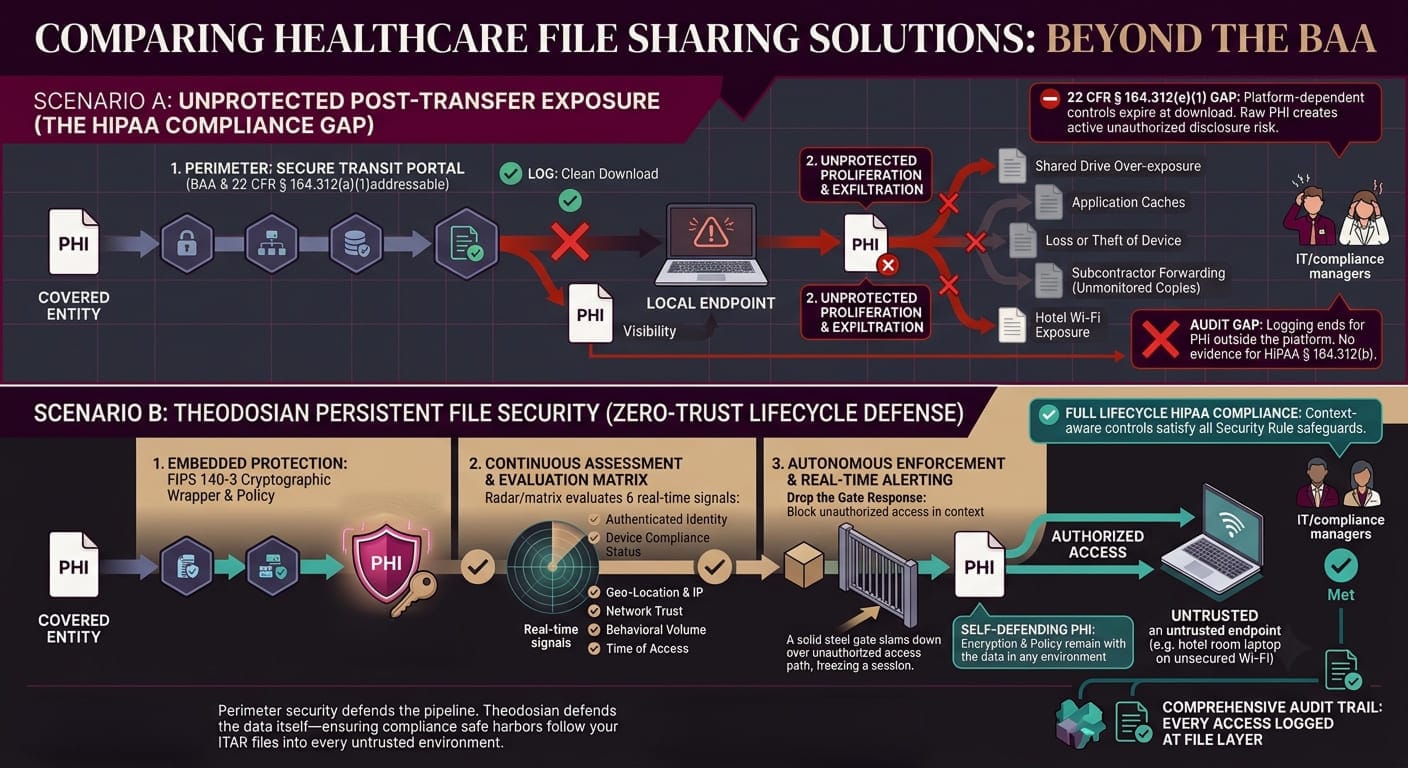
The limitation across every platform above is structural: they protect ePHI within their own environment. The file that leaves — downloaded, emailed, shared externally — exits that protection.
HIPAA's technical safeguards are not scoped to your primary platform. They apply to ePHI "created, received, maintained, or transmitted." For files that travel beyond your primary system — which is most clinically active PHI — the safeguards need to travel with the file.
File-level encryption embeds protection in the file itself. Theodosian applies FIPS 140-3 validated AES-256 encryption at the file layer, with unique keys per file and context-aware access controls that evaluate every access request in real time — regardless of which environment the file is currently in. A PHI file shared with a billing vendor, downloaded by a physician, or exported for a legal hold carries its encryption and access controls into that environment.
When an access request comes in — human or system — Theodosian evaluates: authenticated identity, device compliance status, location, network type, time, and behavioral context. Access is granted or denied at the file layer, not at the boundary of a managed platform. The full access event is logged regardless of which environment the access occurred in.
For HIPAA specifically:
- § 164.312(a)(1) Access Control: Policy is embedded in the file and evaluated on every access, wherever the file is
- § 164.312(b) Audit Controls: Every access event is logged at the file layer, including access outside the primary platform
- § 164.312(e)(1) Transmission Security: Files carry their encryption into recipient environments
- Zero-knowledge key management: Your organization controls the decryption keys, not Theodosian
Theodosian deploys in days with no data migration and integrates with the platforms already in your environment — SharePoint, OneDrive, Google Drive, Dropbox and Windows file servers.
Which Healthcare File Sharing Solution Is Right for Your Organization?
| Platform | HIPAA BAA | File-level encryption | Protects files after download | Organization-controlled keys |
|---|---|---|---|---|
| Microsoft 365 + Purview | ✅ | Within M365 only | ❌ (Advanced features limited) | Advanced features only (limited) |
| Kiteworks | ✅ | Within platform only | ❌ | ✅ (configured) |
| Virtru | ✅ | Email only | Email only | Option (Private Keystore) |
| Google Workspace | ✅ | Within Google only | ❌ | Client-side encryption (limited) |
| Theodosian | ✅ | Per-file, everywhere | ✅ | ✅ (zero-knowledge) |
Platform fit depends on where your PHI compliance gap actually lives.
If your challenge is email-based PHI sharing between providers and payers: Virtru addresses that directly.
If your challenge is secure file transfer and workflow management between healthcare entities: Kiteworks is purpose-built for that use case.
If your PHI routinely moves beyond your primary platform — downloaded to endpoints, shared with external parties, exported for billing, legal, or research purposes — the protection layer needs to follow the file, not stay behind in the platform. That requires a different architecture.
Don't Just Tick a HIPAA Box. Genuinely Protect Your Patient Data.
Relying on platform security is reactive. Building data protection that follows the file is proactive. Genuinely secure healthcare file sharing requires data that defends itself, wherever it travels.
FAQs: Healthcare File Sharing Compliance
What features should I look for in a secure healthcare file sharing platform?
At minimum: a signed HIPAA Business Associate Agreement, encryption in transit and at rest, unique user identification and access logging, and a documented process for revoking access. Beyond the minimum, evaluate whether the platform's protection extends to files after they are downloaded or shared externally — most platforms only protect ePHI within their own environment. For organizations handling PHI that regularly moves to endpoints, external partners, or non-primary-system environments, file-level encryption that travels with the file provides stronger alignment with HIPAA's technical safeguard requirements than platform-only protection.
Does a HIPAA BAA mean a file-sharing platform is fully HIPAA compliant?
A Business Associate Agreement is a contractual requirement — it establishes that the vendor will handle ePHI in accordance with HIPAA. It does not guarantee the platform's technical architecture meets your specific Security Rule obligations. Covered entities remain responsible for conducting a risk analysis, implementing appropriate technical safeguards, and ensuring that ePHI is protected across its full lifecycle. A BAA is the starting point, not the finish line.
Can healthcare providers share PHI files via email?
Yes, with appropriate safeguards. HIPAA does not prohibit email communication about patients, but unencrypted email transmission of ePHI creates compliance exposure. The Security Rule's transmission security requirement (§ 164.312(e)(1)) includes encryption as an addressable implementation specification for ePHI sent over electronic communications networks. In practice, most compliance advisors recommend encrypting any email containing ePHI and using a platform that provides a HIPAA BAA. Patients can also consent to receive their own information via unencrypted email after being informed of the risks.
What is a HIPAA Business Associate Agreement and when is it required?
A Business Associate Agreement (BAA) is a written contract between a covered entity and a business associate — any vendor or partner that creates, receives, maintains, or transmits ePHI on the covered entity's behalf. It is required under the Privacy Rule whenever a vendor handles ePHI as part of their service. For file sharing platforms, this means any platform where ePHI is stored, transmitted, or processed must have a signed BAA in place before use. Operating without a BAA when one is required is itself a HIPAA violation, regardless of whether a breach occurs.