
Every enterprise file encryption vendor will tell you the same things: FIPS-validated encryption, granular access controls, compliance-ready audit logs. The distinctions only become visible when you ask: where does the protection end?
A file that is encrypted inside a platform is protected within that platform. The moment it is downloaded to an endpoint, emailed to a partner, or shared through a collaboration tool the platform was not designed for, the encryption boundary is crossed. Whether protection survives that crossing depends on the architectural approach, not the marketing claims.
This comparison covers the five most commonly evaluated enterprise file encryption platforms, what each one genuinely does, and what each one leaves unprotected.
What Should Enterprise File Encryption Do?
Before comparing platforms, it is worth being explicit about what encryption needs to accomplish in a real enterprise environment, because the requirements are broader than most vendor comparisons acknowledge.
Protect files in storage: Data at rest inside the platform should be encrypted. This is table stakes. Every platform below satisfies it.
Protect files in transit: Data moving between systems should be encrypted in transit. Also table stakes. Every platform below satisfies it.
Protect files after they move: This is where platforms diverge. Files in enterprise environments move constantly — downloaded to endpoints, shared with external parties, synced across devices, emailed to business partners. Encryption that ends at the platform boundary leaves the most common access patterns unprotected.
Maintain organizational key control: The organization — not the vendor — should control the cryptographic keys that protect sensitive data. This satisfies CMMC SC.L2-3.13.10, ITAR's US Person key control requirement, and general security hygiene: a vendor breach should not expose your data.
Generate audit trails at the file layer: Who accessed which file, from where, on which device, at what time — regardless of which platform the file was on when the access occurred. Platform-level audit logs stop at the platform boundary. File-layer audit trails follow the file.
With those criteria established, here is how each platform performs.
How Does Virtru Handle Enterprise File Encryption?
Virtru is an email-centric encryption platform built around Gmail and Outlook integrations. It has FIPS 140-3 validated cryptography, a HIPAA-compliant configuration, and a well-designed user experience that minimizes friction for end users.
What it protects: Email content and attachments. When a user sends a protected email through Virtru, the message and its attachments travel with per-message encryption. The recipient must authenticate to access the content. The sender can revoke access, set expiry, and see access logs for each message.
Where protection ends: Any file not transmitted via Virtru-protected email. Files stored in shared drives, collaboration platforms, or project management tools are outside Virtru's scope. Virtru protects one channel of a multi-channel data movement problem.
Key management: Virtru's Private Keystore option provides organization-controlled keys, satisfying the key control requirement for email-transmitted content.
Best fit: Organizations whose primary sensitive data movement happens through email and who need a documented encryption wrapper for those transmissions.
How Does Kiteworks Handle Enterprise File Encryption?
Kiteworks is a Private Content Network — a secure platform for managed file transfer, secure email, secure file sharing, SFTP, and enterprise content collaboration. It holds FedRAMP Moderate Authorization and is widely used in regulated industries including defense, healthcare, and financial services.
What it protects: Files transferred and stored within the Kiteworks environment. Kiteworks provides strong encryption in transit and at rest within its platform, detailed audit logs for transfer events, and configurable workflow controls for regulated content movement.
Where protection ends: Files downloaded from the Kiteworks platform exit its protection boundary. The platform logs the download event. What happens to the file on the receiving device — whether it is stored in plaintext, forwarded through an unsecured channel, or accessed by unauthorized parties — is outside Kiteworks's visibility and control.
Key management: Kiteworks supports organization-managed encryption keys when configured.
Best fit: Organizations whose primary compliance challenge is controlled, auditable file transfer between known parties through a managed workflow. Not ideal as the sole protection for files that will be actively worked on outside the platform after transfer.
How Does Microsoft Purview Handle Enterprise File Encryption?
Microsoft Purview (formerly Azure Information Protection) provides sensitivity labels, data loss prevention, and encryption capabilities integrated into the Microsoft 365 ecosystem. For organizations already running M365, it is the natural starting point for enterprise file encryption.
What it protects: Files within the M365 ecosystem on managed Windows devices. Sensitivity labels can apply FIPS 140-3 validated encryption to Office documents, with access controls that travel with the document within M365-compatible environments. For organizations whose sensitive data stays substantially within M365, coverage is meaningful.
Where protection ends: Outside M365. Files saved to non-Microsoft cloud storage, opened in non-Microsoft applications, shared with external parties on non-managed devices, or accessed on macOS with certain configurations lose Purview's protection. Sensitivity label encryption may also degrade when files are processed by applications that do not respect the label.
Key management: Double Key Encryption (DKE) provides organization-controlled keys within Purview. DKE trade-offs are significant: Windows desktop only, no M365 Copilot or AI features, no search or indexing for DKE-protected content. Most organizations apply DKE selectively to a small subset of the most sensitive files.
Cost note: Full Purview capabilities require Microsoft 365 E5 at approximately $57 per user per month.
Best fit: Organizations already standardized on M365 whose sensitive data stays substantially within that ecosystem. Less effective as a standalone enterprise file encryption solution for multi-platform environments.
Tired of Platform Lock-In and Steep E5 Licensing Costs?
Secure collaboration shouldn't break your budget or force you into a single ecosystem. See how easy it is to apply persistent, zero-knowledge protection across SharePoint, Google Workspace, and local endpoints.
How Does Seclore Compare for Enterprise File Security?
Seclore is an enterprise Information Rights Management (IRM) platform that applies persistent policy controls to documents — including the ability to prevent copy, print, and save-as operations once a file is open. This is a capability that genuinely distinguishes Seclore from the other platforms in this comparison.
What it protects: Seclore applies policy controls that travel with the file across environments. An authorized user with a Seclore-protected file can open it — but may be prevented from copying content, printing it, or saving an unprotected version. This content-extraction prevention is valuable in environments where the concern is not just unauthorized access but authorized-user content misuse.
Where it gets complicated: Seclore's IRM model creates user friction. Restrictions on copying, printing, and saving produce workarounds in practice — users photograph screens, retype content into unprotected documents, or request policy exceptions. Each workaround creates a new unprotected copy of the sensitive content.
Deployment complexity is significant: implementations typically take months rather than days and require substantial IT involvement. Licensing runs $27,000–$50,000 or more per year for enterprise deployments. For most mid-sized organizations, the cost structure and deployment timeline create barriers.
Seclore also has no autonomous threat response — access anomalies generate alerts, but do not automatically freeze access.
Best fit: Large enterprises with budget and IT capacity for a multi-month implementation, where preventing content extraction from authorized-user sessions is a specific requirement.
How Does Theodosian Compare for Enterprise File Encryption?
Theodosian's architecture applies file-level encryption and access controls at the file layer — meaning the protection is embedded in the file itself and travels with it regardless of environment.
What it protects: Every file Theodosian protects carries FIPS 140-3 validated AES-256 encryption with a unique key per file. When an access request comes in — from a human or from an automated system — context-aware controls evaluate identity, device compliance status, location, network type, time, and behavioral patterns in real time. Access is granted or denied at the file layer, not at the platform boundary.
The protection applies whether the file is in SharePoint, Google Drive, Dropbox, Box, a Windows file server, a NAS share, or on a local drive after download. The file carries its controls into every environment it enters.
Theodosian utilizes a dynamic, on-the-fly decryption architecture during active use. This ensures that files remain protected throughout their active lifecycle without leaving persistent plaintext footprints or temporary cached copies on the local storage, keeping the endpoint exposure window tightly shut.
Key management: Theodosian's patent-pending zero-knowledge architecture means your organization controls decryption keys and Theodosian cannot access them. This satisfies SC.L2-3.13.10 and ITAR's US Person key control requirement by design.
Autonomous threat response: When anomaly signals cross a threshold — bulk access patterns, geographic anomaly, off-hours access from an unrecognized device — Drop the Gate freezes access to protected files automatically, triggers step-up MFA, and notifies the security team. The response does not wait for a human to review a SIEM alert.
Honest gap: Copy, print, and save-as prevention (IRM/DRM capabilities) are on Theodosian’s roadmap and not currently built-in natively. However, enterprise security is rarely an all-or-nothing choice. Theodosian is designed to easily layer into a broader security stack—frequently running alongside existing endpoint DLP systems or specific IRM tools like Seclore to combine automated, zero-knowledge file encryption with strict content-extraction controls.
Deployment: Days, not months. No data migration. Integration with SharePoint, OneDrive, Google Drive, Dropbox, Box, Windows file servers, NAS shares, and identity providers (Active Directory, Okta, Google Workspace, SAML/OIDC).
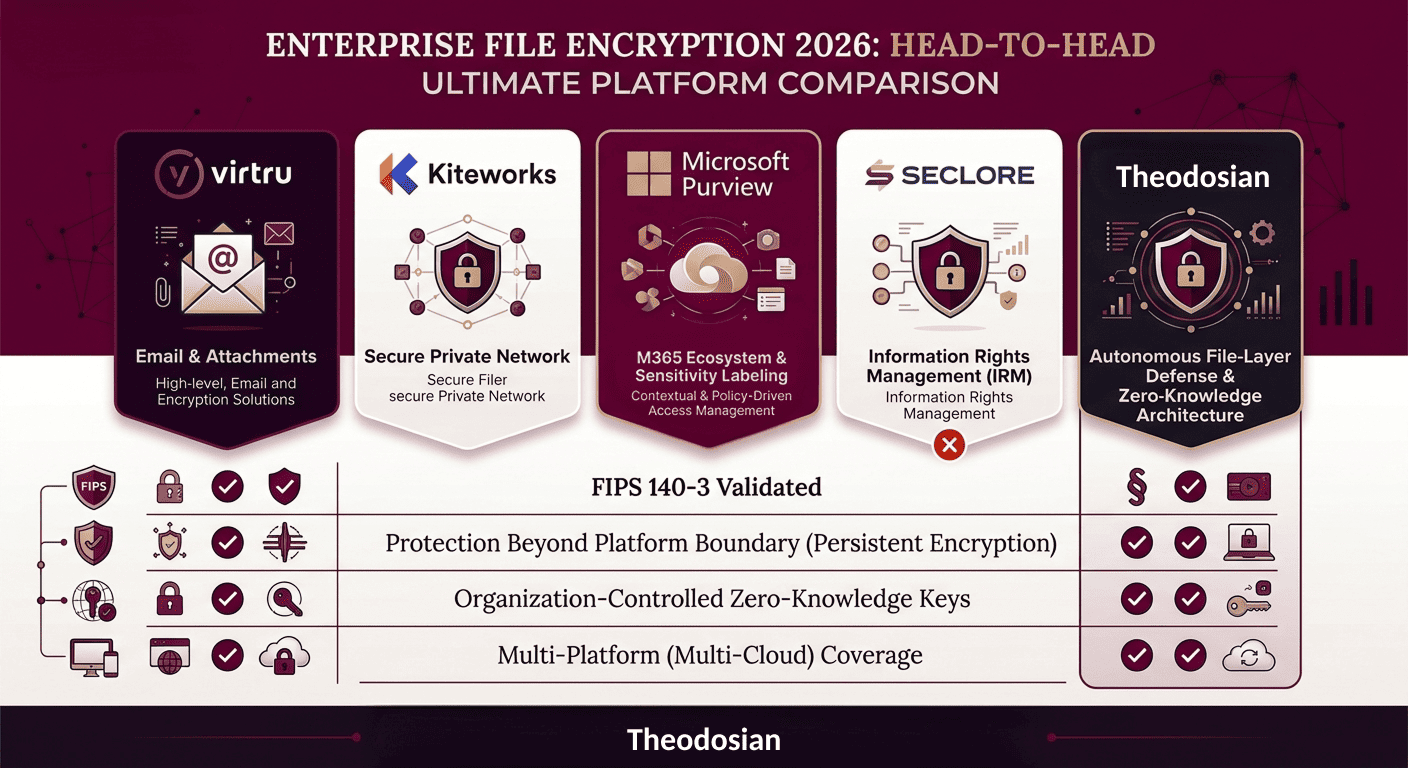
Which Enterprise File Encryption Solution Is the Right Fit?
| Virtru | Kiteworks | Microsoft Purview | Seclore | Theodosian | |
|---|---|---|---|---|---|
| FIPS 140-3 validated | ✅ | ✅ | ✅ | Varies | ✅ |
| Protection after file download | Email only | ❌ | ❌ | ✅ | ✅ |
| Org-controlled keys | Option | ✅ (configured) | DKE only (limited) | ❌ | ✅ (zero-knowledge) |
| In-use encryption | ❌ | ❌ | ❌ | ❌ | ✅ |
| Multi-platform coverage | Email only | Within platform | Within M365 | ✅ | ✅ |
| Autonomous threat response | ❌ | ❌ | Within M365 | ❌ | ✅ |
| Copy/print prevention | ❌ | ❌ | ❌ | ✅ | ❌ (roadmap) |
| Deploy time | Days | Days–weeks | Weeks–months | Months | Days |
| SMB-accessible pricing | ✅ | Mid-market | E5 required | ❌ | ✅ |
Platform fit depends on where your sensitive data actually lives and how it moves:
If sensitive data primarily moves through email and email-attached files: Virtru addresses that channel directly.
If your challenge is secure, auditable file transfer between known parties through a managed workflow: Kiteworks is purpose-built for it.
If your organization is fully embedded in M365 and sensitive data stays substantially within that ecosystem: Purview with Sensitivity Labels provides meaningful coverage.
If your requirement includes preventing content extraction from authorized-user sessions: Seclore is the only platform in this comparison with that capability.
If your sensitive files routinely leave their primary platform — downloaded to endpoints, shared with external partners, accessed across cloud environments — and you need protection that follows the file, zero-knowledge key management, and autonomous response to anomalous access: that is the architecture Theodosian is built around.
Is Your File Security Trapped Inside a Single Ecosystem?
If your data routinely moves across Microsoft, Google, and external partner environments, perimeter tools leave major coverage gaps. See how Theodosian applies persistent, zero-knowledge protection that follows the file everywhere.
FAQs: Enterprise File Encryption
What is the difference between file-level encryption and disk encryption?
Disk encryption (such as BitLocker or FileVault) encrypts the entire storage volume of a device. It protects data if the physical device is stolen or accessed while powered off. Once the device is running and unlocked, all files on the encrypted disk are accessible in plaintext to anyone with OS-level access. File-level encryption encrypts individual files with their own keys and access controls. Even on an unlocked, running device, a file-level encrypted file requires separate authentication to open. File-level encryption also travels with the file — if the file is copied to another device or shared externally, the encryption and access controls remain in place.
How many users does enterprise file encryption software typically support?
Most enterprise file encryption platforms scale from small teams to large organizations, but pricing models and operational complexity vary significantly. Platforms like Virtru and Theodosian are accessible to organizations with as few as 20–50 users. Seclore's pricing structure ($27,000–$50,000+ annually) effectively prices it out of the SMB market. Microsoft Purview's full capabilities require E5 licensing at approximately $57 per user per month, which scales steeply for larger teams. Deployment complexity is as important as license cost — a platform that requires a multi-month implementation carries a higher total cost of ownership than a platform that deploys in days, regardless of the per-user price.
What should I look for in enterprise file encryption software for a remote workforce?
For a distributed or remote workforce, the most important capabilities are: protection that follows files beyond the corporate network (remote users frequently access files from personal devices, home networks, and public Wi-Fi); context-aware access controls that can evaluate device compliance and location even when users are not on a corporate VPN; in-use encryption that prevents plaintext copies from persisting on endpoints; and audit trails that cover access events regardless of network location. Platform-level encryption that depends on corporate network presence to function provides weak protection for remote workforces.