
Every major security investment your organization has made was designed for structured data.
Your SIEM monitors events in databases and application logs. Your DLP tool scans for patterns — social security numbers, credit card formats, and known data structures. Your data warehouse has role-based access controls and query audit logging. Your compliance team can produce a complete lineage for any record in your ERP system.
Now ask the harder question: what do those same controls do with the engineering drawing a supplier just downloaded? The contract your attorney saved to their desktop? The CAD file your engineer put on a USB drive before traveling to a customer site?
Nothing. Those files are unstructured data, and the security infrastructure most organizations have built was never designed for them.
What Is Unstructured Data?
Structured data lives in defined schemas: rows and columns in a database, records in a CRM, transactions in an ERP. It has a predictable format. Security and governance tools can parse it, classify it, and enforce policies on it because they know what to look for.
Unstructured data is everything else. Documents, spreadsheets, PDFs, presentations, CAD files, technical drawings, schematics, emails, images, audio, video, engineering specifications, legal contracts, financial models, research outputs, and design files. It has no fixed schema. It doesn't conform to a pattern. And it comprises 70–90% of the data a typical organization holds, growing at 40–60% per year.
Gartner's August 2025 research found that inquiries about unstructured data management increased approximately 150% in the prior 12 months, because organizations are waking up to a problem that has been quietly accumulating for years. Most governance frameworks, compliance mandates, and security tools were built for the 10–30% of data that's structured. The other 70–90% has been operating largely on trust and policy documents.
Stop Running Your Data Governance on Trust
If 90% of your data is unstructured, and your tools were built for the other 10%, you aren't just facing a gap; you're facing a systemic exposure.
Where the Security Gap Shows Up
The gap shows up in specific, predictable places.
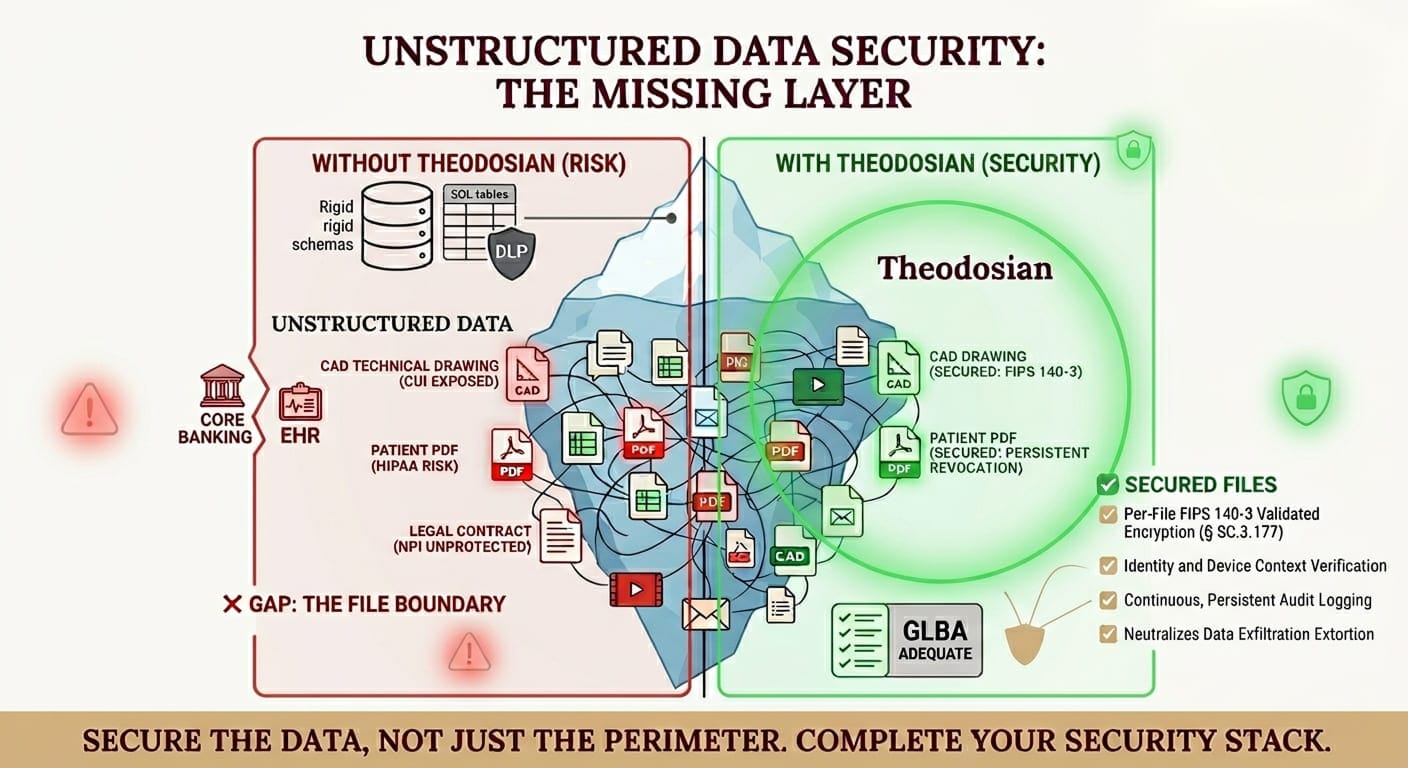
Technical drawings and CAD files in defense and aerospace. An engineer working on a defense subcontract downloads a set of schematics to review at a supplier's facility. The files contain Controlled Unclassified Information governed by CMMC Level 2 requirements. The organization's DLP tool wasn't configured to detect CAD file types. The SIEM logged the download. The file is now on an unmanaged device with no access controls, no encryption, and no audit trail beyond the initial download event. The governance policy said CUI must be protected. Nothing enforced that policy on the file itself.
Clinical records and PHI outside the EHR. A patient referral letter is emailed as a PDF attachment to a specialist. The hospital's EHR system has robust access controls. The email server doesn't. The DLP tool scans for structured PHI patterns — social security numbers, member IDs — but misses the narrative clinical content in the letter. The file is now in an unmanaged inbox with no encryption and no access controls.
Financial models and NPI in transaction workflows. A mortgage lender's processing team shares a customer's financial records — tax returns, bank statements, pay stubs — with an external underwriter via a shared drive. The DLP tool monitors the network perimeter. The shared drive sits outside it. The files have no encryption. If the underwriter's systems are compromised, the NPI is exposed without any technical control to limit the damage.
In every case, the organization had a security program. The program just wasn't built for the files.
Why Standard Security Tools Don't Solve This
DLP was built for structured patterns. Traditional data loss prevention tools look for recognizable data structures — credit card numbers, SSNs, IBAN formats, healthcare member IDs. They work reasonably well on structured outputs. They struggle with unstructured content: a CAD file that doesn't contain any recognizable pattern, a narrative clinical note, a design specification written in engineering language. The Ponemon Institute found DLP false positive rates above 73% — partly because the tool is trying to apply structured-data logic to fundamentally unstructured content.
SIEM monitors events, not file contents. Security information and event management tools tell you when a file was accessed, by whom, and from where. That's valuable audit data. But a SIEM that logs "CAD file downloaded at 3:47 PM by authorized user" isn't protecting the file — it's recording that the file moved. If the file lands somewhere it shouldn't, the SIEM record is forensic evidence after the fact, not a security control.
Perimeter security stops at the boundary. Firewalls, VPNs, and network access controls protect the environment. The moment a file crosses the perimeter — through a legitimate download, an authorized email, a cloud sync, or a USB copy — those controls have nothing to say about the file. The perimeter was the defense. It assumed the data would stay inside it.
Cloud access security brokers see traffic, not files. CASBs monitor and control cloud service usage at the access layer. They can see that a user uploaded a file to an unauthorized cloud service. They can block that upload, but they can't protect the file after a legitimate download, enforce access controls on a file that's already on an endpoint, or revoke access to a file that's been forwarded.
None of these tools are broken; they're solving problems they were designed to solve. The problem they weren't designed to solve is what happens to unstructured files after they move.
How Do You Protect Unstructured Data Security?
Protecting unstructured data requires a different model than protecting structured data. The file itself has to be the security boundary.
Per-file FIPS 140-3 validated encryption means every document, drawing, or file carries its own cryptographic key and access policy—embedded in the content, not in the infrastructure around it. That policy travels with the file. It doesn't matter whether the file is on a managed corporate device, a supplier's laptop, a cloud storage platform, or a USB drive. The encryption and the access conditions are permanently bound to the data.
Context-aware access controls extend the governance model to the file level through continuous verification. A technical drawing classified as CUI can be configured to open only when the user's identity is verified, their device passes a trust check, and they're accessing from an authorized location. These aren't one-time checks performed at the network edge; they are contextual checks carried out every time the file is opened.
Persistent Access Revocation is the natural result of this "always-verify" model. Because the file performs identity and context checks on every access attempt, the organization retains full control. If a supplier relationship ends, a device is lost, or a user account is compromised, access can be revoked centrally. Even if the person was previously authorized and has already downloaded the document, they will be blocked from opening it the next time they try.
This is what unstructured data security means in practice: protection that doesn’t stop at the door and never assumes a previous "allow" is still valid.
The Compliance Dimension
For organizations in regulated industries, unstructured data security isn't a choice; it's the specific control requirement that most organizations are failing to satisfy.
CMMC Level 2 (SC.3.177): Requires FIPS 140-3 validated encryption for CUI. CUI in defense manufacturing is almost entirely unstructured — technical drawings, manufacturing specifications, engineering documents, schematics. A CMMC assessment that finds unencrypted CUI files on contractor devices or unmanaged storage is a failing finding on one of the controls that cannot be deferred to a POA&M.
HIPAA § 164.312 Technical Safeguards: Requires access controls, audit logging, and encryption for ePHI wherever it exists. PHI in clinical environments is predominantly unstructured — referral letters, discharge summaries, pre-authorization requests, and research files. The EHR encrypts what's inside it, and the files that leave it are the gap.
FTC Safeguards Rule § 314.4(d): Requires encryption of NPI at rest and in transit. Financial institutions share NPI as unstructured files constantly — tax returns, bank statements, insurance documents, and customer financial records. The regulation's encryption requirement doesn't stop at the institution's network boundary.
In each case, the regulation is pointing to the same gap: unstructured files that leave governed systems without persistent protection.
A Practical Starting Point
The organizations that close the unstructured data security gap fastest start with the same three steps.
1) Identify your highest-risk file categories
What types of files carry the most sensitive data in your environment? For defense contractors, it's CAD files, technical drawings, and engineering specifications containing CUI. For healthcare organizations, it's clinical documents and PHI attachments. For financial institutions, it's customer financial records. Start with those categories — they're where exposure is highest and where compliance requirements are most specific.
2) Map where those files travel. Follow a file from creation to its final resting place. Who downloads it? Where does it go? How many copies exist, and on what devices? The answer is almost always more distributed than the governance framework acknowledges.
3) Apply file-level protection to the highest-risk files first. You don't have to solve the entire unstructured data problem at once. Start with the files that would generate the most damage — regulatory, financial, or reputational — if they were exfiltrated or accessed without authorization. Per-file encryption can be deployed on those categories first and expanded from there.
Close the File-Boundary Gap in 14 Days
CMMC, HIPAA, and the FTC Safeguards Rule don't care about your perimeter; they care about the data. Theodosian provides the FIPS 140-3 validated encryption and persistent revocation you need to turn "unprotected files" into "self-defending assets.
FAQs: Unstructured Data Security
Why don't DLP tools protect unstructured data?
Traditional DLP tools work by scanning for recognizable data patterns — credit card numbers, social security numbers, and known data structures. These patterns exist in structured data. Unstructured files such as CAD drawings, engineering specifications, or narrative clinical notes don't contain these patterns. DLP tools can monitor whether a file was sent somewhere, but they can't assess whether a CAD file contains export-controlled technical data, and they can't protect the file after it's been legitimately downloaded to an endpoint.
What makes a file "self-defending"?
A self-defending file has its security policy embedded within it, not applied by the environment around it. Per-file encryption means the file carries its own cryptographic key. Context-aware access controls mean the file will only open when the user's identity, device, and access conditions are verified, regardless of where the file is physically located. If those conditions aren't met, access is denied.
Which regulations specifically require unstructured data security?
Several frameworks target unstructured data directly, even if they don't use that terminology. CMMC Level 2 practice SC.3.177 requires FIPS 140-3 validated encryption for CUI, which is primarily unstructured (technical drawings, engineering documents). HIPAA § 164.312 requires access controls and encryption for ePHI regardless of format. The FTC Safeguards Rule requires encryption for NPI in transit and at rest. In each case, the most common failure mode is unstructured files — documents, PDFs, spreadsheets — that leave governed systems without persistent protection.
How does per-file encryption differ from encrypting a storage drive?
Disk or storage encryption protects data while it's at rest on a specific device or storage system. When a file is copied, downloaded, or transmitted, it leaves the encrypted storage and may or may not be re-encrypted in its new location. Per-file encryption embeds a unique cryptographic key in the file itself, protection that travels with the content regardless of where it goes. A file copied from encrypted storage to an unmanaged laptop is still protected. A file sent by email is still protected. A file shared with a subcontractor is still protected.