
Virtru solves a real problem. Email is one of the primary channels through which sensitive files leave organizations — and historically one of the least protected. Virtru applies file-layer encryption to email attachments, gives the sender control over access, and logs delivery and open events. For regulated industries sending sensitive files through Gmail and Outlook, it's a genuine improvement over unencrypted email.
The architectural question isn't whether Virtru works. It's what it works for.
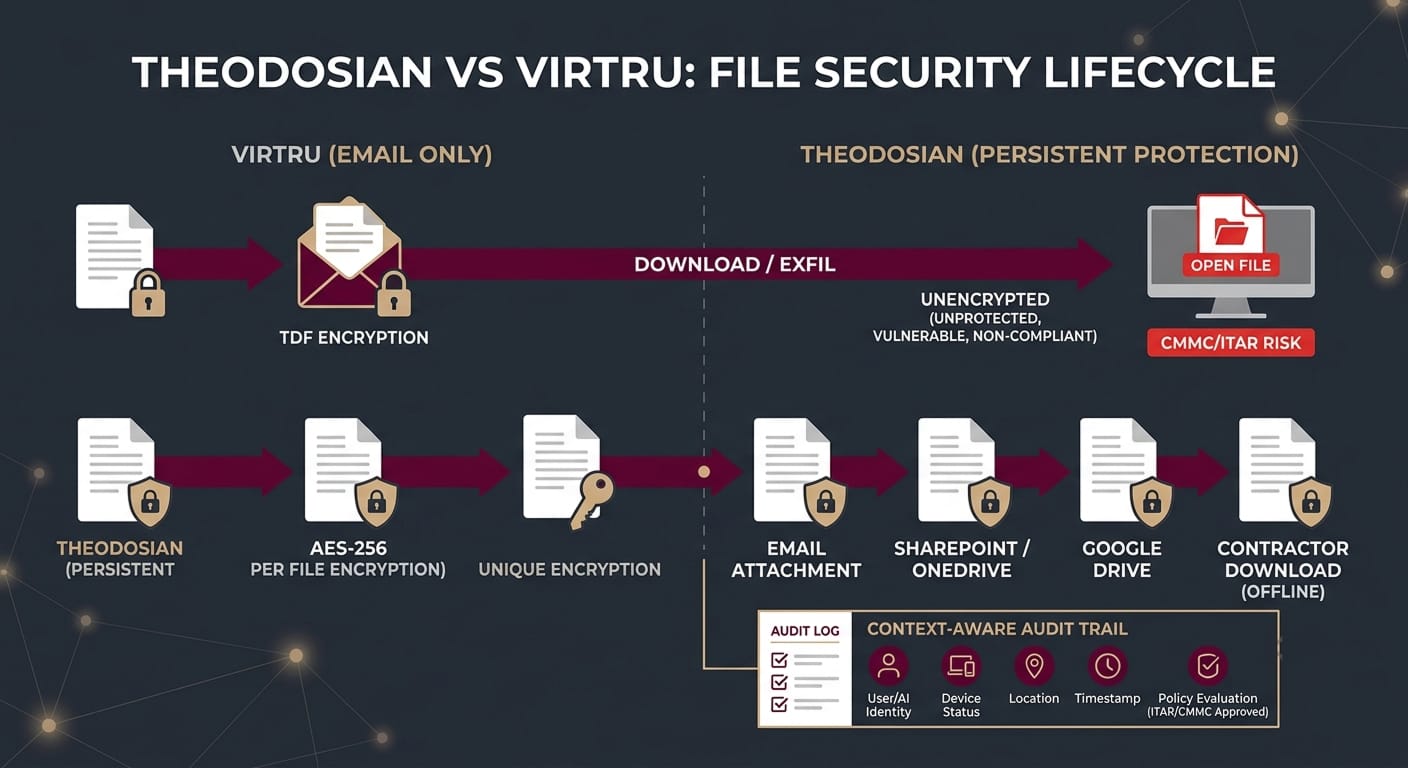
Virtru was built for email. Files that travel through any other channel — SharePoint links, Google Drive shares, Dropbox transfers, direct downloads, USB drives, local endpoints — exit Virtru's protection scope the moment they leave the email ecosystem. The encryption Virtru applied to an attachment doesn't follow that attachment when someone saves it to their desktop and syncs it to a cloud storage folder.
For organizations that need to satisfy CMMC Level 2, ITAR, or HIPAA requirements that follow the data wherever it goes — not just wherever email goes — that scope limitation is the whole problem.
What Is Virtru, and What Does It Actually Protect?
Virtru is a data protection platform focused on email-centric file encryption. Its core capability is end-to-end encryption for Gmail and Outlook using the Trusted Data Format (TDF), an open standard Virtru developed and supports. When a sender uses Virtru to send an email attachment, the recipient needs either the Virtru plugin or access to the Virtru decryption infrastructure to open it.
What Virtru protects well:
- Files sent as email attachments through Gmail or Outlook
- Files shared via Virtru's own secure share links
- Access events for files sent through Virtru's channel
- Revocation of access for email-sent files
What Virtru's architecture doesn't cover:
- Files stored in SharePoint, Google Drive, Dropbox, Box, or any other cloud storage that isn't accessed through Virtru's email integration
- Files downloaded from Virtru-protected email and then saved to a local drive or re-shared through a different channel
- Files accessed by non-email identities: service accounts, AI agents, automated workflows
- Files on Windows file servers, NAS shares, or other on-premise storage
- Cross-platform audit trails covering all of the above
This isn't a criticism unique to Virtru; it's a scope definition. Virtru is an email security product. Organizations that treat it as a comprehensive file protection platform are misidentifying the scope of the problem they've solved.
🛡️ Ensure Compliance Follows Your Data Beyond Email
Don't let your CUI protection stop at the inbox. Experience how seamlessly you can layer FIPS-validated encryption on top of SharePoint, Google Drive, and your local endpoints in minutes.
How Do Virtru and Theodosian Compare for CMMC and ITAR Requirements?
CMMC Level 2 and ITAR impose data protection requirements that follow the data — not the channel. SC.L2-3.13.11 requires FIPS-validated encryption for CUI wherever it exists. SC.L2-3.13.10 requires organization-controlled cryptographic keys. AU.L2-3.3.1 requires audit logging that captures who accessed which file, from where, and when — for every access event, regardless of channel.
| Requirement | Virtru | Theodosian |
|---|---|---|
| FIPS 140-3 validated encryption | ✅ Yes (TDF) | ✅ Yes (AES-256 per file) |
| Encryption after email download | ❌ File unprotected on local drive | ✅ Encryption travels with file |
| SharePoint / OneDrive integration | ❌ Email only | ✅ Native integration |
| Google Drive / Workspace integration | ✅ Gmail integration | ✅ Cross-platform including Drive |
| Dropbox / Box coverage | ❌ | ✅ |
| Windows file server / NAS coverage | ❌ | ✅ |
| Organization-controlled keys (CMMC SC.L2-3.13.10) | ✅ Yes | ✅ Zero-knowledge, customer-held |
| Audit log: post-download access events | ❌ Email open events only | ✅ Per-file, per-access, any platform |
| Context-aware access (device, location, behavior) | ❌ | ✅ Real-time on every file open |
| Autonomous threat response (Drop the Gate)** | ❌ | ✅ |
| Deployment time | Days | Days |
| ITAR US Person key control | ✅ | ✅ |
The primary gap: Virtru's audit trail stops at the email client. A CMMC assessor checking AU.L2-3.3.1 wants to see who accessed a specific CUI file, on which device, from which location, and at what time — for every access event, including access events that happen after the file was downloaded from the email attachment.
Virtru doesn't have that data because Virtru doesn't see that event. The file left Virtru's environment when the recipient downloaded it.
Where Does Virtru Fit Well, and Where Does It Fall Short?
Where Virtru is a strong choice:
Organizations whose primary security concern is email — specifically, sensitive files sent through Gmail or Outlook to external parties who might forward them or lose access to them. Virtru's Google Workspace integration in particular is well-regarded: its native Gmail experience is smooth, and its HIPAA configuration is solid for covered entities whose primary data exchange channel is email.
Virtru holds FedRAMP Moderate Authorization, which satisfies federal security requirements for the use of Virtru's SaaS platform itself. For federal agencies and contractors evaluating cloud tools against FedRAMP requirements, that's a meaningful certification.
For organizations whose file security problem is primarily email-shaped — a law firm sending privileged documents, a healthcare organization sending referral packets, a contractor sending deliverables — Virtru addresses the problem competently.
Where Virtru falls short:
Defense contractors with CMMC Level 2 or ITAR obligations don't have an email-shaped file security problem. CUI lives in SharePoint. Schematics are in shared drives. Proposals are in Dropbox. Engineers download files to local machines and work offline. Sub-tier suppliers access files through a variety of channels, not all of which route through email.
For that environment, email-layer encryption covers one channel out of many. The files that don't travel through email — which is most of them — aren't protected by Virtru's approach.
The same limitation applies in healthcare for organizations sharing ePHI beyond email: EHR-generated PDFs saved to shared drives, imaging files in PACS systems, billing records exchanged through portals. HIPAA's technical safeguards apply to ePHI wherever it exists, not just in email attachments.
What Does Theodosian Do Differently?
The architectural difference is scope: Virtru protects the email channel. Theodosian protects the file itself, in every environment where it exists.
Theodosian applies FIPS 140-3 validated AES-256 encryption to individual files with a unique cryptographic key per file. That encryption doesn't live at the email layer; it lives at the file layer. A file protected by Theodosian carries its encryption into SharePoint, Google Drive, Dropbox, Box, Windows file servers, and local endpoints. If a contractor downloads it, the encryption is on the file on their device. If they copy it to a USB drive, the encryption travels with it.
Context-aware access controls evaluate every request to open a file in real time — regardless of which platform the file is on or which device the request comes from. Identity, device compliance status, geographic location, network type, time of access, and behavioral baseline are all evaluated on every open event. A user who was authorized at 9am on a compliant corporate device doesn't automatically have access at midnight from an unknown device in an unexpected location.
When signals are anomalous, response is automatic. Drop the Gate freezes access to protected files, triggers step-up MFA, and notifies the security team — without waiting for a human to review an alert. That autonomous response is the difference between detecting an exfiltration attempt and containing it.
Theodosian's patent-pending zero-knowledge architecture means your organization holds the decryption keys — not Theodosian, not your cloud provider. This satisfies ITAR's 22 CFR § 120.54 encryption safe harbor and CMMC's SC.L2-3.13.10 by design.
🚀 See True File-Layer Protection in Your Own Environment
Stop relying on channel-specific security. Schedule a demo today to see how our patent-pending, zero-knowledge architecture provides persistent protection across all platforms and endpoints.
Related Reading:
- Theodosian vs. Microsoft Purview: File-Level Control vs. Container Security
- What Are the Best Enterprise File Encryption Solutions in 2026?
- What Are the Best Zero Trust Security Solutions for Protecting Sensitive Files in 2026?
- Does Zero Trust Actually Protect Your Files, or Just Your Network?
- What Are the Best ITAR-Compliant File Transfer Solutions 2026?
FAQs: Virtru vs. Theodosian for High Compliance
What is Virtru used for?
Virtru is an email encryption platform that applies end-to-end file protection to attachments sent through Gmail and Outlook. It uses the Trusted Data Format (TDF), an open standard, to encrypt files at the point of sending and allow senders to control and revoke access to email-sent files. Virtru is well-suited for organizations whose primary security concern is controlling files shared via email — law firms sending privileged documents, healthcare organizations sharing patient records by email, or contractors sending deliverables through email to external parties. It holds FedRAMP Moderate Authorization and has strong Google Workspace integration.
Does Virtru satisfy CMMC Level 2 encryption requirements?
Virtru satisfies the encryption requirement (FIPS 140-3 validated AES-256) and key control requirement (organization-controlled keys) for files sent through its email platform. The gap is coverage: CMMC's SC.L2-3.13.11 requires FIPS-validated encryption for CUI wherever it exists — not just in email. Files stored in SharePoint, shared drives, or local endpoints that weren't sent via Virtru aren't covered by Virtru's encryption. AU.L2-3.3.1's audit logging requirement applies to all CUI access events — Virtru logs email-channel access events, but not access events for files that were downloaded from email and subsequently accessed in another environment. Whether Virtru alone satisfies CMMC Level 2 depends on how thoroughly a contractor's CUI is confined to email — which for most defense contractors, it isn't.
What's the difference between email encryption and file-level encryption?
Email encryption protects files during transmission through an email channel and maintains a connection to the email system that allows the sender to revoke access for email recipients. File-level encryption embeds protection into the file itself — the encryption travels with the file regardless of which platform it's stored on, which channel it was transferred through, or which device it's accessed from. Email encryption solves the email transmission problem. File-level encryption solves the file lifecycle problem — including the period after a file is downloaded from email and lives in a contractor's local environment, a cloud storage folder, or a USB drive. For CMMC and ITAR obligations that follow CUI into downstream environments, file-level encryption is the control that matches the requirement's scope.