
Most organizations evaluating file security for CMMC or ITAR compliance already have Microsoft Purview in place, or are actively deploying it. Sensitivity labels are configured, data classification policies are active, and the compliance workflow is set up.
That investment is well-placed. This post isn't an argument against it.
What it is: a clear-eyed look at a single architectural question that determines whether your CUI is actually protected, or just protected inside Microsoft 365.
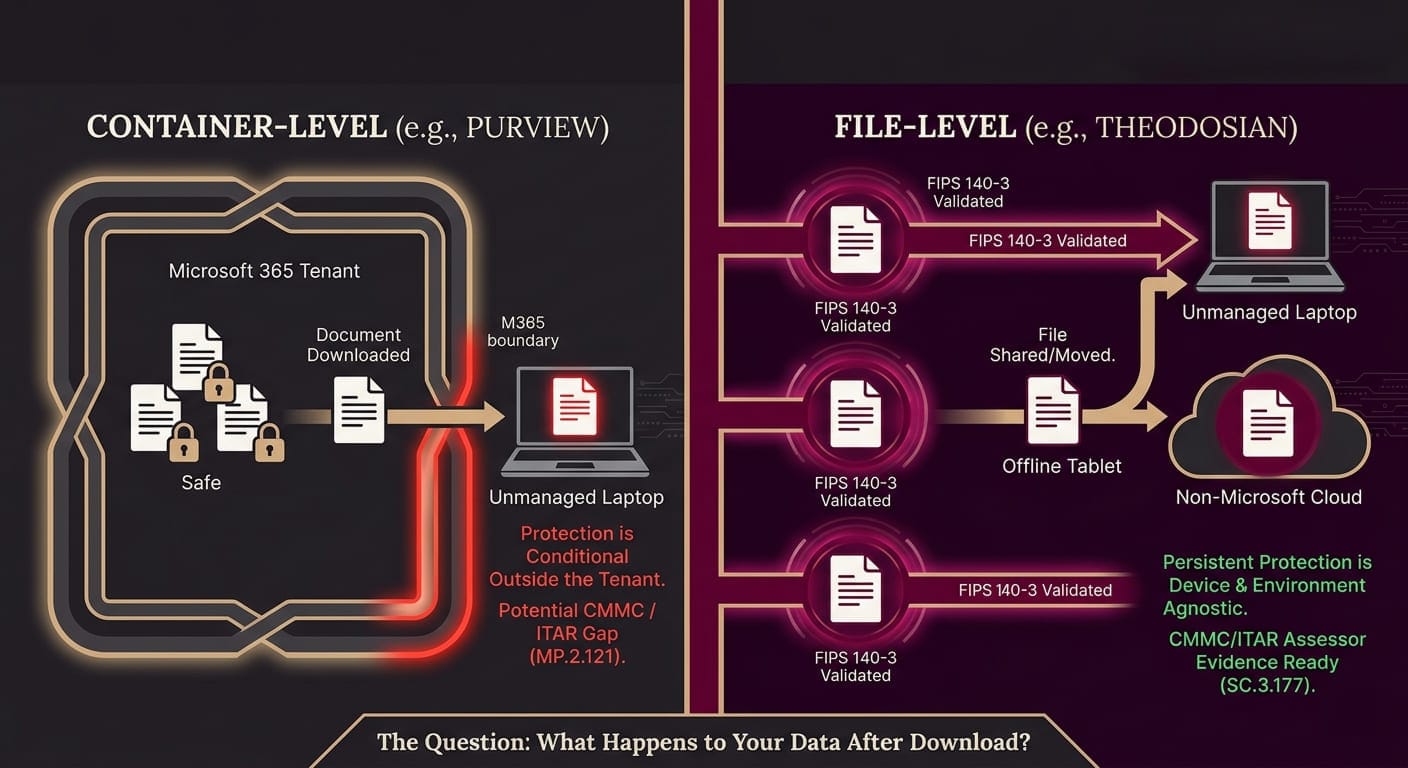
The question is this: what happens to your data after someone clicks download?
The Core Difference
Microsoft Purview Information Protection is a classification and policy enforcement platform. It discovers sensitive data, applies sensitivity labels, enforces policies, and provides comprehensive audit logging across the Microsoft 365 ecosystem. For organizations deeply invested in Microsoft tooling, it covers a significant portion of the governance and discovery surface.
Purview was architected around a specific assumption: that users, devices, and applications stay within the Microsoft 365 environment. When a file crosses that boundary — downloaded to an unmanaged device, forwarded outside the tenant, moved through a non-Microsoft system, or accessed offline — the enforcement model becomes conditional. Protection depends on the receiving environment having the right client software, the right configuration, and a live connection to your tenant.
And it’s not a flaw in Purview, it's an architectural reality. Simply put: Purview protects the container. Theodosian protects the content.
That difference determines what happens to your most sensitive files in every scenario that matters most.
Stop Guessing If Your Encryption Meets SC.3.177
Most "FIPS-validated" claims fall apart under auditor scrutiny. In just 14 days, we’ll help you generate a FIPS 140-3 evidence package in your own environment.
Where Purview's Protection Ends
Unmanaged devices: Sensitivity label enforcement relies on Microsoft 365 client applications being present and the device being enrolled in Intune or joined via Microsoft Entra. A file downloaded to a subcontractor's personal laptop — one that isn't managed by your organization — sits outside that enforcement model. For defense contractors whose supply chains include Tier 2 and Tier 3 subcontractors handling CUI on personal devices, this is a direct gap against MP.2.121, and C3PAO assessors know to look for it.
PDFs in SharePoint: PDF sensitivity labeling in SharePoint and OneDrive is disabled by default. Unless it has been explicitly enabled and tested, PDF files in SharePoint cannot be labeled, won't display existing labels, and sit outside Purview's protection policies. For organizations handling technical drawings, schematics, contracts, or export-controlled documents as PDFs, this configuration gap is an immediate compliance exposure.
Files that leave the Microsoft ecosystem: A labeled file sent to a recipient without a compatible Microsoft 365 client, downloaded into a Linux or macOS workflow, or moved through a non-Microsoft system will carry the label classification marker, but enforcement becomes inconsistent. The label says what to do. The enforcement depends on an environment that may not be there.
Offline access: Purview's enforcement requires a connection to your Microsoft tenant for periodic re-authentication of label policies. In offline environments — field operations, classified facilities, or simply a long-haul flight — enforcement continuity depends on cached credential windows, not live policy validation.
Compromised credentials: Purview enforces access controls based on authenticated identity. If credentials are stolen, the attacker authenticates as the authorized user, and Purview's controls are satisfied. The policy layer doesn't distinguish between the legitimate user and an attacker who acquired their credentials. This matters because 93% of breaches involve stolen credentials or insiders.
What Theodosian Adds
Theodosian's per-file, FIPS 140-3 validated encryption operates at the content layer — below the policy layer, independent of the platform or device environment around the file.
Every file gets its own protection. Context-aware access controls — verified identity, device trust, location, time — govern whether the file can be opened. If those conditions aren't met, access is denied. Not degraded. Not conditionally available. Denied.
The encryption and access policy travel with the file. They don't depend on the recipient's endpoint management status, the presence of a Microsoft 365 client, a live tenant connection, or whether the file is inside or outside the Microsoft ecosystem.
If a file is exfiltrated, there is nothing to read, publish, or monetize. If anomalies are detected by an authorized user, access can be revoked at the file level: immediately, remotely, or retroactively. The file becomes inaccessible, regardless of where it is stored.
This isn't a replacement for Purview. It's the layer that ensures the data is protected wherever Purview's reach ends.
Theodosian and Microsoft Purview: Side-by-Side Comparison
| Capability | Microsoft Purview | Theodosian |
|---|---|---|
| Encryption approach | Sensitivity label triggers platform-managed encryption. | Per-file FIPS 140-3 validated encryption. |
| Protection after download | Conditional on M365 client and device management status. | Persistent — encryption and policy travel with the file. |
| Unmanaged device coverage | Limited — enforcement changes outside Intune/Entra. | Full — protection is device-agnostic. |
| Offline access enforcement | Dependent on the cached credential window. | Context-aware policy enforced at every open attempt. |
| PDF protection in SharePoint | Disabled by default — requires explicit configuration. | Applied at file creation regardless of storage location. |
| Non-Microsoft environments | Label persists; enforcement may not. | Enforcement is environment-independent. |
| Access revocation post-download | Not available for already-downloaded files. | Immediate, retroactive, file-level revocation. |
| Encryption key control | Microsoft-managed (or tenant-managed via Azure Key Vault). | Zero-Knowledge FILE_SEED model — Customer maintains joint custody for sovereign recovery. |
| Audit trail persistence | M365 audit log — requires tenant connection. | Perpetual Audit Logging — Logs are retained for the life of the account to meet ITAR/CMMC requirements. |
| Credential theft protection | None — valid credentials satisfy policy. | Context-aware controls require device trust, location, and time. |
| CMMC SC.3.177 (FIPS-validated encryption) | AES-256 algorithm — CMVP module validation requires documentation. | FIPS 140-3 validated module. |
| CMMC SC.3.187 (key management) | Azure Key Vault — third-party key custody requires assessment scoping. | Zero-knowledge, per-file — organization controls key material. |
| CMMC MP.2.121 (contractor devices) | Gap on unmanaged devices. | Covers managed and unmanaged devices equally. |
| Deployment timeline | Weeks to months for full configuration. | Days. |
The CMMC Assessment Consequences
For defense contractors working toward CMMC Level 2, the architectural gap has specific assessment consequences that go beyond general security posture.
SC.3.177 requires FIPS-validated cryptographic modules for protecting CUI. Purview uses AES-256, but CMMC assessors ask for the CMVP validation certificate number for the specific module in use, not just the algorithm. That certificate requires documentation separate from the standard Purview configuration. If you can't produce the certificate number, the practice may be assessed as partially met.
SC.3.187 requires that your organization manage its cryptographic keys. Purview's default encryption uses Microsoft-managed keys. Theodosian's architecture is designed to answer this directly: it provides zero-knowledge key management where the customer can maintain joint custody of their FILE_SEED lists. This ensures 'Sovereign Continuity'—your organization retains the ingredients needed to recover data independently, keeping the cryptographic heart of your system outside of vendor lock-in and within your assessment boundary.
MP.2.121 requires media protection on contractor-controlled devices. Purview's enforcement on unmanaged contractor devices is limited. This is one of the controls assessors probe most specifically during interviews with contractor teams.
Theodosian's per-file architecture is designed to answer these questions directly: FIPS 140-3 validated module, zero-knowledge key management with Sovereign Continuity, and file-level protection that covers unmanaged contractor devices without additional configuration.
Theodosian and Microsoft Purview: Used Together, They Close the Loop
Purview classifies data and governs policy within Microsoft 365. Theodosian encrypts at the file level and enforces access wherever the file travels.
The classification signal from Purview can drive Theodosian's protection without changing the user workflow. The result is a CMMC-ready architecture that covers both the governance surface — Purview's strength — and the data-layer surface — Theodosian's strength — with assessor-ready evidence generated at every file access event.
For contractors with existing Microsoft investment, adding Theodosian means closing the file boundary gap without rebuilding the compliance stack. The infrastructure stays, and the gap closes.
Ready to Close the Gap Between Purview and the Perimeter?
If your CUI leaves Microsoft 365, your liability shouldn't increase. Secure your technical data with file-level encryption that travels with the document, backed by sovereign key control.
FAQs: File-Level Control vs. Container Security
Does Theodosian replace Microsoft Purview?
No. Purview handles data classification, governance, and policy enforcement within Microsoft 365 — that's valuable, and assessors look for it. Theodosian adds persistent file-level encryption for the scenarios where Purview's enforcement ends: unmanaged devices, files forwarded outside the tenant, PDFs in SharePoint with labeling disabled by default, and offline access. The two layers address different parts of the protection problem.
Does Microsoft Purview satisfy CMMC SC.3.177?
Purview applies AES-256 encryption, but CMMC SC.3.177 requires a FIPS 140-3 validated cryptographic module — not just the algorithm. Assessors ask for the CMVP validation certificate number for the specific module in use. Whether Purview satisfies SC.3.177 depends on which specific Microsoft module is in use and whether it holds a current CMVP validation certificate — documentation that is separate from standard Purview configuration. Theodosian uses a FIPS 140-3 validated module as a core product specification.
What happens to Purview-labeled files on unmanaged contractor devices?
Enforcement of sensitivity label encryption on unmanaged devices — those not enrolled in Intune or joined via Microsoft Entra — depends on the presence of a compatible Microsoft 365 client and a connection to the tenant. On personal devices or subcontractor-owned systems that don't meet those conditions, the enforcement model changes significantly. Theodosian's file-level encryption operates independently of device management status — protection is identical on managed and unmanaged devices.
Can Purview revoke access to a file that's already been downloaded?
Standard Microsoft Purview sensitivity labels generally struggle with retroactive control once a file has left the managed environment. In contrast, Theodosian enforces a mandatory access check every single time a file is opened, regardless of its location.
Because the platform requires a valid FILE_SEED and a verified identity to regenerate the encryption key for each session, access is never "permanent." If a user’s permissions are updated or their identity is disabled in your IdP (Azure AD, Okta), the next access check will fail instantly. The file remains encrypted and becomes inaccessible on the device, effectively providing immediate, remote access termination for files already downloaded to an endpoint.
How long does it take to deploy Theodosian alongside an existing Microsoft 365 environment?
Deployment takes days, not weeks. The 14-day pilot demonstrates the full capability — per-file encryption active on your CUI, working alongside your existing Purview configuration — so you can validate the architecture before committing to full deployment.
Is Theodosian available for organizations without Microsoft 365?
Yes. Theodosian is platform-independent. It provides the same FIPS 140-3 validated per-file protection regardless of the underlying storage or collaboration environment — Google Workspace, Linux environments, or organizations without enterprise Microsoft licensing all get identical file-level protection.