
Your sub-tier supplier just downloaded a CUI package from your Kiteworks portal. The transfer was logged. The channel was FIPS-validated. The file is now on their laptop.
That's where Kiteworks' protection ends. The CMMC SC.3.177 requirement didn't.
This comparison isn't about which platform wins — Kiteworks and Theodosian address adjacent problems, and many defense contractors need both. The question worth answering honestly is: if you're using Kiteworks for CMMC file security, what exactly does that cover, and what does it leave exposed?
What Does Kiteworks Actually Do?
Kiteworks is a content exchange platform built specifically for regulated industries and defense contractors. Its architecture solves the problem of governing how files move between parties: primes to sub-tier suppliers, contractors to government customers, internal teams to external partners — through managed channels with full audit trails.
Core capabilities:
- Secure managed file transfer (SFTP, MFT)
- Secure email for CUI distribution
- Private content exchange networks with defined access controls
- FedRAMP Moderate authorization (since 2017), with FedRAMP High Ready status achieved in February 2025
- FIPS 140-3 Level 1 validated encryption
- Comprehensive per-transfer audit logging
- ITAR and defense sector positioning with explicit DoD compliance support
That FedRAMP Moderate authorization is a genuine, substantive credential. It represents years of continuous monitoring and third-party assessment against a rigorous control baseline. For defense contractors whose primary compliance concern is governed file exchange — sharing technical data packages with the government, receiving CUI from prime contractors through a controlled channel — Kiteworks is a well-designed platform for that specific job.
The key word: that specific job.
Where Does Kiteworks' Protection End?
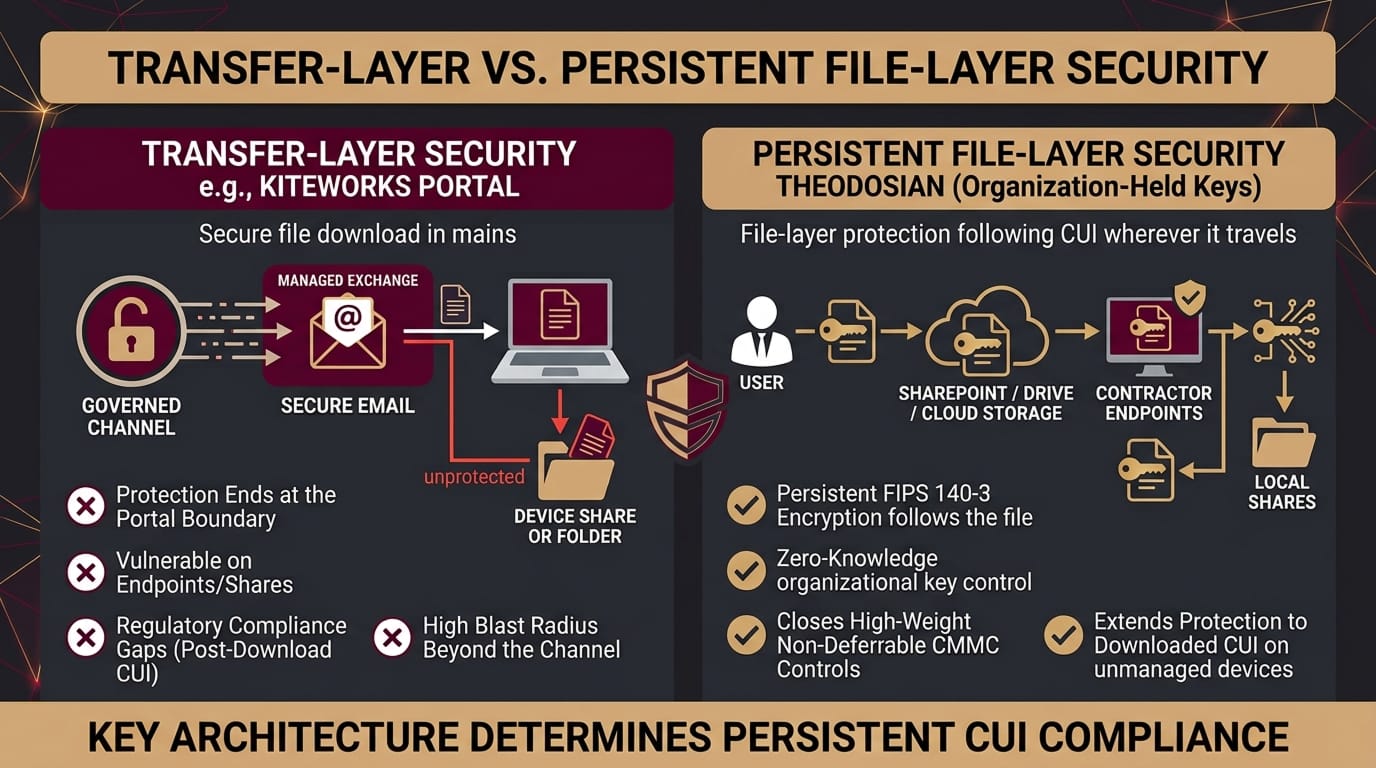
Kiteworks protects files within its managed exchange environment. When a file is downloaded from Kiteworks and lands on a user's device, leaves its portal for an external recipient's system, or gets saved to a local workstation or NAS share, the platform's controls don't follow it.
This isn't a product failure. It's an architectural boundary. Kiteworks is a content exchange platform, not a file-layer security platform. Those are different categories of tools, designed for different threat models.
The CMMC implications are specific:
SC.3.177 requires FIPS-validated encryption for CUI. If CUI is transferred through Kiteworks, that transfer is FIPS-validated. If the same CUI file is then stored on a workstation, synced to a local SharePoint site, or copied to a portable drive, the FIPS requirement applies to those locations too. Kiteworks' transfer channel doesn't satisfy SC.3.177 for CUI that exists outside that channel.
SC.3.187 requires organization-controlled cryptographic keys. Kiteworks manages encryption keys within its platform. The organization controls access through Kiteworks' administrative interface, but the key material is managed within Kiteworks' infrastructure. For organizations with strict ITAR "exclusive organizational control" requirements — where the decryption key cannot be accessible to any third party — Kiteworks' key management model creates a gap.
MP.2.121 requires media protection on contractor-controlled devices. A file downloaded from Kiteworks to a contractor's personal laptop is now on a device likely outside your MDM enrollment. The CMMC control doesn't stop at the edge of your transfer channel.
🛡️ Are Your High-Weight CMMC Controls Truly Covered Beyond the Portal?
Standard managed file transfer stops protecting CUI the moment a file hits a local endpoint or share. Audit your post-download compliance gaps before your C3PAO assessment.
How Do Theodosian and Kiteworks Compare on CMMC's Key Requirements?
| Requirement | Kiteworks | Theodosian |
|---|---|---|
| FIPS 140-3 validated encryption | ✅ FIPS 140-3 Level 1 | ✅ AES-256 per file, unique key per file |
| Zero-knowledge key management | ❌ Platform-managed keys | ✅ Patent-pending, customer-held |
| Organization-controlled keys (SC.L2-3.13.10) | ❌ Kiteworks manages keys | ✅ By design |
| After-download protection | ❌ Transfer channel only | ✅ All platforms + endpoints |
| SC.L2-3.13.11 coverage scope | Within Kiteworks environment | Wherever the file exists |
| MP.L2-3.8.7 (media on contractor devices) | ❌ Ends at download event | ✅ Device-agnostic |
| Per-transfer / per-file audit log | ✅ Transfer events logged | ✅ Every open event, cross-platform |
| SharePoint / OneDrive integration | ❌ | ✅ |
| Google Drive / Workspace | ❌ | ✅ |
| Dropbox / Box | ❌ | ✅ |
| Windows file server / NAS | ❌ | ✅ |
| SFTP / Managed file transfer | ✅ Core capability | ❌ |
| Secure email for CUI | ✅ | ❌ |
| FedRAMP Moderate | ✅ Authorized since 2017 | Runs on FedRAMP Moderate infrastructure |
| ITAR exclusive key control | ❌ Platform-managed | ✅ Zero-knowledge by design |
| Context-aware access (device, geo, behavior) | ❌ | ✅ Real-time on every file open |
| Drop the Gate (autonomous response) | ❌ Alert-based | ✅ Automatic freeze + step-up MFA |
| Deployment time | Weeks to months | Days |
| 2-week POC | ❌ | ✅ |
What Is the Practical Difference Between Transfer-Layer and File-Layer Protection?
Kiteworks protects the channel. Theodosian protects the file.
Channel protection governs what happens during transit: who can send files through the channel, who can receive them, what gets logged about that transfer, and what controls apply to the exchange itself. Kiteworks does this well. The channel is secure.
File-layer protection governs what happens to the file itself, regardless of which channel it came through, which platform it's on, or which device is holding it. A file that was transferred through Kiteworks, downloaded to a laptop, shared internally via email, and saved to a NAS share should carry the same FIPS-validated protection through each of those steps. That's what "protect the content, not the container" means in practice.
For a defense contractor running a real supply chain, the sequence looks like this: a CUI technical data package arrives through your Kiteworks portal. An engineer downloads it onto their workstation. They save a modified version to internal SharePoint. They forward a draft to a sub-tier supplier because provisioning Kiteworks access for a one-time review is more friction than it's worth.
Kiteworks protected step one. Steps two through four sit outside the transfer channel. If those steps involve CUI — and they do — SC.3.177 applies to all of them.
Your blast radius isn't defined by the edges of your Kiteworks environment. It's defined by where CUI actually lives.
Which Organizations Should Use Kiteworks, Theodosian, or Both?
Kiteworks is the right tool when:
The primary requirement is a governed, audited file exchange channel with defense primes and government customers. The organization needs FedRAMP-authorized transfer capability with strong audit trails for inter-organizational CUI exchange. Secure email and managed file transfer for controlled distribution of technical data packages are core workflow requirements.
Theodosian is the right tool when:
The requirement is FIPS-validated, organization-controlled encryption for CUI wherever it exists, not just in a specific transfer channel. SC.3.187 requires zero-knowledge key management — the vendor cannot access decryption keys. Protection needs to follow files to contractor devices, sub-tier suppliers, and internal platforms without requiring those parties to access a specific exchange portal. The non-deferrable SC.3.177, SC.3.187, and MP.2.121 controls need file-layer evidence artifacts for C3PAO assessment.
Both, when:
The organization operates an active supply chain with prime contractors and government customers (Kiteworks as the governed transfer channel) and stores and works with CUI across internal systems, contractor devices, and sub-tier suppliers (Theodosian as the persistent file-layer protection). The CMMC compliance tech stack maps these as separate layers, not competing tools. For how the full stack fits together — GRC, infrastructure, endpoint, file exchange, and file-layer — see our complete CMMC compliance tools breakdown.
For the non-deferrable controls that a C3PAO evaluates specifically: SC.3.177, SC.3.187, and MP.2.121 require file-layer evidence. A Kiteworks deployment satisfies those controls within the transfer channel. Theodosian closes the gap for everywhere the file goes after.
🔒 Extend FIPS 140-3 Protection Beyond the Exchange Channel
Close the gap between governed transfer and persistent file security. Deploy customer-held key encryption across SharePoint, Drive, and contractor endpoints in days
Related Reading:
- Best CMMC Compliance Tools for Defense Contractors in 2026: An Honest Buyer's Guide
- CMMC Compliance Software in 2026: What Each Category Covers and What Assessors Check
- Theodosian vs Virtru: When Email Encryption Isn't Enough for File Security
- What Is Zero-Knowledge Encryption, and Why Does It Matter for Enterprise File Security?
- How to Build a CMMC Audit Trail: What Your Evidence Package Needs to Show a C3PAO
FAQs: Governed File Transfer vs. File-Layer Security
Does Kiteworks satisfy CMMC Level 2 requirements?
Kiteworks directly addresses several CMMC Level 2 control families, particularly audit and accountability (AU) within its transfer environment, system and communications protection (SC) for file exchange, and system and information integrity (SI) for the files it handles. Its FedRAMP Moderate authorization and FIPS 140-3 Level 1 validation are substantive credentials that support CMMC compliance for the transfer workflow. The scope question is what assessors probe: Kiteworks' controls apply to files within its managed exchange environment. CUI on workstations, internal SharePoint sites, NAS shares, or contractor devices outside the Kiteworks portal requires separate technical controls to satisfy SC.3.177, SC.3.187, and MP.2.121.
What is the difference between Kiteworks and Theodosian for ITAR compliance?
ITAR's encryption safe harbor (22 CFR § 120.54) requires that decryption keys remain under the "exclusive organizational control" of a U.S. person. Kiteworks manages encryption keys within its platform infrastructure — the organization controls access through Kiteworks' administrative interface, but the key material is processed within Kiteworks' systems. Theodosian's patent-pending zero-knowledge architecture means key material is generated and held entirely within the customer's organizational infrastructure: Theodosian's systems never receive or process the decryption keys. For ITAR programs where strict "exclusive organizational control" is the compliance standard, the zero-knowledge model satisfies the requirement by design. ITAR compliance determinations should involve legal review of the specific key management architecture.
Can Kiteworks and Theodosian be used together?
Yes, and for many defense contractors with active supply chains, that combination covers both layers. Kiteworks handles the exchange channel for CUI sent between parties. Theodosian ensures that CUI, wherever it lands after the exchange, remains protected with FIPS 140-3 encryption under organizational key control. The CMMC assessment-ready tech stack treats these as separate, complementary layers rather than competing tools — the same way an endpoint protection platform and a file-layer encryption tool serve different control families without overlap.