
Most defense contractors handling Controlled Unclassified Information have some form of encryption in place. The problem surfaces during a C3PAO assessment when the assessor asks a specific question: "How do you know the CUI on this device — or that device, or the one your subcontractor took home — is actually protected right now?"
Disk encryption passes that question for managed, powered-off devices. DLP passes it for files that haven't left yet. Neither of them passes it for a file that's already on a personal laptop, already in a personal OneDrive folder, or already attached to an email from six months ago.
The distinction matters because CMMC Level 2 assessors are trained to find the gap between what your System Security Plan says and what your environment actually does. The most common gap in the file security layer isn't about which encryption tool you chose; it's about which scenarios your chosen approach was never designed to handle.
Here's what each method actually covers.
Disk Encryption: Strong Foundation, Fixed Boundary
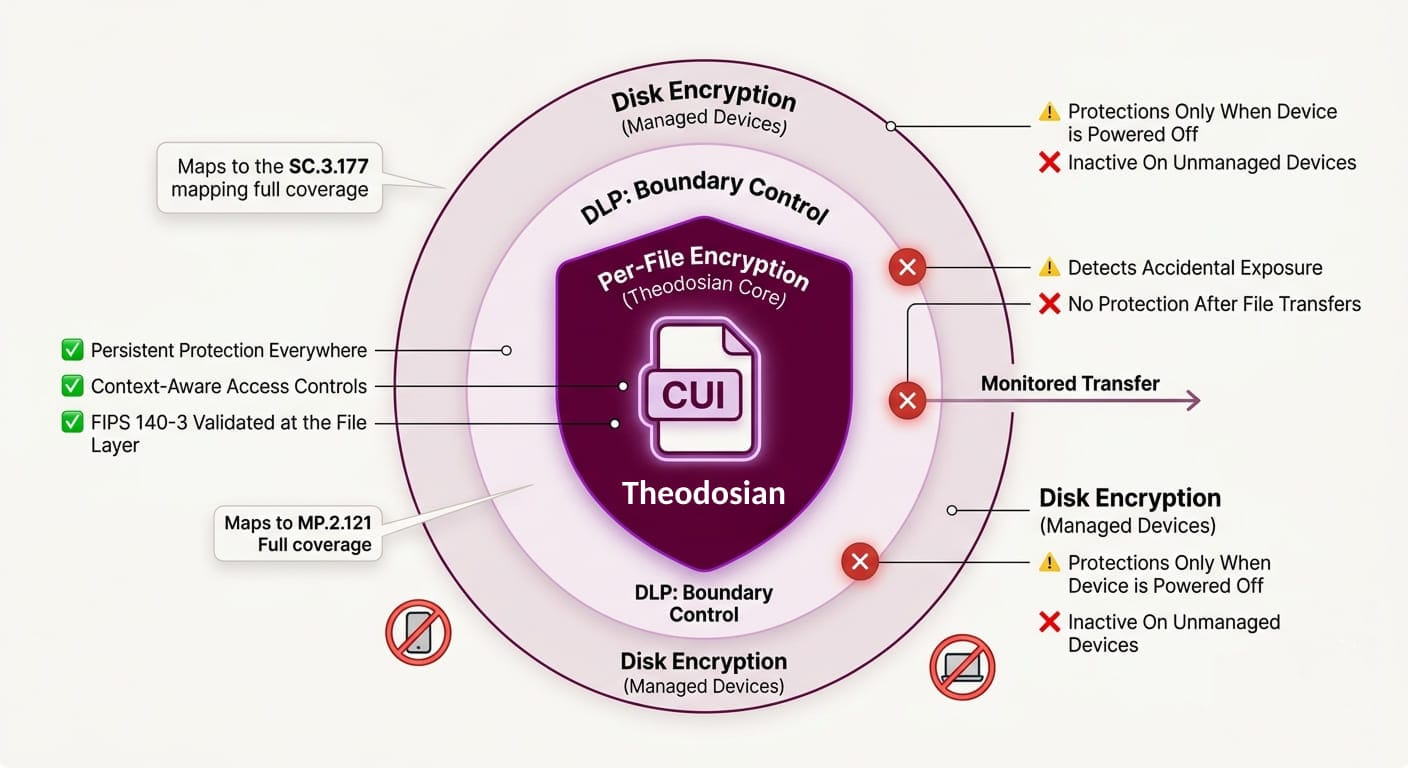
Disk encryption — BitLocker, FileVault, or equivalent — encrypts the entire storage volume on a device. When the device is powered off or locked, the data is inaccessible without the decryption key. For endpoint security, it's a foundational control.
What it protects: A device that is powered off, stolen, lost, or returned at end-of-contract. If an employee's laptop is left at an airport and a threat actor picks it up, disk encryption is what keeps them out.
What it doesn't protect: A device that's powered on and in use. Once the disk is unlocked — which is every moment the device is running — files are accessible in plaintext to anyone operating with valid credentials. The encryption is active at the storage layer, not at the file layer. The moment a user opens a CUI document, it's decrypted in memory and accessible. The moment someone with valid credentials (or stolen credentials, or a credential stuffed into a VPN session) accesses those files, disk encryption offers no protection.
The CMMC assessment problem: SC.3.177 requires FIPS-validated cryptographic protection of CUI. Disk encryption using FIPS 140-3 validated modules satisfies this at the device level. But it doesn't satisfy the control for CUI that has moved off that device — to a shared drive, to a subcontractor's system, to a USB drive, or to a cloud storage service. The assessor will ask about all of those locations.
DLP: Boundary Control, Not Data Protection
Data Loss Prevention tools monitor and control the movement of sensitive data. When a user tries to email a file containing CUI, DLP can block it. When someone tries to upload it to an unauthorized cloud service, DLP can intervene. It's a governance and detection layer.
What it protects: Data attempting to leave through monitored channels. DLP is useful for catching accidental data exposure before it happens — a contractor attaching the wrong file to an email, a user uploading to a personal Dropbox, or a print job to an unauthorized printer.
What it doesn't protect: Data that's already left. DLP has no reach over a file that was transferred before the policy was in place, moved via an unmonitored channel, or copied to removable media before the controls were deployed. DLP tools generate false positive rates exceeding 73%, which in practice means alert fatigue, policy exceptions, and gaps that widen over time. More critically: DLP doesn't encrypt. If a file bypasses DLP, it lands in plaintext wherever it ends up.
The CMMC assessment problem: DLP is a supporting control — it contributes to the overall CUI protection posture, but it doesn't satisfy SC.3.177 (encryption) or SC.3.187 (key management) on its own. An assessor evaluating your encryption controls won't accept "we have DLP" as evidence that CUI is cryptographically protected in all the places it exists.
📋 Get the CMMC Assessment Readiness Checklist
See exactly which controls your C3PAO assessor will test in the encryption domain, and what evidence passes.
Per-File Encryption: Protection That Travels With the Data
Per-file encryption applies a unique cryptographic key to each individual document at the point of creation or classification. The encryption lives in the file itself, not in the storage system around it, not in the network boundary through which it passes.
What it protects: The document, regardless of where it is. A per-file encrypted CUI document is protected on a managed laptop, on a personal device, on a USB drive, in a personal cloud storage account, and in an email attachment sent to the wrong recipient. If a file is exfiltrated, an unauthorized process gets nothing — because unless contextual access controls are met, access is denied entirely. The unauthorized party isn't handed back noise; they're denied entry.
Access control at the file layer: With FIPS 140-3 validated per-file encryption and context-aware access controls, who can open a file — and under what conditions — is governed by identity, device trust level, location, time, and role. A file opened on a managed, enrolled device inside your network behaves differently from the same file accessed from an unmanaged device on a home network. The policy travels with the file.
In-use encryption: Data is decrypted in real-time only, never written as plaintext to disk. This closes the gap disk encryption leaves open, ensuring compliance with NIST 800-171 requirements for CUI on non-organizational systems (contractor laptops). Even while a file is actively in use, plaintext never touches storage.
The ransomware scenario worth noting: When ransomware encrypts files at the local storage layer, it's targeting file contents. With per-file encryption in place, ransomware encrypting the local copy gets nothing, because unless contextual access controls are met, access is denied entirely. The attack surface for the encrypted file is effectively zero.
The Comparison: What Each Approach Covers
| Scenario | Disk Encryption | DLP | Per-File Encryption |
|---|---|---|---|
| Device powered off / stolen | ✅ Protected | ❌ No reach | ✅ Protected |
| Device powered on, valid credentials | ❌ Data in plaintext | ⚠️ Monitors only | ✅ Protected (in-use encryption) |
| File transferred via email | ❌ No reach | ⚠️ Can block (not protect) | ✅ Encryption travels with the file |
| File on unmanaged / personal device | ❌ No reach | ❌ No reach | ✅ Protected regardless of device |
| File in personal cloud storage | ❌ No reach | ❌ No reach | ✅ Protected regardless of location |
| File at subcontractor site | ❌ No reach | ❌ No reach | ✅ Protection follows the data |
| Access revocable after transfer | ❌ Not possible | ❌ Not possible | ✅ Instant revocation at any time |
| FIPS 140-3 validated | ✅ At device layer | ❌ N/A | ✅ At the file layer |
| Generates assessor-ready audit logs | ❌ Limited | ⚠️ Transfer logs only | ✅ Per-file access events |
CMMC Level 2 Control Mapping
| Control | Requirement | Disk Encryption | DLP | Per-File Encryption |
|---|---|---|---|---|
| SC.3.177 | FIPS-validated crypto for CUI | Partial (device only) | ❌ | ✅ Full |
| SC.3.187 | Key management for CUI | Partial | ❌ | ✅ Per-file key architecture |
| MP.2.121 | Media protection on contractor devices | Partial (managed only) | ❌ | ✅ All devices |
| AC.2.007 | Least privilege access | ❌ | ❌ | ✅ Context-aware ABAC |
| AU.2.041 | Audit logging of CUI access | ❌ | ⚠️ Limited | ✅ Document-level logs |
The pattern is consistent: disk encryption satisfies device-layer requirements when the device is controlled and known. Per-file encryption satisfies data-layer requirements regardless of device, location, or environment. For CMMC Level 2 assessors specifically looking at where CUI goes beyond your managed device fleet, only one of these approaches has a credible answer.
The Practical Decision
For defense contractors working toward CMMC Level 2, this isn't a choice between approaches; it's a sequencing question.
Disk encryption is table stakes. BitLocker or equivalent on managed endpoints is assumed as a baseline control. DLP is useful for visibility and governance, particularly for catching accidental exposure before it happens.
But neither of those approaches answers the question a C3PAO assessor asks during an evidence review: "Show me that every CUI file in your environment — including the ones on contractor devices, the ones shared with subcontractors, and the ones that have moved outside your managed infrastructure — is cryptographically protected right now."
That answer requires per-file encryption. Not instead of what you already have, on top of it.
One More Thing Worth Noting
The November 2026 CMMC Phase 2 deadline affects approximately 80,000 defense contractors who handle CUI. The DoD estimates the three-year compliance cost for small contractors at roughly $487,970. A significant portion of that cost comes from remediation — organizations that assumed their existing disk encryption or DLP investment covered the file security domain, and discovered during a gap assessment that it didn't.
The contractors getting ahead of that remediation cost are the ones distinguishing clearly between what each layer covers now, before the assessor does it for them.
🔒 Protect CUI Beyond Your Perimeter
See how patent-pending per-file FIPS 140-3 encryption works in your environment, without changing your workflows.
FAQs: Per-File Encryption vs. Disk Encryption vs. DLP
Does BitLocker satisfy SC.3.177 for CMMC Level 2?
Partially. BitLocker using a FIPS 140-3 validated module satisfies SC.3.177 for data at rest on managed devices that are powered off or locked. It does not satisfy the control for CUI that has moved outside the device — to shared drives, contractor systems, removable media, or cloud storage. A C3PAO assessor will probe all the locations your CUI reaches, not just the endpoint where it originated. If your CUI travels beyond your managed device fleet, BitLocker alone leaves that question unanswered.
Can DLP alone protect CUI for CMMC Level 2 compliance?
No. DLP is a detection and blocking layer, not an encryption layer. It can prevent some unauthorized transfers before they happen, but it doesn't cryptographically protect the data itself — and it has no reach over files that have already moved. CMMC's SC.3.177 requires FIPS-validated cryptographic protection; SC.3.187 requires documented key management. DLP satisfies neither. It's a useful supporting control, but a C3PAO assessor will not accept it as evidence that CUI is encrypted.
What does "per-file encryption" mean, and how is it different from folder-level encryption?
Folder-level or volume-level encryption protects a container — the drive, the folder, the SharePoint site. Per-file encryption applies a unique cryptographic key to each individual document at the moment of creation or classification. The result is that protection stays with the file regardless of where it moves. A file-level encrypted document is protected on a personal laptop, in a personal email, on a USB drive, and in any cloud service — not because the container is encrypted, but because the document itself is. Access is governed by contextual controls (identity, device trust, location, time) at the file layer. If those controls aren't met, access is denied.
Does per-file encryption work on contractor devices that aren't enrolled in our MDM?
Yes — this is the specific scenario per-file encryption is designed to handle. Unlike disk encryption (which depends on device management) or DLP (which depends on monitoring channels), per-file encryption travels with the document. A CUI file protected at the file layer remains protected on an unmanaged personal device, on a subcontractor's system, or anywhere else it goes. This is the gap that MP.2.121 specifically addresses, and the one most CMMC assessors probe for subcontractor supply chain scenarios.
Do I need to replace my disk encryption and DLP tools to deploy per-file encryption?
No. Per-file encryption is an additive layer, not a replacement. Disk encryption on managed endpoints remains valuable as a baseline device security control. DLP remains useful for governance and accidental disclosure prevention. Per-file encryption closes the data-layer gap that both of those tools leave open. The three work together — disk encryption protecting the device, DLP monitoring the boundary, and per-file encryption protecting the document wherever it travels.