
LayerX Security found that 77% of employees have shared company data with AI tools. Netskope reports that sensitive data sent to AI tools grew sixfold in a year. IBM's Cost of a Data Breach Report puts the average cost of a breach involving shadow AI at $4.63M, against $3.96M for a standard breach. That $670,000 gap exists because shadow AI exposure is harder to detect, investigate, and contain.
Your firewall, DLP, and SIEM all see the connection to an AI service. None of them can read the HTTPS-encrypted prompt or the file inside it. Blocking the tool does not close the gap: employees move to personal devices and less-restricted alternatives, and the file still leaves.
The control that holds is at the file. This guide covers what each control can and cannot see, how file-layer encryption and AI egress rules decide what ChatGPT, Copilot, and Gemini can read, and how to find which AI tools and agents can already reach your sensitive files.
🛡️ Are Your Files Reaching AI Tools You Don't Know About?
See which AI tools and agents can reach your sensitive files, and which egress rule would apply to each.
Why Traditional Controls Can't See What Employees Send to AI Tools
Data Loss Prevention tools operate on network traffic and endpoint activity. They can identify that an employee connected to openai.com. They can flag a large file transfer to an external service. What they cannot do is inspect the content of an HTTPS-encrypted prompt sent to ChatGPT. The payload — the actual text the employee typed or pasted — is encrypted in transit and lands inside OpenAI's infrastructure beyond the reach of any enterprise DLP rule.
Network monitoring has the same blind spot. Your SIEM sees an outbound connection to a known AI service. It cannot see the contract text that accompanied it. URL filtering can block access to ChatGPT entirely, but this creates a parallel problem: employees route around the block. They use personal devices on home networks, access AI tools through mobile browsers, or switch to a less-restricted alternative. The file content still exits the organization. The security team just loses visibility when it does.
Microsoft Copilot introduces a variation of this exposure. Because Copilot is integrated directly into Microsoft 365, employees don't think of it as an external AI tool. When Copilot summarizes a SharePoint document or drafts an email based on an attached contract, that data moves through Microsoft's AI processing layer. Most organizations have assumed that existing Microsoft licensing arrangements adequately govern this. Many have not verified the assumption. For organizations handling ITAR-controlled technical data, EAR-restricted information, or any data governed by CMMC requirements, that gap carries direct regulatory weight.
The core issue is that traditional controls treat the file's destination as the control point. AI tools have broken that model. The connection between employee, file, and AI tool is now a single authenticated HTTPS session — invisible to the controls built for a world where data moved over identifiable network paths to known destinations.
| Control | What it can see | What it cannot see |
|---|---|---|
| DLP | Network and endpoint activity; large transfers to external services | The content of an HTTPS-encrypted prompt or upload |
| URL filtering | Connections to AI domains; it can block them | Personal devices, mobile browsers, and tools not on the blocklist |
| SIEM | An outbound connection to a known AI service | The file or text that went with it |
| File-layer controls | Which files are sensitive, who and which AI agents can reach them, and every file action | Text a person retypes from a file they are authorized to open |
The File Is the Attack Surface, Not the AI Tool
When an employee pastes a contract into Gemini or uploads a PDF to ChatGPT, the attack surface is not the AI tool. The AI tool is the destination. The attack surface is the file itself — specifically, the fact that the file's contents are readable by anything that receives them.
A PDF of an ITAR-controlled technical document is readable by ChatGPT for the same reason it is readable by the employee who opened it: the contents are in plaintext, or trivially decoded from the PDF container. Once the employee has access to the content, any tool she uses to interact with that content gains the same access. Her clipboard, her AI assistant, her personal email client — all of them. The file has no ability to enforce policy after it leaves the governed environment.
This reframes the problem in a meaningful way. If you try to control which AI tools employees are permitted to use, you are playing a permanent catch-up game against a tool landscape that is expanding faster than any policy cycle. New AI tools appear weekly. Employees will find the ones that aren't on the blocklist. If instead you control what those tools can read, you address the problem at the source. The specific destination tool becomes irrelevant because the content it receives is ciphertext.
What Does File-Layer Encryption Actually Do When a File Reaches an AI Tool?
File-layer encryption means each file is encrypted with its own unique cryptographic key before it leaves the governed environment. The encryption is applied at the object level, not the transport level. When the file moves to cloud storage, email, a USB drive, or ChatGPT, it travels as ciphertext.
Theodosian implements this using per-file AES-256 encryption with FIPS 140-3 validated cryptographic modules. Each file has a unique key. That key does not reside inside the file. It is managed by Theodosian's patent-pending zero-knowledge architecture, meaning that even Theodosian's own infrastructure cannot decrypt a file without an authorized request from an authenticated, policy-cleared identity.
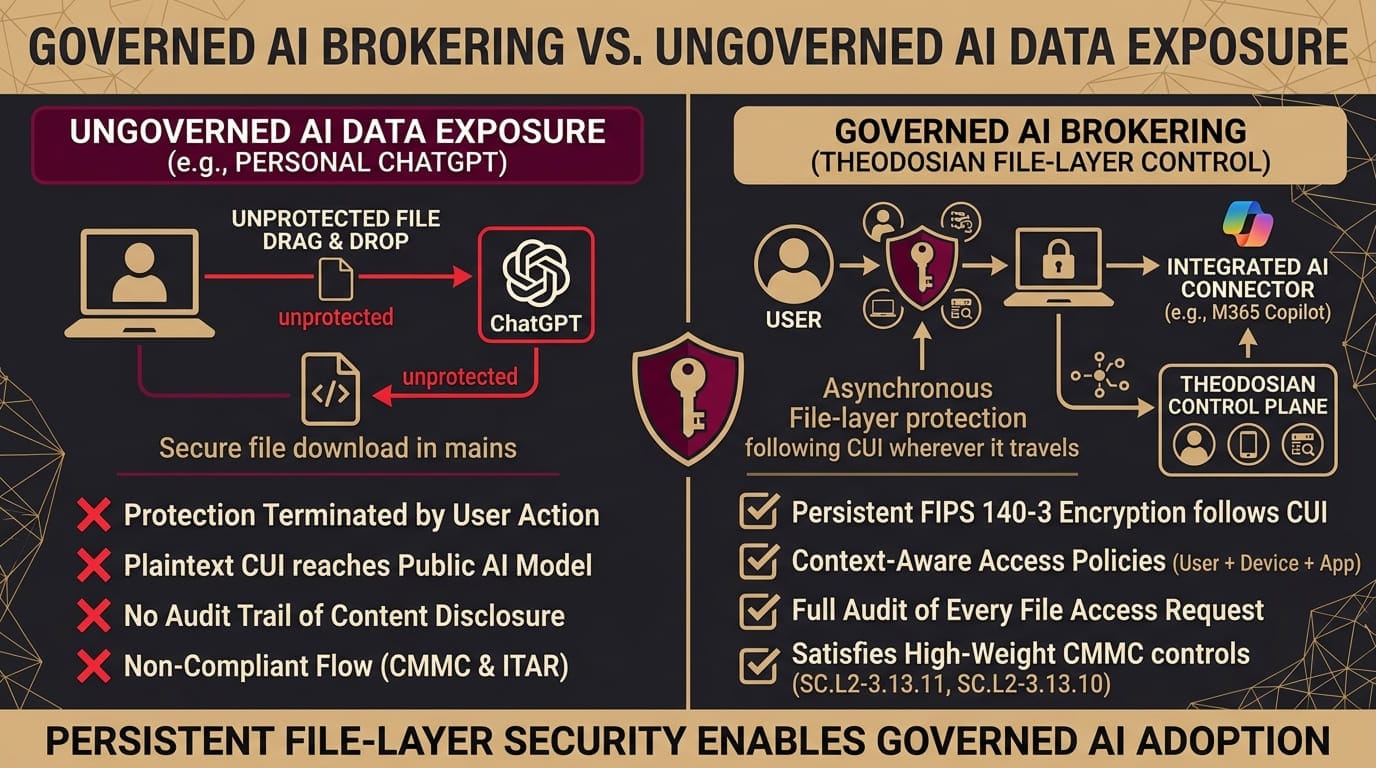
When an employee uploads an encrypted PDF to ChatGPT, what ChatGPT receives is ciphertext. The AI model cannot decrypt it. It reads random bytes. There is no summary to generate because there is no readable content to process. The file's contents remain protected not because the AI tool was blocked, but because the file itself cannot be read without the right cryptographic identity presenting at the right moment under the right access conditions.
This protection follows the file: any AI tool, any device, any transfer method. It governs the file itself. It does not stop a person who is authorized to open a file from retyping its contents into a prompt, which is why encryption works alongside the egress rules and audit trail covered below.
How Does AI Identity Brokering Let You Permit Governed AI Without Blocking Everything?
The immediate objection to a file-layer encryption model is that it would also block legitimate, governed AI use. If a file is always encrypted, how does an authorized Copilot user summarize a document they are permitted to work with?
AI identity brokering is the answer to that practical constraint. Theodosian's access control layer evaluates not just who is requesting access to a file, but the full context of that request. The identity of the requesting application can be factored into the policy decision alongside the user's identity, geolocation, network context, time of access, and behavioral baselines.
An organization can define a policy that allows a governed Microsoft Copilot instance running on a managed endpoint to request decryption of files within a specific sensitivity classification. The same policy denies that decryption request when it originates from an unmanaged personal device, or from a tool that is not in the organization's governed application registry. An unauthorized or personal AI tool receives either unreadable ciphertext or a flat access denial. The employee using enterprise-managed Copilot within policy receives the content. The two experiences diverge at the cryptographic access decision, not at the URL filter.
The policy is not a blocklist. It is a real-time access decision evaluated at the moment of each file request. If something in the access context triggers Theodosian's behavioral anomaly detection — an unusual access volume, an off-hours request pattern, an unrecognized device — Drop the Gate initiates an autonomous access freeze. Decryption requests from the affected identity and file set are suspended without waiting for manual security review. The file is protected from that moment forward until the incident is resolved.
How Do AI Egress Rules Control What Reaches ChatGPT, Copilot, and Gemini?
Encryption decides whether a file can be read. AI egress rules decide what happens when a file is headed to an AI tool in the first place. Theodosian ties those rules to classification: labels applied during discovery drive policy, so a file classified as ITAR technical data is handled differently from a public datasheet without anyone writing a per-file exception.
Each rule produces one of three outcomes.
Block: The file does not reach the AI tool. Use this for classifications where no AI use is acceptable, such as ITAR-controlled technical data.
Limit to approved tools and groups: The file reaches only the AI tools your security team has approved, and only for the groups you name. A contracts team can use the approved assistant; other groups and other tools are denied.
Allow with sensitive fields redacted: The file reaches the AI tool with sensitive fields removed, so a model can summarize a document without receiving the PII, PCI, or PHI inside it.
Because the rule follows the classification rather than the destination, you do not rewrite policy each time a new AI tool appears. Every decision is written to the audit log.
How Do You Find Which AI Tools and Agents Can Already Reach Your Sensitive Files?
You cannot set an egress rule for exposure you have not mapped. Theodosian's discovery runs continuously across SharePoint, Google Drive, Box, and other repositories, and agentic classification sorts files into categories such as PII, PCI, PHI, ITAR, and trade secrets. The output shows which people and which AI agents can reach which files, so the first deliverable is a list of real exposure rather than a policy written from assumptions. For more on how discovery tools compare, see Best Sensitive Data Discovery Tools in 2026.
Start there. Map the exposure, assign an egress rule to each classification, and apply per-file encryption to your most sensitive files.
What Are the Compliance Implications of Shadow AI File Exposure?
For defense contractors and enterprises handling regulated data, the compliance implications of shadow AI exposure are specific and enforceable, not speculative. ITAR requires that controlled technical data be disclosed only to US persons under specific authorized conditions. There is no exception for AI tools. If an employee uploads ITAR-controlled content to ChatGPT, that is a potential ITAR violation regardless of intent. The voluntary disclosure process does not make the violation disappear; it determines how the State Department responds to it.
CMMC Level 2 requires organizations to control access to CUI and to maintain an audit trail of that access. Shadow AI use breaks both requirements: the organization cannot control access it cannot see, and it cannot audit transfers that occur outside managed systems. NIST 800-171 Control 3.1.3 requires the flow of CUI to be controlled. Unmonitored AI tool uploads are, by definition, uncontrolled flows. A CMMC assessor reviewing your system security plan will ask how you prevent unauthorized CUI disclosure. "We block ChatGPT at the URL filter" is not an adequate answer when the bypass vectors are this accessible.
The consequence structure here is not just financial. For defense contractors, a shadow AI incident that exposes controlled technical data can trigger a loss of facility clearance, damage to prime contractor relationships, and direct DoD notification obligations. These are contract-level risks, not just breach cost calculations. The gap between where most organizations are and where they need to be on this issue is specific: the threat mechanism is well understood; the technical control that addresses it at the file level is available; the implementation barrier is organizational rather than technical.
Evidence is the other half of the requirement. Theodosian records every file action and exports the log with cryptographic verification that it has not been altered. For a CMMC assessment, that gives you the access trail an assessor asks for, instead of a URL-filter screenshot. Theodosian implements many of the controls for CMMC and NIST 800-171; Audit Logs for File Access covers what auditors expect that log to contain.
How Long Does It Take to Put File-Layer AI Controls in Place?
A Theodosian proof of concept runs for two weeks on a defined file set in your existing Microsoft 365, Google Workspace, or cloud storage environment. No data migration is required, and authorized users keep file access throughout. Theodosian runs on FedRAMP Moderate infrastructure in the US, with UK, EU, and self-hosted options. To build the policy layer around these controls, see How to Build an AI Governance Framework.
🔒 Put AI Egress Rules on Your Own Files
Run a two-week proof of concept on a defined file set in your existing environment.
FAQs: AI Data Governance & File-Layer Controls
Does encrypting files at the file layer affect employee productivity with legitimate, approved AI tools?
For governed AI tools with correct access policies in place, the experience is transparent. An authorized Copilot user on a managed endpoint with the appropriate policy clearance receives file access without additional steps. Encryption and decryption happen in the background as part of the access decision. The friction is deliberate for ungoverned access attempts — which is exactly the threat model the architecture is designed to address. Employees using tools outside the governed policy set encounter ciphertext. That outcome is the one the organization is engineering toward.
Does this approach apply only to defense contractors, or to other regulated industries?
The specific compliance drivers — ITAR, CMMC, EAR — are defense-sector requirements, but the technical threat and the technical control apply to any organization whose employees handle sensitive contracts, IP, client data, or regulated information. Legal firms, financial services organizations, healthcare providers, and any enterprise with high-value file content face the same core exposure: employees using AI tools they trust, with file contents those tools have no policy authority to receive. The file-layer encryption and AI identity brokering architecture addresses that exposure regardless of the regulatory framework in play.
What happens to file access if Theodosian's anomaly detection triggers a false positive?
Drop the Gate is designed to be reversible and auditable. When an autonomous access freeze activates, the security team receives an alert with the contextual data that triggered the anomaly detection — access volume, device, network, time, and behavioral deviation indicators. A security reviewer can assess the event and restore access for the affected identity and file set with confirmed authorization. The freeze is a protective pause, not a permanent revocation. The audit trail for the event is preserved regardless of the outcome.
Can I see which AI tools and agents can reach our files today?
Yes. Theodosian's continuous discovery maps which people and which AI agents can reach which files across SharePoint, Google Drive, Box, and other repositories, classified as PII, PCI, PHI, ITAR, or trade secret. A proof of concept starts there, so you see your own exposure before any policy is set.
Does this work with Microsoft Copilot in Microsoft 365?
Yes. A rule that limits AI use to approved tools and groups can permit Copilot for the teams you name on managed endpoints, and deny it for everyone else. Files classified for blocking never reach it.