
A defense contractor wraps up a nine-month engagement. Over that period, your team shared 60+ documents: schematics, budget models, technical specifications, and ITAR-controlled design files. Some were sent via email, and some were downloaded directly from your shared project folder.
The contract ends. You remove their SharePoint access. Job done.
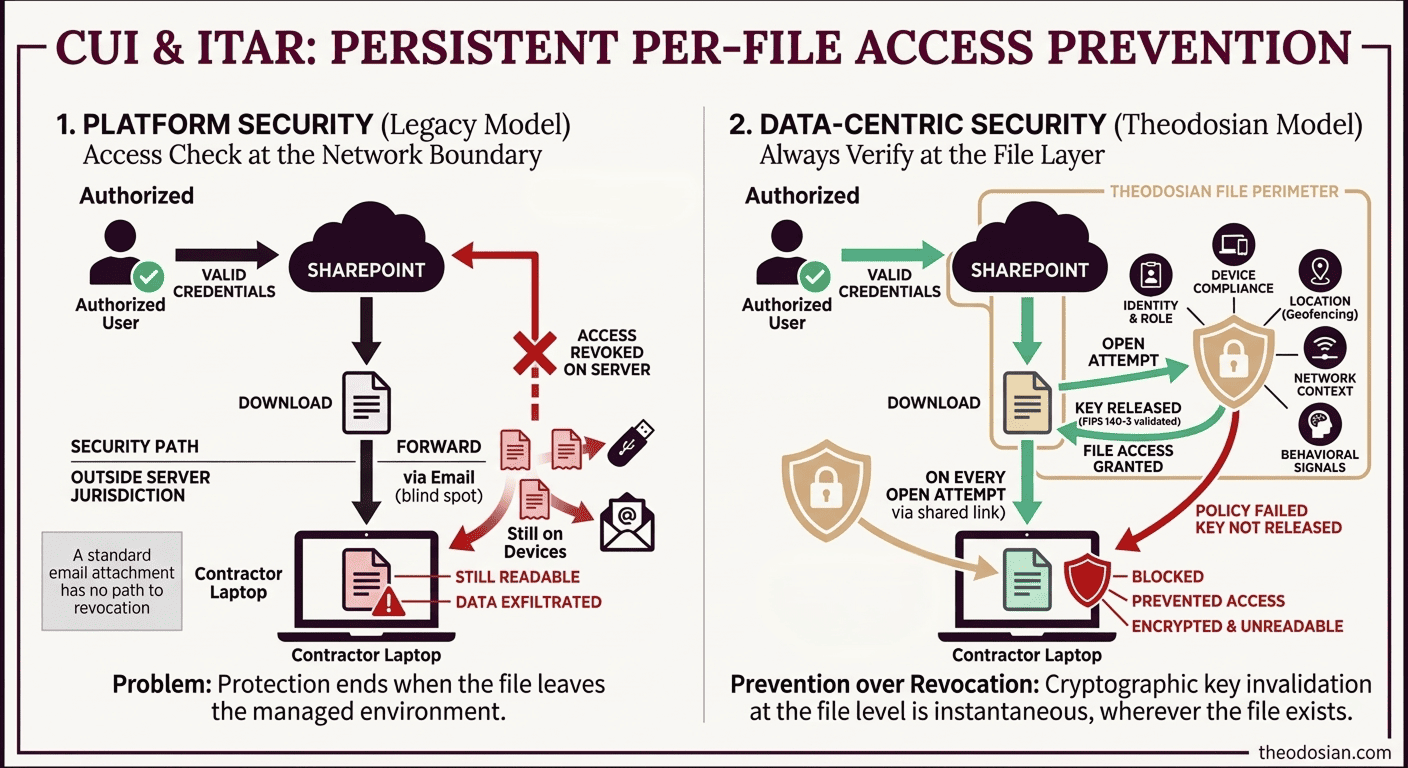
Except it isn't. The downloaded copies — the ones sitting on their laptop, in their personal OneDrive, forwarded to a colleague, saved to a USB drive — are still fully readable. Your security perimeter ends where their 'Save As' begins. And you have no way of knowing how many copies exist or where they went.
This is the revocation gap that most security teams discover at the worst possible moment: during a breach investigation, a contractor dispute, or a C3PAO audit.
⚠️ Can You Revoke Access to Files Already Downloaded?
If a contractor has a local copy of files, they still have your sensitive data. This checklist identifies exactly where files have escaped your revocation reach, before your next audit finds them first.
Why Most Tools Can't Do This
The standard model for file access control is server-side permissions. SharePoint, Google Drive, and OneDrive — these systems let you remove a user's access to a file or folder. That works as long as the file lives on the server and the user accesses it through the platform.
Once the file is downloaded, your permissions system loses jurisdiction. The file is on their device, subject to their operating system, their file manager, and their backup software. Your SharePoint permission change does not affect the local copy.
Email is the most common blind spot. Once a sensitive PDF leaves your mail server as an attachment, it's delivered. It exists on the recipient's device, their email server's archive, any forwarded copies, and any local downloads they made. There is no technical path to revocation for a standard email attachment.
What Microsoft Purview Can (and Can't) Do
The Problem: Purview protects the 'container,' not the data inside, and must check in with Microsoft's Rights Management Service each time they're opened. Revoke the license and, at the next check-in, the file becomes inaccessible.
Where this works well: Files that were labeled before being shared, where both sender and recipient are in a Microsoft 365 environment, and where the recipient has internet connectivity.
The limitations matter for regulated environments:
- Only covers labeled files: Files sent without a sensitivity label, the majority of legacy documents, and ad-hoc email attachments aren't covered.
- Revocation latency (the "offline" gap): To prevent users from being locked out of their work during internet outages or travel, Purview issues a "use license" that is cached locally. By default, this allows a file to be opened offline for up to 30 days. While this ensures productivity, it means a "revoked" file remains accessible until the device next checks in with Microsoft, creating a multi-week window of non-compliance that auditors often flag.
- Microsoft 365 licenses required on both ends: External contractors or subcontractors using non-Microsoft environments may not be able to open labeled files at all, which creates adoption friction that drives teams toward unprotected workarounds.
For organizations with a primarily Microsoft-managed environment and consistent sensitivity labeling discipline, Purview's revocation covers a meaningful portion of the problem. For organizations with heterogeneous environments, large external contractor populations, or file workflows that predate sensitivity label adoption, the gaps are significant.
How Persistent Per-File Access Control Works
The approach that closes the revocation gap works at the encryption layer rather than the permissions layer.
Every file is encrypted with its own unique FIPS 140-3 validated key. That key isn't embedded in the file, and it isn't held by Theodosian either — the architecture is zero-knowledge with decentralized key management, meaning no master key, no central honeypot. When a user attempts to open a file, the platform runs a real-time context-aware access evaluation before any decryption occurs.
This evaluation doesn't just check whether the user is authorized; it evaluates the full policy context in milliseconds:
- Identity and role — verified against your IdP (Entra ID, Okta, Active Directory) via RBAC and ABAC
- Device compliance — is this a managed, registered device? Is the OS patched? Is endpoint protection active?
- Location — geographic restrictions enforced at the file level (US-only for ITAR; embargoed countries blocked)
- Network and IP — specific IP ranges allowed or denied; VPN requirements enforced
- Time-based rules — contractor access with auto-expiration; business hours enforcement
- Behavioral signals — anomalous patterns, bulk downloads, off-hours access flagged in real time
If any condition fails — revoked access, unmanaged device, prohibited location, anomalous pattern — the authorization fails. The file remains inaccessible. This happens regardless of where the file is stored: a personal laptop, a USB drive, a cloud storage folder, or a forwarded email attachment.
Revoke a user's access profile, and every file they were authorized to reach goes dark — instantly, wherever those files exist. There is no cached version, no offline copy, no forwarded attachment that bypasses this evaluation.
This is what data-centric security means operationally: protection and policy enforcement that travel with the file, not the network perimeter. The file defends itself.
Three Scenarios Where Revocation Capability Is Non-Negotiable
1. Contractor Offboarding
43% of organizations have discovered that former employees or contractors still had active access to organizational repositories after their offboarding was considered complete. For contractor populations — longer tenures, larger file footprints, less systematic offboarding workflows — the number is likely higher.
The problem isn't malicious intent (though that exists, too). It's that standard offboarding removes platform access, not file access. The contractor who saved your ITAR-controlled design files to their personal cloud storage before the contract ended didn't need to "steal" them; they were authorized to have them at the time.
Persistent file-level access control changes the offboarding calculus: when a contractor's access profile is revoked, every file they were authorized to access becomes inaccessible, regardless of where it lives. The offboarding is cryptographic, not just administrative.
For ITAR and CMMC compliance, this matters specifically. Technical data shared with subcontractors under an approved access framework must remain controlled for the duration of that framework, and only for that duration. The access control needs to be as precise as the authorization was; anything less is a compliance failure.
2. Breach Response
An alert flags anomalous access patterns on a user account at 11pm. Forensic investigation will take 12 to 48 hours. During that window, the account, compromised or not, still has full access to every file it was authorized to reach.
The operational dilemma with legacy tools: you're choosing between disrupting a potentially legitimate user and leaving a potentially compromised account active.
With cryptographic revocation, the answer is "Revoke First, Investigate Second." Suspend the access profile immediately. The investigation proceeds without a running clock on active data exposure. If the account clears, reinstate access in minutes with a full audit trail. The files go dark for the investigation window. No data moves during that time. For organizations where the investigation can't wait for a human decision, Theodosian's Drop the Gate capability handles this autonomously — anomalous access patterns (bulk downloads, off-hours activity, geographic anomalies) trigger automatic access suspension, step-up MFA, and a security team alert without requiring manual intervention.
This directly addresses one of the key structural weaknesses in breach containment: the gap between detection and action. The average breach goes undetected for more than 200 days. The ability to act immediately, without waiting for forensic confirmation, materially changes the blast radius of any incident.
3. Compliance Audit
A C3PAO assessor asks for 'Evidence of Revocation' for data at rest to demonstrate, on demand, that you can revoke access to a specific file for a specific user. Can you show that revocation is cryptographic — not just permission-level — and that it reaches files outside your network perimeter?
This is increasingly a standard line of questioning in CMMC Level 2 assessments, particularly for SC (System and Communications Protection) and AC (Access Control) control families. Removing a user from a SharePoint group is an acceptable answer for platform-bound access. It is not an acceptable answer for files already in the contractor's possession.
A cryptographic revocation demonstration — showing that a file becomes inaccessible to a revoked user on a device outside your network — is the kind of evidence that distinguishes a strong assessment outcome from a conditional pass.
What This Is Not: The DRM Distinction
Persistent file-level access control is not Digital Rights Management (DRM), and the distinction matters for setting accurate expectations.
DRM controls what an authorized user can do with a file once they've opened it, whether they can print it, copy text from it, take a screenshot, or save a modified version. It's an information rights control.
Access revocation controls whether a user can open the file at all. Once a user has valid access and opens the file, they interact with it normally. The enforcement point is at authentication — can this user decrypt this file right now, not at activity restriction.
The scenario file revocation solves: "a user who should not have access cannot open the file, wherever it is." That's the cryptographic access control problem.
If your requirement is "ensure a former contractor cannot read any design file we shared with them after their access ends," that's an access revocation problem. If your requirement is "prevent an active user from printing or forwarding a document they're authorized to view," that's a DRM problem. Both are valid requirements; they need different solutions.
What Implementation Actually Requires
The question most security teams ask at this point: Does this require migrating off SharePoint? Changing our file formats? A lengthy deployment?
🔎 Does Your Data Know When to Say No?
Theodosian applies a digital guard to every file. Our Context-Aware Access evaluates credentials like identity, device, location, and more every single time a file is opened—even after it's been downloaded.
FAQs: Remote File Access Revocation
What solutions let me revoke access to a file after it's been emailed or shared externally?
Solutions that rely on server-side permissions (SharePoint, Google Drive, OneDrive) can only revoke access to the online version of a file — not copies already downloaded or forwarded. To revoke access to files outside your network perimeter, the protection needs to be baked into the file itself. Persistent per-file encryption works by tying access to a decentralized, zero-knowledge encryption architecture — revoking a user's authorization renders the file unreadable regardless of where it's stored or how many copies exist.
Which tools let us centrally disable access to a set of files if we suspect a breach or data leak?
The only mechanism that provides persistent control over files outside your network perimeter is per-file encryption with a zero-knowledge architecture, where the file runs a real-time authorization check on every open attempt — verifying identity, device, location, and network against your access policy. File access control platforms with cryptographic key management allow bulk revocation — suspending a user's entire access profile or revoking access to a defined file set simultaneously. This enables the ‘Revoke First, Investigate Second’ model to contain the exposure immediately, without waiting for forensic confirmation. Legacy DLP and permission systems don't provide this capability for files that have already left your network.
How can I maintain control over sensitive PDFs and Office documents once they leave our organization's network?
The key is to shift from "Platform Security" to "File-Resident Governance." Standard permission-based tools like SharePoint and Google Drive stop providing control the moment a file is downloaded. Theodosian bridges this gap by plugging directly into your existing Google Drive or SharePoint environment via native connectors. Once connected, every file evaluates a real-time authorization check on every open attempt. You retain the collaboration benefits of your cloud stack, but gain the ability to revoke access to any file—even if it's currently sitting on a contractor's local machine or a forwarded email attachment.
What is the difference between revoking file access and DRM?
Revoking file access means preventing a user from opening a file at all by invalidating their decryption key. DRM (Digital Rights Management) controls what an authorized user can do inside a file once it's open: printing, copying, etc. Both are useful; they address different problems. If your requirement is "ensure a former contractor cannot open a file we shared with them," that's an access revocation problem. If your requirement is "prevent an authorized user from printing a document," that's a DRM problem. They're not interchangeable.