CMMC assessors do not care that your engineer "just quickly downloaded the file" to a personal laptop on a Friday afternoon. That device is now in scope. If it does not meet CMMC requirements, the file was never protected, and you have a media protection finding that could unravel your entire assessment.
MP.2.121 is consistently one of the highest-failure controls in CMMC Level 2 assessments. Not because contractors ignore it, but because they misread it. Most treat it as a policy question — do you have a removable media policy? The assessor is asking something much more specific: Does CUI on any device, under any circumstances, maintain the same protections as CUI on your organizational systems?
The distinction matters. Here is what the control actually requires, where contractors fail it, and what a passing evidence package looks like.
What Does MP.2.121 Actually Require?
MP.2.121 sits in the Media Protection (MP) domain and states that organizations must protect system media containing CUI, both paper and digital. In practice, for CMMC Level 2 assessors, this translates to a specific question: if CUI ends up on a contractor-owned device or removable media, does it maintain the same security posture as CUI on your organizational systems?
That is not a removable drive policy question. That is a data protection architecture question.
"Same protection" has a specific meaning under CMMC. It means the CUI must be encrypted using FIPS-validated cryptography (SC.3.177), access must be controlled and auditable (AC and AU domain controls), and the organization must be able to demonstrate that protection extends to the file itself, not just to the network the device is connected to.
Three things follow from this that most contractors do not account for:
- The protection requirement follows the data, not the device: If a contractor engineer downloads a technical drawing to a personal laptop, that laptop is in scope. The protection requirement did not stay on the server when the file left it. It traveled with the file.
- "Contractor device" includes personal devices used for work: If your engineers access CUI from personal laptops, tablets, or phones — through a VPN, through SharePoint, through email — those devices are in scope. This is not ambiguous under CMMC. An assessor will ask during interviews whether personal devices are ever used to access work data. If the answer is yes, they will follow that thread.
- Access controls must be enforceable after the device leaves the building: A network-level control (VPN, firewall, VLAN) that is only active when the device is on your network does not satisfy MP.2.121. The protection requirement is continuous, not conditional on connectivity.
🛡️ See How Theodosian Solves MP.2.121 Without Restricting Device Access
Per-file FIPS 140-3 encryption follows CUI everywhere it goes — contractor laptops, personal devices, external drives. Access is verified at every open attempt.
Why Is MP.2.121 the Control Most Assessments Flag?
Three failure patterns appear repeatedly in CMMC Level 2 assessment reports. If any of these describe your current environment, you have an MP.2.121 finding waiting to happen.
The Scoping Blind Spot
This is the most common failure: an engineer downloaded a CUI file to a personal laptop to work over the weekend. The device was never included in the system boundary. The assessor finds it during interviews — they routinely ask engineers directly, not just the IT team, whether they have ever accessed work files from a personal device.
When the answer is yes, the scope boundary must be redrawn. If the personal device cannot be brought into compliance (because enrolling a personal device in MDM creates employment and privacy complications), the contractor must demonstrate that the CUI access was unauthorized and has been remediated — and that the file is no longer accessible from that device. Without that demonstration, it is a finding.
The fix is not to instruct engineers to lie to assessors. It is to ensure that CUI on a personal device is either enrolled and managed or protected at the file layer, so that an unauthorized device cannot access it, regardless of where the file is stored.
The "We Have Encryption" Gap
Many contractors respond to MP.2.121 questions with "our devices are BitLocker encrypted." BitLocker is disk-level encryption. It protects data when the device is powered off and the disk is locked. When the device is powered on and the user is logged in, the disk is decrypted, and files are accessible in plaintext.
SC.3.177 requires FIPS-validated cryptography at the content level. If a CUI file is sitting on a BitLocker-encrypted laptop that is powered on, the file is not FIPS-encrypted at the file layer — it is sitting in a decrypted state on an encrypted disk. Those are different things. An assessor who understands the control will ask specifically: Is the file itself encrypted, or is the disk encrypted? The answer must be the file.
The Documentation Trap
The third failure is having reasonable controls but no evidence. A contractor implements file encryption, restricts device access, and runs a monthly review of who has CUI on their endpoints. Solid operational practice. No SSP documentation, no written policy, no log samples, no artifact trail.
CMMC assessors cannot give credit for controls they cannot verify. The question is not "did you implement this?" — it is "can you prove you implemented this?" Good implementation without documentation equals NOT MET in the assessment report.
The Personal Device Problem for CUI Protection
This is the most politically sensitive scoping issue in CMMC, and the one most contractors avoid addressing directly. Engineers use personal devices. That is a fact at virtually every defense subcontractor. The question is what to do about it.
There are three options, and only one scales without creating more problems than it solves.
Option 1 - Prohibit personal device access entirely: Technically enforceable through MDM and network access controls. Operationally disruptive — engineers who need to work remotely, travel, or take work home resist it. Creates productivity friction. Does not solve the problem of files that already exist on personal devices.
Option 2 - Enroll personal devices in MDM and enforce CMMC-equivalent controls: This works from a compliance standpoint. It creates significant employment and privacy complications — employees reasonably object to MDM profiles on their personal devices that give the employer visibility into device activity and the ability to remotely wipe personal data. It is manageable for a small contractor with cooperative staff, but it does not scale.
Option 3 - Protect the file, not the device: If CUI files maintain their own encryption and access controls regardless of where they are stored, the device becomes a lower-risk variable. The file will not open on an unauthorized device. The file will deny access when the contextual check fails — wrong device compliance posture, off-hours access from an unexpected location, or access from a device that has been removed from the authorized list.
Option 3 is the only approach that addresses the practical reality of how engineers work without requiring either operational restriction or employment-law complications.
Theodosian's per-file FIPS 140-3 encryption applies this at the file layer. A CUI file downloaded to a personal laptop carries its protection with it. When the engineer attempts to open it on an unenrolled device, the contextual access check evaluates the device's compliance posture and denies access. The file is not deleted from the device — it is simply inaccessible, which is what MP.2.121 requires: the same protection as if the file were on an organizational system.
What "Same Protection as Organizational Systems" Actually Means
Translating the regulatory language into technical requirements:
FIPS 140-3 validated encryption at the file layer (SC.3.177): Not disk encryption. Not in-transit encryption. The file itself is encrypted using a CMVP-validated implementation, regardless of the device or storage medium it resides on.
Access controlled by identity and role (AC domain controls): The person opening the file must be verified as authorized — not just authorized to be on the network, but authorized to access that specific file with that specific role at that specific time. Role-based and attribute-based access controls are evaluated at every open attempt.
Every access attempt logged (AU domain controls): Successful access, denied access, device context, timestamp. Producible on demand. Not dependent on the device being connected to the corporate network at the time of access.
Access revocable without physical device retrieval: When a contractor relationship ends, access to CUI files must be revoked immediately. If termination of network access does not terminate access to files already downloaded, MP.2.121 is not satisfied. The enforcement mechanism must reach the file itself, not just the network path to it.
How To Build Your MP.2.121 Evidence Package
This is what the assessor wants to see, in the order they typically ask for it:
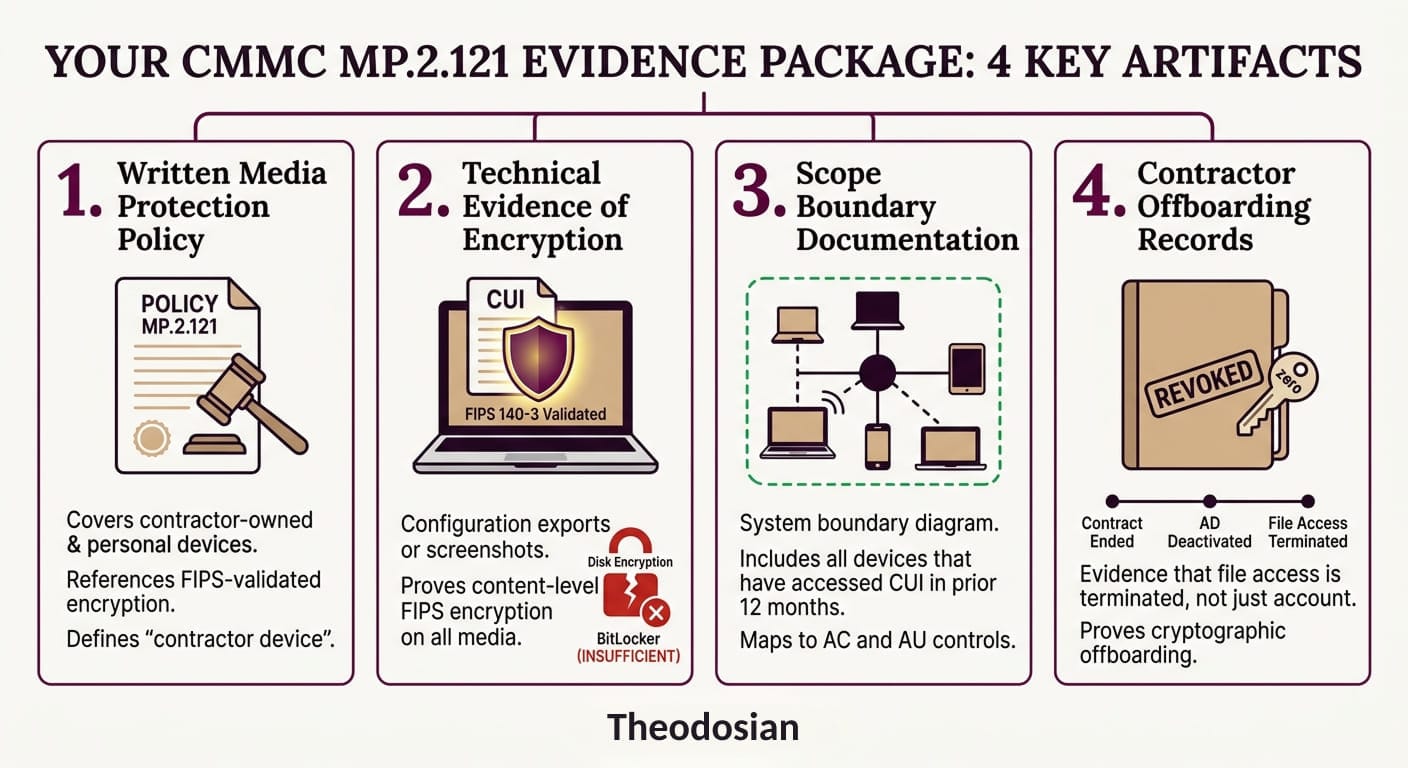
Policy documentation: A written media protection policy that explicitly covers contractor-owned devices and personal devices. It must reference the FIPS-validated encryption requirement and define what "contractor device" includes. Generic acceptable use policies do not satisfy this requirement.
Technical evidence: Configuration exports or screenshots showing file-level encryption applied to CUI. Log samples demonstrating access events — who accessed what, from which device, with what outcome. If your tool generates these automatically, export a 30-day sample before the assessment.
Scope boundary documentation: Updated system boundary diagram showing all devices that have accessed CUI in the prior 12 months. If personal devices appear on that list, show the compensating control or demonstrate that file-level protection means the device's compliance posture is not the controlling variable.
Offboarding records: Evidence that when a contractor relationship ends, file access is terminated — not just network access, not just account deactivation, but access to the files themselves. If a contractor downloaded CUI to a personal laptop and left, show that the files are inaccessible from that device as of the offboarding date.
The Offboarding Scenario Every Contractor Should Walk Through
Walk through this scenario before your assessment and make sure you can answer every question:
A contractor engineer works a six-month engagement. During that time, they download project specs, schematics, and technical drawings to their personal laptop to work remotely. The engagement ends. You deactivate their Active Directory account. Network access: gone.
The files are still on their laptop. What prevents them from opening those files tomorrow?
If the answer is "nothing — we trust them" or "we asked them to delete the files," that is a finding. The assessor will ask this question, or a version of it. The only satisfactory answer is a technical one: the files require an active, verified authorization to open, and that authorization has been revoked. The next open attempt fails. The file is inaccessible regardless of where it is stored.
That is what MP.2.121 requires. Not policy, not trust, not a deletion request, but enforceable, demonstrable, technical control at the file layer.
🛡️ Build Your MP.2.121 Evidence Package Before Your Assessment
The CMMC Assessment Readiness Checklist walks through all five phases — including media protection evidence requirements — so your artifact map is airtight before the C3PAO arrives.
FAQs: MP.2.121 and CUI Protection
Does MP.2.121 apply to personal cell phones?
If an employee uses a personal phone to view CUI (via email or mobile apps), that device is technically in scope. To pass an assessment, you must prove that the CUI on that phone is encrypted and that access can be revoked.
Is a "No Removable Media" policy enough to pass?
No. CMMC requires "demonstrated implementation." If your policy says no USBs are allowed, but your system ports aren't technically disabled or monitored, the assessor will likely flag it as a finding.
Can I use a personal laptop if I use a virtual desktop (VDI)?
VDI is a common way to meet MP.2.121 because the data never technically "resides" on the personal device. However, if the VDI allows "copy-paste" or file downloads to the local drive, the personal device immediately falls back into scope.
What is the difference between MP.2.121 and SC.3.177?
SC.3.177 requires you to use FIPS-validated encryption. MP.2.121 requires you to protect the media (the device). In practice, you use the encryption (SC) to satisfy the protection requirement (MP).