
A file left your environment at 2:14 PM on a Tuesday. An engineer at a Tier 3 subcontractor downloaded a CAD file from your SharePoint. It went onto their local drive. From there, it was emailed to a colleague. Opened on a home laptop. Saved to a personal Google Drive. Maybe printed.
Your SharePoint audit log shows one event: download. Everything after that is blank.
This is not an unusual scenario. It's the default state of file sharing with contractors — and it describes what most organizations call "secure file sharing" because the sharing event itself was controlled. The file was sent to an authorized party through an approved channel. What happened next is not something the sending organization can account for.
For compliance purposes, that's not something regulations recognize.
Why Does Contractor File Sharing Create a Compliance Gap?
ITAR doesn't distinguish between a file that was deliberately sent to an unauthorized foreign national and a file that was downloaded by an authorized US-person contractor and later accessed on an unmanaged device with no encryption. Both outcomes represent a loss of control over controlled technical data. The obligation to maintain that control belongs to the exporting organization, not the contractor who received it.
CMMC Level 2 creates the same exposure. SC.L2-3.13.10 requires that cryptographic keys used to protect CUI remain under organizational control. If a file is downloaded to a contractor's unmanaged laptop, what encryption — if any — protects it on that device? What key management governs it? In most cases, the answer is: whatever the contractor happens to have configured, which may be nothing.
HIPAA creates the equivalent exposure for healthcare organizations sharing patient records with billing processors, specialists, and third-party service providers. The Business Associate Agreement governs the relationship. It doesn't encrypt the files or log access events after they leave your systems.
The compliance obligation follows the data. The controls most organizations have don't.
What Does "Control" Actually Mean for Files Shared With Third Parties?
Control, in the compliance sense, means three things that most file sharing solutions don't provide simultaneously:
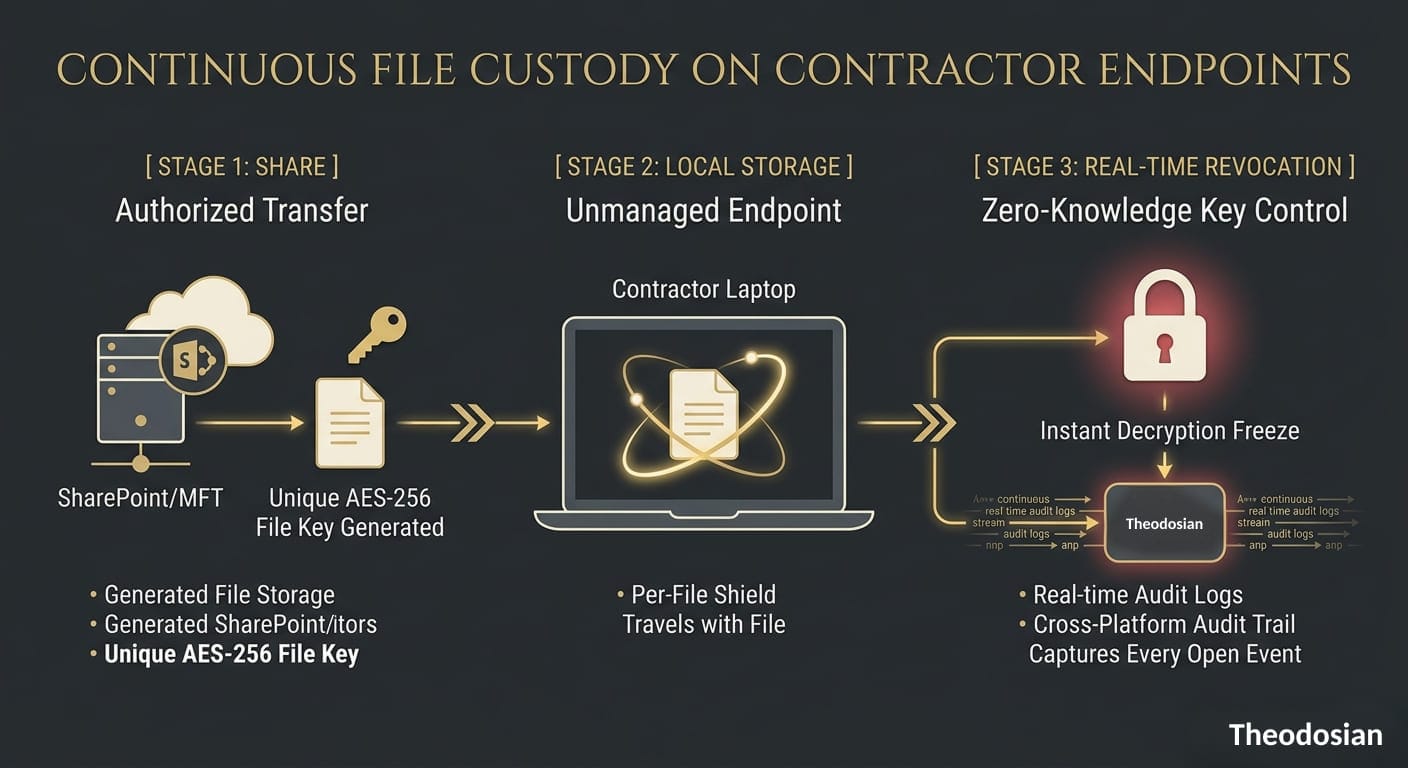
Encryption that travels with the file: The file should be encrypted before it leaves your environment, not just in transit and at rest within your platform. If a contractor downloads it, the encryption should remain on the file on their device. If they email it to a colleague, the encryption should follow it there. If the device is lost or stolen, the file should be meaningless without the decryption key.
Access policy that evaluates in real time: A contractor who was authorized last Tuesday may not be authorized today — because their contract ended, because their device fell out of compliance, because your risk posture changed, or because an anomalous access pattern triggered a security review. Control means the ability to evaluate authorization at the point of the access event, not at the point of the initial share. A file shared yesterday that can be revoked today is a file under control. A file that can only be revoked by asking the contractor to delete it is not.
Audit trail that follows the file, not the platform: Your security team needs to be able to answer: who opened this file, on what device, from where, and when? That question needs to be answerable regardless of whether the file is in your SharePoint, on a contractor's laptop, in their Google Drive, or on a third-party endpoint. Platform-specific logs answer that question for access events within the platform. File-layer audit trails answer it everywhere.
What Happens When Files Are Downloaded to Unmanaged Devices?
The unmanaged device problem is specific and worth naming precisely. When a contractor accesses a file through a managed workflow — your SharePoint with conditional access policies, your secure file transfer platform — those access controls apply. The moment they download the file to a device outside your MDM scope, those controls stop applying.
This happens constantly. Contractors work from home. They use personal laptops. They hand files to colleagues who aren't in your identity system. They work from hotel networks. They use machines that haven't had a security update since the previous administration.
Your access controls were designed for managed environments. Most of your contractors are in unmanaged ones.
The file-layer solution to this is an access policy that doesn't depend on the device being managed by your organization. Context-aware access controls evaluate authorization at the file open event — checking whether the identity is still authorized, whether the device meets minimum hygiene thresholds, whether the location and network are consistent with expected access patterns. That evaluation happens whether the device is your MDM-enrolled laptop or a contractor's personal machine.
When those signals are anomalous, access is denied. When bulk access patterns look like exfiltration — many files opened in rapid succession, at unusual hours, from an unexpected location — the response should be automatic and immediate, not waiting for a human to review a SIEM alert.
👥 Audit Your Third-Party Offboarding Exposure
Deprovisioning a contractor from your identity provider won't delete the sensitive files sitting on their personal laptop. True control means their access to those specific files vanishes instantly by design, not by manual follow-up.
How Do the Leading Secure File Sharing Solutions for Contractors Compare?
| Solution | Encryption After Download | Access Revocation | Unmanaged Device Coverage | Audit Trail Scope | CMMC/ITAR Ready |
|---|---|---|---|---|---|
| SharePoint + Conditional Access | ❌ No file-layer encryption | ❌ SharePoint session only | ❌ Stops at MDM boundary | SharePoint platform only | Partial (container-level) |
| Kiteworks | ❌ Logs the download event | ✅ Within Kiteworks | ❌ Post-download | Within Kiteworks only | Transfer layer only |
| Virtru | ✅ For email attachments | ✅ For email-sent files | ✅ For email recipients | Per email/attachment | Email channel only |
| Seclore | ✅ File-layer IRM | ✅ Including copy/print | ✅ Cross-environment | Per-file, per-access | ✅ |
| Theodosian | ✅ AES-256 FIPS 140-3, per file | ✅ Real-time, any environment | ✅ Context-aware, any device | Per-file, per-access, cross-platform | ✅ Direct mapping |
A few notes on these:
Kiteworks is widely deployed in defense and healthcare as a controlled transfer channel. It holds FedRAMP Moderate Authorization and satisfies compliance requirements for the transfer event. The gap is post-download: once a contractor pulls a file from Kiteworks to their local environment, the platform's controls don't follow. For ITAR and CMMC requirements that extend to files in downstream environments, that creates an audit gap that Kiteworks itself acknowledges in its documentation.
Virtru protects files shared via email. If your contractor workflow involves email attachments, Virtru addresses the problem cleanly. If files move through SharePoint, Google Drive, shared drives, or direct transfers, they exit Virtru's protection scope. Most contractor workflows use multiple channels.
Seclore offers copy/paste/print prevention (IRM) that Theodosian doesn't currently have. For organizations with hard requirements around content extraction prevention — certain classified environments, legal holds, specific data room use cases — that capability is worth the trade-offs: enterprise pricing and multi-month deployment timelines.
Theodosian's approach: FIPS 140-3 validated AES-256 encryption per file, unique key per file, with context-aware access controls evaluating authorization on every file open event regardless of environment. Patent-pending zero-knowledge key architecture means your organization holds the decryption keys — not Theodosian. Access can be revoked in real time across every environment where the file exists. When anomalous access patterns are detected, Drop the Gate freezes access automatically without waiting for human review. Deployment in days, no data migration, integrations with SharePoint/OneDrive, Google Drive, Dropbox, Box, and Windows file servers.
What Questions Should You Ask Before Sharing Sensitive Files With a Third Party?
Five questions that define your actual exposure before the first share event:
What encryption protects the file after the contractor downloads it? If the answer is "whatever the contractor has on their device," you don't have an answer. The encryption should be yours — applied before the file leaves your environment, governed by keys your organization controls.
Can you revoke access after the fact? Real revocation means: if you revoke access today, the contractor cannot open the file tomorrow — regardless of which device they use, which platform it's stored on, or whether they've made copies. If revocation requires manually asking the contractor to delete the file and hoping they comply, that's not revocation.
What does your audit log show for files after they're downloaded? Pull a sample log for a file shared with a contractor six months ago. Does it show access events after the initial download? If not, your audit trail has a gap that a C3PAO or ITAR auditor will ask about.
Do your controls extend to unmanaged devices? Most conditional access policies enforce on managed, MDM-enrolled devices. Ask specifically: what happens when an authorized contractor accesses a file from a personal device that's not enrolled in your MDM? If the answer is "it might be blocked at login" — but not at the file layer — the file is unprotected once they work around the block.
What's your incident response if a contractor device is lost or compromised? The answer should be: we revoke file access centrally, and the files on that device are encrypted ciphertext that can't be opened. If the answer is "we notify the contractor and ask them to report it," you're depending on a party outside your organization to manage your compliance exposure.
🛡️ Stop Guessing What Happens After the Download Event
If you can't answer all five of these questions for your current setup, your organization has a compliance gap waiting for an audit. See how patent-pending, zero-knowledge file encryption lets you control, track, and revoke file access anywhere your data travels.
Related Reading:
- What Happens to Your Sensitive Files When a Contractor Leaves?
- How to Protect CUI on Contractor Devices: The Control Many CMMC Assessments Fail
- BYOD and Defense Contracting: When a Personal Laptop Becomes a CMMC Liability
- How to Revoke Access to a File After It's Already Been Downloaded or Shared
- File-Centric Zero Trust: Why Security Has to Live in the File, Not the Network
FAQs: Controlling Files Shared with Contractors
What is the difference between secure file sharing and file-layer file protection?
Secure file sharing controls the transfer event — who receives the file, through which channel, under what authentication. Platforms like SharePoint with conditional access, Kiteworks, and managed file transfer solutions operate at this layer. File-layer protection controls what happens to the file after it's received: whether it's encrypted on the recipient's device, whether the sending organization can still revoke access, whether every access event is logged regardless of which platform the file is on. For ITAR, CMMC, and HIPAA requirements that follow the data into downstream environments, file-layer protection is what the regulations require — not just a controlled transfer event.
Do ITAR regulations apply to files shared with authorized US-person contractors?
Yes. ITAR (22 CFR § 120–130) requires that controlled technical data remain under appropriate safeguards regardless of who holds it. The authorization to share with a cleared US-person contractor doesn't remove the obligation to ensure that data remains protected in that contractor's environment. If a contractor stores ITAR-controlled files on an unencrypted device, emails them to an unauthorized party, or loses a laptop containing them, the exporting organization's compliance obligation is implicated — even though the initial transfer was authorized. The encryption safe harbor under 22 CFR § 120.54 requires FIPS 140-2/3 validated encryption with keys under US Person organizational control: a requirement that applies to the file in the contractor's environment, not just in transit.
How do you revoke access to a file that's already been downloaded by a contractor?
With file-layer encryption and cloud-connected key management, access revocation means revoking the key — or changing the access policy — so that the next time the file is opened, the decryption request is denied. The file remains on the contractor's device as ciphertext. They cannot open it. This works across any platform or device where the file was copied, because the decryption request is evaluated in real time against current policy. The requirement is that your key management infrastructure is cloud-connected (so revocation is near-instantaneous) and that the encryption is per-file rather than per-device (so revoking access to one file doesn't affect others). Platform-level encryption — where the platform holds the keys — doesn't support this model, because you'd need to revoke the contractor's platform access entirely, which affects all files they hold.