
Most organizations that handle Controlled Unclassified Information have already invested in Microsoft 365. Many have added Microsoft Purview on top of that. The sensitivity labels are configured, the compliance policies are active, and the data classification workflow is in place.
That investment is well-placed. Purview is a mature, capable platform, and this post isn't an argument against it.
What it is: a clear-eyed look at where Purview's protection ends and where a complementary layer of per-file encryption begins. For defense contractors working toward CMMC Level 2 — with the Phase 2 deadline of November 2026 closing in — understanding where one tool hands off to another is the difference between a passing C3PAO assessment and a gap that surfaces on day one.
What Microsoft Purview Is Built to Do
Microsoft Purview Information Protection is a classification and policy enforcement platform. It discovers sensitive data, applies sensitivity labels, enforces information protection policies, and provides audit logging across the Microsoft 365 ecosystem. For organizations with heavy Microsoft investment, it covers a substantial portion of the governance and discovery surface.
When a sensitivity label with encryption is applied to a document, that label travels with the file. Users inside your tenant who have the appropriate rights can open it. Those who don't, can't. That's real protection, and it works as designed.
The key phrase is as designed. Purview was built around the Microsoft ecosystem. Its protection model is strongest when users, devices, and applications stay within that environment. The moment any of those elements leave — a contractor downloads a file to a personal device, a document is forwarded outside the tenant, a file is synced to a non-Microsoft cloud service — the protection model becomes configuration-dependent in ways that require deliberate, ongoing management.
Where Microsoft Purview Coverage Gets Thin
There are three scenarios that defense contractors encounter regularly where Purview's protection requires supplementation.
1. Unmanaged Devices
Purview's sensitivity label enforcement relies on the Microsoft 365 client applications being present on the device when a file reaches a device that isn't enrolled in Intune or joined to your organization via Microsoft Entra — a personal laptop, a home workstation, a device belonging to a subcontractor — the enforcement model changes.
Microsoft itself recognizes this distinction: unmanaged devices don't sign in with a work account, and the enforcement available to managed endpoints doesn't automatically extend to them. For a defense contractor whose supply chain includes Tier 3 subcontractors handling CUI on personal devices, this is a gap.
2. PDFs and Default Configurations
PDF labeling in SharePoint and OneDrive is disabled by default. SharePoint sensitivity label integration is also disabled by default. This means that unless these settings have been explicitly enabled and tested, PDF files in SharePoint can't be labeled, won't display existing labels, and fall outside Purview's protection policies. For organizations handling technical drawings, schematics, contracts, or export-controlled documents in PDF format, this is an immediate compliance exposure against MP.2.121.
3. Files That Leave the Microsoft Ecosystem
Sensitivity labels with encryption follow the file, but that protection depends on the receiving party having software capable of reading and enforcing the label. When a labeled file is sent to a recipient without a compatible Microsoft 365 client, downloaded to a non-Microsoft environment, or moved through a non-Microsoft workflow, the label may persist, but enforcement becomes inconsistent.
The core issue is that Purview is a policy layer, not a persistent cryptographic layer. The encryption it applies is real, but it's conditional on the ecosystem around the file remaining intact.
The Complementary Layer: Per-File Encryption With Theodosian
This is not a replacement argument. It's an architectural one.
Per-file encryption — specifically FIPS 140-3 validated, per-document key architecture — applies persistent cryptographic protection directly to the file, independent of the platform, device, or application environment around it. The encryption isn't applied at the policy layer. It's applied to the bits of the document itself.
What that means:
- A file encrypted at the file layer remains encrypted when downloaded to a personal device, whether or not Intune is managing that device.
- A file encrypted at the file layer remains protected when it's forwarded outside your Microsoft tenant, whether or not the recipient has a compatible M365 client.
- A file encrypted at the file layer remains protected when synced to a third-party cloud service, stored on removable media, or attached to a personal email account.
The encryption doesn't depend on the ecosystem. It depends on the file.
How Purview and Theodosian’s File-Level Encryption Work Together
The table below maps each CMMC Level 2 control to what Purview covers and what per-file encryption adds. If you want the full assessor-ready evidence checklist for these controls before going further, it's here.
📋 CMMC Assessment Readiness Checklist
The exact documentation and technical evidence a C3PAO assessor needs to score SC.3.177, SC.3.187, and MP.2.121 as MET — organized by control.
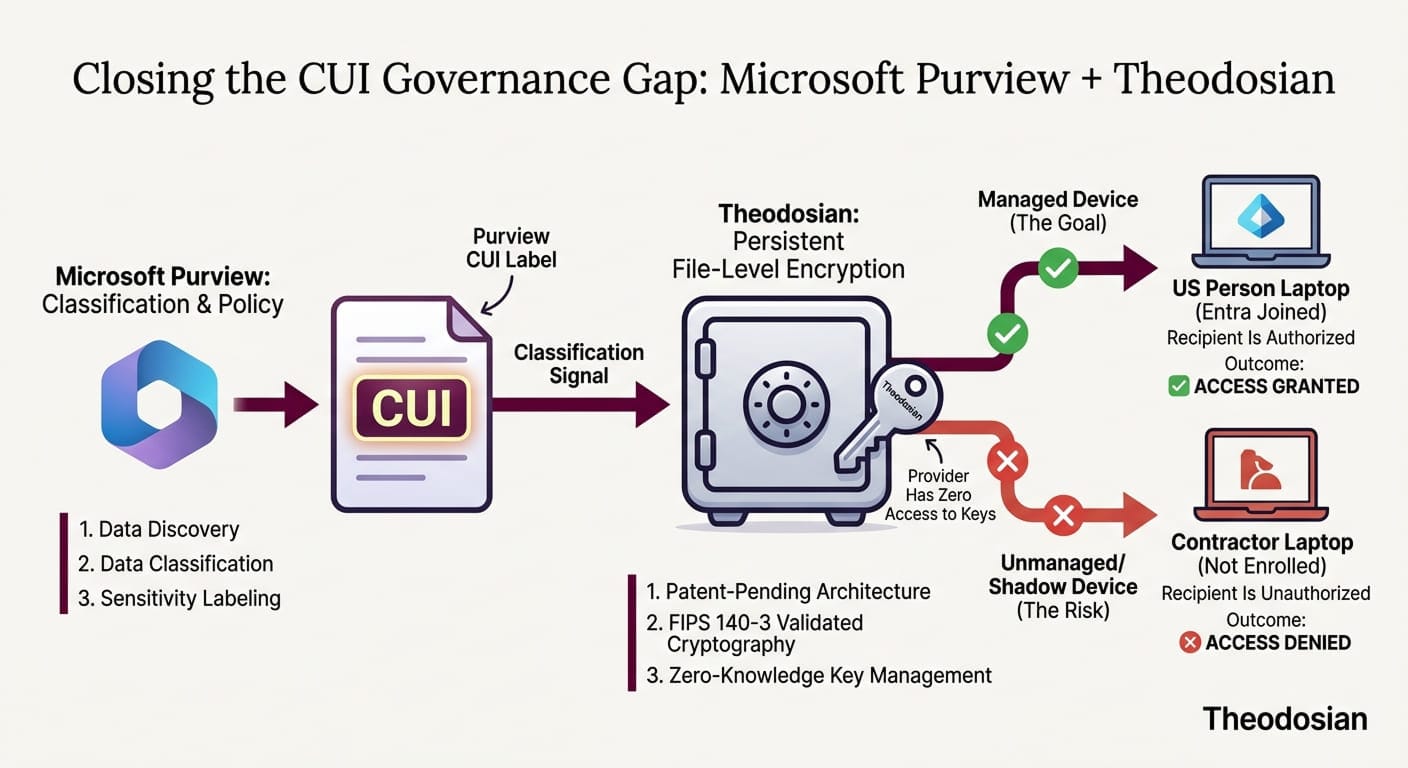
Microsoft Purview handles: Data discovery and classification, sensitivity labeling, policy enforcement within the Microsoft 365 ecosystem, activity monitoring, audit logging, and compliance reporting. It answers the question: what is this data, who's using it, and what policies apply? It is the "Brain" of your Microsoft tenant.
Theodosian’s per-file encryption handles: Persistent cryptographic protection of the document itself, regardless of where it travels. It answers the question: even if this file ends up somewhere it shouldn't, is the data inside it still protected? It is the "Body Armor" for the data. Because Theodosian can also operate as a standalone solution, it ensures that your protection doesn't "break" if a file leaves the Microsoft Brain and enters a subcontractor's unmanaged environment.
These are not competing answers to the same question. They're answers to different questions. Together, they cover both the governance surface (Purview's strength) and the data-layer surface (per-file encryption's strength).
For CMMC Level 2, that combined coverage maps directly to the controls assessors test:
| CMMC Control | What It Requires | How Each Layer Contributes |
|---|---|---|
| SC.3.177 | FIPS-validated cryptographic modules for CUI protection | Per-file FIPS 140-3 validated encryption at the document layer |
| SC.3.187 | Cryptographic key management for CUI | Decentralized, zero-knowledge key management per document |
| MP.2.121 | Media protection on contractor-controlled devices | File-level encryption ensures CUI on any device — managed or unmanaged — is protected |
| AC.2.007 | Least privilege access to CUI | Context-aware access controls (identity, device, location, time) enforced at the file layer |
| AU.2.041 | Audit logging of CUI access | Per-file access logs provide assessor-ready evidence at the document level |
Purview's classification and labeling workflow feeds directly into this model. When a document is labeled CUI in Purview, that classification signal can drive the application of file-level encryption without changing the user's workflow.
What Does This Look Like for the November CMMC 2026 Deadline?
CMMC Phase 2 — when C3PAO third-party assessments become mandatory for CUI-handling contracts — starts November 10, 2026. Organizations that haven't closed their file security gaps by then face two risks: failing the assessment and losing the contract.
The DoD estimates the three-year compliance cost for a representative small defense contractor at approximately $487,970 — broken down as $175,700 in initial implementation costs and roughly $103,800 per year in recurring costs. The organizations getting ahead of that cost are the ones who aren't ripping and replacing their existing Microsoft investment; they're adding the file-level layer on top of it.
A 14-day pilot demonstrates exactly what the combined coverage looks like in your environment: Purview classification feeding into per-file encryption, with assessor-ready evidence generated automatically at every access event.
The Question to Ask Your Team
If a CUI file in your environment were downloaded to a subcontractor's personal laptop tonight, would it still be protected? If your answer depends on whether Intune is managing that device, whether the right Purview configuration was applied, or whether the subcontractor's email client supports sensitivity label enforcement — that's the gap worth closing before a C3PAO assessor finds it first.
Microsoft Purview is a well-built platform doing what it was designed to do. Per-file encryption covers the surface Purview wasn't designed to cover. Together, they close the loop.
🔒 See Per-File Encryption Working in Your Environment
Theodosian provides patent-pending per-file FIPS 140-3 validated encryption with zero-knowledge decentralized key management, designed to work alongside your existing Microsoft stack, not replace it.
Risk-free. No commitment.
FAQs: Microsoft + Theodosian
Does Microsoft Purview provide FIPS 140-3 validated encryption for CMMC Level 2?
Microsoft Purview can apply encryption to documents through sensitivity labels, and that encryption uses AES-256. However, for CMMC Level 2, SC.3.177 specifically requires a FIPS 140-3 validated cryptographic module, not just the algorithm. Purview's encryption operates through Microsoft's broader infrastructure. If you're relying solely on Purview to satisfy SC.3.177, you'll need to confirm and document that the specific module being used holds a current CMVP validation certificate. A C3PAO assessor will ask for that certificate by number.
Can Purview protect CUI on contractor devices that aren't enrolled in Intune?
Not automatically. Purview's label-based protection is most effective on devices managed through Microsoft Entra and Intune. On unmanaged devices — personal laptops, subcontractor systems — enforcement of sensitivity labels depends on the presence of a compatible Microsoft 365 client, and the enforcement model changes significantly. This is the gap that per-file encryption addresses: the file-level protection travels with the document regardless of device management status.
Do I need to replace Microsoft Purview to pass a C3PAO assessment?
No. Purview handles classification, governance, and policy enforcement within the Microsoft 365 ecosystem. That's valuable, and assessors will look for it. The gap isn't in Purview itself; it's in the file security layer beyond the Microsoft ecosystem. Per-file encryption adds a persistent cryptographic layer for scenarios where Purview's reach ends. The two work together, not in competition.
What is the difference between a sensitivity label and per-file encryption?
A sensitivity label is a classification marker that can trigger encryption and enforce access policies — but that enforcement is conditional on the receiving environment (compatible M365 client, enrolled device, active tenant connection). Per-file encryption applies a unique cryptographic key directly to the document's contents, independent of any platform or client. The label tells the system what to do. The encryption ensures the data is protected, whether or not the system can act on that instruction.
How long does it take to add file-level encryption to an existing Microsoft 365 environment?
For most defense subcontractors, a full deployment takes a few days (not weeks) — including configuration and access policy setup. The 14-day pilot is designed to demonstrate the core capability (per-file encryption active on your CUI, working alongside your Purview configuration), so you can validate the architecture before committing.
Does Theodosian require a specific Microsoft 365 license?
No. While Theodosian is the ideal "missing piece" for organizations with Microsoft Purview, it is an environment-agnostic tool. It provides the same FIPS-validated protection for small teams. You get the same audit-ready evidence package regardless of your underlying IT stack.