
Many CMMC Level 2 assessment failures don't happen because a control isn't implemented. They happen because the control is implemented but not provable.
Audit logging is where this gap shows up most visibly. A defense contractor builds a functioning CUI environment, configures cloud logging, and assumes their platform's default log output will satisfy the assessor. It often doesn't, not because the logs don't exist, but because they don't capture what AU.L2-3.3.1 and AU.L2-3.3.2 actually require.
This post covers what the CMMC AU domain requires, what your evidence package needs to show a C3PAO, and where most implementations fall short before the assessor ever walks in.
What Does the CMMC AU Domain Require?
The AU (Audit and Accountability) domain in CMMC Level 2 contains nine practices derived from NIST SP 800-171. Three of them drive the most evidence requests during assessments — and all three are non-deferrable, meaning they cannot go into a POA&M if they're missing.
AU.L2-3.3.1 — Create and retain system audit logs: Create and retain system audit logs and records to the extent needed to enable the monitoring, analysis, investigation, and reporting of unlawful or unauthorized system activity.
The key phrase is "to the extent needed." NIST SP 800-171 doesn't specify a universal minimum log retention period — but CMMC assessors expect evidence that CUI access events are logged in sufficient detail and retained long enough to be useful for incident investigation. A log that captures login events without capturing what was accessed, when, from where, and by whom doesn't satisfy the spirit of the control.
AU.L2-3.3.2 — Ensure that the actions of individual users can be traced: Ensure that the actions of individual users can be uniquely traced to those users so they can be held accountable for their actions.
User-level traceability is the operative requirement. A shared credential log doesn't satisfy this. A log that captures a username but not a device ID, session context, or action type doesn't satisfy this. The assessor needs to be able to pull a log, look at an event, and trace it to a specific identifiable person performing a specific action at a specific time.
AU.L2-3.3.4 — Alert in the event of an audit logging process failure: Alert in the event of an audit logging process failure.
This is the control most implementations forget. If your logging system fails — storage full, agent stops reporting, cloud logging service experiences an outage — who gets alerted? The assessor will ask for evidence of an alerting mechanism, not just the logs themselves.
Three additional AU practices (AU.L2-3.3.5, AU.L2-3.3.6, AU.L2-3.3.7) cover log review, log correlation, and time synchronization. These are worth understanding, but AU.L2-3.3.1, 3.3.2, and 3.3.4 are where most small contractors have gaps.
Don't Let Your Audit Trail End Where Your Perimeter Stops
Default cloud logs do a decent job of telling you when someone logged into an account. But the moment an engineer downloads a CUI file or throws a schematic into an email attachment, most perimeters go completely dark. To pass a CMMC Level 2 assessment, your evidence package has to prove who handled that file, from what device, and where it went, even after it leaves your network.
What Do CMMC Assessors Look For in Audit Log Evidence?
The CMMC Assessment Process (CAP) documentation and assessor guidance describe what constitutes sufficient evidence for AU domain controls. Understanding this before your assessment is the difference between passing on the first review and spending weeks gathering additional documentation.
For AU.L2-3.3.1 and AU.L2-3.3.2, assessors typically ask for:
Log samples covering the assessment period: Typically 90 days. Not screenshots of a dashboard, actual log extracts or exports showing individual events in sufficient detail.
Log content that demonstrates user-level traceability: Each event should capture at minimum: user identity (account, not just a name), timestamp (with timezone, synchronized to a reliable time source per AU.L2-3.3.7), the resource accessed (file, folder, system), the action taken (read, write, download, modify, delete), and the outcome (success, failure, denied).
Evidence that CUI-specific events are logged: A log of all system activity is not the same as a log that specifically captures CUI access events. Assessors will look at whether your logging configuration captures the systems, drives, and applications that contain your in-scope CUI.
Retention documentation: How long are logs retained? Where are they stored? Who can access them? Is the retention policy documented in your SSP?
For AU.L2-3.3.4: Configuration screenshots or documentation showing that log failure triggers an alert — to whom, through what mechanism, within what timeframe.
What Are the Most Common CMMC Audit Log Failures During Assessment?
Platform logs without file-level detail. SharePoint and OneDrive log events exist in Microsoft 365's Unified Audit Log. But the default log captures "opened a file" — not the file's sensitivity classification, the user's location and device context, or what happened to the file after it was accessed. If a CUI document was opened and downloaded to a personal laptop, the default M365 log may show the access event without the context the assessor needs.
Shared account access. If multiple engineers share a service account or generic login to access a CUI system, AU.L2-3.3.2 cannot be satisfied — you cannot trace actions to individual users. Every CUI access must be authenticated to an identifiable individual. Assessors will explicitly ask how shared accounts are handled.
Logs that don't cover all CUI locations. Contractors often configure logging for their primary cloud environment and miss the endpoints, file servers, and NAS shares where CUI also lives. AU.L2-3.3.1 requires logging of system activity across all in-scope CUI systems — not just the primary tenant.
Log gaps for files in transit. When a CUI file is emailed to a prime contractor, downloaded by an engineer working from home, or shared via a collaboration portal, what gets logged? If the answer is "nothing — it left our environment," that's a CUI access event with no audit trail. Assessors will probe whether your logging captures CUI access across the full lifecycle of the file, not just while it lives in your controlled environment.
No evidence of log review. AU.L2-3.3.2 requires the ability to trace user actions, which implies someone is actually reviewing logs. Assessors will ask whether log review happens, at what frequency, and who conducts it. Having logs and never reviewing them satisfies the letter of 3.3.1 but not the spirit, and 3.3.2 requires active accountability, not passive logging.
How Should a CMMC Audit Trail Be Structured in Your Evidence Package?
Your evidence package is the set of documentation you provide to the C3PAO to support your System Security Plan (SSP) assertions. For the AU domain, your package should contain:
1. Log configuration documentation: Screenshots or exported configuration showing which systems are logging, what events are captured, where logs are stored, and how long they're retained. This proves that your logging is deliberate and configured, not accidental.
2. Sample log extracts: Real log samples from the assessment period demonstrating user-level traceability. The samples should show the format and level of detail your logs capture, not just that logs exist, but what they contain. Redact personal data where necessary, but preserve the structure.
3. Log retention policy and storage documentation: Your SSP should reference a log retention policy. Evidence of where logs are stored (and that they're protected from unauthorized modification) supports AU.L2-3.3.1 compliance.
4. Log failure alerting configuration: Documentation showing what happens when logging fails — the alert mechanism, recipient, and any test records showing the alert fires as configured.
5. Log review records: Evidence that someone is reviewing audit logs at a defined cadence. This can be as simple as a dated log of who reviewed the logs, when, and what they looked for. Automated alerting that flags anomalous events also supports this.
6. Incident or anomaly records (if applicable): If any security events occurred during the assessment period, how they were detected, logged, and responded to. A clean log with zero flagged events is fine; it just needs to be genuine and not suspiciously devoid of any activity.
How Does Theodosian Build the Audit Trail That CMMC AU Controls Require?
The most common audit trail gap in CMMC assessments is file-level access logging that follows CUI regardless of where the file lives. Theodosian's architecture closes this gap at the file layer — meaning the audit trail travels with the file, not just within the boundary of your primary environment.
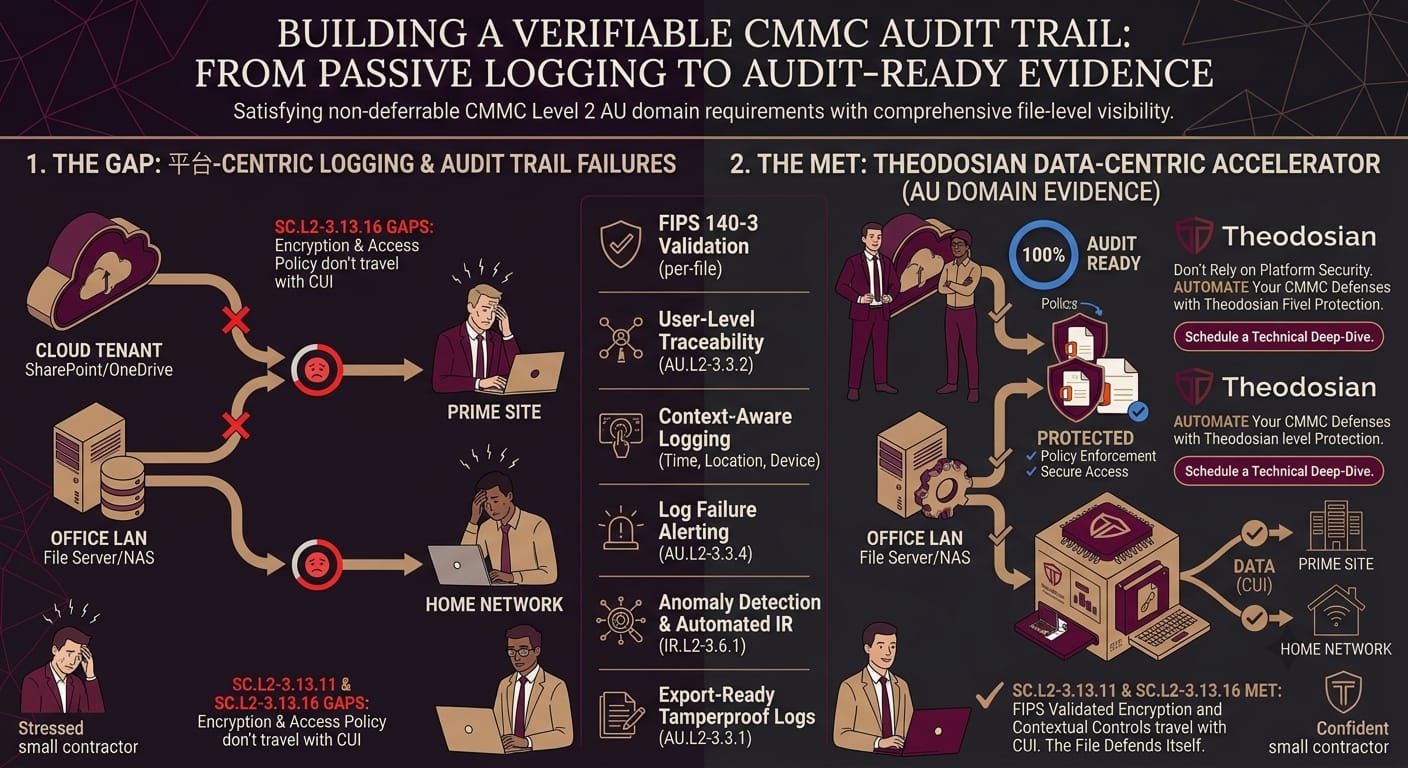
What Theodosian logs on every access event:
To access a Theodosian-protected file, users sync or download it locally where it opens seamlessly in memory. Every single time a protected CUI file is interacted with—or blocked because a policy condition wasn't met—the following data is automatically captured:
- User identity: The specific, authenticated identity mapped directly to their unique Theodosian account.
- File identity: File name, storage path, and sensitivity classification.
- Device: Device type, unique device ID, and endpoint compliance status at the exact moment of access.
- Timestamp: Precise access time synchronized with timezones.
- Location: IP address, GPS coordinates (where available), and country.
- Network context: Whether access originated from a corporate network, VPN, or public/unknown network.
- Policy outcome: Whether access was granted, denied, or escalated (such as an MFA challenge or step-up authentication).
That's AU.L2-3.3.1 and AU.L2-3.3.2 satisfied at the file level — per access event, per file, per user, including access that happens outside your primary CUI environment.
Anomaly detection that surfaces what log review should catch:
AU.L2-3.3.2 requires the ability to trace user actions and hold individuals accountable. That requires someone to actually review the logs. Theodosian's anomaly detection automates the review layer: unusual access patterns, bulk download attempts, geographic anomalies (a user accessing CUI from a location inconsistent with their normal pattern), off-hours access, and repeated failed attempts are all flagged automatically.
Drop the Gate — AU domain meets IR domain:
When anomaly detection identifies a high-risk pattern, Drop the Gate freezes access automatically, triggers step-up MFA, and sends a real-time notification to the security team. The entire sequence is logged — the anomaly detected, the trigger condition, the access freeze, the MFA challenge result, and the security team notification. That log sequence maps to AU.L2-3.3.1 for the access event, AU.L2-3.3.2 for user traceability, and feeds the IR.L2-3.6.1 incident response workflow.
Export-ready logs for your C3PAO:
All Theodosian audit logs are tamperproof and exportable on demand — structured, per-file, per-user, per-event. When your C3PAO asks for 90 days of CUI access logs, you export them. The format is evidence-ready: user identity, device, location, network, policy outcome on every row. This is the artifact that satisfies what most default platform logs don't deliver.
What Should Your CMMC Audit Log Retention Policy Include?
CMMC doesn't specify a fixed log retention period. NIST SP 800-171 guidance and the broader DFARS/CMMC compliance context suggest a minimum of one year for CUI-related audit logs, with three years as a safer baseline for organizations that want a buffer against delayed incident discovery.
Your retention policy, documented in your SSP, should address:
Retention period: How long are logs kept? For which systems and which event types?
Storage location and protection: Where do logs reside? Are they protected from modification by the users who generated the events? (Logs that can be modified by the account holder undermine the entire accountability function.)
Access controls on the log store: Who can view, export, and delete logs? This should be restricted to security personnel and documented accordingly.
Backup and availability: If your primary log storage fails, how are logs recovered? Log failure alerting (AU.L2-3.3.4) addresses the front end; backup and recovery address the back.
Log review cadence: How often are logs reviewed? By whom? The policy should reflect what actually happens, not a theoretical process that hasn't been followed.
Documenting this in your SSP before the assessment starts isn't just good preparation. It's evidence that your logging program is intentional and managed, not reactive.
How Do CMMC Audit Requirements Connect to Incident Response?
The AU and IR (Incident Response) domains are directly linked in CMMC Level 2, and assessors evaluate them together.
IR.L2-3.6.1 requires an operational incident response capability. IR.L2-3.6.2 requires tracking, documenting, and reporting incidents. Both depend on audit logs: you can't track an incident you didn't detect, and you can't detect what you didn't log.
The practical implication is that your audit trail design and your incident response process need to be coherent. If an anomalous CUI access event occurs and your logs capture it, what triggers the investigation? Who sees it? What's the documented response workflow? If your answer is "we'd review logs manually when something looked wrong," that's a human-dependent process that the assessor will probe.
Automated anomaly detection that triggers a documented response workflow — freeze access, notify the security team, begin investigation — satisfies both the AU and IR domain requirements in a way that manual review cannot. The log of the anomaly, the automated response, and the investigation record together form the evidence chain that a C3PAO needs to see.
Moving From "We Have Logs" to "We Can Prove It"
When it comes to the AU domain, passing your CMMC assessment requires a fundamental mindset shift. Your C3PAO assessor isn't going to take your word for it, nor are they going to spend their expensive hours combing through disorganized, generic IT alerts trying to track a file's history.
An unreviewable log is functionally identical to an uncollected log. To secure a Level 2 certification before upcoming contract deadlines, you need an evidence package that clearly isolates CUI access events with zero ambiguity. By shifting your compliance boundary from complex, leaky network walls down to the individual file layer, you ensure that the necessary proof is generated automatically, making your audit efficient, predictable, and stress-free.
Start Building an Active Audit Trail
Handing a C3PAO millions of lines of raw, unindexed SIEM data is a surefire way to stall your audit. They want clear, user-linked evidence trails that show exactly how your CUI is protected at rest and in motion. Discover how Theodosian captures every single file event out of the box, giving your assessors exactly what they need to check the box on day one.
FAQs: CMMC Audit Logging & Compliance Evidence
If we already have a SIEM platform, do we still need file-level logging?
Yes, most likely. While a Security Information and Event Management (SIEM) platform is excellent for collecting logs from firewalls and endpoints, it can only aggregate the data it receives. If your underlying cloud apps or local storage drives only report generic events (like "User Opened Folder"), your SIEM won't have the granularity to prove user-level traceability for individual CUI files. File-layer logging provides the raw, high-fidelity context that your SIEM needs to map out a true CMMC audit trail.
How long are we legally required to store CMMC audit logs?
While NIST SP 800-171 doesn't mandate a specific number of days, the broader DFARS regulations and standard CMMC assessor expectations dictate that you should retain CUI-related audit logs for at least one year. However, a three-year baseline is highly recommended for defense subcontractors, as it aligns with standard federal record-retention windows and protects you against long-delayed incident discoveries.
How do we prove to a C3PAO that our audit logs haven't been tampered with?
All users, including global IT administrators, only have strict read access to the compliance audit logs within the platform. There is no structural path for an insider to alter or erase an entry. When your C3PAO asks for 90 days of CUI access logs, admin users can export them instantly. Crucially, these exports come bundled with a specialized cryptographic "attestation" file. This allows an external auditor to independently verify against us that the exported logs are completely legitimate and have not been tampered with, without requiring a live account or active session in your platform. It is the definitive artifact that satisfies what most default cloud logs fail to deliver.