
"No migration" isn't a feature. It's the thing that determines whether a security control actually gets deployed.
The most common reason organizations with genuine CMMC, ITAR, or HIPAA obligations still don't have file-layer encryption isn't budget. It's that every solution they've evaluated starts with the same requirement: move your data somewhere new. Migrate your SharePoint files to our platform. Rebuild your sharing workflows in our environment. Re-train your users on a new interface.
For an organization with 200,000 files distributed across SharePoint, Google Drive, Dropbox, and local file servers, that's not a security project. It's an IT transformation project. It doesn't happen in a compliance timeline.
Zero-knowledge encryption that layers on top of existing cloud storage solves a different problem: adding file-layer protection to the environments your organization already uses, without requiring anyone to change how they work or where their files live.
What Is Zero-Knowledge Encryption, and Why Does It Matter for Cloud Storage?
Zero-knowledge encryption means the vendor who provides the encryption infrastructure cannot access your data. The decryption keys are generated and held by your organization — not by the cloud storage provider and not by the encryption vendor. "Zero knowledge" describes what the vendor can see about your files when they're encrypted: nothing.
This is the technical architecture that ITAR's encryption safe harbor (22 CFR § 120.54) and CMMC's SC.L2-3.13.10 describe when they require organization-controlled cryptographic keys. The requirement isn't just that data be encrypted — it's that the entity with the keys is your organization, not a third party who could be compelled to produce them, breached to expose them, or simply curious about what you're protecting.
The reason zero-knowledge matters specifically for cloud storage is that cloud storage providers — Microsoft, Google, Dropbox, Box — hold the encryption keys for data at rest by default. Your files in SharePoint are encrypted, but Microsoft holds the keys. A government order served to Microsoft produces your files. A Microsoft insider with sufficient access can read them. "BYOK" (bring your own key) arrangements help, but they still typically process your key through the vendor's infrastructure, which means the vendor's systems touch your key material.
True zero-knowledge architecture means neither Microsoft nor Google nor Theodosian can read your files. The key never leaves your organization's control.
Does Adding File Encryption to Existing Cloud Storage Require a Migration?
No — when the encryption is applied at the file layer rather than the platform layer.
Platform-layer encryption (the default model for most cloud storage providers) encrypts data at rest within the platform. Moving to a different encryption model within that platform typically does require migration: you're changing how the platform handles your data, which means touching all existing files.
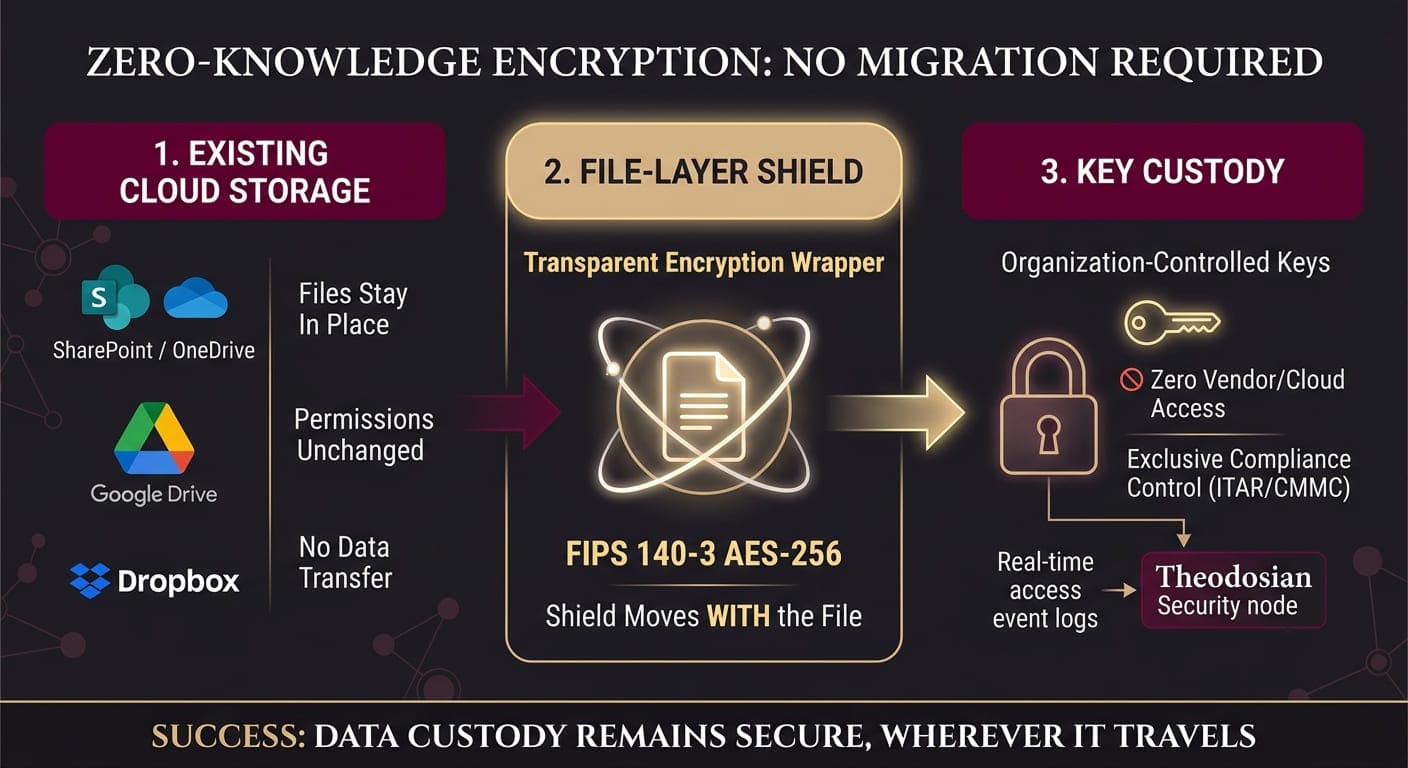
File-layer encryption works differently. The encryption is applied to the file itself — as a wrapper around the content — before the file is stored anywhere. The file can then be stored in SharePoint, Google Drive, Dropbox, Box, or a local file server. The storage platform sees an encrypted file. It stores it. When an authorized user opens it, the decryption happens at their endpoint, not on the platform's servers.
Adding file-layer encryption to an existing cloud storage environment means:
- Deploying the encryption client to endpoints
- Configuring the cloud storage integration (API-level, no migration required)
- Defining which file types and which folders trigger automatic encryption
- Existing files can be encrypted in bulk through the client, without moving them
The workflow change for users is minimal: files open the same way they always did. The encryption and decryption happen transparently, without visible process change, because the security happens at the layer below the application.
Which Cloud Platforms Support Zero-Knowledge File Encryption Without a Migration?
Not all cloud storage platforms support true zero-knowledge encryption at the file layer. The relevant question isn't just "does this platform support encryption" — it's whether you can layer file-layer encryption from a third-party zero-knowledge provider on top of the platform without migrating files out of it.
SharePoint / OneDrive: Supports file-layer encryption through integration with zero-knowledge encryption providers. Microsoft's own Azure Information Protection and Purview apply sensitivity labels but operate within Microsoft's key management infrastructure. Third-party file-layer encryption (like Theodosian) integrates via the SharePoint/OneDrive API, encrypts files at the file layer, and stores the encrypted files back in SharePoint — no migration required.
Google Drive / Google Workspace: Google Client-Side Encryption (CSE) supports BYOK but routes key operations through Google's infrastructure. Third-party file-layer encryption integrates via the Drive API. Files remain in Google Drive; the file content is encrypted before storage and decrypted at the endpoint.
Dropbox: Supports third-party file-layer encryption through API integration. The user experience remains within Dropbox; files are encrypted transparently.
Box: Box has its own Box Shield and BYOK capabilities. As with Google, third-party file-layer encryption adds a zero-knowledge layer that Box's infrastructure cannot access.
Windows File Servers / NAS: File-layer encryption applies the same way as on endpoints. The server stores encrypted files; decryption happens when an authorized user opens the file through the encryption client.
The critical point: in all of these environments, the existing file structure, sharing permissions, and user workflows remain in place. Encryption adds a layer; it doesn't replace the platform.
🚀 Test Zero-Knowledge Protection on Your Existing Cloud Drives
You don't need a multi-month migration to secure your files. Experience how seamlessly you can layer FIPS 140-3 validated encryption across your live SharePoint, Google Drive, and local environments in minutes.
How Does Zero-Knowledge File Encryption Work Across Multiple Cloud Platforms?
The challenge for organizations with files distributed across SharePoint, Google Drive, Dropbox, and local endpoints isn't applying encryption to one platform — it's applying consistent encryption and access controls across all of them, with a unified audit trail.
Platform-specific encryption solves the problem for each platform in isolation. Microsoft Purview sensitivity labels protect files in M365. Google Client-Side Encryption protects files in Google Workspace. But a file that starts in SharePoint and gets downloaded to a contractor's desktop, then shared via Google Drive, has exited M365's protection and entered an unprotected state before Google's encryption can apply.
File-layer encryption that applies to the file rather than the platform solves this differently: the encryption travels with the file. When it leaves SharePoint, it carries the encryption with it. When it arrives in Google Drive, it's still encrypted. When a contractor downloads it to their laptop, the encrypted file is on their device — and decryption requires real-time authorization against your organization's access policy.
Theodosian integrates with SharePoint/OneDrive, Google Drive/Workspace, Dropbox, Box, Windows file servers, and NAS shares through a single deployment. One encryption policy applies across all environments. One audit trail covers access events in every platform. Organization-controlled keys — zero-knowledge, never accessible to Theodosian — apply consistently across the full file estate.
FIPS 140-3 validated AES-256 encryption, unique key per file. Context-aware access controls that evaluate identity, device compliance, location, network, time, and behavioral baseline on every file open event. Drop the Gate for autonomous response when anomalous access patterns are detected. Patent-pending zero-knowledge architecture: your keys, your data, your control.
Deployment: days, not months. No data migration. Two-week proof of concept that covers your actual cloud storage environment, not a sandbox.
How Does Zero-Knowledge Encryption Support CMMC and ITAR Key Control Requirements?
Both frameworks are specific about what "organization-controlled" means.
CMMC SC.L2-3.13.10 requires that organizations "protect the confidentiality of CUI at rest" using organization-controlled cryptographic keys. The practice description from NIST SP 800-171 notes that key management includes "storage, access, and destruction" — meaning your organization, not the cloud provider or the encryption vendor, controls those operations.
ITAR's encryption safe harbor (22 CFR § 120.54) requires FIPS 140-2/3 validated encryption and specifies that decryption keys must remain under the "exclusive organizational control" of a US Person. "Exclusive" is the key word: if the encryption vendor can access your keys — under a government order, in response to their own breach, or through a technical backdoor — the control requirement isn't satisfied.
BYOK (Bring Your Own Key) arrangements from major cloud providers typically fall short of this requirement because the vendor's key management service processes your key material. Your key enters their infrastructure. That's not exclusive control.
Zero-knowledge architecture satisfies exclusive control by design: the key is generated on your infrastructure, stored on your infrastructure, and never transmitted to or processed by the encryption vendor. The vendor's system encrypts and decrypts using the key — but never sees the key material itself. Theodosian's patent-pending approach implements this for file-layer encryption across all supported cloud platforms.
🔑 Eliminate Compliance Key Management Exposure
Stop letting vendor-managed BYOK arrangements compromise your exclusive key control. Ensure your cryptographic keys and data remain entirely under your organization's control across every cloud provider.
Related Reading:
- What Is Zero-Knowledge Encryption, and Why Does It Matter for Enterprise File Security?
- How Do You Keep Sensitive Files Secure Across Multiple Cloud Environments?
- How to Complete Your Microsoft Security Stack With File-Level Encryption
- The Problem With Encryption That Relies on Master Keys
- Best File Encryption for CMMC and ITAR in 2026
FAQs: Zero-Knowledge Encryption for Cloud Storage
What is the difference between zero-knowledge encryption and BYOK (Bring Your Own Key)?
BYOK (Bring Your Own Key) means you provide your encryption key to a vendor's key management service, which then uses it to encrypt your data. Your key enters the vendor's infrastructure. The vendor's systems process your key material — which means, under certain circumstances (legal compulsion, vendor breach, insider threat), the vendor can access your data. Zero-knowledge encryption means the vendor's infrastructure never processes your key. The key is generated, stored, and managed entirely within your organization's infrastructure. The vendor's encryption system uses the key to encrypt and decrypt — but the key material never leaves your control. For ITAR's "exclusive organizational control" requirement and CMMC's SC.L2-3.13.10, zero-knowledge architecture satisfies the control requirement; BYOK typically does not, because exclusive control is broken the moment the key enters the vendor's infrastructure.
Can zero-knowledge encryption be added to SharePoint without IT involvement?
Enterprise deployment of file-layer encryption requires IT configuration: deploying the client to endpoints, connecting the cloud storage integrations via API, and defining encryption policies for specific file types and folders. This is typically a days-to-weeks project rather than a months-long implementation. It doesn't require migrating files or changing SharePoint's architecture. What it doesn't support is silent, user-initiated deployment without IT — any encryption that applies organization-wide access policies and generates audit logs needs to be administered centrally. The right question is whether IT deployment requires weeks or months: for Theodosian, it's days, with a 2-week proof of concept covering the customer's actual cloud storage environment.
Does zero-knowledge encryption affect file performance in SharePoint or Google Drive?
File-layer encryption adds a decryption step when a file is opened and an encryption step when it's saved. For most file types and modern endpoint hardware, this adds milliseconds to the open/save cycle — imperceptible in normal use. The larger performance consideration is key validation: on every file open event, the encryption client validates authorization against a cloud-connected policy server. Theodosian's architecture is designed for sub-100ms validation on well-connected endpoints. In offline or poor-connectivity scenarios, authorization decisions can be cached (within configurable bounds) to maintain usability. File performance in the cloud storage platform itself is unaffected: the platform stores encrypted files and serves them the same way it serves any file.