
Ask a security team where their sensitive files live, and you will typically get an answer that describes one environment: "We're on M365" or "Everything is in Google Workspace." Ask the same question to anyone in finance, engineering, or legal, and the answer is different: SharePoint for internal documents, Google Drive for the project the team shares with the client, Dropbox for the contractor who does not have an M365 license, Box for the legal team's deal room, and a Windows file server in the office for the legacy systems nobody has migrated yet.
The gap between the security team's mental model and the actual file environment is where most multi-cloud exposure lives.
Multi-cloud is not a strategy that most organizations choose deliberately. It is the accumulation of tool decisions made by different teams, at different times, for different reasons. The result is sensitive data scattered across platforms that each have their own security boundaries, and no single protection layer that follows the file across all of them.
Why Do Enterprise Files End Up Across Multiple Cloud Platforms?
The consolidation narrative — "get everything into one platform" — collides with operational reality in most organizations. A few of the structural reasons files end up distributed:
Different teams use different tools: The engineering team uses Google Drive because the product was built there. The finance team uses SharePoint because M365 is the corporate standard. The marketing team uses Dropbox because an agency relationship predates the corporate standard. None of these decisions are wrong on their own.
External collaboration requires flexibility: Clients, partners, contractors, and vendors use different platforms. Sharing a file with someone outside your organization often means putting it somewhere they can access, which may or may not be your primary platform.
Acquisitions carry their own infrastructure: A company acquired 18 months ago brought Box as their standard. The integration project to migrate them to SharePoint is on the roadmap. The files are still in Box.
Legacy systems persist: On-premises file servers, NAS shares, and network drives predate cloud adoption and remain in operation for applications that were not designed to move to the cloud.
The result: a typical enterprise has sensitive files in at least three or four distinct environments simultaneously, each with its own access control model, its own audit logging, and its own security boundary.
What Are the Security Risks of Multi-Cloud File Storage?
The risks are not primarily about any single platform being insecure. Most major cloud platforms have strong platform-level security. The risks emerge from the gaps between platforms and from the file movement that connects them.
No single access control layer: SharePoint permissions, Google Drive sharing settings, Dropbox folder access, and Box collaboration policies are all managed separately. A user who should have access revoked needs to be removed from each platform independently. In practice, access revocation in multi-cloud environments is fragmented and inconsistent.
No unified audit trail: M365's Unified Audit Log covers M365 activity. Google Workspace's audit logs cover Workspace activity. Neither covers what happens in the other. If a sensitive file moves from SharePoint to Google Drive and is accessed by the wrong person, tracing that event requires correlating logs from two separate systems — if the destination platform logged it at all.
Different encryption models: Each platform has its own encryption approach, its own key management model, and its own key ownership structure. A file that is protected by M365's sensitivity label encryption becomes unprotected when it is opened in Google Drive without the supporting client infrastructure.
Files move between platforms without security controls following: This is the central problem. A file downloaded from SharePoint and uploaded to Dropbox loses SharePoint's access controls. A file exported from Box and emailed through Gmail loses Box's audit trail. At each transfer, the security properties of the originating platform stay behind. The file arrives at the destination with whatever default protection the destination applies, which may be none.
Does Each Cloud Platform Handle File Security Differently?
Yes — and the differences are significant enough to create real gaps at the boundaries.
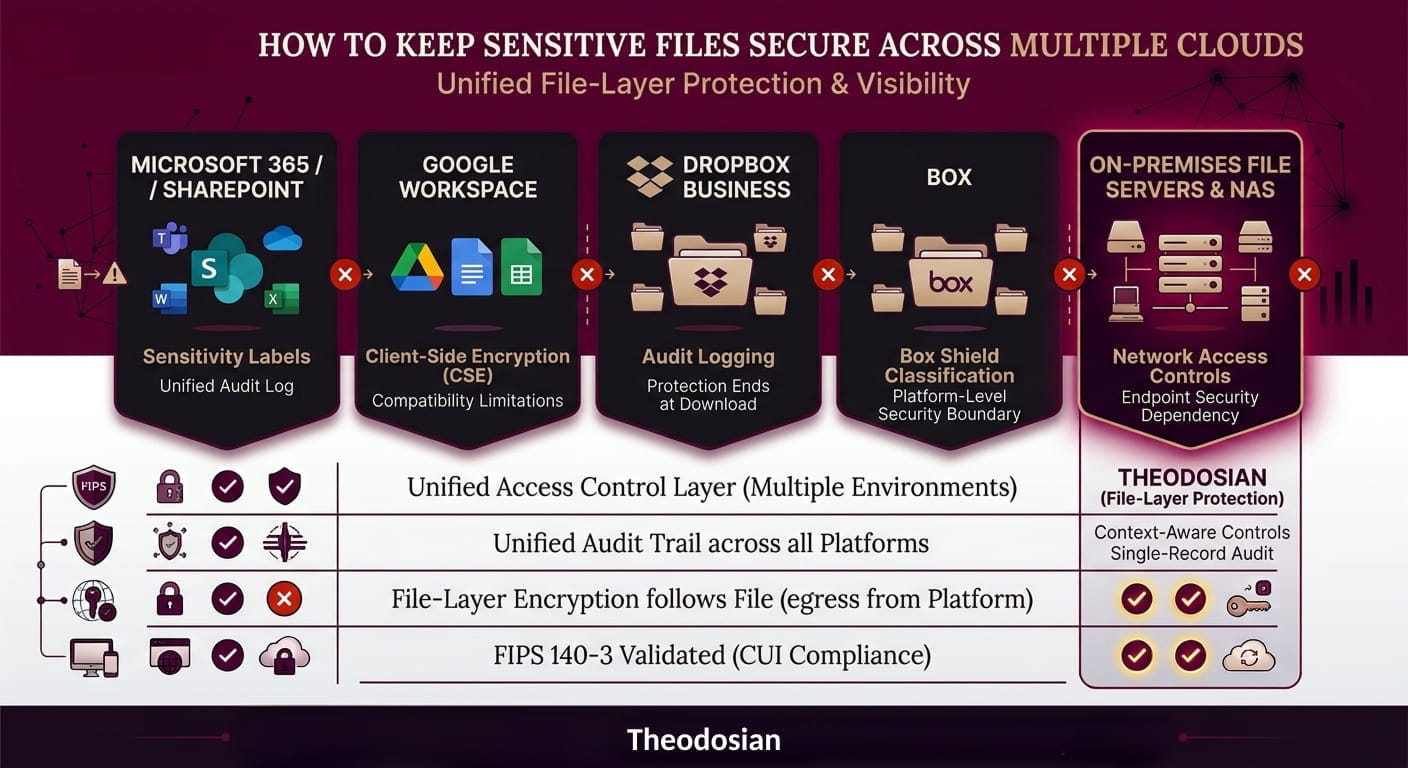
Microsoft 365 / SharePoint / OneDrive: Security within the M365 ecosystem is strong. Sensitivity labels with FIPS 140-3 validated encryption travel with Office documents within M365-compatible environments. Audit logging through the Unified Audit Log covers M365 activity. Outside M365, protection degrades.
Google Workspace / Google Drive: Google encrypts data at rest and in transit within its infrastructure. Sharing controls and audit logs within Workspace are reasonable. Google's client-side encryption (CSE) provides additional control but requires configuration and has compatibility limitations. Files shared externally or downloaded leave Google's protection boundary.
Dropbox Business: Dropbox encrypts data in transit and at rest within its infrastructure. Dropbox Business adds audit logging, extended version history, and admin controls. Protection ends when a file is downloaded. Dropbox does not apply file-level encryption that travels with the file outside the platform.
Box: Box provides encryption in transit and at rest within its environment. Box KeySafe offers customer-managed encryption keys. Box Shield adds classification and access monitoring. Box's security model is platform-level — protection is strong within Box, absent outside it.
On-premises file servers and NAS: Security is entirely dependent on network access controls and whatever endpoint security exists on devices that connect. Files on network shares are typically not encrypted at rest at the file layer. Audit logging requires additional tooling.
Each platform protects its own environment well. None of them protects files that leave.
Stop Trying to Fix Multi-Cloud Leaks With Platform-Specific Patches
When your data leaves its native ecosystem, standard perimeter controls vanish. See how easily you can apply persistent, zero-knowledge protection across all your cloud silos.
Where Do Cloud Platform Security Boundaries End?
The boundary is consistent across every platform: the protection ends when the file exits the platform.
A file in SharePoint is protected by SharePoint's security controls. Download it to a local drive, and those controls no longer apply. A file in Google Drive is protected by Google's infrastructure. Open it in a desktop application that does not integrate with Google's security layer, and the protection model changes. A file in Dropbox is encrypted at rest within Dropbox's storage. Sync it to a local Dropbox folder and the locally cached version has whatever protection the local disk provides.
This boundary is not a flaw; it is the natural consequence of platform-level security models. A platform can control what happens within its own environment. It cannot control what happens to a file that has left it.
For organizations with compliance obligations that follow the data — not the platform — this creates a structural problem. CMMC Level 2's SC.L2-3.13.11 requires FIPS-validated encryption for CUI wherever it lives. "Wherever it lives" includes the SharePoint tenant, the Google Drive folder, the local copy on the engineer's laptop, and the file emailed to the prime contractor. None of those environments are covered by any single platform's security boundary.
What Would Consistent File Security Look Like Across Multiple Cloud Platforms?
The only architecture that provides consistent file security across a multi-cloud environment is one that operates at the file layer, not the platform layer. If the protection is embedded in the file itself, it travels across platform boundaries with the file.
This means:
- A file encrypted at the file layer carries that encryption whether it is in SharePoint, Google Drive, Dropbox, Box, on a local drive, or attached to an email
- Access controls evaluate every access request — regardless of which platform the request originates from
- The audit trail covers access events from every environment, not just the originating platform
Theodosian integrates with SharePoint and OneDrive, Google Drive and Google Workspace, Dropbox, Box, Windows file servers, not as separate deployments for each platform but as a single file-level encryption layer that applies across all of them. A file protected in SharePoint carries its protection into Google Drive. A file shared externally through Dropbox carries its access controls into the recipient's environment.
The context-aware access controls evaluate every access request in real time regardless of which platform the file is on: authenticated identity, device compliance status, location, network type, time, and behavioral patterns. The access decision is based on the file's policy, not the platform's sharing settings.
Every access event generates an audit log entry: user identity, file identity, device, location, network, policy outcome. That log exists at the file layer — meaning it covers access across all platforms and environments in a single, coherent record, rather than requiring correlation across five separate platform audit logs.
How Do You Audit File Access Across Multiple Cloud Environments?
This is where multi-cloud file security gets operationally difficult. Correlating access events across SharePoint's audit log, Google Workspace's admin reports, Dropbox's event log, Box's activity feed, and on-premises file server logs requires either significant manual effort or a SIEM with custom integrations for each platform.
Even with that effort, there are gaps: files that move from one platform to another generate an exit event in one log and an entry event in another — or no entry event at all, if the destination platform does not generate audit records for uploaded files. The story of a file's access history across platforms is almost never complete from platform logs alone.
File-layer audit logging changes this. Theodosian logs every access event at the file level regardless of which platform the file is on. The log record includes: authenticated user identity, file name, device type, timestamp, location (IP, GPS, country), network type, and policy outcome. Whether the file is in SharePoint, in Google Drive, on a local drive, or in a subcontractor's environment, the access event generates the same log record in the same system.
For compliance purposes — CMMC's AU domain, HIPAA's audit controls requirement, ITAR's record-keeping obligations — this provides a complete, file-centric audit trail that does not depend on correlating logs across five different platforms.
For security operations, it means that an anomalous access event in Google Drive looks the same in the audit trail as an anomalous access event in SharePoint — because both are logged at the file layer, not the platform layer.
Take Control of Your Data Architecture
You shouldn't have to choose between user flexibility and strict compliance. Keep your files protected at rest, in transit, and in use across every cloud tool your teams prefer, without complex migrations.
FAQs: Multi-Cloud File Security
What is multi-cloud security and why does it matter?
Multi-cloud security refers to the practices and tools used to protect data, workloads, and applications that are distributed across multiple cloud providers — Microsoft Azure, Google Cloud, AWS, and various SaaS platforms simultaneously. Most enterprise organizations operate in multi-cloud environments not by deliberate strategy but through the accumulation of tool decisions over time. Multi-cloud security matters because each platform has its own security model, access controls, and audit logging — creating gaps at the boundaries where data moves between platforms. A file that is well-protected in one environment may lose its protection the moment it crosses a platform boundary.
Do cloud platforms like SharePoint and Google Drive encrypt my files?
Yes — major cloud platforms encrypt data both in transit and at rest within their own infrastructure. This protects against breaches of the cloud provider's storage layer. What it does not protect against is access by authorized users, by users with compromised credentials, or by anyone who obtains a file after it has been downloaded from the platform. Platform encryption applies while the file lives within that platform's environment. Once downloaded or shared externally, the platform's encryption is no longer the operative control. File-level encryption that is embedded in the file itself provides protection that continues after the file leaves the platform.
How do you manage access control across multiple cloud platforms?
Managing access control across multiple cloud platforms typically requires either a centralized identity and access management (IAM) system that integrates with each platform, or manual administration across each platform separately. The IAM approach works well for controlling who can log into each system but still leaves gaps for files that move between platforms — each platform's file-level access controls are separate and do not synchronize automatically. File-level access controls that are embedded in the files themselves provide a more consistent layer: the same access policy applies regardless of which platform the file is currently on, and access is evaluated at the file layer rather than at the platform boundary.
What is the difference between cloud security and data security?
Cloud security focuses on securing the infrastructure, applications, and access controls within a specific cloud environment. It covers network security, identity management, configuration management, and monitoring within that environment. Data security focuses on protecting the data itself — wherever it lives. In multi-cloud environments, cloud security is scoped to a specific platform, while data security follows the data across platforms. An organization with strong cloud security in each of its five cloud environments may still have weak data security if sensitive files are unprotected when they move between those environments.