
Most defense contractors who fail C3PAO assessments on encryption did not fail because they had no encryption. They failed because the encryption they had did not match what CMMC actually requires — at the algorithm level, the key management level, and the evidence level.
CMMC Level 2 includes 110 practices. Contractors typically invest preparation effort in access control and incident response — the visible, process-heavy domains. Encryption gets under-prioritized because "we already have encryption" feels like a solved problem. SC.3.177 and SC.3.187 are specific controls with specific technical and documentation requirements that standard enterprise encryption does not automatically satisfy.
Here are the five warning signs that your encryption controls have a problem, and what to do about each one before a C3PAO assessor finds it first.
🛡️ Check Your Encryption Controls Against All 110 CMMC Practices
The CMMC Assessment Readiness Checklist walks through all five phases — including the SC and MP control families — so you know exactly where your gaps are before the C3PAO does.
Sign 1: Your Encryption Is Not on the CMVP Validated Modules List
SC.3.177 requires "FIPS-validated cryptography" — not FIPS-compliant, not AES-256, not "military-grade" encryption. The specific implementation must be validated by NIST's Cryptographic Module Validation Program (CMVP) and appear on the active modules list.
AES-256 is an algorithm. FIPS 140-3 is a certification of the specific implementation of that algorithm. A vendor can use AES-256 without ever submitting their implementation to CMVP validation, and many do. The encryption may be cryptographically sound, but it does not satisfy SC.3.177.
When a C3PAO assessor evaluates SC.3.177, they will ask for your CMVP certificate number. If you cannot provide one, or if the tool you are using does not appear on the active modules list at csrc.nist.gov/projects/cryptographic-module-validation-program — SC.3.177 is marked NOT MET.
How to check: Go to the CMVP website and search for your encryption tool by vendor name or product name. Look for an "active" status. A "historical" status means the validation has lapsed and the module no longer satisfies the requirement.
What to document: The CMVP certificate number, the validation date, and the module name as listed on the CMVP database. This goes in your System Security Plan (SSP) alongside the SC.3.177 control description. An assessor should be able to verify your claim in under two minutes.
Sign 2: Your Keys Are Managed by Your Cloud Provider
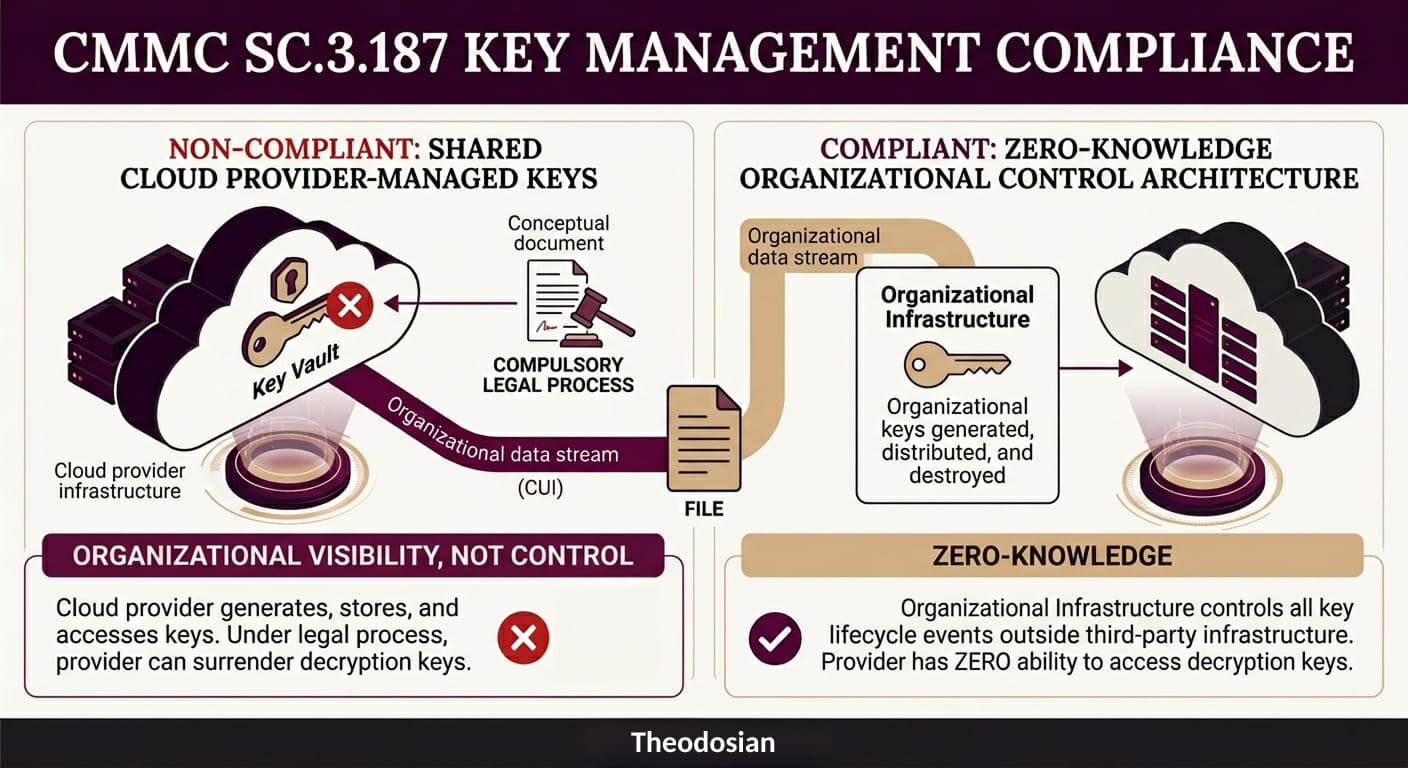
SC.3.187 requires that cryptographic key management is an organizational control, covering generation, distribution, storage, access, and destruction of keys. If your encryption is provided through a cloud platform and that platform manages the keys, SC.3.187 is not satisfied.
The nuance that trips up most contractors: "customer-managed keys" features offered by major cloud platforms do not satisfy this requirement. These features allow you to supply your own keys, but those keys live in the provider's key vault (AWS KMS, Azure Key Vault, Google Cloud KMS). The provider's infrastructure is managing the keys. Under compulsory legal process, the provider could be required to surrender them. You are not in organizational control; you are in organizational visibility.
SC.3.187 requires that your organization controls key generation, distribution, and destruction outside of the provider's infrastructure. The provider should not hold keys at any point — not in transit, not in escrow, not in a managed key service. Zero-knowledge architecture, where the provider has no ability to access decryption keys, is the standard that satisfies this requirement.
When an assessor asks how your organization demonstrates compliance with SC.3.187, the answer must include: a written key management policy, evidence of the key management process, and documentation that keys are not held by a third party. "We use AWS KMS with customer-provided keys" is not a satisfying answer. "We use a zero-knowledge key management system where keys are generated on our infrastructure and never transmitted to the provider".
Sign 3: Your Encryption Only Protects Data in Transit
TLS encryption for data in transit is standard practice. It is also not sufficient for SC.3.177 compliance if CUI sits at rest on servers, devices, or storage media without file-level encryption.
Many contractors implement TLS and consider encryption "done." SC.3.177 requires FIPS-validated encryption for CUI at rest and in transit. If CUI files sit unencrypted (or encrypted with a non-CMVP-validated implementation) on a file server, SharePoint, or endpoint device, the at-rest requirement is not met.
The compound problem: disk-level encryption (BitLocker is the most common example) does not satisfy SC.3.177 for CUI at rest. BitLocker protects data when the disk is locked — meaning when the device is powered off. When the device is powered on and the user is logged in, the disk is decrypted, and files are in plaintext. SC.3.177 requires that the protection exists at the file layer, not the disk layer, so that files remain protected regardless of device power state.
The practical implication: If a powered-on laptop containing CUI files is left unattended, stolen, or remotely accessed by a threat actor who has compromised the user's credentials, BitLocker provides no protection. The files are accessible in plaintext. Per-file FIPS 140-3 encryption, where each file is individually encrypted and requires an active authorization check to open, is what satisfies the at-rest requirement.
Sign 4: You Cannot Demonstrate Access Revocation at the File Layer
This sign appears at the intersection of SC.3.177 and MP.2.121, and it is the one that catches the most contractors off guard during scenario-based assessment questions.
The assessor's question goes something like this: "If a contractor's access to CUI was terminated today, how would you ensure they cannot access files they previously downloaded to their device?"
The standard answer — "we revoke their Active Directory credentials" — closes network access. It does nothing about files that are already on devices. If a contractor downloaded CUI files before termination, those files still exist on their device. Active Directory revocation does not make those files inaccessible.
A passing answer requires demonstrating that access controls exist at the file layer: the files require an active, verified authorization to open, and that authorization is revoked in the same action as account termination. The next time the former contractor attempts to open a file, the access check fails, and the file does not open — regardless of where the file is stored, whether the device is on your network, or whether the person's credentials were ever revoked in Active Directory.
This is not a theoretical scenario. Assessors use it specifically to test whether SC.3.177 and MP.2.121 controls are implemented at the file layer or only at the network layer. Network-layer-only implementation fails this question every time.
Sign 5: Your SSP Documents Encryption Controls You Have Not Actually Deployed
This is the warning sign with the highest stakes, and the one that connects directly to DOJ False Claims Act exposure.
The scenario: a contractor writes an SSP that describes SC.3.177 as "implemented" using a specific tool. The assessor asks for artifact evidence — CMVP certificate number, configuration export, and log samples. The contractor cannot produce them because the tool was evaluated but never deployed, or was deployed for some systems but not for systems that process CUI.
That documentation mismatch is a critical finding. In an assessment, it means SC.3.177 and SC.3.187 are marked NOT MET. In a DOJ investigation, it is the gap between a self-assessment SPRS score and actual implementation, which is exactly the fact pattern that produced a $4.6M False Claims Act settlement in December 2025.
The December 2025 DOJ action was the first FCA enforcement specifically targeting a defense subcontractor for falsifying an SPRS score. It will not be the last. CMMC Phase 2 mandatory enforcement begins November 10, 2026, replacing self-attestation with third-party C3PAO assessments for most Level 2 contractors. The assessors' job is to verify that what your SSP says matches what your systems actually do.
The guidance here is not complex: document only what is verifiably deployed. If a control is partially implemented, mark it as "partially implemented" in the SSP with a Plan of Action and Milestones (POA&M). An accurate SSP with honest gaps is a dramatically better position than a polished SSP with gaps that an assessor will find, and that a DOJ investigator could characterize as intentional misrepresentation.
What Does a Passing Encryption Evidence Package Look Like?
These are the artifacts an assessor expects to see for SC.3.177 and SC.3.187. Pull these together before the assessment begins.
| Evidence Item | Satisfies | Where to Find It |
|---|---|---|
| CMVP certificate number for your encryption tool | SC.3.177 | csrc.nist.gov/projects/cryptographic-module-validation-program |
| Written key management policy (approved, dated) | SC.3.187 | Policy library |
| Architecture documentation showing zero provider key access | SC.3.187 | Network/architecture diagram + vendor documentation |
| File-level encryption deployment evidence for CUI | SC.3.177 | Configuration export or tool screenshot |
| Access log showing denied access post-offboarding | SC.3.177 + MP.2.121 | Audit log export |
| SSP section mapping encryption controls to SC.3.177 and SC.3.187 | Both | System Security Plan |
None of these artifacts are difficult to produce if the controls are deployed. The issue is that contractors often have the controls in some form, but have never organized the evidence. Assessors are not going to help you find it. Produce it proactively, in the format above, before the assessment day.
🛡️ Fix Your Encryption Gap Before the Assessment
Theodosian's per-file FIPS 140-3 encryption with zero-knowledge key management is built to satisfy SC.3.177 and SC.3.187 — with the CMVP validation and organizational key control evidence your assessor will ask for.
FAQs: CMMC Encryption Controls
Does BitLocker satisfy SC.3.177?
For at-rest encryption of CUI, no. BitLocker is disk-level encryption that protects data only when the disk is locked (device powered off). SC.3.177 requires FIPS-validated encryption at the file layer, meaning the CUI file itself is encrypted and requires an active authorization to open, regardless of device power state. Additionally, BitLocker's FIPS 140-3 validation status depends on the specific Windows version and configuration. Verify against the CMVP list for your specific deployment.
What is the difference between FIPS 140-2 and FIPS 140-3 for CMMC?
FIPS 140-3 is the successor standard to FIPS 140-2. CMMC and related frameworks reference "FIPS-validated cryptography" — both 140-2 and 140-3 satisfy this requirement, though NIST stopped accepting new 140-2 submissions in September 2021. Active FIPS 140-2 validations remain valid through their stated expiration. New deployments should target FIPS 140-3 validated implementations.
Does my cloud provider's encryption count toward SC.3.187?
Only if your organization controls key generation, distribution, and destruction outside the provider's infrastructure. Standard cloud-managed encryption (provider holds keys) does not satisfy SC.3.187. Customer-managed key features (keys in the provider's key vault) also do not satisfy it. Zero-knowledge architecture, where the provider never holds keys, is required.
What does "organizational control" of keys mean in practice?
Keys are generated on your infrastructure or by a key management system that your organization operates. The provider of any tool that encrypts or decrypts CUI cannot access those keys — not for support, not under legal process, not in any operational capacity. You document the key generation process, the distribution mechanism, and the destruction procedure in a written key management policy.
Can I use the same encryption tool for ITAR and CMMC requirements?
Yes — if the tool satisfies both sets of requirements simultaneously. A tool with FIPS 140-3 validated encryption, zero-knowledge key management, per-file access controls, and a complete audit trail satisfies SC.3.177, SC.3.187, and the ITAR encryption requirements at the same time. The requirements overlap substantially at the technical layer.