
Zero trust is the right architecture: verify everything, trust nothing, and assume the perimeter has already been breached. The principles are sound, the NIST guidance is clear, and most CISOs have spent the last several years reorienting their programs around them.
Here is the part those programs often miss: zero trust at the network layer does not extend to the files sitting on that network. And the files are usually what attackers are actually after.
Now, most zero-trust implementations control access to systems and applications very well. They are far less effective at controlling what happens to the data inside those systems once a user gets in, and almost entirely ineffective at controlling that data after it leaves.
What Does Zero Trust Actually Mean for Data Security?
The NIST SP 800-207 definition of zero trust focuses on a few core principles: no implicit trust, continuous verification, least-privilege access, and assume breach. Applied to network and identity infrastructure, this translates to identity-verified access requests, device health checks before connection, micro-segmentation to limit lateral movement, and continuous session monitoring.
Those controls are genuinely valuable. Requiring verified identity and a compliant device before accessing a system is better than a flat network where anyone inside the perimeter can reach everything. MFA, conditional access policies, and just-in-time access privileges all reduce the blast radius of a compromised account.
The gap appears when you ask: what happens after the access is granted?
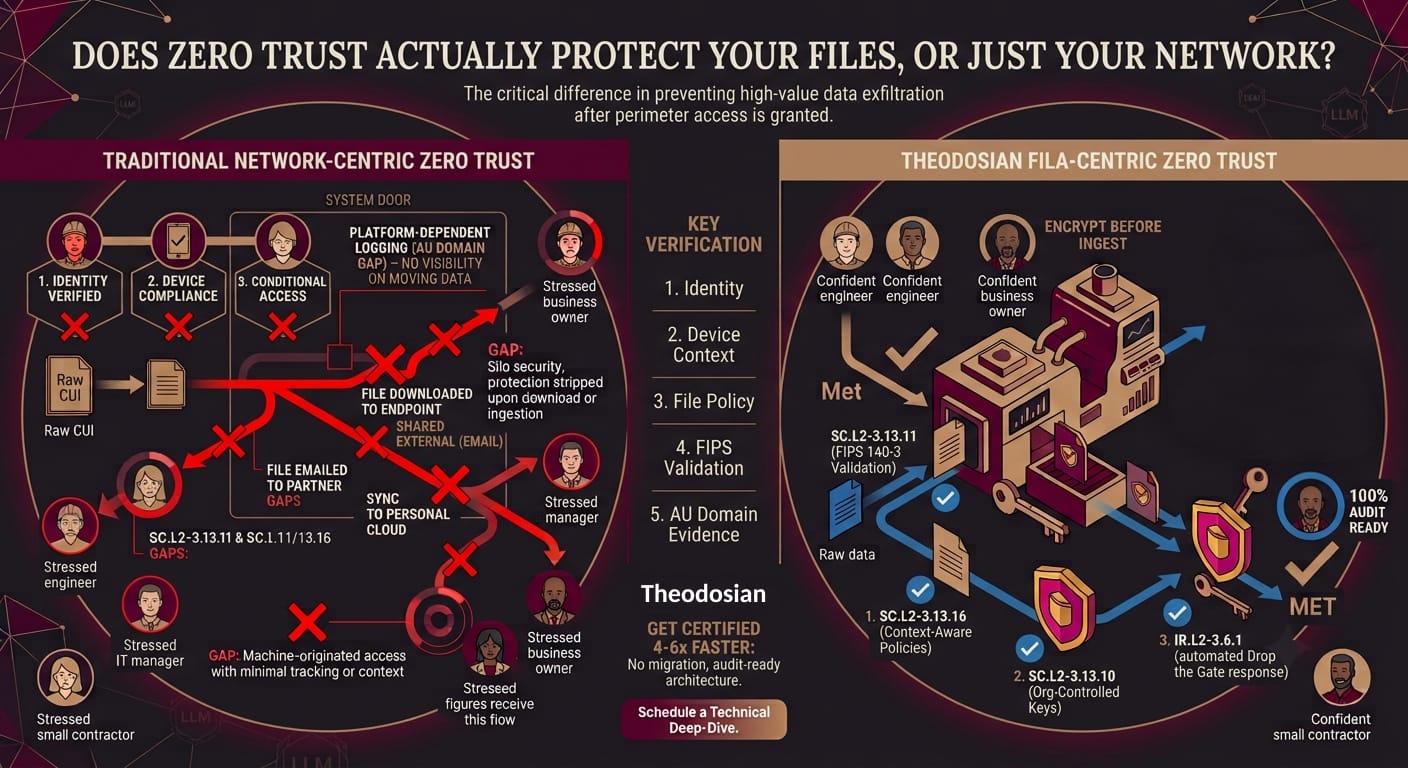
A user on a managed device with verified identity accessing a file through an approved application has satisfied every zero-trust check at the network and identity layer. Now they download the file to their local drive. They email it to a colleague at a partner firm. They sync it to their personal cloud backup. None of those actions require re-authentication. None of them are visible to the network's zero-trust controls. None of them are logged at the file layer unless there is something specifically watching the file.
Zero trust at the network controls the door. It does not control the file walking out through it.
Why Does Zero Trust Often Fail to Protect Unstructured Files?
The honest answer: zero trust was designed primarily for access control to systems and applications. Unstructured files — documents, spreadsheets, presentations, engineering drawings, contracts — are harder to control than systems because they're designed to move. They get downloaded, emailed, printed, shared externally, synced to personal devices, and uploaded to collaboration tools. Every time a file moves, it passes through a context that may not have the same zero-trust controls as the original environment.
There are four structural reasons why network-layer zero trust doesn't protect unstructured data adequately:
The trust decision happens at access, not at the file: Once a user has been verified and granted access, the zero-trust system's job is largely done. What the user does with the file after access — where they copy it, what network they carry it to — is outside the scope of most zero-trust implementations.
Files leave managed environments: Zero trust enforces policy within the organization's managed infrastructure. When a file is shared with a prime contractor, a lawyer, a customer, or an auditor, it exits that infrastructure. The recipient's environment may have no zero-trust controls at all. The file arrives unprotected.
Endpoints are the weakest link: A user accessing a file on a managed device satisfies the device compliance check at the moment of access. If that device is later compromised — malware, a keylogger, an unpatched vulnerability — attackers can access locally cached files without going through any zero-trust gate. Files that were downloaded "for convenience" become the exposure.
Credential compromise circumvents identity verification: When an attacker has valid credentials, they satisfy identity checks. From the zero-trust system's perspective, they look like the legitimate user. Zero trust built entirely on identity is only as secure as the identity itself.
Your Network Boundary Isn't a Data Boundary
If your compliance strategy stops at the system door, you are leaving your most critical data completely undefended the second it travels.
What Happens to Files That Leave a Zero-Trust Environment?
For regulated organizations, this question has a concrete answer: the compliance obligation follows the file. NIST SP 800-171 SC.L2-3.13.11 requires FIPS 140-3 validated encryption for CUI wherever it lives. ITAR requires US Person key control for covered technical data. Neither regulation limits its scope to "within your zero-trust environment."
When a CUI file leaves your zero-trust environment — downloaded to an engineer's home laptop, emailed to a prime contractor, synced through a personal device — it takes its regulatory obligations with it but leaves your access controls behind. What follows is a file in an uncontrolled environment that is legally required to be protected.
This is not an edge case. Defense contractors share CUI with primes, subcontractors, legal teams, and government contracting officers regularly. Healthcare organizations share PHI with billing vendors, specialists, and insurance companies. Financial firms share regulated data with counterparties, auditors, and regulators. In every case, the file regularly crosses the boundary that zero trust was designed to defend.
The zero-trust architecture cannot extend to those external environments. Something attached to the file can.
What Would True Zero Trust for Files Look Like?
The extension of zero-trust principles to the file layer looks like this: every access request to a protected file is evaluated continuously against a defined policy, regardless of where the file is. The requester must satisfy the policy conditions every time, not just the first time. If conditions change — device becomes non-compliant, location anomaly, unusual access pattern — access is denied or stepped up to verification.
The key shift from network zero trust to file zero trust: the policy logic travels with the file. Instead of enforcing policy at the boundary of a controlled environment, the file enforces policy on itself wherever it is.
This means:
- A file shared with an external partner requires authentication against the file's own access policy before it opens, in the partner's environment
- A file downloaded to a personal device cannot be opened without meeting the policy conditions the file carries
- A file accessed after business hours from an unfamiliar location triggers a verification challenge, regardless of which environment the file is in
This is what per-file encryption with context-aware access controls does.
How Do Context-Aware Access Controls Apply Zero-Trust Principles at the File Level?
Context-aware access control is the mechanism that extends zero-trust principles below the network layer to the file itself. Instead of evaluating a single access request at network entry, context-aware controls evaluate every file access request against a set of real-time conditions.
Theodosian's implementation evaluates six signal categories on every access request:
Identity: Who is requesting access, verified against your identity provider — Active Directory, Okta, Google Workspace, or SAML/OIDC. Identity is necessary but not sufficient.
Device: What device is making the request? Is it a managed, compliant device registered with your organization, or an unknown device? Device health status is evaluated in real time at the moment of access, not just at initial session establishment.
Location: Where is the access originating? IP address, GPS coordinates (where available), and country are all evaluated. A user accessing a file from a location inconsistent with their normal pattern triggers step-up verification.
Network: Is the request coming from a corporate network, a known VPN, or a public or unknown network? Network context feeds into the risk evaluation for each access event.
Time: Is the access occurring during expected working hours? Off-hours access to sensitive files is an anomaly signal that feeds into the access decision.
Behavioral pattern: Is this access consistent with how this user normally accesses files? Bulk download attempts, unusually high access frequency, or access to a file type the user rarely touches all generate anomaly signals.
When access is granted, Theodosian decrypts the file data securely in an isolated state, preventing unprotected plaintext from being permanently written or cached openly on the local disk.
When anomaly signals cross a threshold, Drop the Gate freezes access automatically, triggers step-up MFA, and notifies the security team. The entire sequence is logged.
How Does Zero-Trust File Security Support CMMC and ITAR Compliance?
The zero-trust principles at the file layer map directly to the CMMC controls that most contractors struggle with:
SC.L2-3.13.11 (FIPS-validated encryption for CUI): Per-file FIPS 140-3 validated AES-256 encryption satisfies this control wherever the file lives — inside or outside your zero-trust environment.
SC.L2-3.13.10 (Organization-controlled cryptographic keys): Zero-knowledge key management ensures your organization, not your vendor, controls the decryption keys. A compromised vendor or third-party environment cannot decrypt your files.
AC.L2-3.1.1 and AC.L2-3.1.2 (Access control to CUI): Context-aware access controls enforce least-privilege principles at the file layer. Access is evaluated continuously, not granted once at login.
AU.L2-3.3.1 and AU.L2-3.3.2 (Audit logging and user traceability): Every file access event is logged with user identity, device, location, network, and policy outcome — regardless of which environment the access occurred in.
IR.L2-3.6.1 (Incident response capability): Drop the Gate provides an automated incident response mechanism that triggers on anomalous file access events before they escalate.
For ITAR specifically, the US Person key control requirement under 22 CFR § 120.54 is satisfied by the zero-knowledge key management architecture — your organization holds the keys, Theodosian cannot access them, and that relationship does not change based on where the file travels.
Which Zero-Trust Implementations Are Missing the File Layer?
Most of them. Not because the architects missed the concept, but because file-level zero trust requires a different set of controls than what most zero-trust frameworks prioritize.
Check your current zero-trust implementation against these questions:
- Can a user on a verified, compliant device download a CUI file to their local drive without any control preventing further movement of that file?
- When a CUI file is shared with an external party, what controls follow the file into their environment?
- If a user's credentials are compromised and the attacker accesses CUI files during business hours from a known location, does any control prevent that access?
- When a CUI file is opened on an endpoint, is it decrypted to disk (creating a plaintext copy) or to memory only?
- Does your audit trail capture CUI access events for files that have been shared outside your primary environment?
If any of those questions produces an uncomfortable answer, the gap is structural — the zero-trust architecture needs a file-level layer, not just a network-level one.
Start Defending the Data
True zero trust means assuming your network environment will fail, your endpoints will be compromised, and credentials will be stolen. When that happens, your files need to be smart enough to defend themselves. Discover how easily Theodosian secures high-value CUI at rest, in motion, and in external environments without interrupting your team's daily workflows.
FAQs: Zero-Trust vs. File-Level Protection
What is the difference between zero trust and data-centric security?
Zero trust is an architecture — a set of principles (never trust, always verify, assume breach) that can be applied at different layers of a security program. Data-centric security is the application of those principles specifically to data and files, rather than to network access or application access. A zero-trust network controls who can reach which systems. Data-centric security controls who can access which files, regardless of which system or network those files are currently on. The two approaches are complementary — zero trust at the network layer and data-centric security at the file layer address different parts of the same problem.
Does zero trust prevent lateral movement once an attacker is inside the network?
Zero trust significantly reduces lateral movement compared to flat-network architectures. Micro-segmentation limits which systems an attacker can reach from a compromised position. Continuous verification means that accessing a new resource requires a new verification check. However, a user whose credentials have been compromised may satisfy those verification checks as long as the attacker's behavior looks like the legitimate user's normal pattern. Zero trust based entirely on identity cannot distinguish between a legitimate user and an attacker using stolen credentials from an expected location during normal hours. This is where behavioral and contextual signals at the file layer add a meaningful additional control.
Is zero trust required for CMMC Level 2?
CMMC Level 2 does not use the term "zero trust," but the underlying principles map directly to several CMMC controls. AC.L2-3.1.1 (access control), SC.L2-3.13.11 (encryption for CUI), and AU.L2-3.3.1 (audit logging) all reflect zero-trust thinking — the idea that access should be continuously evaluated, data should be protected regardless of location, and every access event should be logged. The NIST SP 800-207 guidance on zero trust provides a useful framework for implementing these controls.
What is the NIST guidance on zero trust for data security?
NIST SP 800-207 defines zero trust architecture and its core tenets. For data security specifically, NIST SP 800-171 provides the control framework that CMMC Level 2 is built on, and NIST SP 800-162 (Attribute-Based Access Control) provides guidance on how context-aware, attribute-based access decisions can implement zero-trust principles at the data layer. The combination of these frameworks describes a security model where every access request to CUI is evaluated against a defined policy based on multiple attributes — identity, device, location, network, time — rather than a single trust decision made at network entry.