
Ransomware attacks follow a predictable pattern: infiltrate, escalate, encrypt, ransom. Every CISO knows it. Most security programs have built significant defenses around the first two stages — detection at the perimeter, EDR on endpoints, zero-trust network access.
The third stage — encryption — is where things get philosophically interesting.
Because ransomware's core attack is encryption. And the standard defense recommendation is also encryption. If your files are already encrypted, can ransomware still hurt you?
The answer is yes, and understanding exactly why reveals an important architectural gap that many security programs haven't addressed.
How Does Ransomware Actually Work on Your Files?
Ransomware is malware that encrypts your files and holds the decryption key for ransom. When it executes on an infected system, it typically:
- Scans the filesystem for target file types (.docx, .xlsx, .pdf, CAD files, database files, etc.)
- Encrypts each file using a unique key controlled by the attacker
- Deletes or overwrites the original unencrypted file
- Demands payment in exchange for the decryption key
Modern ransomware groups — LockBit, BlackCat, Cl0p — often add a second layer: they exfiltrate the data before encrypting it. So even if you restore from backup, they still have your files. The ransom isn't just for decryption anymore; it's for non-publication.
The average cost of a data breach globally has climbed to $4.88 million, with ransomware specifically driving up downtime, recovery, notification, and reputational damage expenses. According to the comprehensive IBM Cost of a Data Breach Report, these costs continue to rise as attackers pivot toward more aggressive extortion tactics. The median ransom demand has also crossed into the multi-million dollar threshold for enterprise targets.
Can Ransomware Encrypt Files That Are Already Encrypted?
Yes. And this is the answer most people find surprising.
When most organizations talk about "encrypting files," they mean one of two things: encrypting the disk (BitLocker, FileVault), or encrypting files at rest on a server (server-side encryption in SharePoint, S3, etc.). Both are valuable security controls, but neither stops ransomware from re-encrypting those files when it executes.
Here's why: disk encryption protects data from physical theft of the drive. When the operating system is running and the disk is unlocked, the encryption is transparent. The ransomware process sees the files as plaintext — because from the OS's perspective, they are. It can read, modify, and encrypt them just like any other process with file system access.
Server-side encryption works the same way. When an authorized user — or an attacker with an authorized user's session — accesses the files, the platform decrypts them in transit. The ransomware receives decrypted data. It can then apply its own encryption on top.
This is why "we encrypt our data" is not, by itself, a ransomware defense strategy.
🔒 Is Your Data Defenseless Against a Compromised Account?
If your data relies entirely on standard disk or server-side encryption, a single compromised user credential allows ransomware to read, exfiltrate, and re-encrypt your entire repository. Traditional boundaries cannot protect data from a threat that is already inside.
Does Encrypting Your Hard Drive Prevent Ransomware?
No, and this is one of the most persistent misconceptions in enterprise security.
Full disk encryption (FDE) protects data if the physical drive is stolen or the machine is powered off. It does not protect data from processes running on that machine with user-level or elevated privileges. Ransomware runs as a process on the operating system. Once the OS boots and the disk is decrypted for use, FDE has done its job, and ransomware can do its.
The same is true for volume-level encryption, folder-level encryption, and most implementations of "encryption at rest." These controls protect data from the outside. They don't protect data from processes that have legitimate (or stolen) access to run on the inside.
What Is the Difference Between Volume Encryption and Per-File Encryption?
This is the architectural difference that matters most for ransomware resilience.
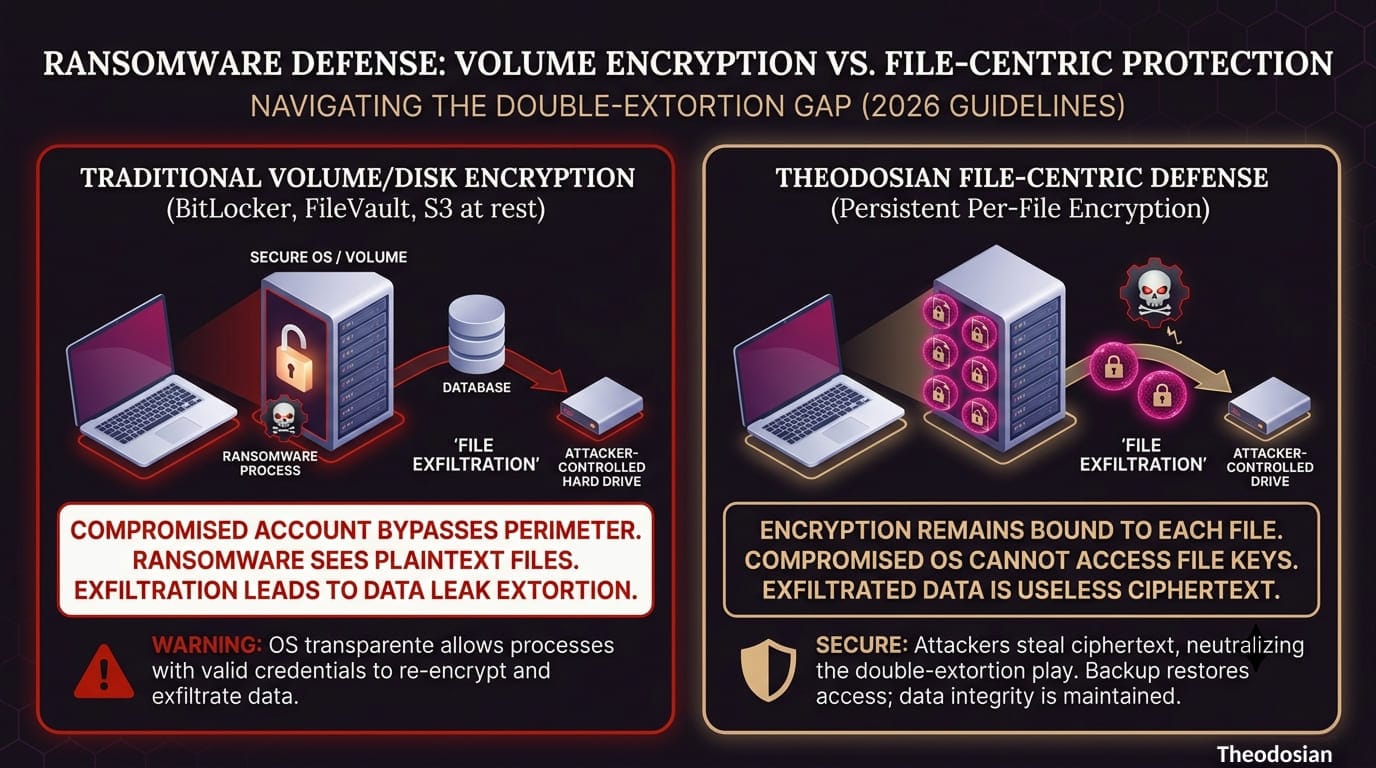
Volume encryption (BitLocker, FileVault, server-side encryption at rest) protects a container. All files inside that container share the same decryption key at the volume level. When the volume is unlocked, every file inside is accessible to any process with file system permissions.
Per-file encryption protects each file individually with its own cryptographic key. That key is managed by a system separate from the operating system and file system — typically tied to identity and access policy. Even if the file is present on a compromised machine, the ransomware process cannot access the per-file key because it doesn't have the authorized identity context to request it.
The practical difference: a ransomware attack that executes on a system with per-file encryption can try to re-encrypt the files — but it will encounter already-encrypted ciphertext that it can't read. The attacker gets encrypted garbage on top of already-encrypted data. Your copy of the file, backed up before the attack, is still recoverable with your key. The attacker has nothing usable.
Is Backup Enough, or Do You Need File-Level Encryption Too?
Backup solves one problem: restoring operations after an attack. It doesn't solve data exposure.
Modern ransomware groups — particularly those running double extortion operations — exfiltrate data before triggering encryption. If your files were accessible in plaintext before they were re-encrypted by ransomware, the attacker already has a copy. A clean backup gets your operations running again, but it doesn't un-expose whatever the attacker already copied.
This is where the blast radius of your architecture matters. If your files are protected with per-file encryption before the attack begins, the attacker's exfiltration copy is ciphertext. Without the decryption keys — which live in a system they haven't compromised — that copy is unreadable. The double extortion lever doesn't work: there's nothing to threaten publication of.
Backup is necessary for operational recovery. Per-file encryption is what determines whether data exposure was a consequence of the breach. The two solve different problems, and you need both.
What Happens to Ransomware-Encrypted Files When You Have Per-File Encryption?
If per-file encryption is in place before an attack:
- The ransomware cannot read the file contents — it encounters ciphertext it doesn't hold keys for
- Any exfiltrated copy is unreadable without the per-file decryption keys
- The ransomware may still lock the file (by encrypting the ciphertext), but the underlying data is not compromised in value
- Recovery from backup restores both access and the integrity of the per-file protection
This is what "breach does not equal data loss" means. The attacker succeeds in the technical sense — they have a copy of files. But the files are useless to them. The leverage that makes ransomware financially viable disappears.
How Theodosian Addresses the Ransomware Problem
Theodosian applies FIPS 140-3 validated per-file encryption before files rest in any storage system. Each file gets its own cryptographic key, managed separately from the operating system and file system — so a process running on an infected machine with valid user credentials cannot access the per-file key without the authorized identity context.
The encryption travels with the file. If a ransomware group exfiltrates files from a system where Theodosian is deployed, they get encrypted files. Without the keys — which are controlled by the organization, not by anything on the compromised machine — those files are ciphertext. The double extortion play fails.
Drop the Gate, Theodosian's autonomous threat response, monitors per-file access patterns and can freeze access automatically when behavior matches a ransomware-like pattern — bulk file reads followed by writes, rapid sequential access across file types — generating an audit event at the point of anomaly.
Your backup strategy still matters. Theodosian works alongside it, not instead of it. Backup restores your operations. Per-file encryption ensures the attacker's copy of your data is worth nothing.
🛡️ Make Exfiltrated Data Worthless to Attackers
Backups restore your systems, but they cannot undo data exposure. True ransomware resilience requires moving your defense to the file layer. With Theodosian, your files remain permanently encrypted, making double-extortion tactics useless against your intellectual property.
FAQs: File-Level Encryption & Ransomware Defense
If ransomware encrypts a file that is already encrypted by the user, can it still be held for ransom?
Yes, technically it can. Because ransomware doesn't care what is inside the file, it can take your already-encrypted ciphertext file and wrap its own layer of malicious encryption around it. However, because your original data was protected at the file level before the attack, the ransomware group cannot read or exfiltrate a plaintext copy. While you will still need to restore the locked file from a backup to regain operational access, the attacker loses 100% of their "double-extortion" leverage because they cannot threaten to leak your sensitive information to the public.
How does file-layer encryption protect data if an attacker steals a valid user's credentials?
Standard volume or portal encryption decrypts files automatically for anyone using a valid credential. Theodosian’s file-layer security, however, separates key management from standard operating system and file system access. Our system evaluates access dynamically on every single file open. Even if an attacker gains valid credentials, automated security mechanisms like Drop the Gate monitor per-file access patterns. If a compromised account starts executing bulk file reads or rapid sequential modifications typical of ransomware, access is instantly frozen at the data layer before widespread damage can occur.
If we already have a robust, daily cloud backup strategy, why do we still need file-level encryption?
Backups and file-level encryption solve entirely different parts of a ransomware attack. Backups solve the operational recovery problem; they give you a clean copy to restore your business operations. They do not, however, solve the data exposure problem. Modern ransomware groups almost always exfiltrate (steal) your files before they lock your systems. A backup cannot stop an attacker from publishing your proprietary IP or regulated data on the dark web. File-level encryption ensures that the stolen copy is completely unreadable ciphertext, effectively neutralizing the extortion.