
Chrome's built-in PDF viewer doesn't enforce password permissions. By PDF specification design, this is not a bug. A contractor opens a "protected" document in their browser; the restrictions don't apply, and the document is fully copyable, printable, and extractable. The protection that was supposed to follow the file never left the sending organization.
Most document security programs share this structural problem: the protection lives in a specific reader, a specific platform, or a specific organizational boundary, not in the document itself. When the file moves, the protection stays behind.
Documents are designed to move. Security that doesn't move with them isn't security. It's a policy.
What "Document Security" Usually Means, and Where Each Approach Breaks Down
The phrase covers four distinct categories. Each addresses a real risk, and has a boundary condition where it fails.
PDF Password Protection
Two mechanisms. Two very different failure modes.
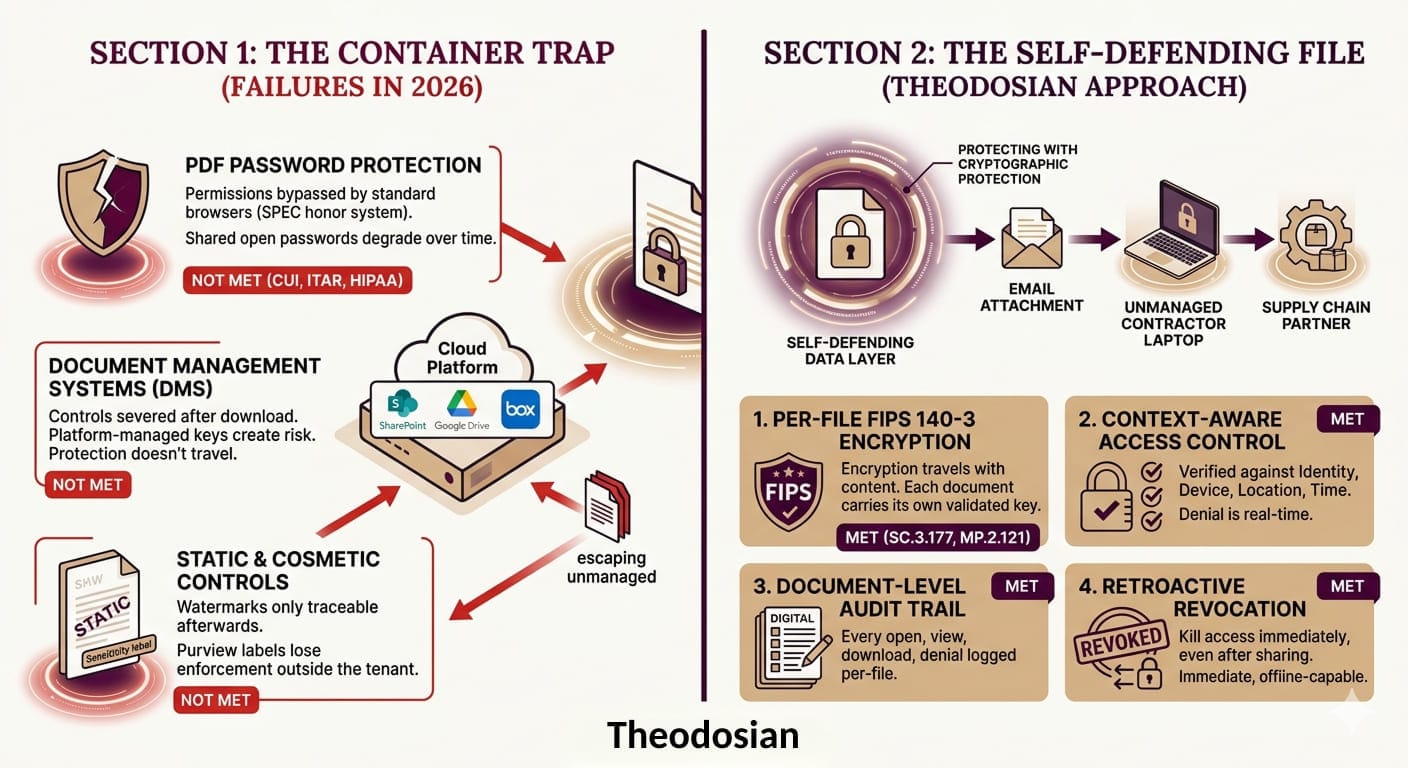
Permissions password restrict printing, copying, and editing, but only for "good faith" applications. Chrome, Edge, and Firefox do not enforce them by specification. Any tool that reads raw PDF content ignores them. A permissions password is an honor system applied to a file in an ecosystem that doesn't require honor. Standard browsers bypass it; specialized removal tools handle it in seconds.
Open passwords require a password to open the file. This is genuine AES encryption when implemented correctly. The problem: every recipient needs the password. Every person who holds the password is a leak vector. Once a recipient opens the file and saves a decrypted copy, all protection is gone.
Watermarking
Static watermarks are visible in screenshots but can be cropped, covered, or photographed around. Dynamic watermarking — personalizing the mark with the recipient's name, email address, and timestamp — is meaningfully stronger. It makes leaks traceable afterwards.
That's the limit. Watermarks are forensic tools, not access controls. They tell you who leaked a document after the breach notification has gone out. CMMC's MP.2.121, HIPAA's § 164.312, and ITAR's § 120.31 require you to prevent unauthorized disclosure, not identify it retrospectively.
Document Management Systems (SharePoint, Box, Google Drive)
DMS platforms are access control systems applied to a repository. They govern who can reach a file while it lives inside the platform. The moment the file is downloaded — which is a designed, expected function — the platform's controls are severed.
A SharePoint permission governs the library. It does not follow the file into an email attachment, a personal Dropbox, or a contractor's laptop. Box and Google Drive have the same architectural limitation.
Microsoft Purview adds label-based policy enforcement within the M365 ecosystem. Outside the tenant — emailed to outside counsel, downloaded to a personal device, uploaded to a non-Microsoft application — the label becomes a visual marking. There is no enforcement mechanism in the file itself.
Enterprise IRM/DRM
Platforms like Seclore, Fasoo, and LockLizard provide persistent controls: policy-enforced access, copy/print restrictions, remote revocation. These get closer to the right architecture. Protection is designed to travel with the document.
The limitations are structural. IRM/DRM requires a compliant reader on the recipient's device. The policy server must be reachable when access is attempted. Offline access needs pre-authorization. Screen capture and phone cameras bypass in-document controls. File format conversion — printing to a new PDF, saving as .docx — can strip protections if not specifically blocked. The architecture is correct; the implementation creates friction, and friction creates exceptions, and exceptions are where protection breaks down.
Stop Trusting the PDF "Permissions" Illusion
If your document security strategy relies on a standard browser and respecting a password, your data is already exposed.
The File Is the Perimeter
Protection has to live in the file itself, not in the reader, not in the platform, not in the network perimeter. When the file moves, the protection moves with it.
That model requires four core things:
Per-file FIPS-validated encryption (transitioning to active FIPS 140-3 standards as the FIPS 140-2 sunset window closes). Not password encryption, which degrades every time the password is shared. Not platform-managed keys, where the platform's compromise is the key's compromise. Per-file encryption where each document carries its own key, derived from a seed the organization controls. The encryption is the same on an unmanaged contractor laptop as on a managed corporate device, because the protection lives in the file, not the device.
Context-aware access controls that enforce at the file level. Every attempt to open the file is an access request — verified against identity, device trust, location, and time. A stolen credential doesn't open the file if the device is unmanaged or the location is unauthorized. Access is denied.
Audit at the document level. Every open, view, download, and denied access attempt is logged per-file, per-user, per-device. This is the audit trail regulators are asking for — evidence that access was controlled at the content level, not just at the platform perimeter.
Retroactive revocation. When a file is sent to the wrong recipient, a contractor relationship ends, or a document is superseded, access is denied if contextual controls aren’t met. The file doesn't need to be retrieved.
That is what "the file defends itself" means.
What CMMC, ITAR, and HIPAA Require at the Document Level
CMMC Level 2 / NIST SP 800-171:
SC.3.177 requires FIPS-validated cryptographic modules (transitioning to active FIPS 140-3 standards as the FIPS 140-2 sunset window closes) for CUI. The validated module must hold a current CMVP certificate number — assessors ask for it specifically. AES-256 as an algorithm is not sufficient; a validated module is.
A permissions-password PDF does not satisfy SC.3.177. Neither does a DMS with platform-managed encryption unless the specific CMVP certificate is confirmed. SC.3.187 requires organization-controlled key management; if a cloud provider manages your encryption keys, that is a documented SC.3.187 failure mode.
Both SC.3.177 and SC.3.187 are on the POA&M-prohibited list. They cannot be deferred. Phase 2 enforcement begins November 10, 2026.
ITAR (§ 120.31):
The ITAR encryption safe harbor provides that properly encrypted technical data is not considered a regulated export — because it cannot be accessed without authorized decryption. The key must remain under organizational control. A shared PDF open password does not satisfy § 120.31 because the recipient holds the key. The moment the password is shared, the control over who can access the document is gone.
The civil penalty for an ITAR violation is $1,271,078 per violation (2025 figure), or twice the transaction value. With organizations averaging thirteen or more insider incidents per year—most of them negligent, not malicious—the exposure to an accidental ITAR leak is not theoretical.
HIPAA (45 CFR § 164.312):
The HIPAA encryption safe harbor under § 164.402(2) means that properly encrypted PHI does not trigger breach notification. "Properly encrypted" under NIST guidance means AES-128 or AES-256 with the decryption key not accessible to unauthorized users. A shared PDF password fails this — once shared, the "unauthorized users" definition expands to anyone who knows the password.
Misdirected email is the leading non-cyber cause of healthcare data breaches. Per-file access controls are the technical safeguard that prevents misdelivered files from becoming breach notifications.
Document Security Approaches: What Each Does
| Capability | PDF Permissions Password | PDF Open Password | Watermarking | SharePoint/DMS | Enterprise DRM | Per-File Encryption |
|---|---|---|---|---|---|---|
| Access control | Honor system (bypassed by browsers) | Shared secret | ❌ | ✅ Within platform | ✅ Policy-based | ✅ Per-file, context-aware |
| Post-download enforcement | ❌ | ❌ (password shared) | ❌ | ❌ | ✅ (requires reader) | ✅ Device-agnostic |
| FIPS validation | ❌ | AES only (unvalidated module) | ❌ | Partial (M365 only) | Varies | ✅ Validated module, CMVP certificate |
| Key management control | Shared password = shared key | Shared password | N/A | Platform-managed | Central server | ✅ Organization-controlled |
| Access revocation after sharing | ❌ | ❌ | ❌ | ❌ | ✅ (when online) | ✅ Immediate, offline-capable |
| Unmanaged device coverage | Password only | Password only | ❌ | ❌ | ❌ (requires reader) | ✅ |
| CMMC SC.3.177 satisfaction | ❌ | ❌ | ❌ | Partial | Varies | ✅ |
| Audit at document level | ❌ | ❌ | Tracing only | Platform logs | ✅ | ✅ |
Choosing the Right Document Security Approach
If your documents stay within a managed Microsoft environment and go to M365 recipients, Purview sensitivity labels with IRM enforcement are a reasonable starting control. The protections work inside the ecosystem.
If your documents regularly leave your environment — to contractors, outside counsel, supply chain partners, or via email to non-managed domains — the ecosystem boundary is where the protection ends. Something has to travel with the file.
If you're subject to CMMC or ITAR, the FIPS validation and key management requirements cannot be deferred. A permissions-password PDF, a cloud DMS with platform-managed keys, or a Microsoft tenant that doesn't hold a documented CMVP certificate will not survive assessment.
If you're subject to HIPAA, the combination of per-file encryption (satisfying the encryption requirement) and access controls (preventing misdelivered files from becoming breach notifications) is the architecture that qualifies for the encryption safe harbor. Platform-managed encryption with shared passwords does not.
Next steps?
1. Do Nothing — Accept that your document security program depends on every recipient, every endpoint, and every application behaving exactly as intended. That is the same as having no guarantee.
2. Protect the Content, Not the Container — Per-file encryption and access controls travel with every document, into every environment, on any device. The protection doesn't end when the file leaves your perimeter, because the protection is the file.
Fix Your Data-Layer Gaps
Don't let default platform encryption or shared passwords sink your compliance status. Give your auditors the verified CMVP cryptographic certificate numbers they are actively looking for.
FAQs: Document Security 2026
What is document security?
Document security refers to the controls applied to a document to restrict access, limit what recipients can do with it, track where it travels, and revoke access after the fact. In practice, organizations use a combination of password protection, digital rights management (DRM), access-controlled document management systems (DMS), and file-level encryption. The distinction that matters: platform-based controls protect documents while they live inside the platform. File-level controls protect documents wherever they travel — and those are two very different guarantees.
What is the difference between DRM/IRM and per-file FIPS-validated encryption?
Digital Rights Management (DRM) and Information Rights Management (IRM) systems apply policy-based controls — restricting printing, copying, and editing, and enabling remote revocation. These controls typically require a compliant reader application on the recipient's device and connectivity to a policy server. Per-file FIPS-validated encryption is a different mechanism: the protection is cryptographic and device-agnostic, not dependent on a specific viewer. It enforces the same access policy regardless of what application or device the recipient uses.
What happens to document protection when a file is shared externally?
With most DMS and DRM systems, external sharing behavior depends on whether the recipient operates within the governance scope of the platform. SharePoint external sharing can expire or be restricted by policy, but a downloaded file leaves all platform controls behind. Watermarks travel visually but have no access enforcement. Enterprise DRM requires the recipient to have a compatible viewer. Per-file encryption with context-aware access controls is the only approach where the same protection applies regardless of whether the file is on a managed corporate device, a contractor's personal laptop, or an external partner's system.
What does ITAR require for document security?
ITAR does not distinguish between a printed technical drawing and a PDF of the same drawing. Any unauthorized disclosure — including making an ITAR-controlled document accessible to a foreign national or storing it on non-compliant infrastructure — is a potential violation regardless of intent. The ITAR encryption safe harbor (§ 120.31) provides that properly encrypted technical data is not considered an export because it cannot be accessed without authorized decryption. The organization must hold the decryption key. A shared PDF password, a platform that manages its own encryption keys without verified FIPS validation, or unencrypted files on cloud storage accessible to non-US persons all represent exposure under this framework.
What is secure document management?
Secure document management combines the governance capabilities of a document management system (access controls, version control, retention policies) with technical protection that travels with the document. A DMS without file-level protection is an access-controlled filing cabinet — useful for governing documents while they live on the platform, but providing no protection once a file is downloaded or shared externally. Adding per-file encryption to a DMS environment closes that gap: documents are governed on-platform and protected off-platform.