
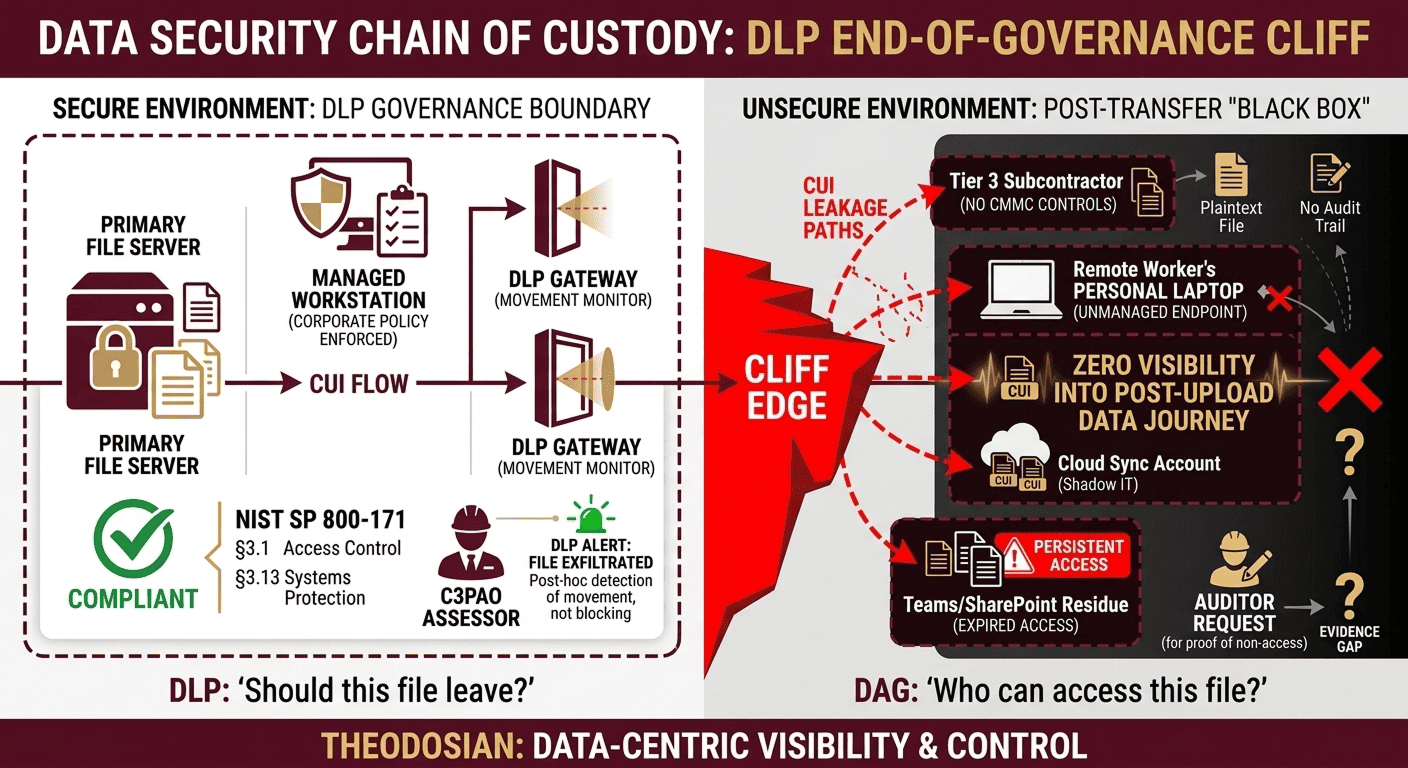
Every major DLP deployment shares a common characteristic: a boundary. DLP enforces at the point of movement: the email gateway, the USB port, and the cloud upload. When a file crosses the boundary with authorization, DLP's job ends. What happens to that file after is not DLP's problem. For the organization that shared it, it is.
Data Access Governance (DAG) fills the gap DLP was never designed to close. Where DLP asks “should this file leave?”, DAG asks “who can access this file, under what conditions, and for how long, regardless of where it is.” According to Gartner, 70–90% of organizational data is unstructured — files, documents, spreadsheets, images — and that volume is growing at 40–60% per year. Most of it is outside DLP's enforcement jurisdiction the moment it leaves the originating system.
🛡️ Does Your Data Governance Die at the Gateway?
Don't wait for an audit finding to secure your post-transfer environment. See how file-resident governance protects your IP everywhere it travels.
No architectural changes. FIPS 140-3 validated. Deploy in minutes.
Where DLP Governance Ends
DLP governs transfer events. It applies rules at the moment of movement — upload, download, email, copy — and blocks or alerts based on content inspection and policy. Once a file is legitimately transferred, DLP has no ongoing authority over that file. The file is now on the recipient's endpoint, in their cloud storage, or in their email archive. The DLP system that approved the original transfer has no visibility into what happens next.
Three scenarios illustrate where DLP governance ends, and DAG governance begins:
Expired Partnership: A design file is shared with a joint venture partner under an NDA. The partnership dissolves. DLP correctly permitted the original transfer. It cannot revoke access to the file now sitting on the partner's system. If that file contains proprietary technical data, it remains accessible — indefinitely — unless the originating organization has per-file governance that survives the transfer.
Contractor Endpoint: A contractor with authorized access downloads CUI to their laptop for offline work. DLP permitted the download, and the contractor was authorized to do so. The project ends. The contractor's VPN access is revoked. The file is still on the laptop, outside the VPN perimeter, outside DLP's enforcement scope, and outside the SSP boundary for CMMC purposes.
Auditor File Share: A healthcare organization shares patient records with an external auditor via encrypted email. HIPAA permits this under a BAA. The audit closes. The auditor retains the files. If the auditor suffers a breach six months later, the healthcare organization has an incident that originated from a legitimately authorized transfer — DLP never had jurisdiction over the outcome.
Read the Analysis: Data Sprawl: The Compliance Risk Nobody is Auditing
What Data Access Governance Actually Requires
DAG is not a feature; it's an architecture. A DAG-capable system must meet five non-negotiable requirements to provide post-transfer governance:
- Per-file Policy Enforcement Independent of the Network: Access policy must travel with the file. A file governed by DAG should enforce access controls, whether it is on a corporate endpoint, a personal device, an external partner's system, or a cloud storage account. Network connectivity to the originating system should not be required for policy enforcement.
- Real-time Revocation on Distributed and Offline Files: When access is revoked, all copies of the file — across all devices and locations — must reflect the revocation at next access. This requires the encryption and access policy to check authorization state, not rely on static permissions set at the time of transfer.
- Cryptographically Timestamped Audit Logs: Every access event — open, view, edit, failed access attempt — must be logged with a cryptographic timestamp that cannot be retroactively altered. This is the evidence layer required for CMMC practice 3.3.1, HIPAA § 164.312(b), and FTC Safeguards Rule examination.
- Context-aware Policy Enforcement: Access should be governed by more than identity. Location, device compliance state, time of day, and project context are legitimate governance variables. A file with ITAR-controlled content should not be accessible from a foreign IP address, even if the user is authenticated.
- No Network Dependency for Enforcement: Policy enforcement at access time requires the cryptographic access check to work offline. This eliminates the vulnerability of a file being accessed during a network outage or while disconnected from the corporate environment.
DAG vs. DLP: A Technical Comparison
| Capability | DLP | Data Access Governance |
|---|---|---|
| Enforcement point | Transfer event (email, upload, copy) | File access event (anywhere) |
| Post-transfer visibility | None | Full — every access event logged |
| Access revocation | Not applicable | Real-time, retroactive on all copies |
| Offline enforcement | No — network-dependent | Yes — Cryptographically bound policy |
| Compliance evidence | Transfer event logs only | Per-file access audit trail |
| Context-aware policy | Content inspection at transfer | Identity + device + location + time |
Strategic Guide: Shadow AI Data Governance: The Hidden Pipeline Your Security Stack Was Never Built to See
Three Compliance Scenarios Where DAG Replaces a Gap
CMMC Level 2 (Access Control and Audit): NIST SP 800-171 practices 3.1.3 (controlling the flow of CUI) and 3.3.1 (creating audit logs of CUI access events) require ongoing governance of CUI — not just at the transfer point. DLP satisfies neither in the post-transfer environment. DAG satisfies both: access flow control is enforced at the file level regardless of location, and audit logs capture every access event with a cryptographic timestamp.
HIPAA Technical Safeguards: HIPAA § 164.312(b) requires audit controls: hardware, software, and procedural mechanisms that record and examine activity in information systems containing ePHI. An audit log that only captures transfers, not ongoing access, does not satisfy this requirement. DAG provides the per-access event log that technical safeguards require.
FTC Safeguards Rule (16 CFR Part 314): The Safeguards Rule requires encryption of customer financial information in transit and at rest — including after authorized sharing. Files shared with service providers, auditors, and contractors must remain encrypted and access-governed. DLP cannot enforce encryption on files it no longer tracks. DAG maintains encryption and access governance independently of where the file resides.
Evaluating DAG Capability in Practice
When evaluating whether a solution provides genuine DAG capability or is rebundling DLP features under new terminology, apply five tests:
- Can the solution revoke access to a file already on an external party's endpoint, without requiring that party to take any action?
- Does access policy enforcement work when the file is opened offline, with no connection to the originating system?
- Does the access log capture every open/view event, or only transfers and downloads?
- Can context variables (location, device compliance, time) be applied at access time, not just at transfer time?
- Is the encryption file-resident — meaning the file carries its own policy, not a policy stored on a server that must be queried at access time?
If the answer to any of these is no, the solution provides DLP with extended reporting, not DAG.
Where DAG Belongs in the Security Architecture
DAG is not a replacement for DLP; it's the layer DLP was never designed to provide. Organizations that implement both address the full data governance lifecycle: DLP governs what leaves, DAG governs what happens after.
For organizations in CMMC, HIPAA, or FTC Safeguards Rule scope, the DAG layer is where the compliance evidence lives. The audit log that satisfies the assessor question — “show me who accessed this CUI file and when, including accesses that occurred outside your network” — is a DAG output, not a DLP output.
When this DAG layer is missing, the files that leave your network don't just disappear; they morph into Shadow Data. These are the authorized transfers that turn into uncontrolled liabilities on contractor laptops and personal clouds. For a breakdown of where these files hide, read our companion piece: Shadow Data: The Files Your DLP Tool Will Never Find.
Close the Gap Between Transfer and Access
If your current security architecture can answer “did this file leave authorized systems?” but cannot answer “who has accessed this file since it left?” — you have a DAG gap. For CMMC, HIPAA, and FTC Safeguards compliance, that gap is a finding.
Theodosian provides post-transfer file governance: per-file FIPS 140-3 validated encryption, context-aware access controls, real-time revocation, and cryptographically timestamped audit logs that follow the file wherever it goes.
🤖 Move Beyond the Boundary: Secure the Data, Not the Path!
Close the gap between DLP and DAG with Theodosian. In just 14 days, we can show you how to embed persistent, cryptographically timestamped governance directly into your files.
FAQs: Data Governance and DLP
Is data access governance the same as data loss prevention?
No. DLP governs the transfer event — it enforces policy at the moment a file moves (upload, email, copy). DAG governs file access after transfer — it enforces policy at the moment a file is opened, anywhere, on any device. The two address different parts of the data lifecycle and serve different compliance requirements. Organizations with only DLP have no governance over files after authorized transfer.
What compliance frameworks specifically require DAG capabilities?
Several frameworks require capabilities that DLP alone cannot satisfy. CMMC Level 2 practices 3.1.3 (controlling CUI flow) and 3.3.1 (audit logging of CUI access) require post-transfer governance and access-event logging — not just transfer logs. HIPAA § 164.312(b) (audit controls) requires recording of access activity in ePHI systems, which includes files accessed on external systems. FTC Safeguards Rule (16 CFR Part 314) requires encryption at rest, including after authorized sharing with service providers.
How does context-aware access control work in a DAG system?
Context-aware access control evaluates multiple variables at the time a file is opened — not just at the time it was transferred. Variables include: user identity and authentication state, device compliance status (managed vs. unmanaged, MDM enrollment, patch status), geographic location or IP address, time of day, and project or data classification context. For example, a file tagged as ITAR-controlled can be configured to refuse access from foreign IP addresses even if the user is authenticated. This is enforced at the cryptographic level within the file, not via a network perimeter check.
Can DAG work when a file is accessed offline?
A properly implemented DAG solution enforces access policy offline through a cryptographic access check embedded in the file's encryption layer. At next access — even without network connectivity — the file checks whether the accessing identity is currently authorized under the policy bound to that file. This is distinct from server-side permission checks, which require connectivity to the originating system to function. Offline enforcement is a critical requirement for organizations with mobile workers, contractors using personal devices, or environments with intermittent connectivity.
What is the difference between file-resident encryption and server-side encryption for DAG purposes?
Server-side encryption protects data at the storage layer. Files are encrypted when they reside on the server and decrypted when accessed through the server's own interface. When a file is downloaded and leaves the server, it may travel and reside elsewhere as plaintext (depending on transit encryption). File-resident encryption binds the encryption and access policy to the file itself, not the server. The file is encrypted everywhere it resides — on the endpoint, in email, on a partner's system — and the policy travels with it. For DAG, file-resident encryption is the foundational requirement: it is what makes per-file governance independent of network location possible.