
An IT manager at a 15-person defense subcontractor spends eight months reading CMMC documentation. Every employee works remotely. The company's registered address is the CEO's home. Everyone uses Google Workspace (GWS). Nobody holds a security clearance. Nobody has "security" in their job title.
She gets quoted $380,000 to stand up a GCC High tenant for the whole company. She's not sure if she needs it. She's not sure which of her employees handles CUI. She's not sure if the assessor will take her seriously.
These are specific, answerable questions. None of them requires an enterprise budget to resolve.
Here's what CMMC Level 2 actually requires from a fully remote company, and what it doesn't.
→ CMMC Level 1 vs. Level 2: How to Know Which Path You're On
→ How Do I Know If I'm Ready for My CMMC Assessment? A Small Contractor's Self-Assessment Guide
→ What Is CUI Scoping and How Can It Reduce Your Compliance Costs?
Do You Actually Need a Physical Office to Pass a CMMC Level 2 Assessment?
No. CMMC Level 2 does not require a physical office. The assessment examines your CUI environment — every system, person, and location that processes, stores, or transmits Controlled Unclassified Information. That environment can be entirely remote.
The Physical and Environmental Protection (PE) domain in NIST SP 800-171 does require physical safeguards, but it requires them for wherever CUI is accessed — not for a specific type of facility. A home office is a location. So is a co-working space. So is a CEO's kitchen table. If CUI is accessed there, PE controls apply to that location.
What assessors look for in a remote-only company isn't a badge reader or a server room. They're looking for:
- A written policy that defines physical safeguards for alternate work sites (the CMMC term for remote locations)
- Confirmation that employees understand and have acknowledged the policy
- Evidence of reasonable controls: screen lock enforcement, no CUI work in shared or public spaces, physical access limitations on devices containing CUI
- Network diagrams that show how CUI flows through remote environments, not just which office it lives in
A locked spare bedroom and a cable-locked laptop are not enterprise physical security. They are reasonable, documented controls for an alternate work site. C3PAOs assessing remote-only companies know the difference between inadequate controls and the absence of an enterprise security program.
The question isn't "do we have an office?" It's "can we demonstrate reasonable physical control over wherever CUI is accessed?"
Don't Buy an Enterprise Office Perimeter for a Remote Workforce
Achieving CMMC Level 2 as a fully remote company doesn't mean you need to stand up a massive, $300k+ cloud enclave or mandate strict office setups. By shifting to file-level security, you can satisfy stringent DoD criteria right from your team's existing remote endpoints.
How Do You Protect CUI When It Has to Travel Across Distributed Teams and Devices?
This is the question every fully remote defense contractor eventually lands on, usually after they've built their CUI environment and realized it doesn't stay inside it.
CUI travels. An engineer downloads a technical drawing to work offline on their home network. A program manager emails a contract summary to a prime's project coordinator. A software developer shares a requirements document through a collaboration portal. At each step, the file moves into an environment that isn't yours to configure or control.
Platform-level security protects what's inside the platform. The file that leaves it inherits whatever security the receiving environment provides, which is often nothing you specified.
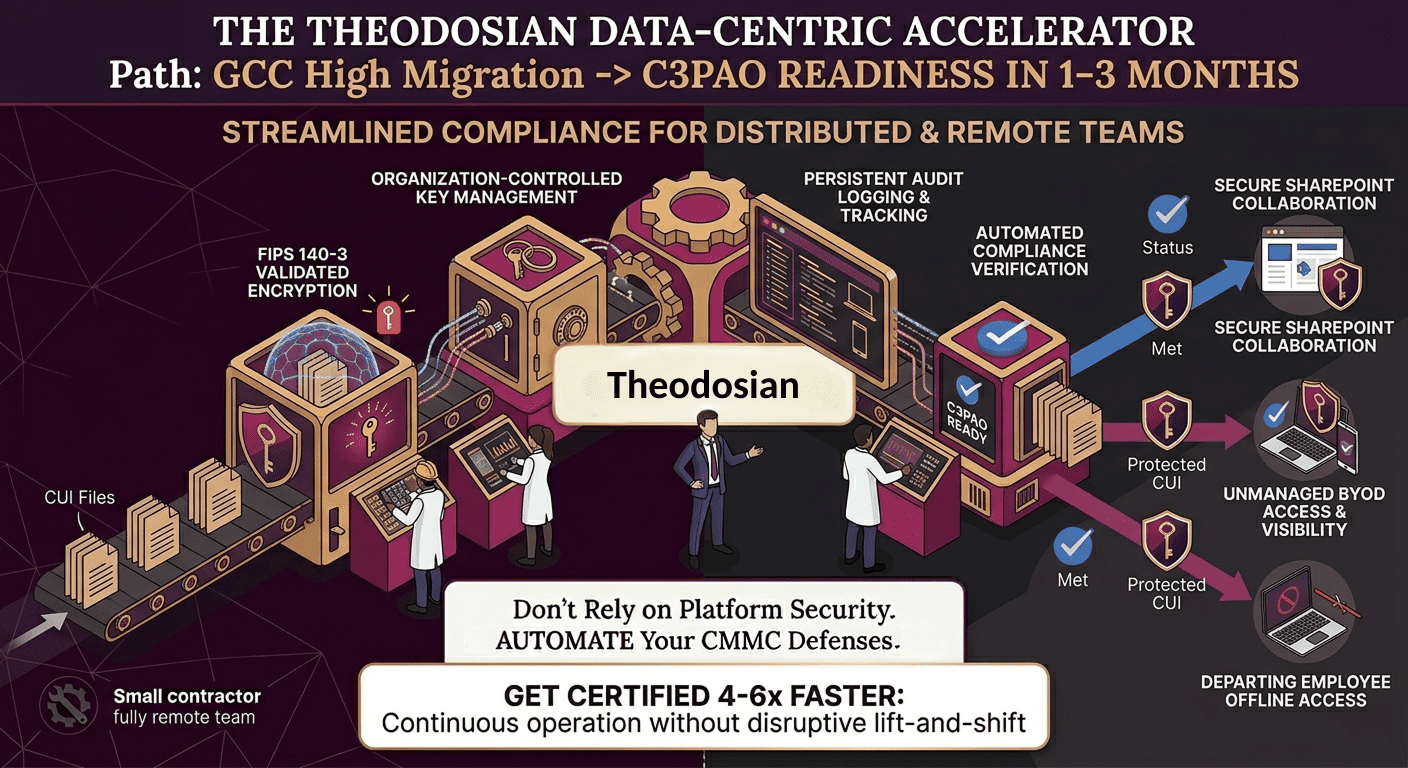
CMMC recognizes this gap directly. SC.3.177 requires FIPS 140-3 validated encryption for CUI wherever the data lives, not just inside your primary environment. SC.3.187 requires that your organization controls the encryption keys, meaning that even when a CUI file lands in a prime's SharePoint or a subcontractor's shared drive, the decryption authority stays with you. These aren't just platform configuration requirements. They're file-level protection requirements.
Theodosian addresses both controls at the file itself. Every CUI document is encrypted with FIPS 140-3 validated cryptography before it leaves your environment, with organization-controlled keys. Access requires authentication that you manage, regardless of where the file has traveled. Per-file audit logs record every access event: who opened it, when, from what device, in what context. If a file moves outside your environment and someone without authorization attempts to open it, they get nothing. The file defends itself.
Protect the content, not the container. Your cloud tenant, your VPN, your endpoint management platform — all necessary, none sufficient for a distributed workforce. When CUI has to travel, the file has to be the security boundary.
For remote contractors, this architecture has a practical compliance advantage too. Rather than documenting the security configuration of fifteen separate home networks and demonstrating that each satisfies alternate work site requirements, you document that every CUI file carries FIPS-validated encryption with organization-controlled keys and logs every access event. Control that travels with the data doesn't depend on which network the engineer is sitting on.
Theodosian also integrates with existing collaboration platforms your team already uses, with no change to how employees work.
How Do Remote Companies Define Their CMMC Assessment Scope?
The same way any company does: by following the data.
The CMMC Scoping Guide (DoD CIO, Level 2) is explicit that your assessment boundary is defined by CUI flows — which systems process it, which people access it, which networks transmit it. Physical office presence is not a scope criterion. Remote work is not a scope carve-out. The question is: where does CUI actually go?
For a 15-person IT subcontractor, the practical scoping exercise looks like this:
Step 1: What CUI do you actually receive? CUI arrives marked. If your prime sends you a document with a CUI banner header and a category designation (e.g., CUI//CTI or CUI//ITAR), that's CUI. Standard contract information, HR data, pricing, and personal employee information are generally not CUI unless specifically designated. If you're genuinely uncertain about specific documents, ask your prime's security officer for classification guidance before assuming everything is in scope.
Step 2: Who receives and handles that CUI? "All employees might have access to CUI." That assumption drives six-figure compliance programs that over-build by 10x. Map who actually receives CUI-bearing documents, who accesses them for work, and who has no legitimate business reason to touch them. The first category is in scope. The second may be in scope. The third is out of scope if you can technically enforce the separation.
Step 3: What systems does that CUI flow through? A GWS shared drive that only the six CUI-handling engineers can access, on company-issued and MDM-enrolled devices — that's your CUI environment. The accounting team's GWS drives, HR's spreadsheets, and the operations manager's calendar are not in scope if they have no pathway to CUI and that separation is technically enforced.
Who Should Own CMMC Compliance at a Small Remote Company, and Do They Need a Security Clearance?
No clearance required. CMMC compliance is an unclassified program. CUI is, by definition, not classified information. The people running your CMMC program are handling controlled but unclassified data; there is no legal or regulatory clearance threshold for that role.
On the title question: CMMC doesn't require a Chief Security Officer, a certified CISO, or a formally designated Information Systems Security Officer. The SSP must identify who is responsible for the program and who can speak to specific controls during an assessment interview. For a 15-person company, that person is frequently the IT manager, operations manager, or a fractional compliance resource.
What matters to a C3PAO isn't your title. It's whether the person named in the SSP can:
- Describe how each control is implemented in your specific environment
- Demonstrate that the documentation matches reality
- Answer follow-up questions without routing every answer to someone else
An IT manager without a security clearance who has done the work — who understands what CUI is, can describe your access control implementation, knows your encryption configuration, and has maintained your SSP — will pass that test. An IT manager who signed off on an SSP they didn't write and can't explain won't pass it regardless of credentials.
The operational risk in a small company is exactly this gap: the person named as responsible and the person who actually knows the environment aren't the same person. Close that gap before the assessor arrives, not during.
What Evidence Does a CMMC Assessor Expect from a Remote-First Company?
The evidence requirements are the same as for any Level 2 assessment. The remote context changes how you produce and organize some of it, not what's required.
What assessors focus on for remote-only organizations:
System boundary documentation: A network diagram showing your CUI environment, where remote workers connect from, and how the CUI environment is isolated from the rest of the internet and from non-CUI systems. This means documenting your cloud tenant boundary, which accounts are in scope, what endpoint devices connect, and how remote access is authenticated.
Configuration evidence: Screenshots, configuration exports, or admin console records showing access controls (who has access to CUI systems and drives), MFA enforcement, audit logging, and data retention settings. For remote endpoint controls: MDM enrollment records, device encryption status, and screen lock policy enforcement.
Policies with acknowledgment records: Your acceptable use policy, your remote work security policy, your alternate work site procedures. Not just the documents themselves — evidence that employees were trained on them and have acknowledged the requirements. For a 15-person company, this is often a signed acknowledgment form or a recorded training completion.
Audit logs: Access logs for CUI systems showing who accessed what, when, and from where. Logging must be actively maintained, not just enabled. Assessors will ask about log review frequency and retention period (typically 90 days minimum for active review; longer for archival).
Incident response evidence: A documented incident response plan and evidence that the plan has been tested or, at minimum, communicated. For a small company, this doesn't require a full tabletop exercise. A documented playbook with named roles and contact information, plus a record of an annual review, satisfies the intent.
The remote assessment process: Most CMMC Level 2 assessments now accommodate remote or hybrid assessment formats. The C3PAO doesn't necessarily visit every employee's home. They conduct interviews via video, review configuration documentation, and verify claims through system screenshots and log exports. Remote-only companies are assessed this way regularly. Your preparation is the same: have documentation ready, have the person named in the SSP available to answer questions, and have configuration evidence organized before the assessor's opening meeting.
What Are the Most Common CMMC Gaps Specific to Remote Defense Contractors?
MFA enforcement gaps on remote access: MFA is required for all access to systems containing CUI (IA.3.083). For remote workers, this means every authentication event — cloud platform logins, VPN authentication, system logins. The gap that appears most often: MFA enforced for primary web app logins but not enforced for VPN authentication, or MFA enforced for most users but missing on a service account or legacy system login. Assessors check all CUI access paths, not just the obvious ones.
Incomplete audit logging: Most cloud platforms enable audit logging by default, but default settings rarely satisfy all CMMC AU domain requirements. Log retention may fall below the 90-day active review threshold, admin and user activity logs may not be reviewed on a documented cadence, and log coverage may miss specific CUI-relevant access events. Configuring logging correctly and demonstrating active review is a consistent gap in remote contractor programs.
Undefined alternate work site policy: Many small contractors have general security policies. Fewer have a documented policy that specifically addresses CUI handling at alternate work sites — what's permitted, what's prohibited, what physical controls are required, and what employees must acknowledge. The absence of this specific policy creates a PE domain gap that an assessor will flag.
CUI identification and marking: Handling CUI correctly requires knowing what it is and marking it as such when you generate it (per DoD Instruction 5200.48). A company that receives marked CUI from a prime but generates derivative CUI in its own work products (test results, technical reports, engineering analysis) without marking those documents creates a gap between what the SSP claims and what's actually happening. Assessors will ask how employees identify and mark CUI they create.
The AI tool problem: If engineers or operations staff use AI tools for work that involves reviewing, summarizing, or discussing CUI — and those tools are not GCC High Copilot or another CUI-authorized AI environment — you have an active CUI handling violation running outside your CMMC boundary. An acceptable use policy for AI tools is now a required element of any CMMC program, and for a remote company where employees work independently without centralized IT oversight, the risk of shadow AI use is higher. For the full picture, see AI Acceptable Use Policy for Defense Contractors: What Your CMMC Program Must Include.
Secure Your Distributed Data, Not Just Your Virtual Containers.
Traditional CMMC strategies break down the second a remote engineer downloads a document to work offline. Stop worrying about the security configuration of fifteen different home networks and start protecting the files themselves with zero disruption to how your team collaborates.
FAQs: Remote Companies and CMMC Level 2 Compliance
Does being fully remote make CMMC Level 2 assessment harder or more expensive?
Not inherently more expensive, but it does require more documentation rigor on scope and controls. A well-scoped remote program with strong endpoint management and VPN architecture can be assessed efficiently. What creates cost is an undefined boundary: remote workers on personal devices, undefined CUI access controls, and an SSP that describes a theoretical environment rather than an actual one. The scoping exercise matters more for remote companies than for companies with a defined physical perimeter. Get the scope right first, then build controls within it.
Can our employees use personal devices for CUI work?
Under traditional compliance models, letting employees use personal devices is an absolute nightmare. To pass an audit, your company would have to enforce intrusive Mobile Device Management (MDM) profiles on your employees' private phones and laptops, giving you the power to wipe their personal data, track their devices, and monitor their applications. Unsurprisingly, employees hate this, and it introduces massive corporate liability.
A data-centric model using Theodosian solves this friction entirely. Instead of attempting to control and audit the entire personal device, Theodosian embeds FIPS 140-3 validated encryption and access control policies directly into the individual CUI files themselves.
Because the security controls are tied to the data, your company retains absolute visibility and access rights over the government files—including persistent audit trails of who opened what and when—without needing any administrative control over the employee's personal device. If an employee leaves the company, you simply revoke their access. The CUI on their personal computer instantly locks down, while their private photos, apps, and personal data remain completely untouched.
Our prime contractor says all employees need to be in scope. Can we push back on that?
Your prime flows down the CMMC Level 2 requirement. They do not define your assessment scope, your CUI data flows do. If your prime has issued a blanket requirement that all subcontractor employees be in scope regardless of CUI contact, that's an over-broad contractual requirement, not a CMMC regulation. CMMC scoping guidance from DoD CIO is clear that scope is defined by CUI handling, not by organizational headcount. Document your scope determination, confirm with an RPO that it's defensible, and present it to your prime with supporting documentation if required.
What should our System Security Plan say about remote work?
The SSP should document: (1) a description of your alternate work site environment, including how employees access CUI remotely; (2) the technical controls in place (VPN, endpoint management, MFA); (3) the physical controls at alternate work sites (documented in your written alternate work site policy); and (4) how the remote access configuration satisfies each relevant NIST SP 800-171 control. The SSP should describe your actual environment, not a theoretical ideal. An assessor who reads your SSP and then interviews your employees should hear the same story from both sources.