
Your IT team has done the work; mobile device management is deployed, and employees with personal devices enrolled in your MDM are subject to your BYOD policy: screen lock enforced, remote wipe enabled, approved apps only. The policy document is clean, and the compliance logs look fine.
Then your CMMC assessor arrives and asks a different question: "Show me every device that has accessed, processed, or stored CUI in the past 12 months."
That's not an MDM report; that's a scoping exercise. And the answer to that question determines how many of your employees' personal laptops are now inside your CMMC assessment boundary — subject to the same 110 practices as your corporate infrastructure, regardless of who paid for them.
This is the part of the BYOD policy that most defense contractors haven't finished thinking through. Your BYOD policy controls what behaviors are allowed on personal devices. CMMC controls which devices are in scope for assessment. Those are different questions, and your MDM policy doesn't answer the CMMC one.
MDM Manages the Laptop; It Does Not Secure the CUI
The moment a file lands on an unmanaged endpoint, your boundary breaks and your compliance disappears.
How Does CMMC Scoping Actually Work for Personal Devices?
The CMMC Assessment Scope guidance is explicit: any asset that processes, stores, or transmits CUI is in scope for assessment. The term used is "CUI Asset", and the definition does not include any exception for employee-owned hardware.
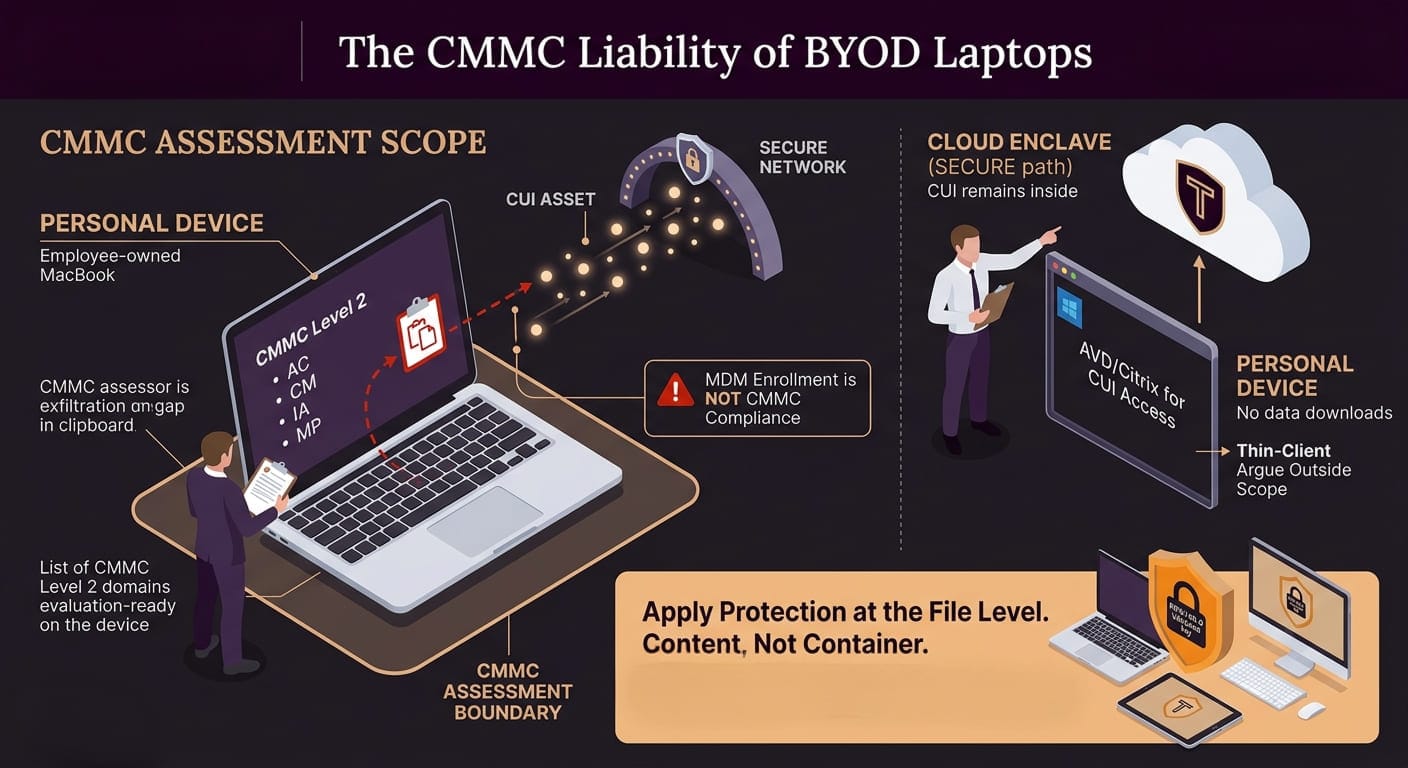
If your engineer accesses a CUI file from their personal MacBook, that laptop is a CUI Asset. If your program manager opens a controlled technical document on a home PC to prepare for a meeting, that PC is a CUI Asset. If your accountant handles a contract with CUI-bearing line items on a personal tablet, that tablet is a CUI Asset.
What does "in scope" mean practically? The assessor can evaluate that device for compliance with all relevant CMMC Level 2 practices. Access control (AC domain), configuration management (CM domain), identification and authentication (IA domain), media protection (MP domain) — these apply to the device. You need to be able to demonstrate, with evidence, that those practices are met on each in-scope device.
Your MDM enrollment gives you partial visibility and partial control. It does not, by itself, demonstrate compliance with 110 CMMC practices on a device you don't own and cannot fully administer.
The CMMC scoping guidance offers one legitimate alternative: if personal devices access CUI exclusively through a cloud enclave (with no local download or sync), and the device is treated as a thin client with no CUI touching local storage, you may be able to argue the device falls outside your CUI boundary. But that architecture requires strict enforcement; the moment a file downloads to the local machine, the boundary moves.
What MDM Can and Cannot Control on a Personal Device
Mobile device management is the standard enterprise response to BYOD security. It's a meaningful control. It is not a CMMC compliance solution.
Here's the actual capability boundary:
What MDM Can Do on a Personal Device:
- Enforce screen lock and PIN policy
- Require OS version minimums
- Push approved app configurations
- Remotely wipe corporate data containers (not the whole device)
- Block access to corporate resources from non-compliant devices
- Monitor device health status
What MDM Cannot Do on a Personal Device:
- Audit activity in personal applications (Signal, WhatsApp, personal email)
- Prevent clipboard exfiltration from a managed app to an unmanaged one
- Enforce full-disk encryption on a device the organization doesn't own
- Conduct a forensic analysis of the device
- Prevent screenshots or screen recording in most configurations
- Control what happens to files synced to the device's personal cloud account before MDM enrollment
The clipboard gap alone is significant for CMMC. An employee can open a CUI document in a managed app, copy a passage of controlled technical data, and paste it into a personal email with no MDM policy capable of stopping them.
CMMC's MP.L2-3.8.1 (media protection for CUI) and AC.L2-3.1.19 (encryption of CUI on mobile devices) require more than MDM enrollment evidence. They require demonstrating that CUI on those devices is actually protected at the data level, not just that the device has a screen lock.
The Infostealer Problem: Personal Devices Are High-Value Targets
Beyond the scoping question, personal devices introduce a threat vector that corporate hardware typically doesn't carry: pre-existing malware infections from personal use.
Infostealer malware — software designed to harvest credentials, session tokens, and files from infected machines — is disproportionately distributed on personal and unmanaged devices. Verizon's 2024 Data Breach Investigations Report found that approximately 30% of infostealer-compromised systems are personal or unmanaged devices used for work purposes.
The scale of the exposure in defense contracting specifically is documented. According to Hudson Rock's research:
- 398 Honeywell employees had their credentials compromised via infostealer malware
- 66 Boeing employees were affected
- 55 Lockheed Martin employees were affected
These are corporate credential compromises that started on personal machines. The employee used a personal device that was already infected. When they accessed corporate systems from that device, the infostealer captured their session tokens. The company's MDM and corporate endpoint controls were irrelevant; the compromise happened at the personal device layer, upstream of the corporate authentication.
For a CMMC Level 2 contractor, a credential compromise of this type creates direct exposure: a threat actor with a valid employee session token can access CUI repositories, download files, and operate within your environment as an authenticated user. Your access control logs won't flag it as anomalous because it isn't anomalous; it looks like a normal employee login.
The ITAR Dimension: When Your Home Network Is the Liability
BYOD risk in defense contracting has a second legal dimension that sits alongside CMMC: ITAR's deemed export rules.
Under 22 CFR 120.17, disclosing ITAR-controlled technical data to a foreign national constitutes an "export" — regardless of whether it happens in the United States. If an employee accesses ITAR-controlled CUI from a home network that includes a foreign national household member, that access event may constitute an ITAR-deemed export violation.
The State Department's Directorate of Defense Trade Controls (DDTC) has pursued deemed export enforcement in residential settings. The relevant legal question — whether the employee's home network access constitutes "disclosure" to a foreign national — depends on facts that most IT teams don't collect and most BYOD policies don't address.
Your BYOD policy almost certainly does not ask employees to certify the citizenship status of everyone on their home network. CMMC doesn't require it either. But if a violation occurs and you're looking at a DDTC investigation, the absence of any control — technical or procedural — for home network access to ITAR data will be visible in the record.
Three BYOD Strategies: What Each Actually Costs
Defense contractors handling CUI have three realistic options for BYOD. Each has a different cost structure and a different compliance ceiling.
Strategy 1: Prohibit CUI on Personal Devices
How it works: Update your BYOD policy to prohibit access to CUI from personal devices. Issue corporate hardware to anyone who needs CUI access.
What it costs: Hardware procurement ($800–$2,500 per device), corporate MDM licensing (already likely in place), ongoing device management overhead.
What it solves: Takes personal devices out of your CMMC assessment scope. Eliminates the MDM capability gap for CUI access.
What it doesn't solve: Enforcement. Employees will access CUI from personal devices unless you have technical controls that prevent it, a policy prohibition alone is not a CMMC control. You need technical enforcement to make this strategy credible in an assessment.
Strategy 2: Enclave / Cloud Thin-Client for BYOD CUI Access
How it works: Deploy a cloud-based CUI environment (e.g., Azure Virtual Desktop, Citrix in a GCC High environment) that employees access from personal devices. CUI stays in the cloud. Nothing downloads locally.
What it costs: Azure Virtual Desktop or equivalent: $15–$50/user/month above base licensing. Configuration and deployment: $20,000–$80,000 one-time. Ongoing management overhead.
What it solves: Keeps CUI out of local device storage if strictly enforced. A personal device may be arguable as out of scope.
What it doesn't solve: User behavior. Employees in virtual desktop environments frequently screenshot, photograph screens with phones, or copy-paste to local applications. Technical DLP controls inside the virtual environment help, but don't eliminate the gap. The "thin client" argument also fails the moment a file is downloaded.
Strategy 3: Apply Protection at the File Level
How it works: CUI files are encrypted with FIPS 140-3 validated per-file encryption and organization-controlled keys. Employees access files from any device. The file itself carries the access control; only authorized users with valid credentials can decrypt and read it.
What it costs: Per-file encryption licensing (varies by user count and deployment). Integration with existing document repositories.
What it solves: The CMMC controls that matter most for BYOD exposure — SC.3.177 (FIPS 140-3 validated encryption) and SC.3.187 (organization-controlled key management) — are satisfied at the content level. It doesn't matter which device the file lands on. It doesn't matter whether the device is enrolled in MDM. The file is protected.
What it doesn't solve: It doesn't eliminate the need for other CMMC controls (MFA, access management, audit logging). And it doesn't replace a thoughtful BYOD policy. What it does is take the "what happens to the CUI on the device" question off the table.
Most defense contractors will use a combination of these strategies. The question is which controls map to which risks, and whether your combination actually satisfies the CMMC practices your assessor will check.
An Encrypted File Doesn’t Care Who Bought the Laptop
Stop trying to audit your employees' home networks or personal hardware. By applying FIPS 140-3 validated encryption directly to the file, your CUI remains locked down and under your organization’s strict control, no matter what unmanaged device or personal cloud it touches.
FAQs: BYOD and Defense Contracting
Does CMMC require me to ban BYOD entirely?
No. CMMC Level 2 does not prohibit BYOD. It requires that CUI Assets — including personal devices that access CUI — comply with the relevant practices. You can maintain a BYOD program and achieve CMMC compliance, but the compliance demonstration for personal devices is more complex than for fully managed corporate hardware. Many contractors find that the compliance overhead of in-scope personal devices exceeds the cost of issuing corporate hardware for CUI access.
If I use a cloud enclave for BYOD access, are personal devices out of scope?
Potentially, if the architecture is implemented correctly and strictly enforced, the CMMC scoping guidance allows for "excluded assets" when access is through a secure cloud environment with no local data storage. But this requires technical controls that enforce the boundary — not just a policy statement. If any CUI can be downloaded to the local device, the device is in scope.
What is AC.L2-3.1.18, and why does it matter for BYOD?
AC.L2-3.1.18 requires you to "control connection of mobile devices." This practice requires documenting and technically enforcing which mobile devices are allowed to connect to your CUI environment. A BYOD policy that allows any personal device to connect to CUI repositories without enrollment and compliance verification does not satisfy this control.
Can I use a personal device for CMMC-compliant work if it has FIPS 140-3 validated encryption?
The encryption control satisfies SC.3.177. It doesn't satisfy all the other controls required for in-scope CUI Assets. MFA (IA practices), access control (AC practices), and configuration management (CM practices) still apply. File-level encryption reduces your exposure but doesn't take the device out of scope on its own.
What should my BYOD policy say to be CMMC-aligned?
At minimum: define which devices are allowed to access CUI (and require enrollment as a precondition), specify that CUI access from personal devices is limited to the approved technical environment, document the technical controls in place (MDM, encryption, VPN), and require employees to report device loss or compromise immediately. The policy should be matched with technical enforcement — a policy document alone is not a CMMC control.