
Zero trust has become the dominant security architecture for enterprise organizations. The premise, "never trust, always verify", represents a meaningful departure from the perimeter-first model that characterized enterprise security for three decades. Instead of assuming that traffic inside the network is safe, zero trust requires every access request to be authenticated, authorized, and validated regardless of its origin.
That architecture is correct and necessary, but it's also incomplete.
The leading zero-trust platforms verify identity rigorously. They control network access with precision. They enforce conditional access policies based on device, location, and user role. But zero trust was architected around the question "should this person access this system?", not "what happens to the data after they do?"
An authorized user with valid credentials, a compliant device, and a legitimate business reason to access a sensitive file will pass every zero-trust check in the stack. Once they have the file downloaded to their laptop, forwarded to a subcontractor, or attached to an email, the zero-trust framework has nothing further to say about it.
This guide covers the leading zero-trust platforms, what each one does, and the specific data-layer gap that exists across all of them.
Your Network Zero Trust Stops at the Download Folder
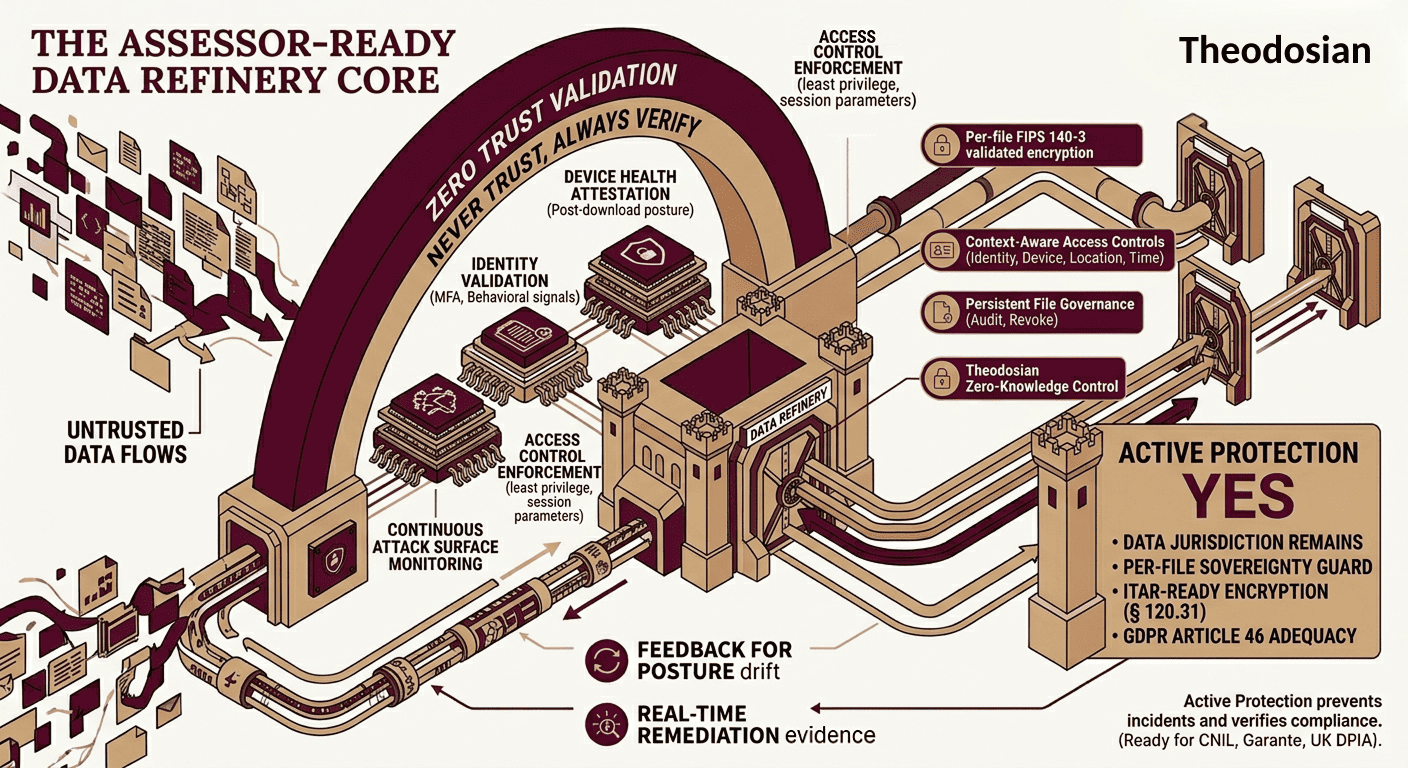
Identity engines verify who can open the front door, but they cannot secure the data after it leaves the threshold. If your files don't protect themselves wherever they travel, your zero-trust architecture is missing its final layer.
What Zero Trust Covers
Before evaluating platforms, it's worth being precise about what zero trust architecture addresses:
Identity verification — Every user authentication is evaluated continuously, not just at login. MFA, risk-based conditional access, and behavioral analytics flag anomalous identity signals.
Device trust — Endpoints must meet compliance requirements before being granted access. Unmanaged devices, non-compliant configurations, and unpatched systems are restricted or blocked.
Network access control — Access is granted to specific applications and resources, not entire network segments. Lateral movement is constrained. Microsegmentation prevents a compromised workload from reaching sensitive systems across the network.
Application and workload security — Access to specific applications is controlled based on user role, device health, and context. Traffic is inspected and policies enforced at the application layer.
What zero trust does not address: what happens to data after an authorized user accesses it. The data layer, the file itself, operates outside the control plane of every zero-trust platform listed below.
The Leading Zero Trust Platforms
Zscaler Zero Trust Exchange
Zscaler's architecture routes all traffic through its cloud platform, creating a proxy-based security model. Users connect to Zscaler; Zscaler connects them to the specific applications they're authorized to use. There is no network-level access, only application-level access through a monitored, inspected channel.
Strengths: Cloud-native, excellent for remote workforces, strong SaaS visibility, CASB capabilities built in. The proxy model provides granular logging of all application access.
What it doesn't cover: Files downloaded from authorized applications. Once a file leaves the Zscaler-proxied session and lands on an endpoint, Zscaler's visibility ends. A document downloaded from SharePoint is outside the proxy from that point forward.
Ideal for: Cloud-first enterprises with remote workforces requiring consistent ZTNA across all locations.
Palo Alto Networks Prisma Access
Prisma Access delivers SASE (Secure Access Service Edge), combining ZTNA, SD-WAN, CASB, and DLP in a cloud-delivered platform. Its strength is breadth: a unified policy engine spans network, cloud, and endpoint controls with deep threat intelligence integration.
Strengths: Comprehensive platform coverage, strong threat prevention, advanced DLP capabilities for monitoring data in motion across the Prisma proxy, and integration with Palo Alto's broader security ecosystem.
What it doesn't cover: Data-at-rest on endpoints and file-level access control post-download. Like all proxy-based ZTNA, the enforcement boundary is the connection — not the content after it lands.
Ideal for: Large enterprises seeking a unified SASE architecture replacing multiple point solutions.
CrowdStrike Falcon Zero Trust Assessment
CrowdStrike approaches zero trust from the endpoint, a continuous device health assessment that feeds identity and access decisions in real time. Falcon's Zero Trust Assessment score reflects the device's current security posture and informs conditional access policies across integrated platforms (Microsoft Entra, Okta, Zscaler).
Strengths: Endpoint-native, real-time device posture signal, deep behavioral analytics, seamless integration with identity providers for dynamic access control.
What it doesn't cover: Files on endpoints. CrowdStrike protects the device and informs access decisions, but doesn't apply encryption or access controls to the files stored on or copied from that device. An endpoint can be fully CrowdStrike-compliant while hosting unprotected sensitive files.
Ideal for: Organizations with CrowdStrike-managed fleets seeking endpoint-driven zero trust posture signals.
Microsoft Entra ID with Conditional Access
Microsoft's identity-centric zero trust implementation combines Entra ID (formerly Azure AD) with Conditional Access policies to enforce context-based access controls across Microsoft 365, Azure, and integrated third-party applications.
Strengths: Native Microsoft ecosystem integration, depth of conditional access policy options, strong MFA enforcement, Microsoft Entra Suite / Secure Access Service Edge (SASE), which natively packages both Entra Private Access (ZTNA) and Entra Internet Access (Secure Web Gateway).
What it doesn't cover: Files on unmanaged devices and files shared outside the Microsoft tenant. Conditional Access governs whether a user can authenticate and access a resource. It does not govern what happens to the file after it's downloaded to an endpoint, particularly on a device not enrolled in Microsoft Intune.
Ideal for: Microsoft-heavy organizations extending zero trust across M365, Azure, and hybrid infrastructure.
Cloudflare Zero Trust
Cloudflare's platform provides ZTNA, secure web gateway, CASB, and email security through its global network. The developer-friendly API model makes it particularly suitable for organizations with complex multi-cloud and SaaS footprints.
Strengths: Global edge network performance, strong DNS and web filtering, competitive pricing model, strong browser isolation capabilities.
What it doesn't cover: File-level access control post-download. Like other proxy-based models, Cloudflare controls the session — not the content after it leaves.
Ideal for: Organizations seeking cost-effective ZTNA with strong web and DNS security, particularly in developer-centric environments.
The Data Layer: What None of These Platforms Cover
Every platform above implements zero-trust principles at the infrastructure and identity layer. None of them implements zero trust at the data layer.
The gap appears in predictable scenarios:
Authorized download to an unmanaged device. Zero-trust conditional access can require device compliance for accessing a resource. Once a file is downloaded, with authorization, to a contractor's personal laptop that meets the compliance bar at login, the zero-trust framework no longer controls the file. The laptop's security posture may change, but the file doesn't.
Credential compromise at scale. Zero-trust systems verify identity. They cannot distinguish between a legitimate user and an attacker who has obtained valid credentials. Verizon's DBIR has consistently found that 88–93% of breaches involve stolen credentials. When an attacker authenticates successfully, every zero-trust check passes. The file is theirs.
Forwarding and third-party access. An authorized user accessing a file through a fully zero-trust-compliant session can forward that file to an external recipient who is entirely outside the zero-trust perimeter. The recipient's device, network, and identity are unknown. The zero-trust framework had nothing to say about that forwarding action.
Files that persist beyond the session. Zero trust policies govern sessions and access decisions in real time. They don't govern files that were downloaded in previous sessions, exist in local caches, or persist in cloud storage outside the governed environment.
File-Centric Zero Trust: Extending the Model to the Data Layer
The logical extension of zero trust principles to the data layer is this: every access request for a file should be authenticated, authorized, and validated — regardless of where the file is, regardless of what network it's on, and regardless of whether a zero trust session is currently active.
Per-file FIPS 140-3 validated encryption implements this at the document level. Every file carries its own cryptographic key and access policy. Opening the file is an access request that must satisfy the policy: verified identity, compliant device, authorized location, and current time window. If those conditions aren't met, on any device, anywhere, access is denied.
This is zero trust applied to the file rather than the network:
- Never trust, always verify → the file verifies identity and device trust at every open attempt, regardless of network location
- Least privilege → context-aware access controls restrict which users can open which files, under what conditions
- Assume breach → if credentials are stolen, protected files remain inaccessible because the attacker can't satisfy the full access policy
- Continuous verification → access can be revoked at any time; a previously authorized user whose access is revoked can no longer open the file on any device
This layer doesn't replace the zero-trust platforms above. It extends the model to cover the gap they leave.
Platform Comparison: Zero Trust Coverage
| Capability | Zscaler | Palo Alto Prisma | CrowdStrike Falcon | Microsoft Entra | Cloudflare ZT | Theodosian |
|---|---|---|---|---|---|---|
| Identity verification | ✅ Via IdP integration | ✅ Via IdP integration | ✅ Endpoint-driven | ✅ Native | ✅ Via IdP integration | ✅ Per-file identity check |
| Network access control | ✅ Proxy-based | ✅ SASE | ✅ Via integration | ✅ Conditional Access | ✅ ZTNA | ❌ Not a network tool |
| Post-download protection | ❌ | ❌ | ❌ | ❌ | ❌ | ✅ Encryption travels with the file |
| Unmanaged device coverage | Partial | Partial | Partial | Partial | Partial | ✅ Device-agnostic |
| Access revocation after sharing | ❌ | ❌ | ❌ | ❌ | ❌ | ✅ Immediate, retroactive |
| CMMC SC.3.177 satisfaction | ❌ | ❌ | ❌ | ❌ | ❌ | ✅ FIPS 140-3 validated |
| Credential theft protection | Partial (MFA) | Partial (MFA) | Partial (behavioral) | Partial (MFA/CA) | Partial (MFA) | ✅ Full access policy required |
Choosing the Right Stack
The right zero-trust architecture depends on your environment, compliance requirements, and where your most sensitive data actually travels.
If your primary concern is network access and application control, the established ZTNA platforms above provide mature, well-integrated solutions. Zscaler, Palo Alto, and Cloudflare offer different trade-offs on architecture and breadth; Microsoft Entra is the natural choice for Microsoft-centric organizations; CrowdStrike is optimal when endpoint-driven posture signals are the priority.
If sensitive data regularly leaves the governed environment — to contractors, to external counsel, to subcontractors, via email — the network layer needs to be complemented with file-level protection. No amount of ZTNA sophistication can control a file that's on a USB drive in a contractor's bag.
If you're subject to CMMC Level 2, CMMC SC.3.177 requires FIPS 140-3 validated encryption on CUI. Zero trust access controls support several CMMC practices (AC.2.006, AC.2.007, IA.3.083), but they do not satisfy the specific encryption requirement. That requires a file-level layer.
If you're targeting zero-trust maturity beyond network and identity, the data layer is the logical next step. File-centric zero trust extends the "never trust, always verify" principle to the content itself, the asset that ultimately matters.
🛠️ CMMC Audit Readiness: Identity-centric zero trust controls satisfy critical Access Control (AC) requirements, but they cannot fulfill the FIPS 140-3 validation demands of SC.3.177. Use our CMMC Level 2 Compliance Checklist to map your current technical gaps before scheduling an assessment.
Extend Zero Trust Principles to the Data Layer
Theodosian plugs the visibility gap by embedding zero-trust policy engines directly into the file boundary. By utilizing FIPS 140-3 validated per-file encryption and zero-knowledge identity validation, your data remains secure on unmanaged devices, across contractor networks, and beyond your perimeter boundaries.
FAQs: Zero Trust Data Security
What is the difference between zero-trust network access and zero-trust data security?
Zero trust network access (ZTNA) controls which users and devices can connect to which applications and resources. It verifies identity and device health before granting access and enforces least-privilege access at the network and application layer. Zero trust data security extends the same principles to the data itself — verifying identity and device trust at every file access attempt, regardless of network location or whether a ZTNA session is active. ZTNA controls the connection; data-level zero trust controls the content.
Does zero trust satisfy CMMC Level 2 encryption requirements?
Not on its own. CMMC Level 2 practice SC.3.177 requires FIPS 140-3 validated cryptographic modules for protecting CUI. Zero trust access controls support several CMMC access control and audit practices, but they do not provide FIPS-validated encryption at the file level. SC.3.177 requires the data itself to be encrypted with a validated module, a requirement that falls to a file-level encryption tool, not a ZTNA platform.
Can zero-trust platforms protect files shared with external parties?
Standard ZTNA platforms control access within your governed environment. Files shared with external parties — contractors, partners, legal counsel — leave that environment and are no longer subject to your zero trust policies. The recipient's identity, device, and network are unknown to your zero-trust platform. File-level encryption addresses this: protected files carry their own access policy, which enforces your organization's conditions regardless of where the file is and who holds it.
How does "never trust, always verify" apply at the file level?
Applied at the file level, the zero trust principle means every attempt to open a protected file is treated as an access request requiring real-time verification — regardless of whether the user has previously been granted access, regardless of their network location, and regardless of whether a zero trust session is currently active. The file checks identity (is this an authorized user?), device trust (is this a compliant device?), location (is this an authorized location?), and time (is this within the authorized access window?). If any condition fails, access is denied. Access can be revoked at any time, taking effect immediately on all devices holding a copy of the file. Related Reading: What Happens to Your Files When Credentials Are Stolen?