
Why Shadow IT Has Become Harder to Control in 2026
Shadow IT used to mean employees stashing files in personal Dropbox accounts while IT looked the other way. In 2026, the attack surface is exponentially wider.
A contractor working on your ITAR-controlled program is now using personal Google Drive, Notion, and ChatGPT to handle sensitive documents, all simultaneously. An engineer syncs CUI files to an unsanctioned SSD on a personal MacBook. A team lead uses an unauthorized Slack workspace to "speed up feedback" on controlled export documents. A junior analyst downloads a PDF to her personal iPad because her corporate device is slow.
Every single one of these scenarios puts classified or controlled data into environments your security team has no visibility into and no control over.
The traditional problem—finding shadow IT—has been partly solved by detection tools like Microsoft Defender for Cloud Apps and Palo Alto Prisma Access. The new problem is what happens after you find the data. Detection tells you where your data went. It doesn't protect it once it's there.
That gap between detection and defense is the story of 2026's shadow IT landscape. This guide reviews the best detection tools on the market, maps their strengths and blind spots, and explains why detection alone is insufficient for organizations handling ITAR, CMMC, or other compliance frameworks where unauthorized access is a contract threat.
What Shadow IT Looks Like in 2026
The perimeter has dissolved. Your data no longer lives inside your corporate network—it lives on contractor laptops, in personal cloud accounts, on shared team drives, and embedded in AI tools trained on your intellectual property.
Common shadow IT vectors in 2026:
- Personal cloud storage: Employees and contractors storing CUI, EAR-controlled data, or ITAR-classified information in personal Google Drive, Dropbox, OneDrive, or iCloud accounts to "work flexibly."
- Unauthorized SaaS and AI tools: ChatGPT, Gemini, Claude, Notion, Figma, and other AI-powered and collaborative platforms are processing sensitive documents without encryption controls.
- Contractor and partner devices: Third-party technicians and vendors accessing your systems with personal devices, personal cloud storage, and unsanctioned collaboration tools.
- Messaging apps and file transfer: Teams using WhatsApp, Signal, Telegram, or personal email to transfer sensitive documents outside of monitored channels.
- Hybrid work infrastructure: Employees using personal devices and home networks to access systems, with data living in multiple unsanctioned cloud locations.
🛡️ Is Your CUI Currently Sitting in a Contractor’s Personal Cloud?
Visibility tools only tell you when it’s too late. Use this Shadow IT & AI Risk Assessment Checklist to audit your exposure and see where file-level encryption is required to stay compliant.
The compliance exposure is very real:
- CMMC MP.2.121 (Boundary Protection): Requires monitoring and controlling information flows across boundaries. Shadow IT is a direct control failure.
- ITAR § 120.31 (Storage and Transmission): Controlled technical data must be stored and transmitted only through authorized, secured means. Personal Dropbox is not authorized.
- NIST SP 800-171 3.1.1 (Information and Information System Boundaries): Organizations must define and protect information and information system boundaries.
If your auditor finds CUI in a personal cloud account during a CMMC assessment, your company does not pass. If ITAR compliance is required for your contracts, shadow IT is a deal-killer.
How We Evaluated These Shadow IT Tools
We assessed five tools based on criteria that matter to security buyers:
- Discovery breadth: How many app categories does the tool identify, and what's the false positive rate?
- Real-time visibility: Does the tool monitor ongoing activity or provide only periodic snapshots?
- CASB capabilities: Can the tool enforce conditional access, require MFA, or block risky behavior at the cloud application layer?
- DLP integration: Can the tool detect and report on sensitive data (PII, API keys, controlled data) being transferred to unauthorized apps?
- Compliance reporting: Does it map to specific frameworks like CMMC, ITAR, or NIST?
- Response and blocking options: Can the tool actually block access, or only alert?
Shadow IT Tool Reviews
Microsoft Defender for Cloud Apps (MCAS)
What it discovers: Microsoft Defender for Cloud Apps (formerly Cloud App Security) provides shadow IT discovery through traffic analysis, proxy logs, and endpoint telemetry. It monitors DNS queries, SSL inspection, and client-side telemetry to identify apps accessing your M365 environment.
- Coverage: 25,000+ cloud apps catalogued and risk-scored
- Real-time monitoring: Yes, for M365-connected apps and devices with Defender agent
- Advantage: Already integrated into Microsoft 365 E5 licensing—most enterprises already pay for it
What it can block:
- Conditional access policies (e.g., "block personal Dropbox unless device is corporate-managed")
- Session-based blocking (revoke active sessions to risky apps)
- Token revocation for connected Microsoft accounts
What it reports:
- Risk scores for discovered apps (1–10 scale)
- User behavior anomalies
- File uploads and downloads to risky apps
- DLP integration with Purview to flag sensitive data types (credit cards, SSN, healthcare records)
Where coverage ends:
- No visibility into traffic outside the M365 ecosystem without additional Defender for Endpoint licensing
- Cannot see what happens to data after it lands in personal Dropbox—only that the file was uploaded
- Contractor devices and non-corporate endpoints require separate licensing
- Limited visibility into AI tool usage (ChatGPT, Gemini) unless accessed through the M365 portal
- Cannot block access to the app itself—only Microsoft-managed behavior
Zscaler Internet Access (ZIA)
What it discovers: Zscaler provides shadow IT discovery through inline inspection of all traffic (HTTP, HTTPS, DNS, encrypted tunnels). Every packet destined for any cloud application passes through Zscaler's cloud gateway.
- Coverage: Visibility into all HTTP/HTTPS traffic regardless of app category
- Real-time monitoring: Yes, with sub-second latency
- Advantage: Works on any device (corporate, BYOD, contractor) that routes traffic through Zscaler
What it can block:
- Full app-level blocking (user cannot access the application at all)
- URL category blocking (e.g., "block all personal cloud storage")
- Credential submission blocking (prevents users from entering username/password into risky apps)
- Advanced threat detection blocks zero-day app exploits
What it reports:
- Application usage by user, role, location, device type
- Encrypted payload inspection (when configured for advanced DLP)
- Integration with CASB capabilities for risk scoring and compliance reporting
Where coverage ends:
- No visibility into local file transfers (USB, physical media, AirDrop)
- No protection for data once it lands in a personal Dropbox (only visibility that it arrived)
- Contractor devices not on Zscaler network are invisible
- Cannot prevent data exfiltration if the user copies the file locally and then uploads it manually
- Offline devices and air-gapped environments have zero coverage
Palo Alto Networks Prisma Access
What it discovers: Prisma Access is a SASE (Secure Access Service Edge) platform that combines firewall, threat prevention, cloud access broker, and DLP into one integrated service. Shadow IT discovery happens through traffic inspection and endpoint telemetry.
- Coverage: Full SASE architecture provides app discovery, threat prevention, and DLP in one platform
- Real-time monitoring: Yes, with integration to Cortex XDR for behavioral analytics
- Advantage: Part of broader Palo Alto ecosystem; integrates with other Palo Alto security tools
What it can block:
- Full application blocking based on risk profile
- Conditional access rules (geographic, device compliance, user role)
- Credential-submission blocking
- Automated response to security incidents (block user, revoke session)
What it reports:
- Granular app analytics (usage, data movement, user behavior)
- DLP detection for structured data (credit cards, API keys, controlled data markers)
- Compliance dashboards for frameworks like HIPAA, PCI-DSS
- Custom threat intelligence feeds
Where coverage ends:
- CMMC-specific compliance reporting is basic (requires additional configuration)
- Cannot protect ITAR-controlled data unless custom DLP rules are written and maintained
- Post-exfiltration protection limited to behavioral detection (e.g., unusual download volume)
- Contractor and partner devices require Cortex XDR agent, which may not be feasible in all settings
- Air-gapped systems and offline devices have no protection
Cisco Umbrella
What it discovers: Cisco Umbrella is a DNS-layer security platform that provides shadow IT discovery through DNS query analysis. Every time a user visits a website, Umbrella sees the domain query and can categorize and score it.
- Coverage: DNS-layer visibility into all web traffic; 2+ billion devices already use Cisco Umbrella
- Real-time monitoring: Yes, with roaming client for BYOD and remote devices
- Advantage: Long-standing enterprise brand; works on any network
What it can block:
- DNS-level blocking (users cannot resolve the domain at all—access is denied at the DNS layer)
- URL category blocking (e.g., "block all personal cloud storage domains")
- Malware and phishing protection built-in
- Conditional blocking based on user identity and device posture
What it reports:
- Domain visit frequency and user behavior
- Malware and phishing threat prevention logs
- Roaming client telemetry (device posture, OS version, threat events)
Where coverage ends:
- No deep-packet inspection of encrypted traffic—cannot see what is being uploaded to Dropbox, only that Dropbox is being accessed
- No DLP capabilities—cannot detect sensitive data in flight
- No application-layer control (only DNS blocking)
- Cannot protect data after exfiltration
- Contractor devices require a roaming client deployment
- Limited CMMC or ITAR-specific compliance reporting
Theodosian
Category: File-level encryption / data-centric security
Theodosian is not a shadow IT detection tool. It won't tell you which unauthorized apps your employees are using, score app risk levels, or block access to unsanctioned SaaS platforms. The other four tools in this list do those things better.
What Theodosian addresses is what happens to sensitive data once it's already in a shadow IT environment. Per-file FIPS 140-3 validated encryption means that a document saved to a personal Dropbox, shared via an unauthorized messaging app, or downloaded to an unmanaged contractor device carries its own access controls. If the contextual conditions—identity, device trust, location, time, role—aren't met, access is denied. The file doesn't open, regardless of where it is.
What it covers well: Organizations where CUI or sensitive documents are likely to end up outside managed environments through shadow IT activity—and where the compliance consequence of that exposure (CMMC MP.2.121, ITAR § 120.31) is a direct risk. Theodosian doesn't prevent the shadow IT behavior, but it significantly reduces the exposure consequence. Even in an unauthorized environment, the data stays protected.
What it doesn't cover: App discovery, shadow IT risk scoring, real-time monitoring, or transfer blocking. Organizations should treat Theodosian as a protection layer alongside—not instead of—a CASB or shadow IT detection tool.
Ideal for: Defense contractors with CMMC or ITAR obligations, professional services firms with sensitive client data, and security teams who want data to be protected regardless of where it ends up in the workflow.
Pricing: Free 14-day pilot. Enterprise pricing on request.
Shadow IT Solutions Comparison Table
| Capability | Microsoft MCAS | Zscaler ZIA | Palo Alto Prisma | Cisco Umbrella | Theodosian |
|---|---|---|---|---|---|
| App Discovery | 25,000+ apps | All HTTP/HTTPS traffic | Full traffic inspection | DNS-layer only | ❌ Not in scope |
| Real-Time Monitoring | Yes (M365+) | Yes | Yes | Yes | ❌ Not in scope |
| Transfer Blocking | Conditional only | Full blocking | Full blocking | DNS blocking only | ❌ Not in scope |
| DLP Integration | Yes (Purview) | Advanced options | Yes (granular) | No | |
| ✅ Complementary layer | |||||
| Compliance Reporting | Limited | Limited | Basic | No | ✅ Per-file audit logs |
| Post-Exfiltration Protection | None | None | Behavioral only | None | ✅ Access denied if contextual controls are not met |
| CMMC MP.2.121 Alignment | Limited | Limited | Basic | No | ✅ |
| Cost Per User (Est.) | Bundled with M365 E5 | $5–8/user/month | $6–10/user/month | $3–5/user/month | See pricing: Enterprise pricing on request |
The Detection-to-Protection Gap
Every tool in this table answers one critical question well: Where did my data go?
- Microsoft MCAS tells you that a user uploaded a 50 MB file to their personal Dropbox.
- Zscaler tells you that someone accessed Box from an unmanaged device.
- Palo Alto Prisma tells you that an employee transferred API keys to a personal email account.
- Cisco Umbrella tells you that a contractor accessed a personal iCloud.
But detection alone doesn't answer the harder question: Is that data protected now that it's there?
A CASB flags a CUI file in a personal Dropbox. IT escalates the ticket. The file is still sitting in Dropbox. The contractor still has access. The data is still exposed. Detection does not equal protection.
Most organizations need both: A shadow IT detection or CASB tool to find where data is moving, and a file protection layer to ensure that even if data ends up in unauthorized environments, it remains inaccessible without meeting compliance controls.
Detection and protection are complementary strategies, not competing ones.
The Layered Approach: Detection + File Protection
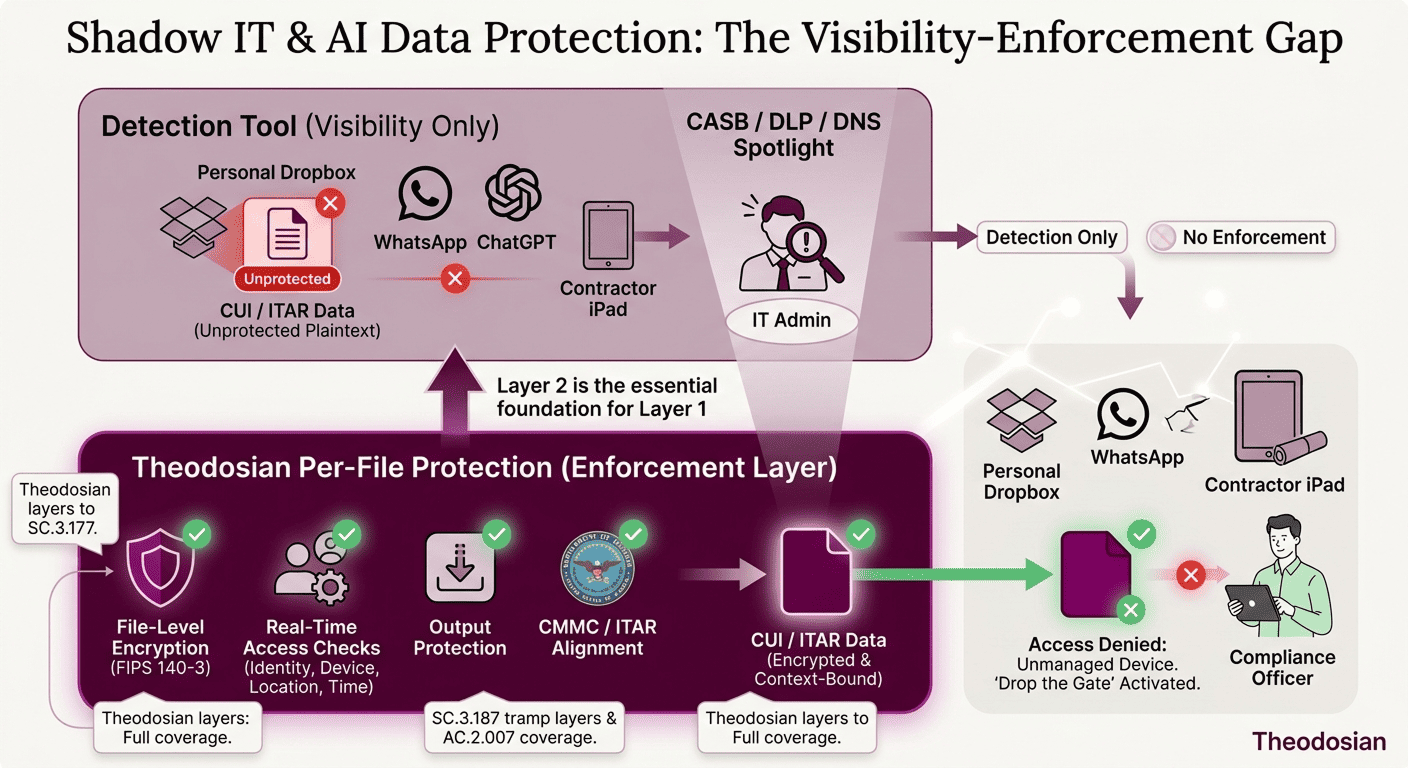
The mistake many organizations make is treating shadow IT as a detection problem. It isn't. It's a control problem.
Detection tools are essential; they give you visibility and incident response triggers. But visibility without protection is incomplete security.
A layered approach looks like this:
| Layer | Tool | Job |
|---|---|---|
| Visibility | Defender for Cloud Apps, Zscaler, Prisma Access | Find where data is moving. Identify risky behavior. Alert on exfiltration attempts. |
| Prevention | Network policy, DLP rules | Block certain apps, require MFA, restrict downloads to personal devices. |
| Protection | File-level encryption (Theodosian) | Even if prevention fails and data is exfiltrated, access is denied unless contextual controls are met. |
The third layer—file protection—is where organizations with ITAR, CMMC, or EAR compliance requirements separate from those taking risks.
A CISO can confidently tell an auditor: "We know where our data is. We control who can access it. And even if it ends up somewhere unauthorized, the data itself is protected."
Layered Defense for Shadow IT
The market for shadow IT solutions is crowded because the problem is real. Every organization with sensitive data and hybrid or contractor work faces shadow IT risk. The detection and response tools reviewed here—Microsoft Defender for Cloud Apps, Zscaler Internet Access, Palo Alto Networks Prisma Access, and Cisco Umbrella—are the market leaders for good reason. They provide genuine visibility into cloud app usage and exfiltration attempts.
But visibility is only the first layer of defense.
When an auditor asks, "How do you ensure that CUI doesn't end up in unauthorized environments?" the answer can't be, "Our CASB tells us if it does." The complete answer needs to include both detection and protection: "We detect shadow IT activity with our CASB, and we protect sensitive data with file-level encryption and contextual access controls with Theodosian. Even if data ends up in an unauthorized environment, it's inaccessible without meeting compliance controls."
That's the difference between detecting shadow IT and controlling it.
🔒 Encrypt Your Sensitive Files with Per-File Controls
File-level encryption + contextual access controls mean your data stays protected, even in shadow IT.
FAQs: Shadow IT Solutions
What's the difference between a CASB and shadow IT discovery?
A Cloud Access Security Broker (CASB) is a security tool that sits between users and cloud applications. It monitors activity, enforces access policies, and detects threats. Shadow IT discovery is the specific function of identifying which unauthorized cloud apps are being used in your environment. All four tools reviewed here have CASB capabilities, but Defender for Cloud Apps and Prisma Access market themselves primarily as CASBs, while Zscaler and Cisco Umbrella market themselves as broader security platforms with CASB embedded. The distinction matters less than understanding what each tool can actually do—which is why we focused on specific blocking and reporting capabilities rather than category labels.
Does shadow IT create CMMC compliance risk?
Yes, directly. CMMC MP.2.121 (Boundary Protection) requires organizations to monitor and control information flows across system boundaries. Shadow IT is a boundary violation. If an auditor finds CUI in personal cloud storage, your organization has failed to protect information at the boundary. CMMC Level 2 explicitly requires demonstration of boundary monitoring and control. CMMC Level 3 (if your company pursues it) adds additional rigor. Detection alone doesn't satisfy the control—you need to show that data in shadow IT is either inaccessible (through file encryption) or that incidents are detected and remediated with evidence of control.
Can Microsoft Defender for Cloud Apps block personal Dropbox?
Partially. MCAS can apply conditional access policies that require MFA or device compliance before allowing access to Dropbox. It can also revoke active sessions if a user is accessing from a non-compliant device. However, it cannot prevent the file upload itself if the user has already authenticated to personal Dropbox outside of the M365 ecosystem. If a contractor uses Dropbox's native client on a personal Mac, MCAS has no visibility or control over that transfer. It only sees and controls Dropbox access through M365 portals or web clients that pass through Microsoft's proxy layer.
Does shadow IT monitoring satisfy MP.2.121?
Not on its own. MP.2.121 requires "monitoring and controlling information flows across system boundaries." Detection tools provide monitoring. But "controlling" information flows means preventing unauthorized access or ensuring that data in unauthorized locations is protected. If your organization only detects shadow IT without either blocking it or protecting the data itself, you've addressed half the requirement. CMMC assessors expect to see evidence of control—either prevention (blocking the app) or protection (ensuring the data is inaccessible even if it reaches shadow IT). Detection logs alone are insufficient.
What's the fastest way to reduce shadow IT risk without blocking productivity?
Start with shadow IT discovery; find what apps are actually being used. Classify the apps into categories: business-critical (allow with controls), risky (require compliance and MFA), and banned (block). For business-critical apps, implement file-level encryption so that even authorized users are accessing protected data. For risky apps, require MFA and device compliance. For banned apps, block at the network layer.