
Financial services firms have always moved sensitive data. Loan documents to underwriters. Client portfolios to wealth advisors. Trade confirmations to counterparties. Audit materials to regulators. The flow of confidential files is part of how financial services actually operates.
So we know that data moves, but it's whether the tools moving it were built to handle the regulatory weight those files carry.
With the FTC Safeguards Rule in active enforcement since April 2024, GLBA security requirements updated and tightened, and examiners from the OCC, FDIC, and FFIEC increasingly asking for per-record evidence of encryption controls, "we use Box" is not a sufficient compliance answer.
This guide breaks down what financial services organizations actually need from secure file sharing, and how the leading tools compare against those requirements.
Why Do Financial Services Firms Need Secure File Sharing?
Financial institutions handle three categories of data that carry explicit regulatory obligations:
- Customer financial records (GLBA, FTC Safeguards Rule, state financial privacy laws)
- Non-public personal information (NPI) shared with third parties — brokers, advisors, TPAs, insurers
- Trade information, M&A materials, and investment data (FINRA, SEC Rule 17a-4, insider trading controls)
The average cost of a data breach in the financial services sector has climbed to $6.08 million per incident, remaining one of the costliest industries globally. When customer NPI is exposed, the financial fallout is compounded: immediate containment expenses are followed by long-term class-action litigation and regulatory remediation.
Most breach liability in financial services traces back to a file that left the institution's controlled environment and ended up in a place where the institution had no visibility or control. A wealth manager emailing a client's portfolio to an advisor's personal account. A mortgage officer attaching loan documents to a Gmail thread. A compliance officer sharing audit documentation through a personal Dropbox link.
The problem isn't the technology your IT department approved. It's the technology your people actually use when the approved tooling feels slow or inconvenient.
What Does GLBA Actually Require for File Sharing?
The Gramm-Leach-Bliley Act (GLBA) requires financial institutions to protect the security and confidentiality of customer NPI. The FTC's updated Safeguards Rule — enforceable since 2023 and in active enforcement since April 2024 — operationalizes this with specific technical controls:
- Encryption of customer information in transit and at rest
- Multi-factor authentication for accessing customer financial data systems
- Monitoring and testing of information security systems
- Security risk assessment covering third-party service providers
Regulatory enforcement has reached unprecedented levels of strictness. The FTC’s maximum civil penalty for Safeguards Rule violations has officially been adjusted upward to $53,088 per violation per day. Additionally, banking regulators (OCC, FDIC) and the SEC have dramatically escalated enforcement on "off-channel communications" and uncontrolled data transfers — resulting in billions of dollars in cumulative industry penalties. It is no longer just about preventing a breach; it is about the active failure to maintain continuous technical controls over NPI once it leaves your primary repository.
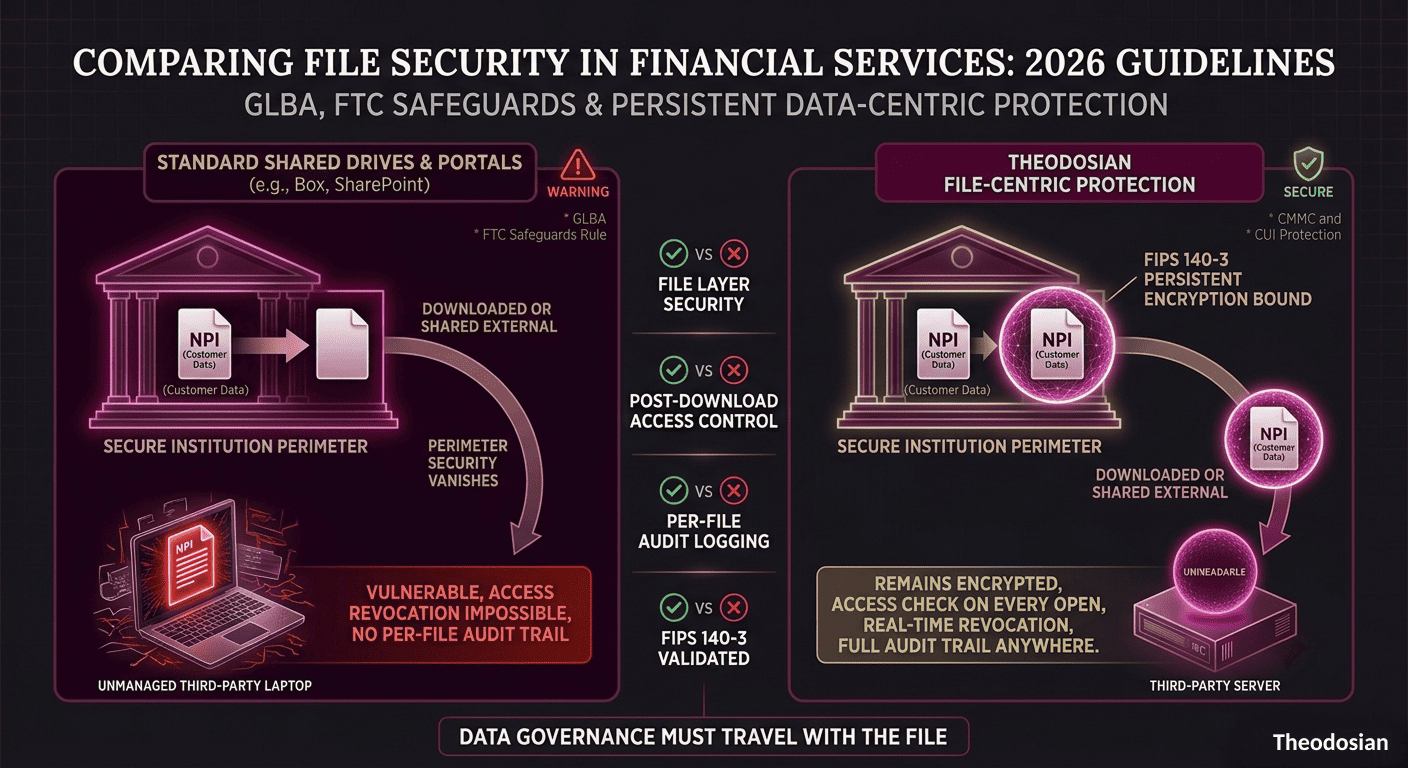
"Encryption in transit and at rest" is the floor, not a complete answer. When customer NPI is exported as a PDF and emailed to a broker, transit encryption (TLS) protects it during the send. At-rest encryption protects it on your server. Neither controls what happens to it in the broker's inbox, on their laptop, or in their filing system. That's the gap most financial services file sharing tools leave open.
🔒 Is Your Customer NPI Truly Protected Post-Download?
Standard portal encryption stops working the second a broker, advisor, or client downloads a document to their local device. If a file leaves your system unprotected, your compliance posture is compromised.
What Does the FTC Safeguards Rule Say About Third-Party File Sharing?
The Safeguards Rule explicitly requires financial institutions to oversee their service providers — requiring contracts that mandate appropriate safeguards and monitoring whether those safeguards are actually in place.
This means:
- You cannot simply hand customer NPI to a third-party broker, advisor, or processor and consider your obligation discharged
- You need evidence that appropriate safeguards were in place when the data transferred
- You need to demonstrate, in an examination or investigation, what controls governed that file after it left your environment
This is the standard most conventional file sharing tools fail: they can document that the file was sent, but not what happened to it afterward, whether access was ever revoked, or whether the receiving party's environment was actually secure.
What Features Should Financial Services Firms Look for in a Secure File Sharing Solution?
Based on GLBA requirements, FTC Safeguards Rule obligations, and FFIEC examination guidance, financial services organizations should evaluate file sharing solutions against these specific criteria:
- Encryption at the file level (not just in transit or at rest at the server level)
- Per-file, per-user access logging queryable by specific file or individual
- Access revocation that works regardless of where the file currently resides
- Controls that travel with the file outside your environment (to brokers, advisors, regulators)
- FIPS 140-3 validated encryption (for institutions seeking to meet federal examination standards)
- Zero-friction deployment — solutions that require users to change behavior get bypassed
How Do the Leading Solutions Compare?
Here's how the main options evaluate against the controls that matter for GLBA and FTC Safeguards compliance:
| Solution | GLBA/FTC Safeguards | Per-File Encryption | Post-Send Access Control | Per-File Audit Log | Access Revocation |
|---|---|---|---|---|---|
| Microsoft SharePoint / OneDrive | Partial | Volume-level only | No — file leaves control when downloaded | System-level, not file-level | No |
| Box | Partial | At-rest on Box servers | Limited — download breaks control | Folder-level events | No |
| Kiteworks | Strong | At-rest, in-transit | Governance tools available | Activity logs | Limited |
| Virtru | Moderate | Email-layer encryption | Email only — not file-native | Email thread logs | Email revocation only |
| Egnyte | Moderate | Volume-level | Governance for Egnyte ecosystem | Folder-level events | Limited |
| Theodosian | Direct | FIPS 140-3 per-file | Full — controls travel with file | Per-file, per-user, per-action | Any location, any device |
A few clarifications on the table:
SharePoint and OneDrive: Microsoft's ecosystem encryption protects data at rest on Microsoft servers and in transit through TLS. Once a file is downloaded to a broker's laptop or forwarded to a personal email, Microsoft's controls end.
Box: Strong platform for secure collaboration within controlled environments. Like SharePoint, governance diminishes once a file leaves the Box ecosystem through a download or share link.
Kiteworks: Purpose-built for regulated industries with strong in-transit and at-rest controls, and governance tooling. The gap is that controls are still primarily environment-based rather than file-native — protection weakens at the boundary.
Virtru: Email-layer encryption is valuable for email-based NPI transfer. Doesn't extend to non-email file sharing channels, which is where most financial services data actually moves.
Egnyte: Solid for internal file governance in regulated environments. Like Box, the control boundary is the platform.
Where Does Theodosian Fit for Financial Services?
Theodosian is built for the specific gap every platform above leaves: what happens to the file once it leaves the platform.
Every file processed through Theodosian carries its own FIPS 140-3 validated encryption and access policy, independent of the platform it was stored on or transmitted through. A customer NPI file shared with a broker arrives encrypted. The broker gets access — under the conditions the financial institution sets — for as long as that access should last. When the engagement ends, access is revoked centrally, regardless of whether the file is still on the broker's server, their laptop, or a shared drive their successor is using.
For FFIEC examination purposes: every access event is logged at the per-file, per-user, per-action level. When an examiner asks for a complete access history for a specific customer's file, the answer is immediately queryable — not reconstructed from fragmented system event logs.
Theodosian deploys in days on FedRAMP Moderate infrastructure. It works alongside SharePoint, email, and whatever collaboration tooling your teams already use — so there's no workflow change required that gives users a reason to route around it.
🛡️ Stop Worrying Where Your Files Land
Financial regulators demand continuous governance. With Theodosian, you retain absolute key control, real-time revocation, and per-user audit trails—even after a file is downloaded or shared externally.
FAQs: Secure File Sharing & Financial Compliance
Does the FTC Safeguards Rule explicitly require file-level encryption?
While the Safeguards Rule mandates "encryption of customer information both in transit and at rest," it does not explicitly dictate the technological architecture (such as file-level vs. server-level). However, in modern financial workflows where NPI is routinely downloaded, emailed, and shared with third-party service providers, server-level encryption (like standard Box or SharePoint) fails to protect the file once it leaves your platform. File-level encryption is the only way to satisfy the continuous encryption requirement once data moves outside your immediate boundary.
How does file-level revocation work if a client or broker has already downloaded the document?
Traditional file sharing tools lose all control of a file once a user downloads it to their local hard drive. With Theodosian’s file-level protection, the file remains encrypted with a unique key. Every single time the recipient attempts to open or view that downloaded document, a real-time, zero-knowledge handshake occurs to verify their identity and permissions. If you revoke access in your central dashboard, the next handshake fails, and the local file instantly becomes an unreadable, encrypted string of characters—no matter where it is saved.
Can we use Microsoft 365 or SharePoint to fully satisfy GLBA and FFIEC file sharing requirements?
While Microsoft 365 offers robust security features for data sitting inside your tenant (at rest) and moving through their servers (in transit), it presents compliance gaps once files are exported or shared externally. Under FFIEC guidelines and GLBA, you must maintain audit logs and access controls. Once a user downloads a spreadsheet or PDF from SharePoint, Microsoft's audit logging and access controls cease to apply. To achieve complete compliance, you must pair your collaborative platforms with a file-layer security solution that keeps audit trails and access control persistently attached to the file itself.