
The search for ITAR-compliant cloud storage almost always starts with the same question: which platform keeps our technical data inside the right boundary?
That's a reasonable starting point. Data residency matters. US-person-only access matters. Audit logging matters. A platform without these fundamentals isn't worth evaluating.
But here's where most buyer guides fall short: ITAR violations don't occur within secure platforms. They happen after a file moves.
A defense engineer downloads a CAD drawing to review offline. An authorized subcontractor forwards a technical specification to a colleague. A laptop is taken into a hotel room while a consultant is traveling for a site visit. In each case, the cloud platform logged a clean access event. The ITAR-controlled data is now outside any platform's jurisdiction.
This guide covers the platforms worth considering, what each one actually protects, and what none of them protect against — along with what fills that gap.
Is Your Technical Data Truly "Protected," or Just "Stored"?
Most platforms secure the server, then leave the file vulnerable the moment it’s downloaded. Don't let a clean download in your audit log mask an ITAR violation on a subcontractor's laptop.
What ITAR-Compliant Cloud Storage Requires
Before evaluating platforms, it's worth establishing what the regulations actually demand of any system handling ITAR technical data.
ITAR technical data includes information required for the design, development, production, manufacture, assembly, operation, repair, testing, maintenance, or modification of defense articles. In practice: CAD files, blueprints, specifications, manufacturing process documentation, test results, performance data, and source code for defense applications. If it's on the US Munitions List and someone needs to know it to build or modify the item, it's likely technical data.
Access control requirements: Only US persons — US citizens and lawful permanent residents — can access ITAR-controlled technical data without an export license. Any cloud system handling ITAR data must enforce this at the identity level, not just at the physical location level. Administrator access must also be restricted to vetted US personnel.
Encryption requirements: FIPS 140-2 or FIPS 140-3 validated encryption is required, with AES-256 being the recommended standard. TLS 1.2 or higher for data in transit. Critically, the organization must maintain control of encryption keys — if a provider can access your key material, that access may itself constitute a regulated disclosure under ITAR's broad definition of "export."
Data residency: All ITAR-controlled data must be stored within US borders. Physical data center location must be verifiable and documented.
Audit logging: Comprehensive logs of all access, modification, and download activity are required — not just for compliance demonstration, but because any unauthorized disclosure must be traceable.
With that framework established, here's how the leading platforms perform.
The Platforms
Kiteworks
Kiteworks positions itself specifically for regulated content in defense and government contracting. It holds FedRAMP Moderate authorization (since 2017) and achieved FedRAMP High Ready status in February 2025. FIPS 140-3 Level 1 validated encryption. Supports approximately 90% of CMMC 2.0 Level 2 controls.
For ITAR specifically, Kiteworks offers end-to-end encryption, role-based access controls, comprehensive audit logging, and optional digital watermarking on shared files. All file activity — including download attempts — is tracked.
What it protects well: Access control within the platform, audit trail generation, US-only data residency, SFTP, and secure email integration. For organizations that need a documented, ITAR-defensible file transfer and collaboration environment, Kiteworks is one of the more complete options available.
The file boundary gap: Once a file is downloaded to an endpoint, Kiteworks's encryption and policy controls do not persist with the file. The platform knows who downloaded it. It doesn't control what happens next.
Microsoft GCC High
Microsoft's Government Community Cloud High (GCC High) is the environment Microsoft will contractually agree to for ITAR data handling — standard GCC does not qualify. GCC High stores all customer data, content, and metadata within the continental US, limits access to US persons, and runs on physically separate infrastructure with cleared personnel.
GCC High holds FedRAMP High authorization and supports DoD IL4 and IL5 standards. For organizations already deep in the Microsoft 365 ecosystem, GCC High is the natural path to an ITAR-defensible environment without leaving Microsoft's tooling.
What it protects well: Data residency, US person access controls, deep integration with Microsoft's compliance and governance tooling (including Purview), and a contractual ITAR commitment from Microsoft itself.
The file boundary gap: GCC High's encryption uses Microsoft-managed keys by default. Once files are downloaded to endpoints, the GCC High boundary ends, and no persistent protection travels with the file. Files shared outside the GCC High tenant lose the boundary protections entirely. There is no native mechanism to revoke access to a downloaded file.
Tresorit
Tresorit is a Swiss-based provider with a strong cryptographic foundation. It uses client-side, end-to-end encryption with unique, randomly generated keys per file — keys are generated on the user's device and never sent unencrypted to Tresorit's servers. A 2024 cryptographic audit by ETH Zurich ranked Tresorit best among five E2EE providers tested.
Tresorit carries ISO 27001:2022 certification and explicitly positions itself for ITAR compliance. Role-based access controls, detailed activity reporting, and link-sharing controls with password, expiration, and download restrictions are all available.
What it protects well: The per-file E2EE model is one of the strongest in this category. For organizations seeking strong cryptographic assurance on the platform, Tresorit's implementation is technically rigorous.
The file boundary gap: Like every other platform on this list, Tresorit's encryption does not persist after a file is downloaded. Once on a local device, the file is decrypted, and the platform's protection ends. There is no revocation capability for already-downloaded files.
Egnyte
Egnyte achieved FedRAMP Moderate Equivalency in 2024 and supports CMMC 2.0 compliance for government contractors. It offers automated sensitive content classification with ITAR flagging, least-privileged access controls, SSO, MFA, and a secure data enclave specifically for CUI and ITAR data handling.
What it protects well: Content classification and governance, granular access controls, ITAR data enclave separation, and solid CMMC coverage for Level 2 requirements.
The file boundary gap: FedRAMP Moderate (not High) — less stringent than Kiteworks or GCC High for ITAR-sensitive environments. No documented end-to-end encryption or download revocation capability.
ShareFile (by Cloud Software Group)
ShareFile offers SOC 2 Type II and ISO 27001 certification through its underlying cloud providers, with 256-bit AES encryption at rest and in transit. It's a widely deployed platform for secure file sharing in professional services and contractor environments.
What it protects well: Standard secure file sharing, basic access controls, and audit logging in a well-supported enterprise platform.
The file boundary gap: No explicit ITAR certification in the current vendor documentation. Key management appears to be provider-managed. No documented DRM, download revocation, or persistent encryption. For contractors requiring specific ITAR contractual commitments, ShareFile's documentation does not support that case.
What None of These Platforms Cover: The File Boundary
Every platform above builds a defensible perimeter around files while they live in the platform. That perimeter is real, and it matters. But ITAR violations don't happen at the perimeter — they happen at the boundary, when data moves.
Seven scenarios that every platform above leaves unaddressed:
Downloaded files on personal devices: An authorized user downloads a technical specification to a personal laptop. The platform audit log records a clean download. The file is now on a device the organization doesn't manage, with no encryption, no access controls, and no revocation capability.
Email forwarding: A subcontractor emails a downloaded drawing to a colleague. Neither the platform nor the organization has any visibility into or control over that email. Email is the single most common channel for unintentional ITAR violations.
Offline access: A traveling engineer has downloaded files to work offline. The platform knows the file was downloaded before the trip. It has no control over access during the trip.
USB export: A user copies a downloaded file to a USB drive. No platform on this list prevents or tracks what happens after that.
Credential compromise: An attacker acquires valid user credentials and authenticates into any of these platforms as that user. Every access control passes because the identity check is satisfied. The attacker downloads files as a legitimate user with a clean audit trail.
Forwarded links: Shared links with no expiration, or with expiration that isn't enforced uniformly, can be forwarded to unauthorized recipients.
Supply chain re-sharing: A Tier 3 subcontractor downloads files from a Tier 2 subcontractor, who downloaded from a Tier 1. By the third hop, the original platform has no visibility.
Theodosian: The Persistent Security Layer
Theodosian is not a storage platform; it’s a security layer that wraps around your files regardless of where they live. Whether your CUI is in SharePoint, on a local engineering workstation, or being sent via email, Theodosian ensures the protection stays with the content, not the container.
How It Works: The FILE_SEED Architecture
Theodosian uses a zero-knowledge, split-key model. Instead of storing your encryption keys in a central vault (a "honeypot" for attackers), we manage a unique FILE_SEED for every document.
- Identity-Driven Access: The file only decrypts when a user’s identity is verified by your IdP (Azure AD, Okta, etc.).
- On-Demand Keys: The encryption key is regenerated on the device at the moment of access and destroyed the moment the file is closed.
- Strategic Revocation: Because every "open" attempt requires a fresh check for the FILE_SEED, you can revoke access to a file that has already been downloaded. If a subcontractor is offboarded, their local copies become instantly unreadable.
Why It Matters for ITAR and CMMC
- The ITAR Safe Harbor (§ 120.31): Theodosian provides the end-to-end, persistent encryption required to satisfy the "Safe Harbor" provisions. Because the data is never accessible to unauthorized parties—even if they possess the physical file—it is not considered an "export."
- Sovereign Continuity: We provide joint custody of your FILE_SEED lists. This ensures your organization retains the ultimate sovereign right to your data. You are never "locked in" to a vendor; you own the keys to your kingdom.
- Automated "Drop the Gate" Defense: Traditional platforms only alert you after a suspicious download occurs. Theodosian monitors for anomalous patterns—such as bulk file access, off-hours activity, or geographic "impossible travel"—and can automatically freeze access (Drop the Gate). For ITAR compliance, this means moving from detecting a potential export violation to preventing it before the data is ever decrypted.
- Assessor-Ready Evidence: While cloud platforms log downloads, Theodosian logs access. You can show a C3PAO assessor exactly who opened which file, on what device, and at what time, providing a 100% audit trail of your technical data.
What ITAR Compliance Actually Requires at the File Level
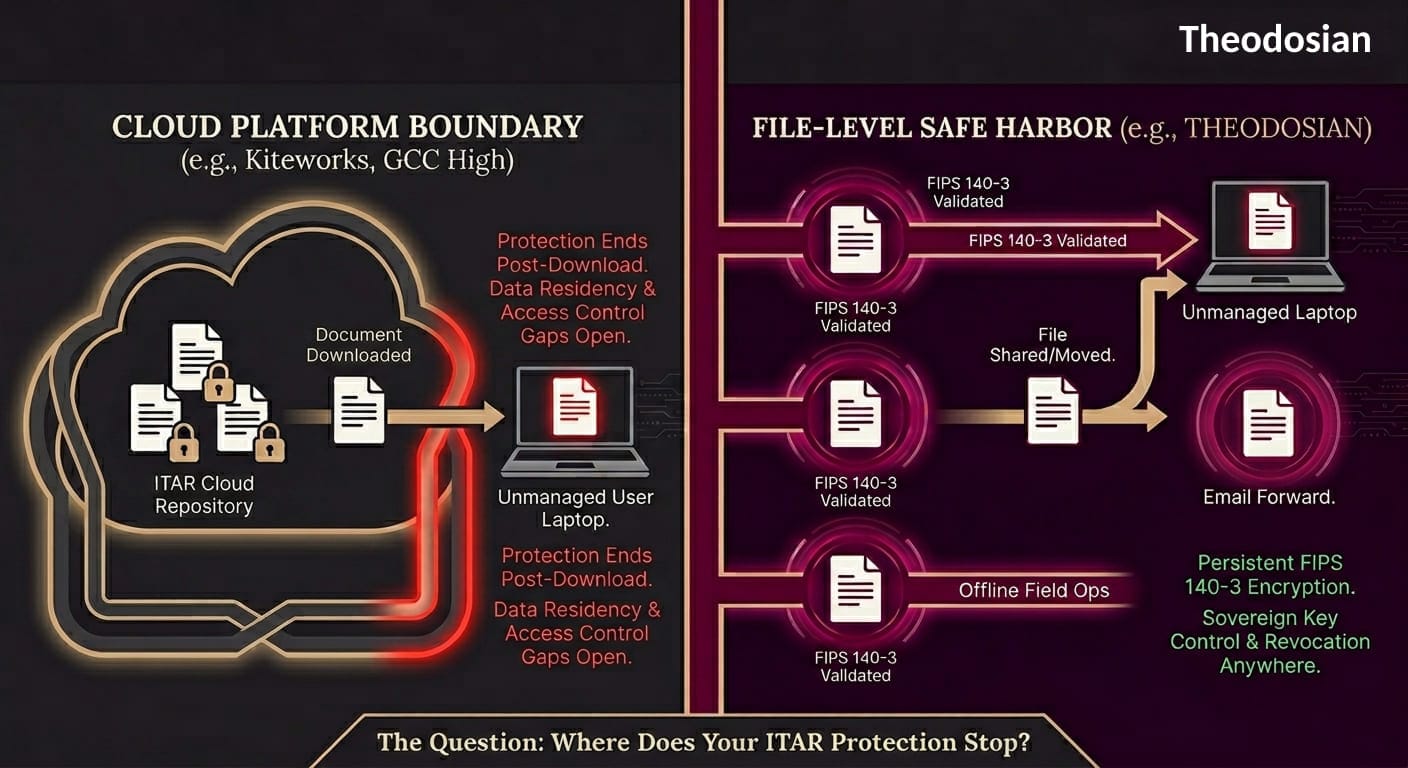
The technical safeguard that ITAR's encryption provisions point toward — and that every platform above lacks in its default configuration — is protection that travels with the file itself.
ITAR § 120.31 and EAR § 734.18(a)(5) provide an encryption safe harbor: properly encrypted data is not considered an "export" for purposes of the regulations because it's not accessible without authorized decryption. That safe harbor only applies when the encryption is persistent — when the file remains protected wherever it travels, not just while it sits inside a specific platform.
Per-file FIPS 140-3 validated encryption means each document carries its own cryptographic key and access policy. Context-aware access controls verify identity, device trust, location, and authorization at every open attempt — on any device, in any environment, online or offline. If those conditions aren't met, access is denied.
The ITAR safe harbor is preserved because the data is never exposed to unauthorized parties — the encryption is the safeguard, not the platform boundary.
Comparison Table
| Platform | FedRAMP Level | FIPS Encryption | ITAR Contractual Commitment | File-Level Access Revocation | US-Person Admin Controls |
|---|---|---|---|---|---|
| Kiteworks | Moderate Auth / High Ready | FIPS 140-3 L1 | Yes | No | No |
| Microsoft GCC High | High | AES-256 (Microsoft-managed keys) | Yes (GCC High only) | No | No |
| Tresorit | None (ISO 27001) | Per-file E2EE | Yes | No | No |
| Egnyte | Moderate Equivalency | AES-256 | Limited documentation | No | No |
| ShareFile | None (SOC 2) | AES-256 | Not documented | No | No |
| Theodosian (file layer) | Runs on FedRAMP Moderate infrastructure | FIPS 140-3 validated, per-file | Yes | Yes | Yes |
What to Look for in ITAR-Compliant Cloud Storage: Evaluation Checklist
Before finalizing a platform selection, confirm each of these with the vendor in writing:
- Does the vendor contractually agree to ITAR data handling obligations? (GCC High and Kiteworks do; verify others explicitly)
- Where are data centers physically located, and can this be confirmed in the service agreement?
- Who holds encryption keys — the vendor, the customer, or both? What is the key management architecture?
- Can administrator access be restricted to verified US persons, and how is that enforced and audited?
- Does audit logging capture downloads, not just views? Is log data exportable for assessments?
- What is the encryption and access control model for files after they are downloaded to an endpoint?
- Can access to a specific file be revoked after it has been downloaded?
- Does the platform support FIPS 140-3 validated encryption modules (not just FIPS-approved algorithms)?
If any of the last three answers are "no" or "not available," you have a file boundary gap. That gap is where most unintentional ITAR violations occur, and it requires a file-level protection layer to address.
Close the File Boundary Gap in Days
You don't need to migrate your entire cloud stack to achieve sovereign file control. Theodosian adds a persistent layer of FIPS 140-3 encryption to your existing workflows in days, not months.
FAQs: ITAR Compliant Storage
What makes a cloud storage platform ITAR-compliant?
ITAR compliance in a cloud storage context requires: data residency in the US, access controls that restrict access to US persons, FIPS 140-2 or 140-3 validated encryption, comprehensive audit logging, and a contractual commitment from the provider to ITAR data handling obligations. Most enterprise cloud platforms meet the first three requirements. The contractual commitment is where many fall short — Microsoft only makes this commitment for GCC High, not standard GCC.
Is standard Microsoft 365 / GCC ITAR-compliant?
No. Microsoft only contractually agrees to ITAR data handling for GCC High — not standard commercial Microsoft 365 or standard GCC. Organizations storing ITAR technical data on standard Microsoft 365 environments, SharePoint Online, or OneDrive for Business without GCC High licensing are likely not operating in an ITAR-defensible environment. Verify your licensing tier and Microsoft's contractual ITAR commitments before assuming compliance.
What is the ITAR encryption safe harbor?
ITAR § 120.31 and EAR § 734.18(a)(5) provide that properly encrypted technical data is not considered an export under the regulations, because the data is not accessible without authorized decryption. This safe harbor only applies when the encryption is persistent, and the key is controlled by the authorized party. Platform-based encryption that decrypts at download does not fully satisfy this safe harbor for files that subsequently travel outside the authorized access environment.
Do I need a separate system for ITAR file protection, or can my cloud storage handle it?
Most ITAR-compliant cloud storage platforms handle data residency, access control, and audit logging well — those are platform-level controls. What they don't handle is file-level protection after download. Persistent per-file encryption that travels with the document is a separate layer that works alongside cloud storage platforms, not in place of them. Think of it as the cloud platform handling the repository security and per-file encryption, handling what happens after the file moves.
What ITAR violations are most common in cloud storage environments?
The most common violations involve files leaving the secure platform environment through legitimate channels: downloaded to personal devices, forwarded via email to recipients who aren't US persons or aren't authorized on the specific program, accessed offline in a non-compliant environment, or copied to removable media. Every platform on this list logs these activities — but logging a violation doesn't prevent it. File-level encryption makes these transmission paths compliant because the data is never accessible to unauthorized recipients.