
A CISO at a Tier 2 defense contractor puts four file encryption platforms through evaluation. All four have CMMC solution pages. All four mention FIPS 140-3 somewhere in their marketing. Three of them protect CUI while it lives inside their platform.
None of them guarantees that protection holds when a CUI file leaves the platform — when an engineer downloads it to a home laptop, emails it to a prime's procurement team, or shares it through a collaboration portal you don't control.
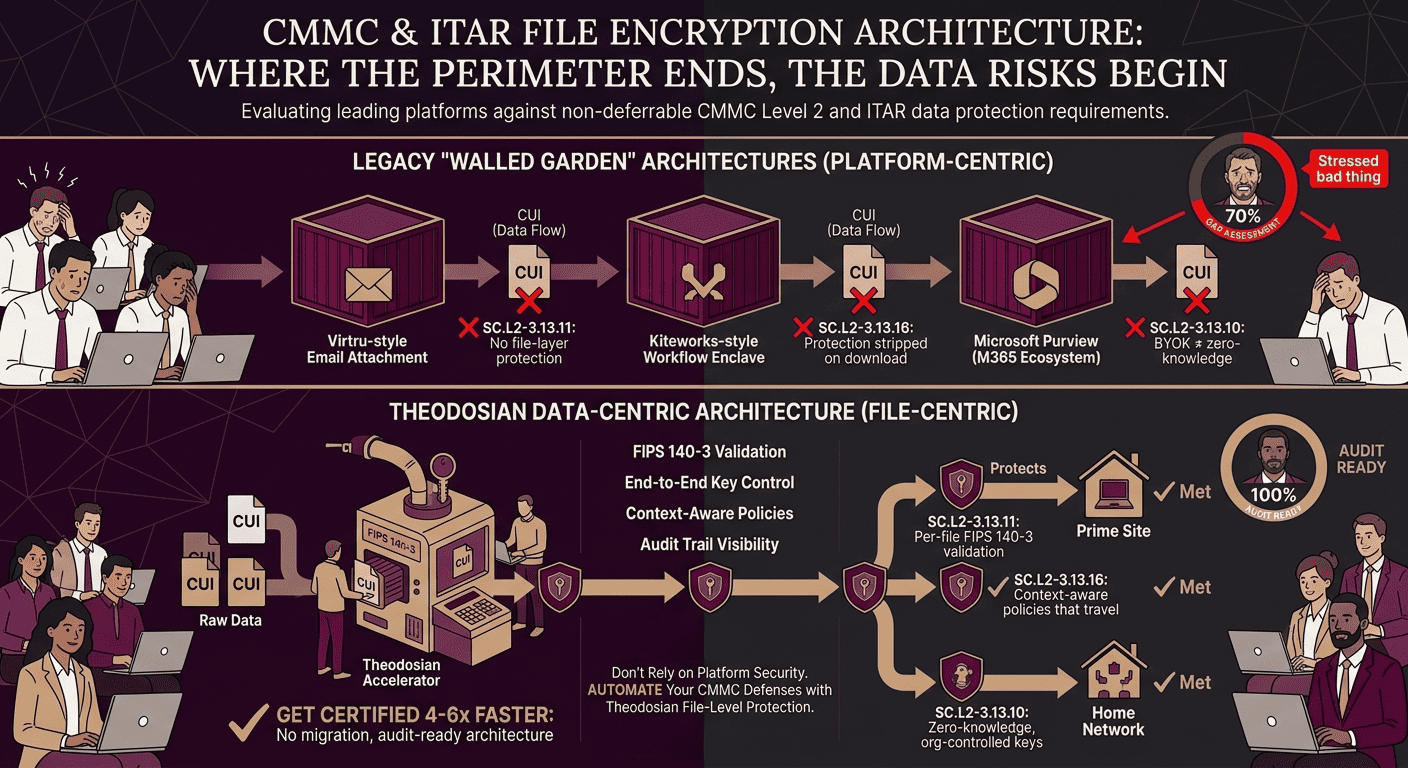
SC.L2-3.13.11 doesn't ask whether your platform is encrypted. It asks whether CUI is encrypted everywhere it lives. SC.L2-3.13.16 asks whether your organization controls the encryption keys, not your vendor.
Those two requirements are where legacy architectures stop short, forcing contractors into massive, expensive infrastructure overhauls just to secure data perimeters. This comparison shows exactly where traditional platforms fail, and how a truly data-centric platform like Theodosian bridges the gap by making the file itself the security boundary, protecting your CUI effortlessly even after it leaves your network.
What Do CMMC and ITAR Require from File Encryption?
Before comparing platforms, it's worth being precise about what the requirements actually say — because most platform comparisons skip this step and end up evaluating features that don't map to the compliance obligation.
For CMMC Level 2, the two encryption controls that matter most:
SC.L2-3.13.11: Employ FIPS-validated cryptography when used to protect the confidentiality of CUI. The key phrase: "when used to protect the confidentiality of CUI" — not "within your primary environment" or "while in your cloud tenant." Wherever CUI lives, the encryption must be FIPS 140-3 validated. A file on an engineer's local drive is still CUI. A file in a prime's SharePoint is still CUI.
SC.L2-3.13.16: Protect the confidentiality of CUI at rest. Paired with SC.L2-3.13.11, this means your encryption must cover CUI at rest in every location it lands — not just the systems your platform directly manages.
And the control most vendors don't highlight: SC.L2-3.13.10 requires that your organization manages its own cryptographic keys. If your vendor holds the keys, the control isn't met by you — it's met by them. If that vendor is breached or compelled to produce your decryption keys by a foreign authority, your CUI is exposed.
For ITAR, the encryption carve-out under 22 CFR § 120.54 requires end-to-end encryption using publicly available algorithms (per NIST SP 800-175B guidance) with keys in US Person control. "US Person control" is the operative requirement. The vendor's FedRAMP status doesn't satisfy this; key management does.
With those requirements established, here's how each platform performs against them.
Stop Buying Complex Infrastructure to Solve a Data Problem
You don't need to rebuild your entire IT perimeter or force your team into clunky, isolated workflows just to satisfy federal encryption standards. Secure the data itself, not the container it sits in.
How Does Virtru Handle CMMC and ITAR File Encryption?
Virtru is an email-centric encryption platform with genuine strengths: FedRAMP Authorized (ATO since 2019), FIPS 140-3 validated cryptography, and a well-designed Gmail and Outlook integration that security teams trust. In government and healthcare email compliance use cases, Virtru is a credible choice.
For CMMC and ITAR file encryption, the limitations are structural.
Where Virtru's coverage applies: Virtru encrypts email content and attachments. When a CUI document is sent via Virtru-protected email, the attachment travels with per-message encryption that the recipient must authenticate to access. That access is logged, and the sender can revoke.
Where it stops: Virtru's protection model is email-attached. A CUI file that lives in SharePoint, OneDrive, a network share, a contractor's laptop, or a cloud collaboration folder is outside Virtru's scope entirely. Virtru doesn't encrypt files at rest in storage. It encrypts messages and their attachments.
For a defense contractor whose CUI primarily moves through email and needs a documented encryption wrapper for those transmissions, Virtru satisfies part of the SC.L2-3.13.11 picture. For a contractor whose CUI lives in shared drives, gets downloaded for offline work, or flows through collaboration portals, Virtru covers one channel of a multi-channel problem.
On key management: Virtru's standard deployment uses Virtru-hosted keys. Their Private Keystore option gives organizations key management control, which addresses SC.L2-3.13.10 and the ITAR key control requirement, but requires additional configuration and infrastructure.
How Does Kiteworks Approach CMMC and ITAR Compliance?
Kiteworks is a Private Content Network — a secure platform for managing regulated content transfers, including secure email, secure file sharing, SFTP, and managed file transfer workflows. It holds FedRAMP Authorization and has dedicated CMMC and ITAR compliance positioning.
Where Kiteworks's coverage applies: Files shared or transferred through the Kiteworks platform are encrypted in transit and at rest within Kiteworks's environment. The platform maintains detailed audit logs of who sent what, to whom, and when — satisfying the AU domain requirements for activities conducted inside the platform. For organizations whose CUI compliance challenge is primarily about controlled file sharing and transfer workflows, Kiteworks addresses that use case well.
Where it stops: Kiteworks's encryption model is platform-level, not file-level. Protection exists within the Kiteworks environment. When a file is downloaded from the Kiteworks platform to a local device — which engineers regularly do to actually work on the file — the CUI exits the protected environment. What happens to it next depends on the receiving device's security posture, not Kiteworks's policies.
This is the same architectural limitation as any walled-garden approach: the protection is inside the wall. SC.L2-3.13.11 asks about the file regardless of what wall it currently lives inside.
On key management: Kiteworks supports organization-managed keys in its architecture, which addresses the SC.L2-3.13.10 requirement for contractors who configure this option.
The practical question to ask: Does your CUI compliance challenge live primarily in file transfer workflows, or does it live in how CUI files are handled after they've been transferred? If the former, Kiteworks addresses it directly. If the latter, the transfer-layer protection doesn't follow the file.
How Does Seclore Compare for Defense Contractor Use Cases?
Seclore is an enterprise Information Rights Management (IRM) platform — document-level access controls, including the ability to prevent copying, printing, and save-as operations once a user has access. It has genuine capabilities that are relevant to defense IP protection.
Where Seclore's coverage applies: Seclore applies persistent rights management to documents, meaning access policy travels with the file across environments. A Seclore-protected file carries its policy into a prime's environment, a subcontractor's laptop, or a partner's portal. That's the correct architectural model for CMMC/ITAR's data-follows-the-file requirement.
Where it gets complicated:
DRM friction: Seclore's IRM model restricts what users can do with files once accessed — can't copy text, can't print, can't save-as. This creates real user frustration and, in practice, produces workarounds: users photograph screens, type content into unprotected documents, or request policy exceptions. Workarounds generate new CUI handling events that aren't in scope or logged.
Deployment complexity and cost: Seclore implementations typically run months, not days, and involve significant IT overhead. Licensing runs $27,000–$50,000+ per year for enterprise deployments, with implementation costs on top. For a 20-person subcontractor, that cost structure is prohibitive.
FIPS validation: varies by deployment configuration, worth confirming against your specific SC.L2-3.13.11 requirement.
No autonomous threat response: Seclore enforces static policies. If an insider's credentials are compromised and they're accessing CUI files outside normal patterns, Seclore logs it, but doesn't automatically freeze access.
Seclore is worth evaluating if your compliance requirement includes DRM capabilities (copy/print/save-as prevention) and your organization has the budget and IT capacity for a multi-month deployment. For most small-to-mid defense subcontractors, the cost and complexity make it a poor fit.
Can Microsoft Purview Satisfy CMMC File Encryption Requirements on Its Own?
Microsoft Purview is the most common incumbent in this evaluation — most defense contractors already have M365 licenses, and Purview's sensitivity labels, DLP, and information protection capabilities come bundled with E5. The question isn't whether Purview is valuable. It is. The question is whether it satisfies SC.L2-3.13.11 and SC.L2-3.13.16 on its own, in all the environments where CUI actually lives.
Where Purview's coverage is strong: Within the M365 ecosystem — SharePoint, OneDrive, Teams, and Office apps on managed devices — Purview sensitivity labels apply FIPS 140-3 validated encryption and access controls that travel with the document. For organizations whose CUI lives entirely within M365, Purview's coverage is meaningful.
Where it gets more complicated: Files outside M365. When a CUI file leaves the M365 ecosystem — saved to a NAS, downloaded to a macOS endpoint with certain configurations, shared via non-M365 platforms, or synced to a personal device — Purview's encryption coverage degrades. Endpoint DLP can block some uploads to non-Microsoft platforms, but the file at rest on a non-M365 system isn't actively protected by Purview's encryption layer.
Double Key Encryption: Purview offers Double Key Encryption, where the organization holds one encryption key, and Microsoft holds the other — Microsoft cannot decrypt without the customer's key. Double Key Encryption addresses SC.L2-3.13.10 in principle. In practice, it comes with severe trade-offs: it works only with desktop Office apps on Windows, Double Key Encryption-protected files can't be searched or processed by M365 services, and they can't be used with Microsoft Copilot or other AI features. Most organizations reserve Double Key Encryption for a small subset of the most sensitive files, not their entire CUI environment.
BYOK ≠ zero-knowledge: Even with standard BYOK configuration in Purview, Microsoft retains tenant-level key management capability. True organizational key control — where only you can decrypt — requires Double Key Encryption with its associated limitations.
No in-use encryption: Purview's encryption decrypts files to plaintext on the local disk when a user opens them. The file exists as plaintext while in use.
Purview is a valuable layer in a CMMC compliance program. It's not the complete answer to SC.L2-3.13.11 in environments where CUI moves beyond M365, which is most environments.
How Does Theodosian Compare on CMMC and ITAR Encryption Requirements?
The evaluation criteria above — FIPS 140-3 validation, protection that survives file movement, organization-controlled keys, in-use encryption — are the same criteria that define where the platforms above stop short. Here's how Theodosian performs against each:
FIPS 140-3 validated encryption: Every CUI file is encrypted using FIPS 140-3 validated AES-256 cryptography before it leaves your environment. The validation standard covers the cryptographic modules themselves, not just the algorithm. SC.L2-3.13.11 satisfied.
Protection that travels with the file: Theodosian's per-file encryption architecture means the encryption and access policy are embedded in the file, not the platform. A CUI file that travels from your SharePoint to a prime's network drive, to an engineer's home laptop, to a subcontractor's email — that file carries its controls into every environment. Protect the content, not the container.
Organization-controlled keys: Theodosian's zero-knowledge, patent-pending key management ensures that your organization — not Theodosian — controls decryption. If a file lands in an unauthorized environment, the unauthorized party gets ciphertext they can't act on. SC.L2-3.13.10 and the ITAR US Person key control requirement satisfied.
In-use encryption: Files are decrypted in memory only, never written to disk as plaintext. This closes the endpoint exposure gap that Purview and others leave open when files are actively being worked on.
Deployment: days, not months. No data migration. Works with the platforms your team already uses — SharePoint, OneDrive, Google Drive, Dropbox, Box, Windows file servers, and NAS shares.
Which Platform Is the Right Fit for a Small Defense Contractor?
The honest answer: platform fit depends on where your CUI compliance gap actually lives.
| Requirement | Virtru | Kiteworks | Seclore | Microsoft Purview | Theodosian |
|---|---|---|---|---|---|
| FIPS 140-3 validated | ✅ | ✅ | Varies | ✅ | ✅ |
| Encryption travels with file | Email only | ❌ | ✅ | Within M365 | ✅ |
| Organization-controlled keys | Option (Private Keystore) | ✅ (configured) | ❌ | Double-Key Encryption only (limited) | ✅ (zero-knowledge) |
| In-use encryption | ❌ | ❌ | ❌ | ❌ | ✅ |
| Protects non-M365 environments | ❌ | ❌ | ✅ | Limited | ✅ |
| Autonomous threat response | ❌ | ❌ | ❌ | Within M365 | ✅ |
| Deploy time | Days | Days–weeks | Months | Weeks–months | Days |
| SMB-accessible pricing | ✅ | Mid-market | ❌ | E5 required | ✅ |
If your CUI compliance challenge is primarily email-transmission security: Virtru is a credible, deployable option.
If your challenge is secure file transfer and workflow management: Kiteworks addresses that use case directly.
If you're already in M365 and CUI stays almost entirely within that ecosystem, Purview with Double Key Encryption on your most sensitive files covers a meaningful portion of your requirement.
If your CUI files travel to primes, subcontractors, engineer laptops, off-platform collaboration — and you need the encryption and access policy to travel with them regardless of destination, per-file protection with organization-controlled keys is the architecture that satisfies SC.L2-3.13.10, SC.L2-3.13.11, and SC.L2-3.13.16 across all environments.
Deploy CMMC-Compliant Encryption in Days, Not Months
You don't have to choose between user friction, crippling costs, or incomplete M365 ecosystems. Discover how Theodosian’s zero-knowledge, file-level encryption gives you absolute regulatory peace of mind without changing how your team works.
FAQs: CMMC & ITAR File Encryption
What is the practical difference between "at-rest" platform encryption and file-level encryption?
Platform-level encryption (like standard SharePoint or Kiteworks) secures data only while it remains inside that specific system's "container." The moment an employee or prime contractor downloads that file to a local desktop, the platform's encryption is stripped away, leaving raw plaintext. File-level encryption, like Theodosian, embeds the FIPS-validated cryptography directly into the file's code. Whether it is uploaded to a personal Dropbox, emailed, or saved to a thumb drive, it remains safely encrypted.
Why is vendor key management a risk for ITAR compliance?
Under ITAR (22 CFR § 120.54), technical data sent outside the US must use strong encryption with cryptographic keys maintained strictly under "US Person control." If your cloud or security vendor manages your encryption keys on their servers, they technically maintain decryption authority. If that vendor suffers a server breach or is forced to hand over data by an outside legal authority, your ITAR data is compromised. True compliance requires a zero-knowledge architecture where only your organization holds the keys.
Does file-level encryption prevent unauthorized users from viewing files if they intercept an email?
Yes. Because data-centric encryption requires real-time authentication against the file's embedded access policies, an intercepted file is completely useless to an attacker. Even if a malicious actor gains access to a network stream or steals an email attachment, they won’t see anything. Access is only granted when a user successfully proves their identity and satisfies real-time contextual policies (like device compliance and location).