
The Honest State of DLP in 2026
Data Loss Prevention tools have dominated the enterprise security conversation for two decades. They monitor endpoints, watch networks, intercept emails, and flag suspicious file movement. For organizations bound by CMMC, ITAR, or EAR, DLP is often a required control.
Yet despite decades of maturity and billions in investment, DLP solves only part of the problem.
The real problem is this: DLP is a perimeter tool. It was engineered to catch data at defined boundaries—when files leave email, when they're uploaded to consumer cloud storage, when they transit a monitored network. But it has no authority over what happens after that boundary is crossed. Once data leaves the monitored environment—copied to a personal device, moved to an unmanaged endpoint, shared with a contractor, or simply sitting in a cloud folder—DLP sees nothing. Its jurisdiction ends.
This is not a flaw in the product. It's the architectural limit of what network and endpoint-layer tools can accomplish.
This buyer's guide cuts through the marketing claims and shows you exactly what each major DLP platform was built to do, where it excels, and critically, where it stops. We'll then show you why the gap that remains requires a different approach entirely.
How We Evaluated These Solutions
We assessed each platform against five key criteria that matter most to enterprise security teams and CMMC-bound organizations:
- Coverage Scope: What environments, file types, and data movements does it actually monitor? (Managed endpoints only? Cloud applications? Unmanaged devices?)
- CMMC SC.3.177 Alignment: Does the tool itself satisfy encryption and access control requirements, or does it only detect violations?
- Managed vs. Unmanaged Device Coverage: Can it protect data on devices not under your control?
- False Positive Rate and Operational Burden: How much noise does it generate? What's the cost of response?
- Deployment Complexity: How long until it's actually protecting data, not just generating logs?
We did not include point solutions for specific cloud platforms (like Salesforce-native DLP) or industry-specific tools. We focused on general-purpose platforms that enterprise security teams evaluate for cross-functional protection.
The Five Major Platforms: What Each Does
1. Microsoft Purview Data Loss Prevention
What It Does Well: Microsoft Purview DLP is the native data protection layer for Microsoft 365. It operates natively within Exchange, SharePoint, OneDrive, and Teams. Sensitivity labels can be applied to documents, and DLP rules enforce policies based on label, content pattern, or user identity. If you're already deep in M365, the integration is seamless—no additional agents, no cloud broker required.
For teams that rarely export data outside Microsoft's ecosystem, Purview DLP provides strong control over what leaves Exchange, what's shared via Teams, and what gets uploaded to OneDrive.
Ideal Use Case: Mid-market organizations with homogeneous M365 environments where most work happens inside the Microsoft tenant.
Where Coverage Ends: The moment data leaves Microsoft environments, Purview's visibility stops. A file downloaded to a local machine, copied to a personal cloud storage account (Dropbox, Google Drive, iCloud), or shared via a third-party communication platform is outside Purview's scope. For organizations with contractors, partners, or employees using non-M365 tools, Purview alone leaves significant gaps.
Additionally, Purview DLP detects policy violations; it does not encrypt files. It can block actions or alert teams, but once a file is exfiltrated, it remains plaintext. CMMC SC.3.177 requires encryption, not just detection and alerting.
2. CrowdStrike Falcon Data Protection
What It Does Well: CrowdStrike's approach is endpoint-native. Because CrowdStrike Falcon already runs on most managed endpoints, Data Protection layers directly into that existing telemetry. It monitors real-time file activity at the kernel level, catching file moves, USB transfers, uploads to cloud services, and screen captures. For organizations with a CrowdStrike-managed fleet, this is operationally efficient—one agent, one console, one policy engine.
The behavioral analytics component distinguishes legitimate file access from anomalous movement patterns, reducing false positives relative to rule-based approaches.
Ideal Use Case: Large enterprises with predominantly CrowdStrike-managed fleets where most sensitive data remains on corporate endpoints.
Where Coverage Ends: Like all endpoint DLP, Falcon Data Protection requires the agent. Unmanaged endpoints—contractors' machines, customer devices, partner organizations—are invisible to the platform. The moment an employee connects to a personal laptop or a contractor accesses a file from their own device, DLP coverage drops to zero. For defense contractors and supply chain partners, this is a critical gap: your most sensitive data often flows to people you don't manage.
Additionally, CrowdStrike DLP detects and blocks file movements. It does not encrypt the file itself. Once a file is successfully exfiltrated, it remains plaintext. This matters for compliance: CMMC SC.3.177 specifies encryption, not just movement prevention.
3. Zscaler Data Security (CASB + DLP)
What It Does Well: Zscaler operates in the cloud, positioned as part of the SASE architecture. It inspects traffic destined for SaaS platforms, cloud storage, and web services. For organizations routing traffic through Zscaler, DLP policies can flag uploads to unapproved cloud storage, prevent file sharing outside the organization, and catch credential theft or data staging in web applications. The cloud-native architecture means minimal on-premises infrastructure.
Zscaler's strength is visibility into cloud-first workflows. For companies where employees are constantly uploading to Google Workspace, Slack, Notion, and other SaaS platforms, Zscaler provides meaningful control.
Ideal Use Case: Cloud-native enterprises with SASE deployments where most data flows through monitored cloud applications.
Where Coverage Ends: Zscaler DLP is traffic-inspection based. It sees what flows through the cloud platform it monitors, but it does not see local file system activity. An employee copying a sensitive document to a USB drive, emailing it to a personal account via webmail, or printing it does not trigger Zscaler. Additionally, Zscaler cannot see traffic outside its proxy—direct downloads, peer-to-peer file sharing, or communication through non-web applications are outside the scope.
Like other DLP platforms, Zscaler detects violations but does not encrypt files. Once data is successfully uploaded to an unsanctioned platform, it is plaintext. Compliance with encryption-specific controls like CMMC SC.3.177 requires a separate mechanism.
4. Palo Alto Networks Enterprise DLP (within Prisma)
What It Does Well: Palo Alto's Enterprise DLP sits within the Prisma suite and provides hybrid coverage: network-layer policies for on-premises traffic, cloud-layer policies for SaaS platforms, and endpoint agents for managed devices. The centralized policy engine is sophisticated, allowing rules based on content analysis, user identity, asset classification, and custom dictionaries. For large enterprises with hybrid cloud footprints and extensive on-premises infrastructure, Palo Alto offers comprehensive policy orchestration.
Palo Alto's threat intelligence integration means DLP policies can adapt based on detected threats, allowing dynamic adjustment of data access policies in response to active incidents.
Ideal Use Case: Large enterprises with hybrid cloud-on-premises environments where centralized policy management and advanced threat intelligence integration is required.
Where Coverage Ends: Like all network-layer DLP, Palo Alto's visibility depends on traffic flowing through monitored checkpoints. Employees on personal networks, using VPNs to bypass the security stack, or working on unmanaged devices, are partially or entirely outside scope. Additionally, Palo Alto DLP enforces policy—it detects and blocks movements—but does not encrypt files. Data that successfully evades policy or is shared with an insider threat actor remains plaintext. For CMMC SC.3.177 and advanced persistent threat scenarios, encryption at the file layer is required.
5. Varonis Data Security Platform
What It Does Well: Varonis takes a data-centric approach: data classification, file activity monitoring, user behavior analytics, and permission management. Rather than watching for data movement, Varonis watches who accesses data and flags deviations from baseline behavior. This approach is particularly effective at detecting insider threats and abnormal access patterns. Varonis can ingest data from Windows file shares, cloud storage, databases, and identity platforms, creating a unified view of data access across the environment.
The behavior analytics are sophisticated. Varonis can flag when a user downloads an unusually large number of files, accesses data outside their typical role, or exhibits timing patterns consistent with data staging.
Ideal Use Case: Enterprise security teams focused on insider threat detection and compliance investigations. Organizations with complex permissions structures where excessive access is a primary risk.
Where Coverage Ends: Varonis is not a preventive DLP tool; it's a detective tool. It generates alerts about suspicious access, but it does not encrypt files, block network movements, or prevent exfiltration. It answers the question "Did someone try to steal data?" but not "If they tried, is the data still protected?" Additionally, Varonis' file activity monitoring depends on network visibility. Data on endpoints, personal devices, or cloud storage not connected to monitored systems is outside the scope.
For CMMC compliance, Varonis supports investigations and forensics but does not itself encrypt sensitive data or enforce context-aware access controls. It requires complementary tools to satisfy encryption and access control mandates.
5. Theodosian
Category: File-level encryption / data-centric security
Theodosian is not a DLP tool in the traditional sense—it doesn't monitor network traffic, inspect email content, or block unauthorized transfers in transit. What it does is apply per-file FIPS 140-3 validated encryption directly to individual documents, with access governed by contextual controls: identity, device, location, time, role, and more.
What It Does Well:
The practical difference is scope: where DLP tools protect data at the channel layer (what leaves, via which path), Theodosian protects data at the file layer (what the file does, wherever it is). A document encrypted by Theodosian carries its own access controls regardless of which device it's on, which network it travels through, or which storage service holds it. If contextual access conditions aren't met, access is denied and the file doesn't open.
Organizations handling CUI under CMMC Level 2 or ITAR-controlled technical data where data moves outside managed environments—to subcontractor devices, personal laptops, or external collaborators—get strong compliance alignment. Per-file encryption satisfies CMMC SC.3.177 (FIPS-validated crypto) and SC.3.187 (key management) at the document level. Zero-knowledge decentralized key management means Theodosian cannot access or decrypt customer data.
Ideal Use Case:
Defense contractors (CMMC/ITAR), legal and professional services firms handling client files outside managed environments, and organizations where subcontractor supply chain data movement is a primary risk.
Where Coverage Ends:
While Theodosian provides foundational protection, it is designed to work in harmony with your existing security ecosystem. For organizations that need to map "dark data" across massive, legacy unstructured repositories, a DSPM tool (like Varonis) remains a valuable companion for initial discovery and classification. However, once data is identified, Theodosian takes over the enforcement.
Unlike traditional encryption that is "blind" after deployment, Theodosian provides active forensic telemetry, logging every access attempt with full identity and device context. When the platform’s behavioral analytics flag an anomaly—such as a bulk download or an unauthorized geographic shift—it doesn't just alert your SOC; it can automatically "Drop the Gate," revoking decryption keys in real-time to neutralize the threat before exfiltration can occur.
Pricing: Free 14-day pilot available. Enterprise pricing on request.
📋 Is Your Current DLP Leaving Data Exposed?
Use our Shadow AI & Data Risk Assessment Checklist to identify exactly where sensitive files are escaping your managed perimeter.
Comparison Table: DLP and File-Level Security Solutions Side-by-Side
| Capability | Purview DLP | CrowdStrike Falcon Data Protection | Zscaler | Palo Alto Prisma DLP | Varonis | Theodosian |
|---|---|---|---|---|---|---|
| Managed Endpoint Coverage | M365 apps only | Excellent | Partial (traffic only) | Excellent | Excellent (via agent) | ✅ File layer (all devices) |
| Unmanaged Device Coverage | None | None | Partial (SaaS traffic) | Partial | Partial (monitoring only) | ✅ Encryption travels with the file |
| Files Outside Environment | Not visible | Not visible | Not visible | Not visible | Not visible | ✅ Protected regardless of location |
| Encryption (CMMC SC.3.177) | No—detects violations only | No—detects violations only | No—detects violations only | No—detects violations only | No—monitoring only | ✅ Full (FIPS 140-3 validated, per-file) |
| Access Control Enforcement | No | No | No | No | No | ✅ Context-aware (identity, device, location, time) |
| False Positive Rate | Moderate | Low-Moderate | Moderate-High | Low-Moderate | Low (behavioral baseline) | N/A (not channel-based) |
| Deployment Complexity | Low (M365 native) | Medium (agent rollout) | Medium (proxy config) | High (multi-layer config) | Medium-High (integration dependent) | Low (file selection + policy) |
| Ideal Org Size | Mid-market | Enterprise | Enterprise | Enterprise | Enterprise | All sizes with external data movement |
Understanding the Architectural Difference
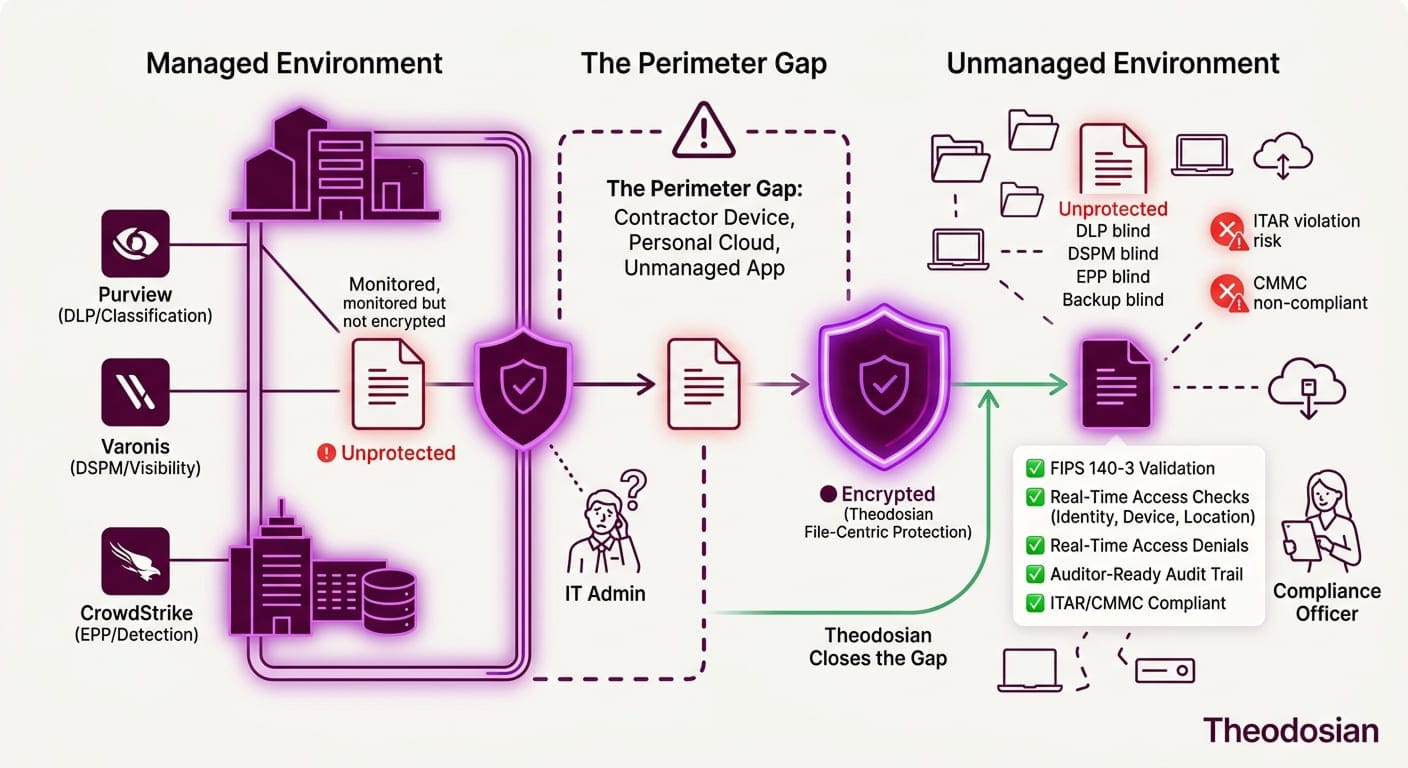
All five DLP platforms above share a common architectural foundation: they monitor boundaries. Theodosian operates on a different layer entirely: it protects files regardless of boundaries.
DLP assumes a perimeter. It watches what leaves the email system, the endpoint, the network, and the cloud platform. This is a fundamentally sound approach for organizations where data typically stays within controlled environments. But once data crosses that boundary into uncontrolled space—a personal device, a contractor's laptop, a public cloud folder, a chat application—the tool's authority ends.
This is not a flaw in DLP products. It's the architectural reality of boundary-based security.
Theodosian operates differently. Instead of monitoring where data goes, it travels with the file. Access is enforced at the file level based on context (who you are, what device you're on, where you are, what time it is), not by inspection or network checkpoints.
Should you use both? Many CISOs do. DLP catches suspicious activity at boundaries and alerts teams. File-layer encryption ensures that even if perimeter controls fail, the data itself is protected. These are complementary security layers, not competing approaches.
Should you use one or the other? It depends on your compliance requirements and data movement patterns:
- If most sensitive data stays within managed environments (M365, corporate endpoints, monitored cloud apps): DLP alone may be sufficient.
- If sensitive data regularly moves to unmanaged devices, contractors, or external platforms, file-layer encryption becomes essential.
- If you're subject to CMMC Level 2 SC.3.177: File-layer encryption with context-aware access controls is the most efficient path to compliance, whether or not you also deploy DLP.
How to Choose: Decision Framework by Organization Profile
If you are: A mid-market M365-native organization
Recommendation: Start with Microsoft Purview DLP. Native integration, low operational burden, strong coverage within the Microsoft ecosystem. If data regularly leaves M365, evaluate Theodosian for per-file protection.
If you are: A large enterprise with a managed endpoint fleet and CrowdStrike
Recommendation: CrowdStrike Falcon Data Protection provides strong real-time endpoint visibility and blocks common exfiltration vectors. If unmanaged device access or CMMC compliance is a concern, layer Theodosian for per-file encryption and context-aware access control.
If you are: A cloud-first organization with SASE architecture
Recommendation: Zscaler for cloud application monitoring and traffic inspection. If files are shared with external parties or accessed offline, consider Theodosian to ensure files remain protected outside the Zscaler proxy.
If you are: A large hybrid enterprise (on-premises + cloud)
Recommendation: Palo Alto Enterprise DLP for centralized hybrid monitoring and policy orchestration. Evaluate Theodosian for encryption enforcement and access control, especially for data shared with external parties or accessed on unmanaged devices.
If you are: An insider-threat-focused team
Recommendation: Varonis for behavior analytics and access monitoring. Consider Theodosian as a preventive layer, ensuring that even if an insider attempts to exfiltrate data, the file itself remains protected through per-file encryption and context-aware access controls.
If you are: CMMC Level 2 or higher with external data movement
Recommendation: CMMC SC.3.177 requires encryption of controlled technical data. DLP alone does not encrypt files. If contractors, partners, or employees access sensitive data on unmanaged devices, Theodosian per-file encryption with context-aware access controls is an efficient way to meet the mandate. DLP can provide additional monitoring and alerting on top of this foundation.
Where Does Your Sensitive Data Actually Go?
The choice between DLP, file-layer encryption, or both depends on where your sensitive data actually moves and who has access to it.
If most sensitive data stays within your managed environments, DLP provides strong boundary monitoring and is often sufficient.
If sensitive data regularly moves to unmanaged devices, contractor laptops, or external platforms, file-layer encryption becomes critical. It ensures that even if DLP detects a violation (or if perimeter controls fail), the file itself remains protected.
The best security approaches in 2026 are not platforms that replace each other; they are platforms that work together. Use DLP to monitor boundaries. Use file-layer encryption to protect data once those boundaries are crossed. Together, they form a more complete defense.
Next Steps: Assess Your Data Movement
The best approach for your organization depends on your environment, compliance requirements, and where your sensitive data actually flows.
Identify first, then protect:
- Where does your most sensitive data live? (M365, on-premises, cloud storage, contractor devices?)
- Who accesses it? (Employees only, contractors, partners, customers?)
- On what devices? (Managed endpoints, personal laptops, tablets?)
- What are your compliance requirements? (CMMC, ITAR, EAR, industry regulations?)
Once you answer these questions, the right tool mix becomes clear:
- If most data stays within managed M365/endpoint environments, DLP (Purview or CrowdStrike) may be sufficient.
- If data moves to unmanaged devices or external parties: Add file-layer encryption.
- If you're subject to CMMC, ITAR, or EAR with external data movement: File-layer encryption becomes essential, with DLP providing additional monitoring.
The goal is not to deploy the most complex tool. The goal is to protect data where it actually goes.
🛡️ Stop Monitoring Violations. Start Enforcing Protection.
If your data regularly moves to contractors, personal devices, or supply chain partners, boundary-based DLP isn't enough. You need security that travels with the file.
FAQs: DLP Solutions
Does DLP satisfy CMMC Level 2 SC.3.177?
No. CMMC SC.3.177 requires that controlled technical data be encrypted. DLP detects and prevents unauthorized movement of data, but it does not itself encrypt files. Additionally, DLP provides no authority over data once it leaves monitored boundaries. To satisfy SC.3.177, you need encryption that applies to the file itself, independent of storage location or network boundaries. File-layer encryption is a more direct approach to meeting this requirement.
How is file-layer encryption different from DLP encryption?
File-layer encryption (like Theodosian) applies encryption to the file itself, with access controls embedded at the document level. DLP tools like Purview or CrowdStrike detect policy violations but do not encrypt files. Cloud storage encryption (OneDrive, SharePoint) encrypts data at rest on the provider's servers but doesn't travel with the file once downloaded. File-layer encryption travels with the file regardless of where it's stored or accessed, making it effective for protecting data on unmanaged devices and external platforms.
Can DLP and file-layer encryption work together?
Yes, they serve complementary functions. DLP monitors the "pipes," alerting on suspicious movement patterns across your network. File-layer encryption protects the "water" (the file itself) using contextual access controls. Theodosian enhances this with automated anomaly detection at the data layer. While DLP answers "What is moving, and where?", Theodosian answers "Who is accessing this, and is the behavior safe?" Many organizations use both: DLP to catch broad exfiltration attempts, and Theodosian to enforce granular protection and "Drop the Gate" if a specific file's access pattern becomes high-risk.
Why do DLP tools generate so many false positives?
DLP is inherently rule-based and predictive; it flags activity (like a bulk upload) because it might be a breach. However, legitimate business often looks like a breach, such as a project manager downloading a folder for a site visit. This creates "alert fatigue."
File-layer encryption sidesteps this by relying on verified identity and context (who you are, your device, your location) rather than just behavioral guesses. Theodosian further reduces noise by using targeted anomaly detection: it doesn't flag a user for moving files, but it will intervene if a user’s "Gate" is accessed from an impossible location or an unmanaged device. You get the security of a "block" without the friction of a false positive.
Can I use just file-layer encryption without DLP?
For compliance purposes, yes. File-layer encryption with context-aware access controls can satisfy encryption and access control mandates on its own. However, DLP provides detective capabilities that encryption does not: it tells you when attempts to move data occur and how data is being accessed. For comprehensive security in high-risk environments, both provide value, but each solves a different problem.
What about encryption built into cloud storage (OneDrive, SharePoint, etc.)?
Cloud storage encryption protects data at rest on the cloud provider's servers, a critical control. However, it does not protect data once it's downloaded to a user's device or moved to a different platform. Additionally, cloud storage encryption is managed by the cloud provider, not by your organization. Your access controls are limited to what the provider's platform supports. File-layer encryption, by contrast, travels with the file. Access controls remain under your governance regardless of where the file is stored or accessed.