
An IT Director ran a usage audit after their CMMC gap assessment flagged AI tools as a scoping concern. The audit covered ChatGPT Enterprise logs for the previous 90 days.
Fourteen employees had pasted content into ChatGPT sessions that included contract language, technical specifications, and program descriptions; the kinds of content that routinely contain or border on CUI. All fourteen had signed the company's AI acceptable use policy six months earlier. The policy stated clearly: do not enter sensitive or proprietary information into external AI tools.
The policy didn't prevent anything; it documented the rules, but it didn't enforce them.
That distinction between a policy that documents rules and a control that enforces them is the gap that CMMC assessors are increasingly probing in AI tool evaluations. Your AI acceptable use policy is a compliance artifact. The technical controls that implement it are a CMMC requirement. If you only have the first, your assessor will find the gap that your policy was supposed to prevent.
Why AI Tools Create a Specific CMMC Problem
Most CMMC compliance work focuses on where CUI lives and how it's protected in your primary environment. AI tools introduce a different threat vector: authorized employees voluntarily moving CUI outside your assessment boundary, not through carelessness with file storage, but through the normal workflow of getting their work done faster.
An engineer summarizing a technical specification for a meeting. A program manager drafting a contract response. A proposal writer using AI to clean up scope language. In each case, the workflow involves pasting content into a tool that sits entirely outside your CUI boundary — that processes queries on infrastructure you don't control, under terms of service that don't align with ITAR, DFARS, or CMMC requirements.
The employee isn't being reckless; they're being efficient. That's the exact model your CMMC program needs to address: authorized users doing authorized work using tools that aren't authorized for CUI.
This is what AC.L2-3.1.2 covers: limiting system access to the types of transactions and functions that authorized users are permitted to execute. Your CMMC-compliant employees should be authorized to use AI tools. They should not be authorized to use AI tools that process CUI outside your controlled environment. The policy says that, and the technical control is what makes it true.
A Signed AI Policy Stops Exactly Zero Data Leaks
Your employees aren't trying to breach security; they are trying to move faster. But pasting text into a commercial AI tool moves your CUI completely outside your assessment boundary and directly into non-compliant infrastructure. If you don't back up your policy with deterministic technical data controls, your next CMMC audit will uncover a major compliance failure.
Which AI Tools Are and Aren't Authorized for CUI
The critical distinction is whether the tool processes data in an environment that meets CMMC's requirements for CUI handling, primarily FIPS 140-3 validated encryption and FedRAMP authorization at the appropriate impact level.
Not authorized for CUI:
These tools process queries on commercial infrastructure without FedRAMP authorization and cannot be used in contexts where CUI may be present:
- ChatGPT (all tiers, including Enterprise, unless running in a compliant private deployment)
- Google Gemini (commercial)
- Anthropic Claude (commercial API and consumer products)
- Grammarly (commercial tier)
- GitHub Copilot (commercial, standard tier)
- Microsoft 365 Copilot (commercial M365, non-GCC High)
Potentially authorized, with proper configuration:
- Microsoft 365 Copilot in GCC High: Generally available as of December 2025. Copilot running within a GCC High tenant processes queries within the sovereign cloud boundary, using the same data residency and access controls that govern your M365 GCC High environment. This is currently the most mature compliant AI option for DIB contractors. Proper configuration requires that Copilot's data access is scoped to your CUI boundary and that its interactions are logged.
- Azure OpenAI Service (GCC High or Commercial with appropriate configuration): Private Azure OpenAI deployments can be configured with FedRAMP controls. Whether this meets CMMC requirements for CUI depends on the specific deployment architecture and your assessor's evaluation.
The category of compliant AI tools for CUI handling is narrow and changing. Any tool not explicitly evaluated, documented, and authorized in your SSP is not authorized for CUI — regardless of what the vendor's security documentation claims.
What CMMC Controls AI Tool Usage Actually Implicates
Before writing an AI acceptable use policy, it's useful to understand which CMMC practices are at issue. This isn't an exhaustive mapping, but these are the controls that come up in AI-related assessment findings:
AC.L2-3.1.2 — Transaction and Function Controls: Limits what authorized users can do on organizational systems. Allowing employees to paste CUI into unauthorized AI tools may constitute permitting unauthorized transactions on systems that touch CUI workflows.
SC.3.177 — FIPS 140-3 Validated Encryption: CUI must be encrypted using FIPS 140-3 validated cryptographic modules. When CUI is pasted into an unauthorized AI tool, it enters an environment where you cannot demonstrate FIPS-validated encryption is in place. The CUI is no longer under cryptographic control; you can verify.
SC.3.190 — Protection of CUI During Transmission: Requires protecting CUI during transmission to prevent unauthorized disclosure. Transmitting CUI to a non-compliant AI service over the public internet may fail this control depending on the transmission architecture.
CM.L2-3.4.6 / CM.L2-3.4.7 — Least Functionality: Requires configuring systems to provide only essential capabilities and prohibiting use of functions not required for operation. AI tools not required for mission functions shouldn't be accessible from CUI-handling systems.
What Should an AI Acceptable Use Policy Contain
Most AI acceptable use policies are written as usage guidelines: what's permitted, what's not, and who to contact with questions. That's a starting point, not a compliance document.
For CMMC purposes, your AI AUP needs to address:
Authorized vs. unauthorized tool classification: A specific list of AI tools authorized for use on work systems, with explicit notation of which may be used in contexts where CUI is present vs. which may be used only for non-CUI work. "No AI tools with CUI" is not a classification; it's a rule that employees can't operationalize if they can't tell what's authorized.
CUI recognition guidance: The acceptable use policy is only as effective as the user's ability to recognize CUI. If your employees don't know what content constitutes CUI, a policy that says "don't enter CUI into AI tools" is unenforceable. The AUP should reference your CUI training program and require CUI marking to be applied to documents that contain it.
The approval process for new tools: A documented workflow for requesting authorization of new AI tools — who reviews them, what criteria they're evaluated against, and what happens if an employee encounters an AI capability built into an existing authorized tool (like Copilot features added to a software they're already using).
Incident reporting: What an employee does if they realize they've already pasted CUI into an unauthorized tool. This is the policy equivalent of a kill switch, the action that contains the incident before it becomes a reportable breach.
Disciplinary scope: CMMC assessors want to see that your security policies have teeth. The AUP should reference your organization's disciplinary process for security violations.
Why Policy Without Technical Enforcement Is Not a CMMC Control
This is the central issue with AI acceptable use policies, and it applies more broadly to CMMC compliance than just AI.
An acceptable use policy documents what employees are expected to do. A CMMC control is a technical or procedural mechanism that enforces a security requirement. These are different things. Under the CMMC assessment methodology, policies are artifacts that support technical controls; they don't substitute for them.
When a C3PAO evaluates your AC.L2-3.1.2 implementation, they're looking for technical evidence that unauthorized transactions are limited, not just that employees were told not to perform them. A signed policy is not evidence of technical enforcement.
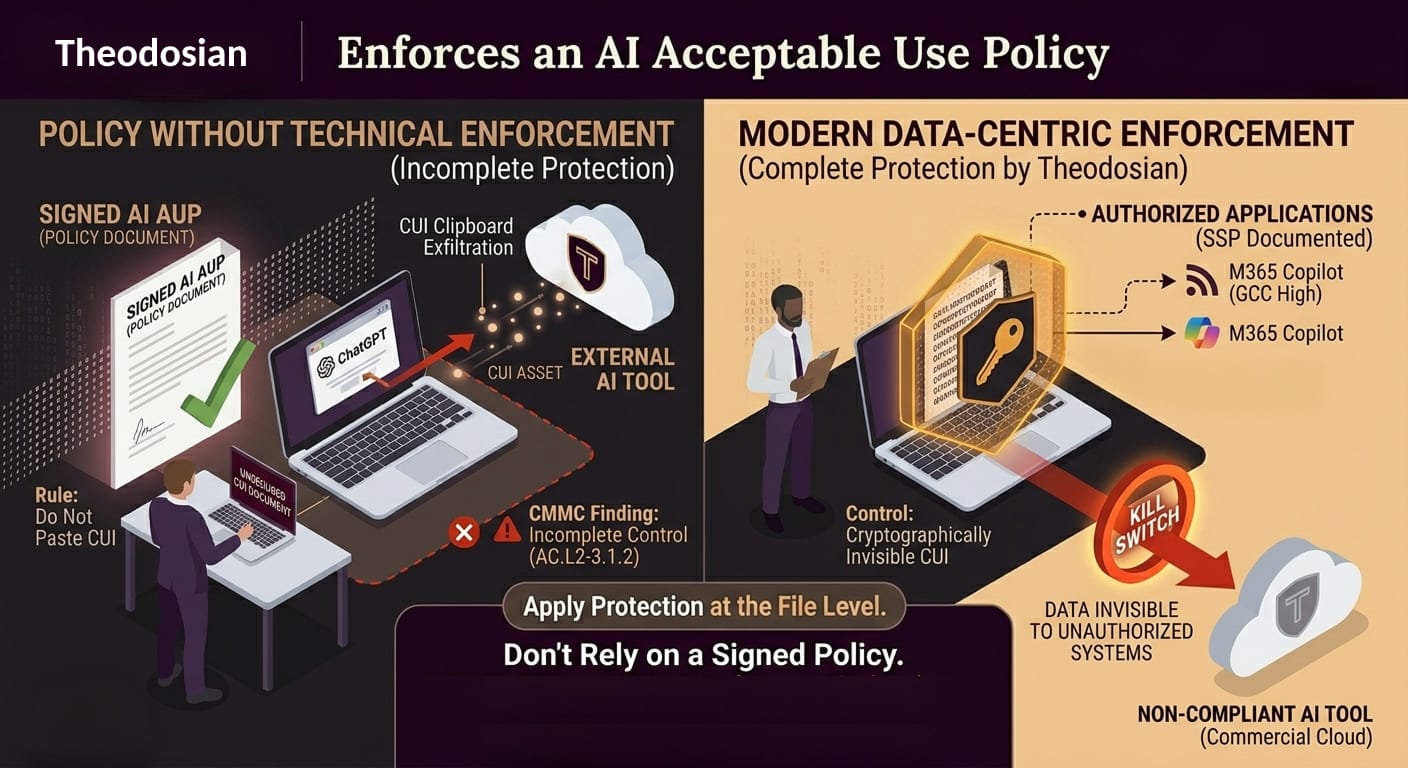
For AI tools specifically, technical enforcement means:
DNS filtering or category blocking: Configuring your DNS resolver or web filter to block categories of AI tools from systems in your CUI boundary. ChatGPT, Gemini, and similar tools are identifiable by domain and can be blocked at the network layer. This is imperfect for mobile and home networks, but it's a documentable technical control for managed devices on your network.
CASB (Cloud Access Security Broker): A CASB provides visibility into what cloud services users are accessing and can enforce policies at the cloud application layer. Sanctioned vs. unsanctioned AI tools can be monitored and controlled through a CASB without requiring DNS-level blocking.
DLP integration on managed endpoints: Data Loss Prevention rules configured on endpoint agents or within your M365 GCC High environment can detect content classified as CUI being transmitted to unauthorized destinations, including AI tool domains.
Browser-level restrictions: For managed devices, browser policies can restrict access to specific URLs or categories, adding a client-side enforcement layer that complements network controls.
GCC High Copilot as the authorized alternative: When employees have access to a compliant AI tool that does what they need — drafting, summarizing, coding assistance — the demand for unauthorized alternatives drops. Deploying Microsoft 365 Copilot in GCC High provides a legitimate AI productivity layer within the CMMC boundary.
None of these technical controls are free or trivial to implement. But they're the difference between a policy that documents expectations and a program that enforces them.
What Goes in Your SSP
Your System Security Plan must document how each CMMC practice is implemented in your environment. For AI tools, that means:
Tool inventory: Every AI tool that employees may use on systems within your CUI boundary — authorized or not, intentionally or by default — should appear in your component inventory or boundary diagram. If you haven't audited your environment for AI capabilities embedded in existing software (Copilot in Word, AI features in your project management tools, AI-assisted search in SharePoint), you have undocumented components.
Data flows: How does data move between your CUI systems and any authorized AI tools? What encryption is in place? Where does query data go, and who can access it? For M365 Copilot in GCC High, Microsoft's documentation specifies data flows within the tenant. That documentation becomes part of your evidence package.
Control mapping: For each CMMC practice that AI tool usage implicates, your SSP should document how the control is satisfied — referencing the specific technical enforcement mechanism (DNS filter, CASB policy, Copilot GCC High configuration) rather than the acceptable use policy.
Authorized tool list: A formal, signed authorization for every AI tool permitted in contexts where CUI may be present. This is the document your assessor wants to see alongside the policy.
What's Coming: CMMC and AI in 2026–2027
The FY2026 National Defense Authorization Act introduced two provisions that defense contractors should be tracking:
Section 1512 directs the DoD to develop a cybersecurity policy specific to AI and machine learning technologies used in defense applications. This is the precursor to formal CMMC-style requirements for AI tool security, a "CMMC for AI" framework currently in development.
Section 1513 directs a security framework for AI systems as an extension of existing frameworks, explicitly including CMMC. Industry analysts expect draft guidance in late 2026 or early 2027, with potential flowdown into DIB contracts shortly after.
The current CMMC Level 2 requirements don't include AI-specific controls, but they do include the access control, encryption, and system authorization requirements that AI tool usage implicates. What's forming is a more explicit framework that will map AI tool controls to formal compliance requirements. Contractors who have addressed AI as part of their current CMMC program will have a head start. Contractors who haven't will face another gap assessment in an already compressed compliance timeline.
Eliminating the AI Exposure with Data-Centric Security
The core issue with commercial AI tools is that they look for data to ingest, index, and process. If your compliance strategy relies on policing user behavior or setting up flimsy browser blocks, you are carrying an unmitigated risk.
Theodosian solves this by embedding zero-trust cryptographic protection directly into the CUI files themselves. Instead of trying to monitor what a user types, the file itself restricts who—and what—can read its contents.
By applying this content-level model, you technically enforce your AI Acceptable Use Policy without relying on human behavior:
- Cryptographic Blindness for AI Systems: Every piece of CUI is encrypted using FIPS 140-3 validated modules linked to explicit organizational identities. Because commercial AI engines and browser extensions cannot authenticate against your identity provider, they cannot decrypt the data. If an unauthorized AI tool attempts to ingest, scrape, or process a protected file, it sees nothing.
- Granular, Validated Access Controls (AC.L2-3.1.2): You define the exact, trusted applications and authenticated identities permitted to decrypt and interact with the data. Unauthorized software applications (including non-compliant AI tools) are fundamentally locked out of the decryption loop.
- Assessor-Ready Audit Telemetry: Every single attempt to access or decrypt a file registers a real-time audit event. If an unauthorized system utility or AI process tries to parse a document, Theodosian logs the blocked attempt instantly, giving your CMMC assessor empirical proof of automated enforcement.
Instead of trying to police every web application your contractors open, data-centric security ensures that your CUI is cryptographically invisible to unauthorized AI infrastructure by default.
Secure the Data, Not Just the Browser
Web filters and DNS blocks are easily bypassed by remote workers or mobile devices. Instead of playing whack-a-mole with an ever-expanding list of unsanctioned AI tools, secure the data itself. By wrapping files in FIPS 140-3 validated encryption, you guarantee that unauthorized AI systems can never ingest or process your CUI.
FAQs: AI Use Policy for Defense Contractors
Can employees use ChatGPT for non-CUI work under CMMC?
It depends on whether those employees, devices, or sessions are in your CUI boundary. An employee using ChatGPT on a personally owned device that doesn't touch your CUI systems may be outside scope. An employee using ChatGPT on a managed work device that also accesses your CUI environment is more complicated. Your boundary definition and device classification determine scope. The risk is whether CUI can reach a session that starts as non-CUI — and with AI tools, that boundary is easy to blur.
Does Microsoft 365 GCC High Copilot satisfy CMMC requirements?
For many contractors, M365 Copilot in GCC High is the most straightforward path to a compliant AI tool within the CMMC boundary. The data stays within the GCC High sovereign cloud environment. But "compliant environment" doesn't mean "no SSP documentation required." The tool needs to be scoped, documented, and its data flows need to be mapped before your assessment.
What if an employee discovers they've already sent CUI to an unauthorized AI tool?
Your AI AUP and your incident response plan should cover this sequence. Treat it as a potential CUI spillage event: stop the activity, document what was transmitted, notify your CMMC program lead, and evaluate whether a reportable incident exists under DFARS 252.204-7012. The 72-hour reporting clock for medium assurance events starts when the incident is discovered, not when it occurred.
Does having an AI acceptable use policy satisfy AC.L2-3.1.2?
Partially. The policy is part of the evidence package for AC.L2-3.1.2, but the control requires demonstrating that transaction limits are actually enforced. A policy without technical enforcement mechanisms leaves the control partially implemented — which is Not Met under the CMMC scoring methodology. Technical controls need to accompany the policy for a fully implemented finding.
What's the risk of listing AI tools in the SSP that I'm not currently controlling?
Listing them without documented controls draws assessor scrutiny to an area with gaps. Not listing them doesn't make them not in scope — if your assessor finds AI tool usage that isn't in your SSP, that's an undocumented component, which creates its own finding. The better path is to address the control gaps, then document accurately. An honest SSP with documented gaps and a POA&M is more defensible than an SSP that omits components your assessor can find through log review.