
Part 3 of 3 in the CMMC for Small Defense Contractors series
→ Part 1: CMMC for Small Defense Subcontractors: Level 1, Level 2, and How to Know Which Path You're On
→ Part 2: How Do I Know If I'm Ready for My CMMC Assessment? A Small Contractor's Self-Assessment Guide
A defense subcontractor with 60 employees gets a CMMC Level 2 flowdown. Standard reaction: every employee, every device, every system goes into the compliance program. The MSP quotes $340,000 for a company-wide GCC High migration.
A compliance consultant asks one question before anything moves: "Which employees actually touch the CUI?"
Six engineers. The CUI lives in one shared drive, accessed from six workstations, reviewed in a controlled lab environment. The rest of the company — 54 people in accounting, HR, logistics, and operations — never touches it.
Scoped correctly, the CMMC Level 2 assessment boundary covers six people and the systems they use, not sixty. The GCC High tenant covers six seats, not sixty. The C3PAO assessment examines a defined enclave, not an entire corporate network.
The compliance cost didn't drop because the requirements changed. It dropped because the scope was drawn accurately. That's CUI scoping, and for most small defense subcontractors, it's the highest-leverage decision in the entire CMMC program.
What Is CUI Scoping in CMMC?
CUI scoping is the process of accurately defining which systems, locations, and individuals are within the boundary of your CMMC Level 2 assessment — based on where CUI actually flows, not where it theoretically could flow.
CMMC Level 2 requires implementing all 110 NIST SP 800-171 practices across your entire CUI environment — every system, person, and location that processes, stores, or transmits Controlled Unclassified Information. What it does not require is applying those 110 practices to systems and people that never touch CUI.
This distinction matters enormously in practice, because most small contractors' initial instinct is to treat the compliance boundary as their entire company. Every device, every email account, and every employee becomes part of the assessment scope. That approach is conservative and expensive, and it's often wrong.
The DoD's CMMC scoping guidance (published in the CMMC Assessment Process documentation) is explicit: the scope of a CMMC Level 2 assessment is your CUI environment, defined as the full set of systems, components, people, and locations where CUI is processed, stored, or transmitted. Systems and people that are logically or physically separated from that environment — and that have no pathway to CUI — are out of scope.
Out of scope means not assessed. Not assessed means 110 controls don't apply to them.
Why Does CUI Scoping Reduce CMMC Compliance Costs So Significantly?
Every person and system in your CMMC assessment scope requires CMMC-compliant infrastructure. In a Level 2 program:
- Every in-scope user needs a GCC High license (~$60/user/month)
- Every in-scope endpoint needs EDR, patching, encryption, and configuration baselines
- Every in-scope system needs to be documented in your SSP
- Every in-scope data flow needs to be mapped
- Every in-scope control gap needs to be remediated before your C3PAO
If your company has 100 employees and your compliance program treats all 100 as in-scope, you're building a program for 100 people. If only 20 actually touch CUI, you've overbuild by 80 people — which, at $60/user/month for GCC High alone, is $57,600/year in unnecessary licensing, before you count the additional MSP costs, endpoint management, training overhead, and C3PAO assessment scope.
The math compounds across every line item. A properly scoped 20-person CUI environment has dramatically lower gap assessment costs, faster SSP documentation, fewer controls to verify during assessment, and a smaller C3PAO fee because assessment time tracks scope complexity. The full breakdown of CMMC Level 2 compliance costs covers each line item — and in nearly every scenario, scope size is the primary driver of total program cost.
The requirement is real, and the scope you define determines the cost.
Stop Scoping the Infrastructure. Start Scoping the Data.
Don't let your compliance budget be dictated by the size of your IT footprint. If your files can evaluate their own security boundary, unmanaged endpoints and general business networks drop completely out of your CMMC assessment scope.
What Systems and People Are In Scope for CMMC Level 2?
The CMMC scoping guidance identifies four categories of assets relevant to Level 2 scope determination:
CUI Assets: Systems, components, and devices that process, store, or transmit CUI directly. These are always in scope. Examples: the server or cloud environment where CUI files live, the workstations engineers use to access and modify controlled technical data, the email environment used to receive CUI documents from primes.
Security Protection Assets: Systems and components that protect CUI assets — even if they don't touch CUI directly. Examples: firewalls that protect the CUI network segment, identity management systems (like Active Directory) that control access to CUI systems, SIEM platforms that aggregate logs from CUI systems. These are in scope because compromising them creates a path to CUI.
Contractor Risk-Managed Assets: Devices or systems that could touch CUI but don't by documented policy and technical control. Examples: employee personal phones that access corporate email but are explicitly blocked from CUI repositories. These can potentially be placed out of scope if you can demonstrate isolation, but the burden of proof falls on you.
Out-of-Scope Assets: Systems and people with no pathway to CUI — physically separated, logically isolated, with no documented data flow to in-scope systems. HR systems, accounting platforms, customer-facing websites, and operational systems with no CUI connection may qualify as out of scope when properly isolated.
The scoping decision isn't binary. It's a documented argument that you'll make in your SSP and defend during your C3PAO assessment. The stronger your evidence of isolation, the more confidently you can place assets out of scope.
How Do You Actually Draw the CUI Boundary for a Small Business?
Five steps that produce a defensible scope determination:
Step 1: Map where CUI enters your organization
CUI comes from your prime contractor — in documents, files, and data they share with you under the contract. Identify every channel through which you receive CUI from your prime: email, shared portals, file transfer, physical media. The entry points define the starting edge of your boundary.
Step 2: Follow the CUI flows
Once CUI enters, where does it go? Who accesses it, on what systems, in what locations? A CUI document received via email and opened by one engineer who then saves it to a shared drive that two other engineers access represents a flow — and every system and person in that flow is potentially in scope. Map the complete path from ingestion to final storage or deletion.
Step 3: Identify where CUI is generated
Even if your prime doesn't send you CUI, you may generate it. A manufacturing company that produces controlled components using specifications from a defense program may generate CUI in the form of inspection records, test data, or manufacturing documentation containing controlled technical information. If you're generating CUI, that generation point is in scope.
Step 4: Identify isolation boundaries
Where does your CUI flow stop? A shared drive accessible only to the six engineers in the controlled lab — not synced to personal devices, not accessible from guest networks, not connected to general corporate IT systems — has a defined isolation boundary. Document the technical and physical controls that create that boundary: network segmentation, access controls, device management policies.
Step 5: Document everything and run it by your RPO before committing
Your scope determination goes into your SSP and is the first thing your C3PAO will challenge. A scope that's too narrow and can't be defended — where the assessor finds data flows or access paths you didn't document — creates out-of-scope assets that are now in scope with no controls applied. Scope errors in the narrow direction are worse than scope errors in the broad direction. Have your RPO or a compliance consultant review your scope determination before you build your compliance program around it.
What Is a CMMC Enclave, and Should Small Contractors Use One?
A CMMC enclave is a defined, isolated environment that contains your CUI and satisfies all CMMC Level 2 requirements, while keeping the rest of your corporate network separate from—and out of scope for—your assessment.
For small contractors, the traditional enclave model typically looks like this:
- A Microsoft 365 GCC High tenant, licensed only for employees who need CUI access
- CUI files stored only within that GCC High environment (SharePoint, OneDrive, Teams)
- Access limited to CUI-handling employees via Conditional Access policies
- Dedicated or CMMC-compliant endpoints for CUI work, either company-issued or enrolled under strict MDM policies
- Network segmentation that prevents traffic between the CUI environment and general corporate IT
The rest of the company—employees without CUI access, general business systems, the commercial M365 tenant used for non-CUI communication—operates outside the enclave and outside the CMMC assessment boundary.
The enclave model works for small contractors under two conditions: first, CUI handling is actually concentrated in a subset of employees (which it usually is for manufacturing, engineering, and specialized services firms); and second, the isolation between the enclave and the rest of the corporate environment can be technically demonstrated, not just asserted.
The Vulnerability: When the "Container" Breaks
Where the traditional enclave model breaks down is when CUI migrates out—when an enclave user downloads a CUI document to a personal device, forwards a CUI email to a colleague outside the enclave, or inadvertently pastes CUI content into a general-use tool. Technical controls that prevent CUI from leaving the enclave boundary are the difference between an enclave that holds its shape and one that is leaking scope.
If a file leaves the container unencrypted, your entire scoping argument collapses, and those unmanaged endpoints are suddenly dragged back into your assessment boundary.
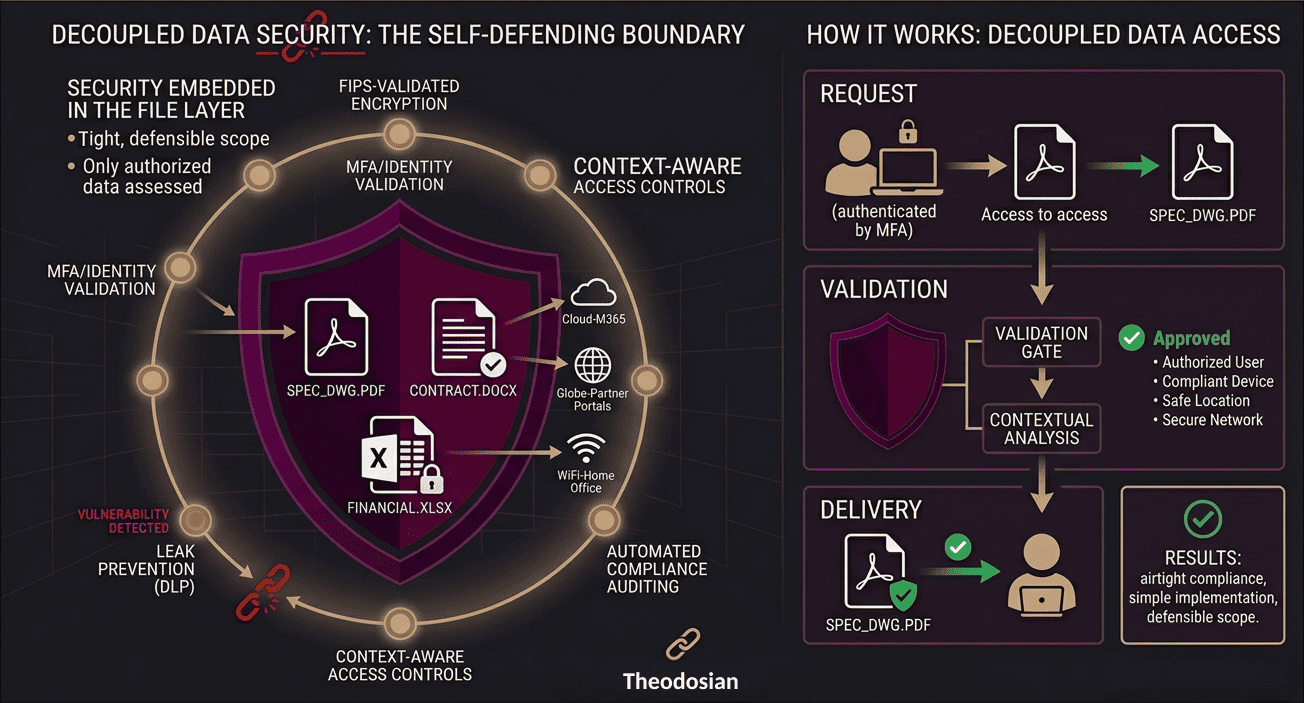
Shift the Boundary: Decoupling Security from Infrastructure
Because rigid infrastructure enclaves can be expensive to build and fragile to maintain, many small-to-midsize subcontractors are shifting from container-based security to data-centric security.
Instead of building a massive digital wall around your network, solutions like Theodosian embed FIPS-validated encryption, access controls, and automated compliance tracking directly into the file layer itself.
When security follows the file, the physical or cloud infrastructure it sits on becomes irrelevant to your audit scope. If an engineer accidentally downloads a document to an unmanaged device, the file itself evaluates whether that environment is authorized before opening. If it isn't, the file remains a locked, encrypted brick.
This data-centric approach lets smaller defense contractors maintain an airtight, defensible CMMC Level 2 boundary without forcing a 60-person company to undergo a brutal, full-scale IT migration.
What Are the Most Common CUI Scoping Mistakes Small Contractors Make?
Treating "could access CUI" as the same as "does access CUI." The scoping threshold is actual data flows — documented, verifiable flows of CUI to specific systems and people. An employee who theoretically could access a CUI file if they knew the right SharePoint path, but never has and has no legitimate business reason to, is not necessarily in scope. Scope is about actual function, not theoretical possibility. Your controls and documentation need to support that determination.
Letting scope expand silently through collaboration tools. CUI shared in a Teams channel, forwarded in an email, or pasted into a project management tool can migrate outside your intended boundary without anyone noticing. A scoping determination made in January can be rendered inaccurate by February if collaboration patterns expand it. Scope maintenance is an ongoing process, not a one-time document.
Underscoping security protection assets. Contractors sometimes exclude IT infrastructure from scope because it doesn't store CUI — forgetting that systems protecting the CUI environment are in scope. A misconfigured firewall, a compromised identity management system, or a SIEM with unprotected logs can provide a path to CUI. These systems belong in your assessment boundary even if they never directly process a CUI file.
Assuming the prime's CMMC flowdown defines your scope. Your prime flows down the CMMC requirement. They don't define your assessment scope — you do, based on your actual CUI handling. A prime who flows down Level 2 to all subcontractors as a blanket risk management policy doesn't mean all subcontractors have the same CUI footprint. Scope is yours to define and defend, not theirs to assign. Revisit Part 1 of this series if you're still determining whether you even handle CUI.
Letting the MSP define scope by default. Your MSP builds the technical environment. They implement controls within the scope you give them. If you haven't given them a precise scope determination — just "we need CMMC compliance" — they'll often default to a broad implementation that includes more systems than necessary, both because it's operationally safer from their perspective and because a larger scope means a larger engagement. You own the scope decision. The MSP builds inside it.
How Does CUI Scoping Interact with Your SPRS Score?
Your SPRS self-assessment score reflects your implementation across your defined CUI environment. Scope and score are directly connected: a smaller, accurately defined scope with full control implementation produces a higher score than a larger, over-broad scope with partial implementation.
This creates an important sequencing requirement: define scope before you score. A score calculated against an over-broad scope — where in-scope systems include assets that don't actually need to be in scope — may identify gaps that aren't real compliance requirements, inflating your gap count and your remediation cost estimate. A score calculated against an accurately scoped environment tells you what you actually need to fix.
The same applies to your POA&M. Open gaps in your POA&M should be gaps within your defined CUI scope. A gap in a system that's correctly out of scope isn't a POA&M item — it's a reason to verify your scope documentation is solid.
Protect Your SPRS Score Before the Auditor Arrives
A single unencrypted document sitting on the wrong endpoint can instantly tank your self-assessment score and expand your audit boundary. By embedding security directly into the files, you create a self-defending data perimeter that keeps your C3PAO review fast, predictable, and tightly scoped.
FAQs: CUI Scoping and Cutting Compliance Costs
What is the CUI Registry, and how do I use it for scoping?
The National Archives' CUI Registry is the authoritative list of all CUI categories and the handling requirements associated with each one. For defense contractors, the relevant categories are typically under Defense, Export Control, and Intelligence. The Registry tells you what type of information qualifies as CUI — but it doesn't tell you whether information your prime has sent you falls into those categories. That determination requires reviewing your actual contracts and the documents your prime provides, looking for CUI markings (banner headers, designation indicators) and category labels as required by DoD Instruction 5200.48.
Can I have some employees on GCC High for CUI work and others on standard commercial M365?
Yes — this is the enclave model. Employees who handle CUI use GCC High; employees who don't stay on commercial M365 or whatever general IT infrastructure your company uses. The critical requirement is that the two environments don't mix in ways that could move CUI from the GCC High environment to the commercial environment. That means no cross-tenant sync, no shared document repositories, and technical controls (Conditional Access policies, DLP rules) that prevent CUI from migrating outside the GCC High boundary.
How do I handle subcontractors who need access to CUI I manage?
If you're a prime or upper-tier subcontractor passing CUI down to your own subcontractors, you have a DFARS 252.204-7012 obligation to flow down appropriate CUI handling requirements. From a scoping perspective, your subcontractor's systems that handle the CUI you provide them are their CMMC responsibility — not yours. However, the mechanism by which you share CUI with them (the file transfer method, the shared portal, the email channel) may be in your assessment scope as a CUI transmission point. How you protect CUI in transit to subcontractors, and whether that protection travels with the file, is a scoping and control question simultaneously.
Does CUI scoping work differently for remote employees?
Remote employees who handle CUI bring their home network into your scoping picture — not as in-scope systems, but as an environment your CMMC-compliant endpoints operate within. The controls that matter for remote CUI handlers are endpoint-level rather than network-level: MDM enrollment, FIPS-validated encryption on the device, enforced MFA, and DLP controls that prevent CUI from syncing to non-managed storage. The home network doesn't need to be in scope; the managed device the employee uses does.
What documentation do I need to defend my scope determination to a C3PAO?
A defensible scope determination requires: a system boundary diagram showing every in-scope system and its connection to the CUI environment; documented data flow diagrams showing how CUI enters, moves through, and exits (or is retained in) your environment; written justification for assets placed out of scope, including the technical and policy controls that create the isolation; and an access control matrix showing who has access to in-scope systems and on what basis. This documentation lives in your SSP. The C3PAO will challenge any out-of-scope determination that seems like it might be motivated by cost reduction rather than actual isolation.